QuickBooks Blog
A person sitting at a desk with a laptop.
Invoicing

Free graphic designer invoice template: PDF, Excel & Word downloads

As a freelance graphic designer, you're an expert at visually bringing brand stories to life. But running a business also means getting paid for your work. You know that great design builds trust. The same applies to your invoices. A clear, well-designed invoice not only reinforces your professionalism but also ensures you get paid on time. Create your invoice today with a free template or invoicing software.

Jump to:

Downloadable graphic designer invoice templates

Excel / Word / PDF

Proforma invoice

Tools plus experts, together

Confidently manage your finances with QuickBooks experts by your side.*

10 things graphic designer invoices should include

1. Designer and branding info

Include your full name or studio name, logo, mailing address, website, and up-to-date contact information. You can also include links to your website or social channels so clients can see your work, leave reviews, or share recommendations.

2. Invoice and project dates

List the invoice creation date, the date(s) you delivered services, and the project timeline for larger assignments. This documentation keeps your records clear and helps your clients stay organized.

3. Project location (if applicable)

If you worked onsite or delivered assets to a particular address, include these details for added clarity—especially for clients with multiple branches or remote teams.

4. Services provided

Break down your work and deliverables and be as specific as possible: for example, “Brand identity package (logo, color palette, guidelines),” “Website homepage mockup,” or “Business card design—3 concepts, 2 revisions.” This will let clients know exactly what was included and also give you a detailed record of the work completed.

If your project involves licensing or usage rights, note how the final designs can be used—print, web, or full commercial use—to set expectations and protect your creative ownership.

5. Rates and project details

Detail your hourly rates, flat fees, or per-deliverable pricing. Note the number of hours billed or the project scope, such as the number of initial concepts and included revisions.

6. Materials or reimbursable expenses

Include any extra costs, such as font licenses, stock images, or printing services that extended beyond your standard rate. Listing these separately ensures you’re repaid for project expenses.

7. Additional charges

If you incurred additional fees—such as a rush request, extra revision rounds, file conversions, or urgent printing—outline them in a separate line. Being upfront avoids confusion and supports client trust.

8. Totals

Provide the subtotal, tax (if applicable), and the total amount due. Make it easy for your clients to process payments without guesswork.

9. Payment terms and instructions

Your invoice should include straightforward payment terms and instructions that outline exactly how and when you expect to be paid. Be sure it lists the following:

Payment timeframe

Specify the timeframe for payment, such as "Net 30" (payment due within 30 days of the invoice date), "Due on Receipt," or any other agreed-upon terms.

Accepted payment method

List the payment types you accept, such as checks, credit cards, online payments, or cash.

Payment details

Include all required information for each payment method, like your check mailing address or online payment portal link.

Late payment penalties

If you charge penalties for late payments, state the penalty amount or percentage.

Early payment discount

Mention any discount available for early payment and eligibility criteria.

10. Notes or thank you message

Leave room at the end for a thank you or a brief personal note, such as “Thank you for trusting me with your brand!” This creates a lasting positive impression and can reinforce your client relationships.

How often should graphic designer invoices be sent to clients?

Your invoicing schedule should reflect the variety and structure of your design jobs and what you’ve agreed to with each client. The following are typical invoicing cadences:

  • One-time design projects: Send your invoice right after project completion and client approval.
  • Ongoing or long-term work: For extended branding or website projects, break out invoices for key milestones, such as “deposit,” “concept delivery,” and “final files.”
  • Monthly retainers: For regular creative support or marketing work, invoice at the same time each month to create predictability for both you and your client.

Do graphic designers give itemized invoices?

Yes. Itemized invoices give clients a well-defined breakdown of your services and costs. This builds trust, reduces confusion, and creates better records for both you and your clients. Invoices are also especially useful at tax time since detailed invoices make it easier to track income, expenses, and tax deductions accurately.

Graphic designer invoice template best practices

Getting paid for your creative work should be as seamless as the designs you deliver. Follow these best practices to create professional invoices and maintain a cash flow.

Reflect your creative identity

Showcase your talents and create an invoice that enhances your brand experience. Use your colors, typography, and visual style so every document feels like an extension of your portfolio. A cohesive look reinforces professionalism and helps clients associate your name with quality and attention to detail.

Keep your process transparent

Make it easy for clients to understand the work behind the outcome. A transparent invoice clarifies the phases of your design process (concepts, revisions, final delivery), helping clients see the value behind each charge and reducing back-and-forth questions later.

Align billing with your workflow

Design work often happens in stages—concepts, drafts, client feedback, final files. Structure your billing around those phases. For example, request an initial deposit to secure the project, then invoice again after milestone approvals or file delivery. This ensures steady cash flow and sets clear expectations.

Communicate boundaries early

Keep in mind your agreed-upon services to avoid scope creep. Note on your invoice what’s included (for example, two rounds of revisions) and what will trigger additional fees. This small detail keeps projects from drifting and protects your time.

Use itemization to your advantage

Itemized invoices not only justify your pricing but also serve as an ongoing project log. Break down deliverables so you and your client have a shared reference of what was completed and approved.

Provide visual proof when it helps

Attach thumbnails, links to final files, or a summary page for complex design packages. These can serve as confirmation of delivery, build confidence with clients, and make recordkeeping easier for both parties.

Note usage rights clearly

If you license illustrations, photography, or design assets, specify the scope and duration of usage rights on your invoice. This is standard in the design industry and helps prevent disputes over how work is used later.

Track your records carefully

Keep copies of every invoice, contract, and proof of payment. Organized records make year-end taxes and potential audits far easier. They help you see patterns in your income across clients and projects.

Double-check for accuracy

Review every invoice for the essentials: correct client info, charges, and terms.

Save and share as a PDF

Export the completed invoice as a PDF to preserve formatting and ensure compatibility on any device.

Graphic designer invoice template vs. QuickBooks invoicing software

While a downloadable Word, Excel, or PDF template covers the basics, busy freelance graphic designers can benefit from a platform that facilitates the invoicing process and allows them to do more. QuickBooks invoicing and accounting software is built for freelancers like you and can streamline your client billing, tax prep, and financial organization.

Customize without repetitive manual entry

QuickBooks stores your client contacts, services, and standard rates. Instead of retyping, you can easily create streamlined invoices. Your branding and details stay consistent across every job.

Automate invoices and workflow

QuickBooks automates key processes, so you spend less time on admin and more on what you do best:

  • Progress invoicing: Bill for milestones—like initial concepts, design revisions, or final deliverables—so cash flow keeps up with your creative process.
  • Automatic payment matching: Client payments are tracked and matched to the correct project instantly, saving you from sorting through multiple jobs or repeat clients.
  • Recurring invoices: Ideal for retainer or subscription-style clients, QuickBooks sends invoices automatically on your set schedule, so ongoing work never slips through the cracks.

Track expenses and billable time

Monitor every expense—font purchases, mockups, digital assets, or subscriptions—and mark them billable as needed. QuickBooks time tracking lets you log hours and add them to invoices.

Stay on top of your cash flow

Monitor project payments and understand cash flow at a glance by accessing a real-time dashboard that shows what’s billed, paid, or overdue. This empowers you to make informed business decisions and know when to follow up with clients.

Get paid anywhere

Whether you’re at a client meeting or a coffee shop, you can use the QuickBooks mobile app to invoice clients from your phone or tablet. Clients enjoy easy online payment options, so you get paid faster.

Organize your records for tax season

QuickBooks automatically tracks income and design expenses, flagging deductible items such as software, hardware, portfolio-building travel, and education. Easily generate reports to share with an accountant or use with filing tools to complete the IRS Schedule C, the standard tax form for self-employed creatives.

Less paperwork, more design

Automation for invoicing, expense recording, and reporting gives you more freedom to focus on design, not admin. QuickBooks handles the business, so you can create.

Try our free invoice generator powered by AI
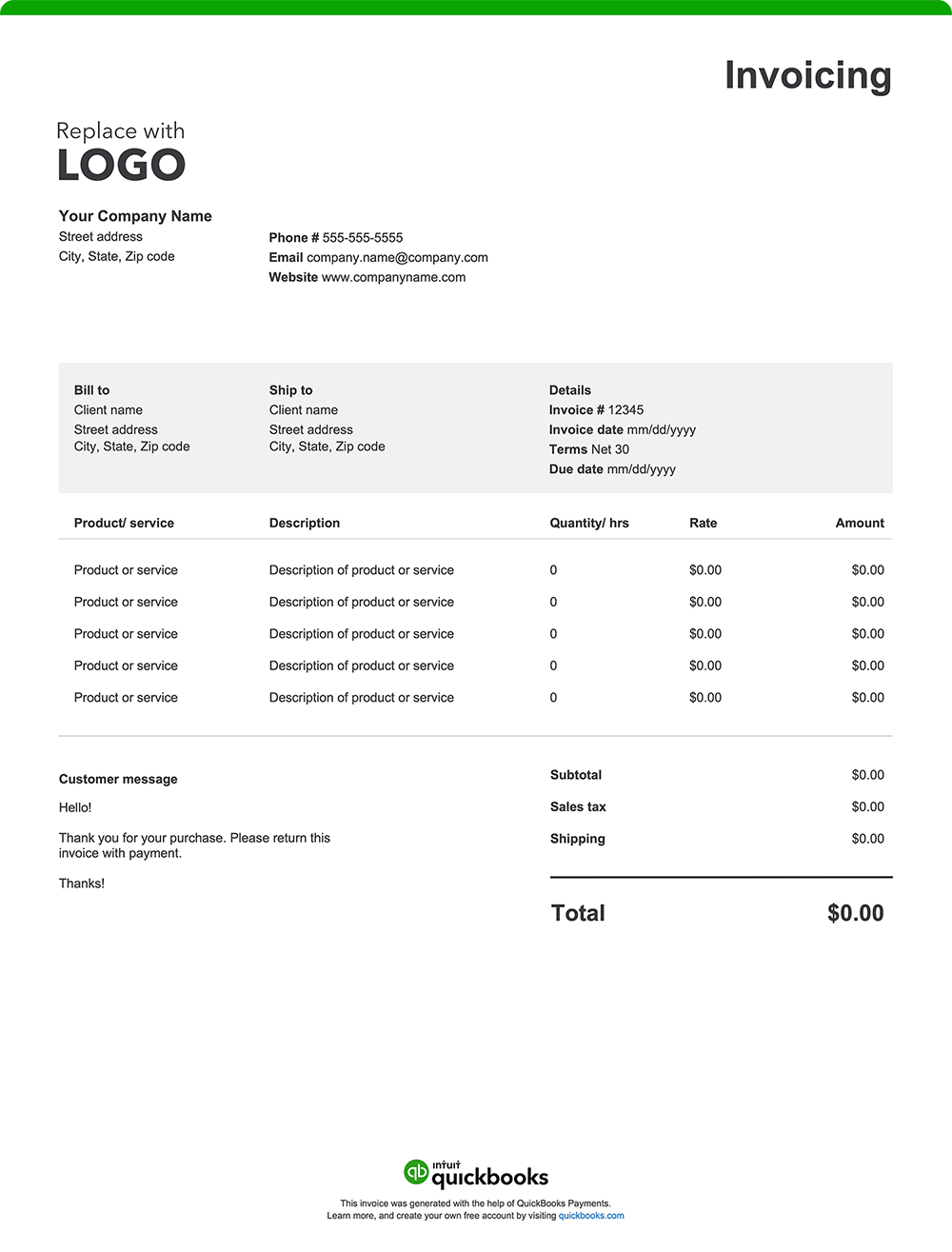
Easily create a custom graphic designer invoice online with our free generator—auto-fill client details, add your branding, download, and send. If you prefer, use our printable invoice templates in Word, Excel, PDF, and other formats.

QuickBooks makes it simple for freelance graphic designers to bill clients, track cash flow, prepare for taxes, and run a smooth and successful business. With streamlined tools, you gain peace of mind and more time for your creative work.


Recommended for you

Mail icon
Get the latest to your inbox
No Thanks

Get the latest to your inbox

Relevant resources to help start, run, and grow your business.

By clicking “Submit,” you agree to permit Intuit to contact you regarding QuickBooks and have read and acknowledge our Privacy Statement.

Thanks for subscribing.

Fresh business resources are headed your way!

Looking for something else?

QuickBooks

From big jobs to small tasks, we've got your business covered.

Firm of the Future

Topical articles and news from top pros and Intuit product experts.

QuickBooks Support

Get help with QuickBooks. Find articles, video tutorials, and more.