QuickBooks Blog
A person sitting at a desk with a laptop computer.
Invoicing

Free legal invoice template: PDF, Excel, & Word downloads

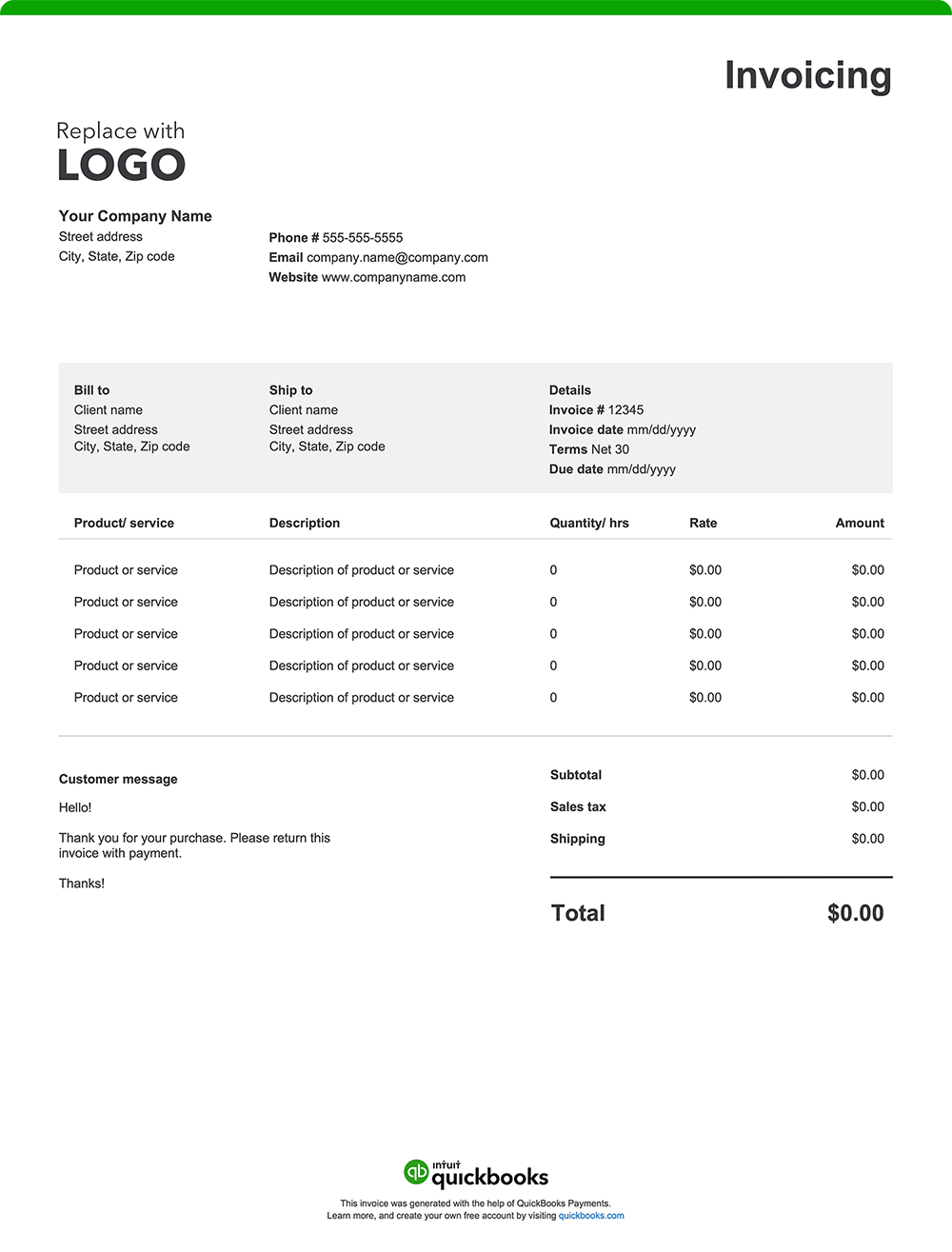
As a legal professional, delivering accurate, well-structured invoices is key to building trust and maintaining transparency with your clients. Whether you’re billing for a quick consultation, ongoing counsel, or complex litigation, clearly outlining your hours, expenses, and services helps reinforce your value and encourages timely payment. No matter your law firm's size or practice area, using a customizable invoice template or invoicing software can streamline billing and promote accountability. Download a free, customizable, and printable legal service invoice template from QuickBooks.

*See invoice template | Generate free invoice*

Jump to:

Downloadable invoice templates for legal services

Excel / Word / PDF

9 elements every legal invoice should include

You’ve closed the case, delivered counsel, conducted due diligence, drafted contracts, or prepared for discovery. Now, it’s time to bill for your time, strategy, and expertise. Here’s what every attorney invoice should include:

1. Firm details

Your invoice should feature your law firm's name, mailing address, phone number, email address, and website. 

Establish professional credibility by also including your bar license number or firm registration ID. Add a firm logo to further enhance brand recognition.

2. Date

The invoice date is essential for recordkeeping and tracking accounts receivable. It helps clients identify when services were billed and supports documentation for tax filing and audits. Dating your invoices also helps with managing retainers and time-sensitive matters like court deadlines.

3. Client information

Include your client's name, address, and contact details. Specify the case number or matter ID, if applicable.

4. Services rendered

List in detail all legal services performed, such as consultations, case research, document drafting, client meetings, or court representation. Include relevant dates or time frames. This transparency helps clients understand what they are paying for and reduces the likelihood of disputes.

5.  Time and fee breakdown

Itemize billable time and rates by activity, attorney, or paralegal. For example:

  • Hourly rates for different team members
  • Flat fees for services like contract drafting or trademark filing
  • Retainer fees and how they're applied to billed hours 

Breakdowns are especially beneficial when multiple professionals contribute to a case, providing clarity into specific rates and fees.

6. Disbursements

Outline disbursements, which are reimbursable costs paid directly to third parties on behalf of your client. These may include:

  • Filing or court fees
  • Travel expenses
  • Expert witness fees
  • Court reporter fees
  • Postage, printing, or courier services
  • Research or access fees for legal databases 

It is important to keep in mind that attorneys must ensure all costs are reasonable, necessary, and well-documented to comply with ethical rules and standards and applicable state regulations.

7. Additional charges

This section covers expenses that are charged to the client but do not fall under disbursements, such as: 

  • Rush fees
  • Phone calls or faxing
  • Specialized software or technology

8. The total amount due

The "Amount Due" section of your invoice should outline the final total, incorporating:

  • Subtotals for services and expenses
  • Applicable taxes 
  • Adjustments like retainer deductions or discounts

9. Payment terms and instructions

Avoid payment delays by outlining your payment terms and expectations.

Here's what to include:

  • Payment terms: Specify the payment due date, such as "Net 30" (payment due within 30 days of the invoice date), "Due on Receipt," or any other agreed-upon terms.
  • Accepted payment methods: Make it easy for your clients by listing all the ways they can pay you, whether by check, credit card, online payment, client portal, or cash.
  • Payment details: Provide all the necessary information for each payment method, like your check mailing address or a link to your online payment portal.
  • Late payment penalties: If you charge penalties for late payments, state the penalty amount or percentage.
  • Early payment discounts: Mention any early payment discount available and how to qualify for it.

When should you use a legal invoice?

Use a legal invoice whenever you provide billable legal services, such as:

  • Ongoing casework
  • Consultations
  • Court appearances
  • Document preparation
  • Research
  • Mediation or arbitration
  • Legal guidance
  • Due diligence

Legal invoice template format best practices

Keep your billing professional, clear, and compliant by following these invoice format tips for legal services.

Incorporate branding

Include your law firm’s logo and use consistent fonts or color schemes to reinforce your professional identity and improve recognition.

Assign a unique invoice number and date

Assign a distinct invoice number and issue date to each invoice to support organized recordkeeping, facilitate payment tracking, and simplify accounting.

Detail client information

List the client’s full name, address, and preferred contact details. Accurate information helps ensure the invoice reaches the right person and ties to the correct case or matter.

Include licensing information

Add your bar number or relevant legal certifications. This builds client confidence and maintains compliance with jurisdictional regulations.

Itemize legal services and expenses

Break down billable hours, fixed-fee services, and reimbursable expenses. Include descriptions of legal work, time spent, hourly rates, and any associated court or filing fees.

Specify payment terms

Clearly outline payment due dates, accepted payment methods, and any late payment penalties.​

Attach supporting documents

Include relevant supporting documentation, such as retainer agreements, time logs, expense receipts, or court filing confirmations, to provide full transparency.

Review for accuracy

Double-check that all services, fees, and client information are correct. Errors can lead to delayed payments or disagreements.

Save and send as a PDF

Save, download, and send the invoice in a PDF format to maintain its layout and ensure compatibility across different devices and systems.

Why is it important for law firms to send professional invoices?

Professional invoices help law firms and other legal professionals build trust, maintain compliance, and reduce payment delays. A comprehensive and organized invoice shows transparency, supports ethical billing practices, and reinforces the firm’s credibility.

How do attorneys bill clients, and when is the right time to send a legal invoice?

Attorneys may bill hourly, by flat fee, or on a retainer basis. Invoices are typically sent at certain milestones: monthly, after specific services are rendered, or when agreed upon in the client contract.

Legal invoice template vs QuickBooks 

As in any professional field, law firms rely on efficient invoicing to support a steady cash flow and promote timely payments. While basic Excel, Word, and PDF invoice templates can be a starting point for invoice creation, they may fall short when it comes to handling the precise hourly billing and expense tracking that legal practices require. A better option? QuickBooks invoicing and legal accounting software

Less manual entry means fewer errors 

Legal billing can be highly detailed, especially when tracking billable hours, client communications, and reimbursable expenses. Traditional invoice templates often require manual input of time entries, case descriptions, and client details, leaving more room for error. 

QuickBooks simplifies this process by automatically populating recurring details, minimizing mistakes, and saving valuable administrative time.

Automate invoicing for legal services

Law firms managing multiple cases and clients benefit from automation features that streamline invoicing tasks. With QuickBooks, you can:

  • Create recurring invoices: Ideal for ongoing retainers or long-term engagements.
  • Batch invoices. Create multiple invoices using standardized fee structures and customer-specific terms from a single-entry input. With batch invoicing, you can generate invoices 37% faster.¹
  • Schedule invoices. Schedule invoices to be created and emailed on specific dates. 
  • Set-and-forget it. Set hourly billing rates for each service, or custom rates for partners, associates, paralegals, and assistants. Add billable hours to invoices and the accounting software will do the calculations. 
  • Integrates with time tracking. You can convert billable hours into invoices with QuickBooks Time

This level of automation offered by QuickBooks reduces administrative work and eliminates delays, so you can prioritize your practice, instead of time-consuming payment paperwork.

Invoice from anywhere

Whether you're in the office, at court, or working remotely, QuickBooks allows you to send and manage invoices directly from your smartphone, tablet, or desktop. You can also attach engagement letters, receipts, or supporting documentation.

Manage cash flow across clients and cases

Legal practices often juggle various billing arrangements—hourly, flat-fee, or contingency. QuickBooks integrates invoicing with bookkeeping, so you can track unpaid invoices, forecast income, and manage your firm’s cash flow with more precision.

Offer flexible payment options

Give your clients the convenience of paying with credit cards, debit cards, ACH transfers, and even popular platforms like Apple Pay, PayPal, and Venmo. This flexibility can help you get paid faster and improve your cash flow.

Send invoices through email or SMS

QuickBooks allows attorneys and other legal professionals to send digital invoices directly via email or SMS—making it easy for clients to access and respond quickly. 

How do I accept payments in QuickBooks?

QuickBooks makes payment collection simple and secure. You can accept payments online with a “Pay Now” button directly on your invoice or use in-person options like mobile card swipes. Payments are automatically matched to the right client and case, reducing the need for manual tracking.

What is recurring invoicing for law firms?

Recurring invoicing is ideal for lawyers who offer retainer services or ongoing legal support. QuickBooks lets you schedule invoices at regular intervals (monthly, quarterly, etc.) and will automatically send them to clients. You’ll stay on schedule without needing to start each billing cycle from scratch.


Try our free legal invoice generator

Create a custom legal invoice online with QuickBooks—autofill job details, add branding, and send with ease. Prefer a blank template? Download free printable options in Word, Excel, or PDF.

When you or your firm is ready for a simpler, time-saving alternative to manual invoice creation, consider QuickBooks. Our invoicing software automates your billing process, allowing you to easily create professional, instantly payable invoices. Plus, it seamlessly integrates with expense tracking and other reporting tools, keeping all your financial management in one place. That means streamlined tax preparation, enhanced organization, and robust insights to support your decision-making.

QuickBooks has the tools you need to help your business thrive.

Claims

1. Batch Invoicing 37% Faster claim: Based on internal tests comparing QuickBooks Online regular invoice workflow with QuickBooks Online Advanced multiple invoice workflow. QuickBooks Online Advanced supports the upload of 1,000 transaction lines for invoices at one time. Number of invoices imported depends on number of transaction lines in the .CSV file. Customer received payment for participating in the tests.


Recommended for you

Mail icon
Get the latest to your inbox
No Thanks

Get the latest to your inbox

Relevant resources to help start, run, and grow your business.

By clicking “Submit,” you agree to permit Intuit to contact you regarding QuickBooks and have read and acknowledge our Privacy Statement.

Thanks for subscribing.

Fresh business resources are headed your way!

Looking for something else?

QuickBooks

From big jobs to small tasks, we've got your business covered.

Firm of the Future

Topical articles and news from top pros and Intuit product experts.

QuickBooks Support

Get help with QuickBooks. Find articles, video tutorials, and more.