QuickBooks Blog
A person holding a camera and talking on a phone.
Invoicing

Free photography invoice template: PDF, Excel, & Word downloads

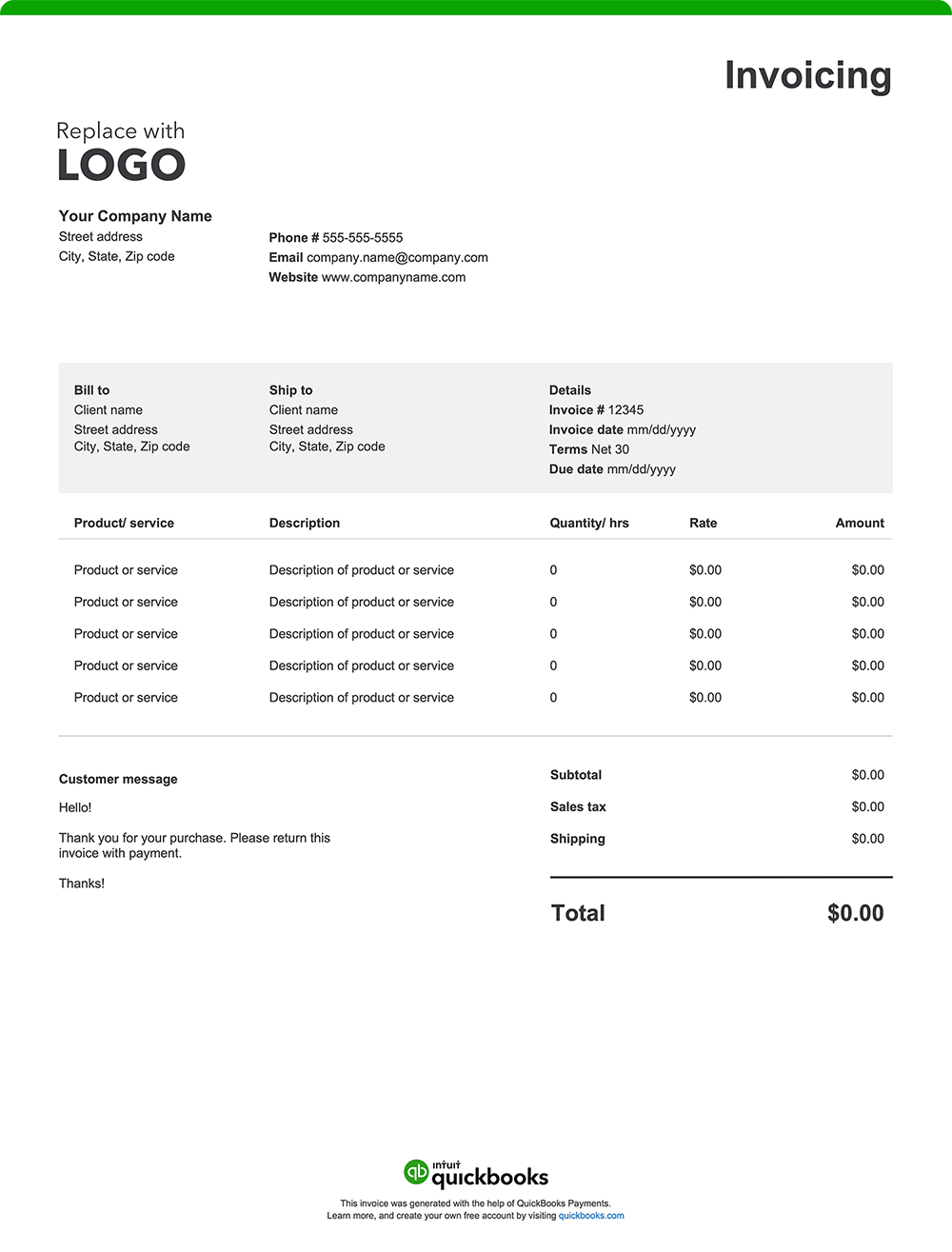
The creative world of photography is incredibly diverse. But whether your specialty is photographing weddings or wildlife, food or fashion, you need a solid invoicing system. A proper invoice helps encourage timely payments while also enhancing client relationships and accurate recordkeeping. Provide transparency and help ensure accountability by creating an invoice using a free invoice template or invoicing software for photographers. Download a free, customizable, and printable consulting invoice template from QuickBooks.

*See invoice template | Generate free invoice*

Jump to:

Downloadable invoice templates for photographers

Excel / Word / PDF

9 elements every photography invoice should include

Your creative vision and talent have captured unforgettable moments, told powerful stories, and brought ideas to life. Now it’s time to make sure you’re paid for your skills and hard work. An easy-to-understand invoice facilitates accurate billing and timely payments while upholding your professional image. Here’s what a well-crafted photography invoice should include:

1. Company details

Your invoice should prominently display your or your business’s name, address, phone number, email, and website. 

Include a logo to enhance your brand recognition and professionalism. This information facilitates easy identification and reinforces your credibility.

2. Client information

Include your client's name, address, and contact details.​

3. Invoice number and date

Assign a unique invoice number and specify the issuance date. This information helps keep financial records organized, simplifies tax reporting, and allows for quick reference in case of disputes or audits.

4. Description of services and deliverables 

List the photography services you provided along with the final deliverables. Be specific to help clients understand the scope of work. For example:

  • Services: "4-hour wedding photoshoot," "corporate headshots for 10 employees," or "product photography for 15 items."
  • Deliverables: Number of edited photos, format of delivery (e.g., digital files, prints, albums), and resolution specifications (like high-resolution images for printing or web-optimized files).

5. Itemized breakdown of services and fees

Itemize your charges based on how you bill, such as:

  • Hourly rates 
  • Flat rates 
  • Retainer fees for ongoing support over a set period
  • Per image rates, e.g., $50 per edited image for 20 images
  • Milestone payments, e.g., 50% deposit upfront, 50% upon final image delivery

Breaking down costs adds transparency, especially for complex projects. For instance, a photographer may charge different amounts for the photoshoot and post-processing. Clearly billing for each service helps your clients understand the value provided and can minimize potential conflicts over charges.

6. Any additional charges incurred

Account for supplementary costs that may arise during the project, such as:

  • Travel expenses
  • Equipment, location, or prop rentals
  • Assistant fees
  • Printing costs
  • Rush fees
  • Administrative costs

7. The total amount due

The "Amount Due" section of your invoice should outline the final total, incorporating:

  • The initial subtotal of services provided
  • Applicable taxes based on local requirements
  • Additional fees, such as travel costs or rush fees
  • Any discounts applied to the original cost, such as referral discounts or package deals
  • Any other adjustments, such as deposits already paid, impacting the total amount owed

8. Payment terms and instructions

Set clear expectations for payment by outlining terms and instructions in the invoice. This ensures clients understand their obligations.

Here's what to include:

  • Payment terms: Specify the payment due date, such as "Net 30" (payment due within 30 days of the invoice date), "Due on Receipt," or any other agreed-upon payment terms.
  • Accepted payment methods: List all the ways your clients can pay you, such as check, credit card, online payment, or cash.
  • Payment details: Provide all the necessary information for each payment method, like your check mailing address or a link to your online payment portal.
  • Late payment penalties: If you charge penalties for late payments, state the penalty amount or percentage.
  • Early payment incentives: Mention any early payment discount available and how to qualify for it.

9. Image usage rights

Include a section detailing the licensing and usage rights granted to the client. Specify how the client may use the images (e.g., personal use, commercial use), any restrictions, and duration of the license. This clarifies ownership and usage, protecting both parties' interests. ​

Photography invoice template format best practices

Make sure your photography invoice is professional, easy to understand, and encourages timely payment. Follow the best practices below. 

Include your branding

Your photography business is unique—make sure your invoices reflect that. Add your logo, use consistent brand colors, and include your business name and contact information. 

Add invoice number and date

A dated invoice with a unique invoice number is beneficial for both you and your clients. It helps with recordkeeping, tracking, and future referencing. 

Customize 

Personalize the invoice with your client’s name, contact details, and specific project information. Consider labeling the invoice by type of shoot (like wedding, portrait, or commercial) to make the invoice easily identifiable.

Break down services, deliverables, and charges

A transparent invoice helps avoid misunderstandings. Itemize all provided services and deliverables and your corresponding rates.

Set clear payment terms

Facilitate prompt payment by including payment due dates, accepted payment methods, and any special terms or conditions. 

Proofread 

Errors can slow payment and potentially cause confusion and disputes. Double-check all details to ensure invoice accuracy.

Save and send as a PDF

Once the invoice is finalized, save it as a PDF, which is a universally compatible format.

Common charging structures for photographers

In order to accommodate different types of shoots and projects, photographers often bill clients by time, scope or work, the number of final deliverables, or the complexity of post-production work. Popular charging structures are as follows:

  • Hourly rates: Common for events or extended shoots.
  • Flat fees: Typical for standard packages, like weddings or portraits.
  • Per image fees: Useful for commercial and product photography.
  • Post-production and editing charges: Applied when extensive retouching or editing is required, often billed separately from the shoot.
  • Retainers: Typical for ongoing projects, like monthly content creation.
  • Upfront deposits: Often required to secure a booking, especially for large events.

Include your branding

Your photography business is unique—make sure your invoices reflect that. Add your logo, use consistent brand colors, and include your business name and contact information.

Licensing information to include on a photography invoice

Your photography invoice should clearly state the licensing terms for the images you deliver. Include the following:

  • Where and how the client can use the photos, for example, social media, commercial, or editorial use.
  • How long the client can use the images, such as 6 months, 1 year, or indefinitely.
  • Any restrictions on image modifications, resale, or third-party distribution.

How to address photography travel costs in an invoice

List travel expenses as separate line items under the “Additional Expenses” section of your invoice. Include a short description, like mileage or lodging, and the associated cost. Always discuss travel fees with your client in advance so there are no surprises later.

Standard payment terms for photographers

Typical terms include Net 30, Net 15, or Due on Receipt. For event photography, it’s common to request a deposit upfront, with the balance due after image delivery. Include policies on late fees to encourage timely payment. Offering a small discount for early payment can also incentivize clients to settle their invoices quickly.

The difference between a photography invoice and a freelance invoice

A photography invoice includes deliverables like image files, formats, usage rights, and any travel fees. Unlike a general freelance invoice, it often outlines licensing terms and protects your intellectual property. While both follow a similar structure, photography invoices are tailored to the unique needs of creative visual work.

Photography invoice template vs QuickBooks 

Like any professional service, photography requires efficient invoicing to maintain steady cash flow and support timely payments. While basic Excel, Word, and PDF invoice templates can be a starting point for invoice creation, they often lack the functionality and automation that photographers need to manage their complex billing processes. A better option? QuickBooks invoicing and photography accounting software. 

Less manual entry means fewer errors 

Photographers often work on a variety of projects, all requiring detailed invoicing. Traditional invoice templates usually involve manual data entry for client details, shoot descriptions, and editing charges. This method can be time-consuming and prone to errors, especially for photographers balancing multiple jobs.

QuickBooks streamlines invoicing by automating much of this manual work. It automatically populates client details, service descriptions, and pricing information, saving you valuable time and reducing the risk of costly errors.

Automate invoicing 

As a photographer, juggling numerous clients with different billing schedules can be a challenge. QuickBooks offers automation features that can simplify your invoicing and help you stay organized. 

Automated workflows

Set up customized workflows to automate tasks such as sending invoice reminders or approving invoices. ​

Real-time tracking

QuickBooks lets you see when clients view or pay invoices, making it easy to follow up on overdue payments and facilitate collections.

Invoice from anywhere

Whether you're in your studio, on location at a client’s office, or capturing an event on-site, QuickBooks allows you to create and send invoices directly from your mobile device or tablet. 

Manage cash flow from booking to delivery

Photography projects often involve variable payment schedules—upfront deposits, milestone payments, and final balances on image delivery. QuickBooks integrates invoicing with bookkeeping, so you can monitor payment timelines and forecast income. This helps you plan your budget, even when payments come in stages.

Offer flexible payment options

Make it easy for clients to settle their bills by offering them more ways to pay. QuickBooks enables you to accept various payment methods, including credit cards, debit cards, ACH transfers, and popular platforms like Apple Pay, PayPal, and Venmo. 

Send invoices through email or SMS

QuickBooks allows you to send invoices directly via email or SMS, catering to client preferences and ensuring prompt delivery. For recurring services, automated invoices can save time and ensure consistent billing. ​

How do I accept payments in QuickBooks?

You are in control of how you get paid. Accept payment options such as credit cards, bank transfers, checks, or even cash. Create invoices with a "Pay Now" button for instant online payments, or you can swipe cards on the spot with our mobile card reader. Payments will be tracked to the correct job, and funds will be deposited directly into your bank account.


Try our free photography invoice generator

Create a custom invoice online with QuickBooks—autofill job and project details, add branding, and send with ease. Prefer a blank template? Download free printable options in Word, Excel, or PDF.

When you’re ready for a simpler, time-saving alternative to manual invoice creation, consider QuickBooks. Our invoicing software automates your billing process, allowing you to easily create professional, instantly payable invoices. Plus, it seamlessly integrates with expense tracking and other reporting tools, keeping all your financial management in one place. That means streamlined tax preparation, enhanced organization, and robust insights to support your decision-making.

QuickBooks has the tools you need to help your business thrive.

Recommended for you

Mail icon
Get the latest to your inbox
No Thanks

Get the latest to your inbox

Relevant resources to help start, run, and grow your business.

By clicking “Submit,” you agree to permit Intuit to contact you regarding QuickBooks and have read and acknowledge our Privacy Statement.

Thanks for subscribing.

Fresh business resources are headed your way!

Looking for something else?

QuickBooks

From big jobs to small tasks, we've got your business covered.

Firm of the Future

Topical articles and news from top pros and Intuit product experts.

QuickBooks Support

Get help with QuickBooks. Find articles, video tutorials, and more.