QuickBooks Blog
A group of people standing around a table.
Invoicing

Free restaurant invoice template: PDF, Excel & Word downloads

If you run a restaurant or food service business, having a customizable invoice template is essential for billing clients beyond the point of sale. Whether you're providing catering, managing large events, or offering meal prep subscriptions, professional invoicing helps clarify terms, support timely payments, and keep your cash flow steady. Provide transparency and help ensure accountability by creating an invoice using a free invoice template. Download a free, customizable, and printable restaurant invoice template from QuickBooks.

*See invoice template | Generate free invoice*

Jump to:

Downloadable invoice templates for restaurants

Excel / Word / PDF

7 elements every restaurant invoice should include

You’ve served up great food, delivered memorable events, and kept your clients coming back for more—now it’s time to make billing just as smooth. A well-organized invoice helps you get paid faster, keeps your business running efficiently, and leaves a lasting impression. Whether you’re catering a special event, running a food truck, or managing a corporate cafeteria, here’s what every restaurant invoice should include:

1. Restaurant details

Include your company name, logo, address, phone number, and email. This gives the invoice a professional look and enhances brand recognition. 

2. Customer information

Include the client’s name and contact information.

3. Invoice number and date

Assign a unique invoice number and include the invoice issue date to support accurate recordkeeping, simplify tax reporting, and allow for easy reference in case of questions or disputes. For catering or event-related invoices, you may also want to include the event name, event date, or order number to help both you and the client clearly identify what the invoice pertains to.

4. Description of goods and services provided

Provide your clients with a clear understanding of what they’re paying for and why. Break down all goods or services provided, including quantities, rates, and individual costs. For example:

  • Buffet catering for 50 guests – $25 per person
  • Bartending service – 3 hours @ $40/hour
  • Chafing dish rental – 2 units @ $15 each
  • Corporate lunch drop-off – 20 boxed meals @ $12 each
  • Food truck service – 4 hours @ $150/hour (includes setup, service, and cleanup)

5. Any additional charges incurred

List any charges for extras, such as:

  • Delivery
  • Setup
  • Rush services
  • Mileage
  • Weekend rates

6. The total amount due

The "Amount Due" section of your invoice should outline the final total, incorporating:

  • The initial subtotal of services provided
  • Applicable taxes based on local requirements
  • Additional fees, such as travel costs or rush fees
  • Any discounts applied to the original cost, such as seasonal promotions or package discounts
  • Any other adjustments impacting the total amount owed

7. Payment terms and instructions

Alleviate confusion by detailing payment terms and instructions. 

Here's what to include:

  • Payment terms: Specify the payment due date, such as "Net 30" (payment due within 30 days of the invoice date), "Due on Receipt," or any other agreed-upon payment terms.
  • Accepted payment methods: List all the ways your clients can pay you, such as check, credit card, online payment, or cash.
  • Payment details: Provide all the necessary information for each payment method, like your check mailing address or a link to your online payment portal.
  • Late payment penalties: If you charge penalties for late payments, state the penalty amount or percentage.
  • Early payment discounts Note any early payment discounts and the conditions for receiving them.

What is a restaurant invoice?

A restaurant invoice is a document used to bill customers for food, services, or event-related charges when payment isn’t collected at the point of sale. It’s common for catering, private dining, and large group orders.

Common restaurant and food service businesses that use invoicing

Invoicing plays an essential role in restaurant and food service operations, particularly when payment isn’t made upfront. From traditional restaurants to caterers to specialized providers, many businesses rely on invoices to manage billing, track payments, and keep cash flow on course.

Catering services

Used to bill for weddings, corporate events, private parties, or other large gatherings. Invoices typically include menu details, guest counts, staffing, and rentals.

Meal prep and subscription services

Restaurants offering weekly meal kits or prepared food plans often invoice customers on a recurring schedule.

Food trucks 

Food trucks may invoice event organizers or business partners after servicing private parties and events, festivals, or venue partnerships.

Corporate dining and large orders

Businesses that provide regular lunches or bulk orders for offices often invoice monthly or per order, with itemized charges and delivery fees.

Event venues and private dining

Restaurants and venues offering private dining or event spaces typically issue post-function invoices that include costs for food and beverages and service fees.

Restaurant billing overview

Restaurant billing includes any post-service charges for goods or services. It helps manage cash flow, track outstanding balances, and maintain client communication.

A restaurant invoice typically includes:

  • Customer and business contact information
  • Itemized meals or services
  • Quantity and pricing details
  • Payment terms and due date
  • Taxes, tips, and service fees, if applicable

Restaurant invoice template best practices

Follow these best practices to help ensure your restaurant invoice is professional and easy for clients to understand and pay:

Include your branding

Reinforce your brand identity and build your business recognition. Adding your restaurant logo and brand colors gives your invoice a polished, professional look.

Date and number the invoice

Include a unique invoice number and the invoice date to support accurate recordkeeping, track payments, assist with tax reporting, and quickly resolve any customer questions or disputes.

Customize for each client

Your clients aren’t one-size-fits-all. Your invoice shouldn’t be either. Add your customer’s name, company, and any relevant event or delivery details to make the invoice specific and easy to understand.

Break down charges 

List out food items, services (like staffing or rentals), and any extras by quantity and rate. Careful itemization helps avoid confusion and supports trust.

Set payment terms upfront

Manage expectations and encourage timely payment by including the due date, accepted payment methods, and any applicable late fees. 

Double-check for accuracy

Review your invoice before sending it to catch any errors in charges, taxes, or customer info. Mistakes can lead to payment delays.

Send as a PDF

Finalize your invoice and send it as a PDF, a widely compatible format.

When to use a restaurant invoice template

An invoice template is helpful for restaurant owners who need to bill customers for services or goods that are not paid for immediately at the point of sale. This is common for:

  • Catering services
  • Private events or functions
  • Corporate accounts or large group bookings
  • Delivery orders billed to a business
  • Recurring meal prep or subscription services

Key considerations for a restaurant invoice template

An effective restaurant invoice template should support your workflow, reflect your brand, and help you get paid on time. When choosing or customizing a template, consider:

Flexibility for different services

Your invoice should work for catering, meal prep, delivery, venue bookings, or private dining without needing major edits every time.

Clear layout for fast review

Clients should be able to glance at your invoice and understand exactly what they’re being charged for. A streamlined layout reduces confusion and follow-up questions.

Mobile-friendly formatting

If you’re invoicing from a phone or tablet choose a template that’s easy to use on the go and can send clean PDFs.

Room for custom notes

Whether it’s special instructions or a personalized thank-you, the option to add brief notes shows attention to detail.

Built-in tax and tip calculations

Make sure your template can automatically calculate sales tax, service fees, or gratuities to help prevent mistakes and save time.

Support for recurring or batch billing

If you invoice repeat clients regularly or bill multiple accounts at once (e.g., corporate lunch programs), look for templates or tools that streamline those processes.

Is a restaurant invoice the same as a receipt?

No. An invoice is a request for payment sent before the customer pays—common for catering, large orders, or events. A receipt confirms payment after the transaction is complete.

Restaurant invoice templates vs. QuickBooks

Basic Excel, Word, or PDF invoice templates can work for smaller operations like food trucks or pop-up vendors, but they often require manual entry and don’t offer much flexibility. QuickBooks gives you a faster, more reliable way to invoice, track payments, and stay organized.

Less manual work, fewer errors

Generic invoice templates require you to re-enter client info, pricing, and services each time. This is cumbersome and leaves more room for mistakes. QuickBooks saves customer and item details, so you can invoice quickly and trust that your numbers are accurate.

Automate your invoicing

Running multiple catering jobs or handling weekly clients? QuickBooks automation tools can help:

  • Batch invoicing: Send multiple invoices at once to save time.
  • Recurring invoices: Bill regular clients automatically for meal prep or standing orders.
  • Auto-reminders: Set up payment reminders so you don’t have to chase down late payments.

Invoice anytime, anywhere

Whether you're on-site at an event or handling back-of-house operations, QuickBooks lets you send invoices from your phone or tablet. You can also attach menus, contracts, or service details so everything your customer needs is in one place.

Track cash flow in real time

Always know where your money stands. With QuickBooks, you can see what invoices have been sent, viewed, and paid, or which are overdue. Built-in reporting tools also help forecast revenue and spot trends.

Get paid faster

QuickBooks makes it easy for clients to pay you right from the invoice. Accept credit cards, ACH transfers, PayPal, and Apple Pay. The easier it is to pay, the faster the money hits your account.

Send invoices via email or SMS

Deliver invoices to match your client’s preferences. Send directly by email or text, and add a personal touch that helps keep relationships strong and payments on track.

Try our free restaurant invoice generator
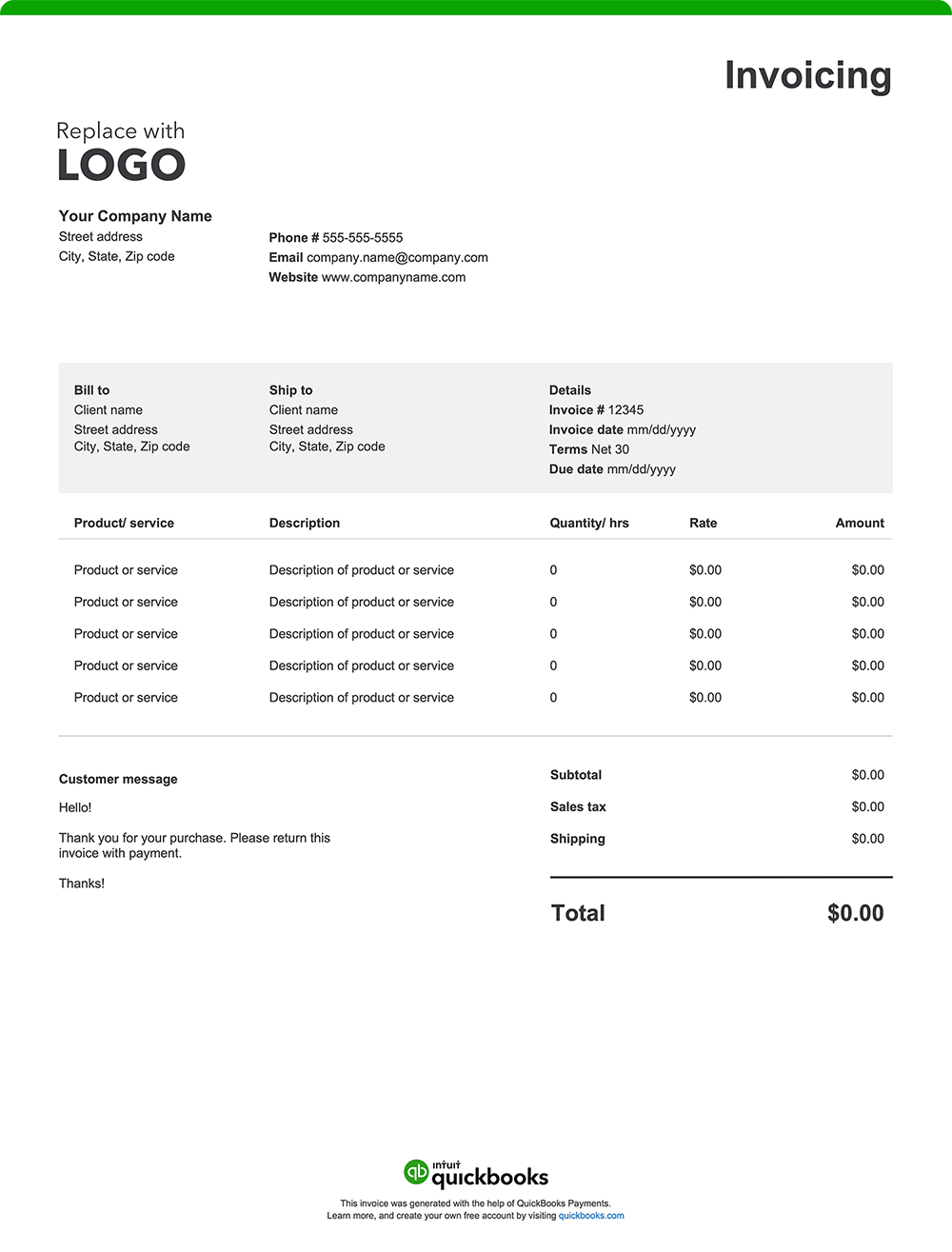
Create a custom restaurant invoice online with QuickBooks—autofill job and project details, add branding, and send with ease. Prefer a blank template? Download free printable options in Word, Excel, or PDF.

When you’re ready for a more efficient way to manage your invoices, consider QuickBooks. Our invoicing software automates the process, allowing you to create professional invoices quickly. Once the final invoice is issued, QuickBooks makes it easy to track payments, integrate expense management, and generate reports, keeping all your financial data in one place. That means better organization, simplified tax preparation, and valuable insights to support your business decisions.

QuickBooks has the tools you need to help your business thrive.

Recommended for you

Mail icon
Get the latest to your inbox
No Thanks

Get the latest to your inbox

Relevant resources to help start, run, and grow your business.

By clicking “Submit,” you agree to permit Intuit to contact you regarding QuickBooks and have read and acknowledge our Privacy Statement.

Thanks for subscribing.

Fresh business resources are headed your way!

Looking for something else?

QuickBooks

From big jobs to small tasks, we've got your business covered.

Firm of the Future

Topical articles and news from top pros and Intuit product experts.

QuickBooks Support

Get help with QuickBooks. Find articles, video tutorials, and more.