You could save up to 25% on transaction costs².
Speak with us now to see if you qualify.
Talk to sales 1-800-515-8366
Monday - Friday, 6 AM to 4 PM PT

Table of contents
Table of contents
Bookkeeping and accounting workflows that work at $1M often start breaking down long before a business reaches $5M, creating permission gaps, buried errors, and reconciliation delays that carry a measurable cost. Intuit’s Enterprise Technology Benchmark reflects that strain, with 64% of respondents saying month-end close takes too long, leading to slower decisions and less time for performance analysis.
With QuickBooks Online Advanced, you get stronger permissions, live reporting synced to Excel, AI-powered anomaly detection to flag discrepancies, and workflow automation without the cost or complexity of an ERP.
In this article, find out the eight accounting problems that show up first as a business expands in size and sales, and how to stay ahead of them.
Increased transaction volume and team size mean that, for smaller businesses, manual data entry is not just a chore but a control risk. That’s because there are more opportunities for errors to go unnoticed.
Plus, the reports you used to grow your company that once took minutes to produce now take days. By the time they reach you, the numbers are already out of date. During growth phases, that means flying blind on decisions that need live, accurate numbers, and that pressure increases as the company continues to scale.
Eight of the problems that show up most often at this stage of business development:
Below, find out more about the challenges the eight issues present that, unchecked, can become financial problems:
When your accounting platform gives users all-or-nothing access, that works when it is just you and a bookkeeper. But it becomes a security risk as you add department heads, project managers, and sales staff.
Each new user either sees everything, including payroll and the full balance sheet, or gets locked out of the data they need to do their job. It is one of the first accounting control and data protection issues that growing businesses encounter.
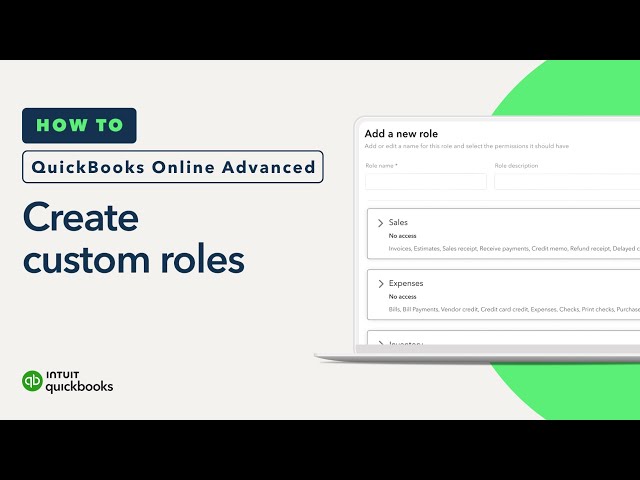
Custom role-based permissions in QuickBooks Online Advanced allow you to define exactly what each user can see and do. Everyone gets the access they need to do their job and nothing more, so you protect sensitive data without creating new bottlenecks.
Example: A growing services firm promotes two team leads with the same level of access to the books. One can view the full payroll, while the other can edit vendor payments. Assign specific roles instead to limit access by responsibility and keep sensitive financial data safe.
Finance teams at growing businesses spend too much time building reports and not enough time analyzing the numbers. The spreadsheet system that worked at $1M becomes the Excel trap at $5M.
The challenges scaling organizations generally face are:
QuickBooks Online Advanced updates every time there’s a new transaction. Customize a report so you can monitor performance in real-time, so you can run analyses on cash, hiring, and pricing decisions with the latest numbers.
Example: A business with three departments discovers that each one is circulating a different export of the same spreadsheet-based P&L, and the numbers don't match because two were pulled a week apart. QuickBooks Online Advanced’s Spreadsheet Sync eliminates that drift by keeping every export synced with the live data.
 Live sync only helps if finance decides which version is the working file, who owns it, and when leadership stops circulating old exports. Set a rule to have one live-linked file, one owner, refreshed before every decision meeting. Use an accounting checklist to standardize which reports get pulled and when.
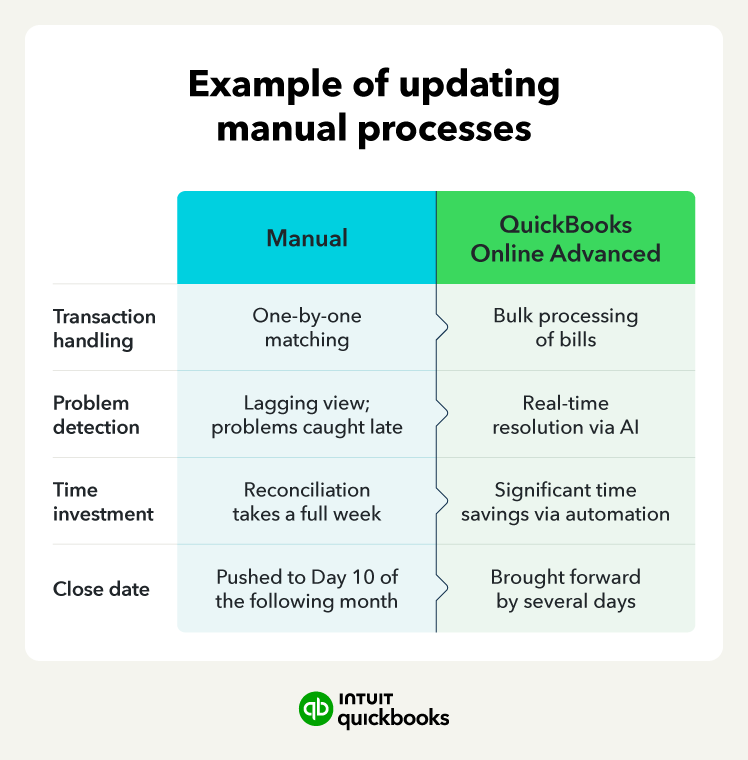
Manual "one-by-one" matching becomes increasingly difficult as you grow. Your view of business performance is lagging, making it harder to catch problems while they are still easy to fix.
With QuickBooks Online Advanced, you can:
Your finance team spots and resolves accounting problems as they happen, freeing up time for analysis rather than cleanup.
Example: A business processing 600 monthly transactions finds that reconciliation consumes the first full week of every month, pushing the close to day 10. Switching to bulk batches and AI-powered reconciliation brings the close forward by several days.
At $5M+ in revenue, no manual review catches every error, which stays in your income statement and on your balance sheet until someone catches them by hand.
The AI Accounting Agent scans your P&L and balance sheet and flags potential anomalies. It alerts your team to these outliers, allowing them to investigate and resolve the issue before it distorts the period-end. With assisted review, inaccuracies get caught before they carry through into the close or the forecast.
Example: A vendor invoice is accidentally entered twice in the same month. The standard P&L review does not catch it, but the Accounting Agent highlights the discrepancy and recommends a review. The duplicate is corrected before the close, and the P&L goes to leadership with accurate vendor costs.
Scaling firms struggle to differentiate profitable work from low-margin work. If you can’t see live labor and material costs on a project, you only notice smaller margins on a job at period-end, by which time it might already be over budget. If that happens, your choices are few; the only fixes left are usually scope cuts, staffing changes, or accepting a lower margin.
QuickBooks Online Advanced’s Project Cost Estimates lets you compare estimated project income and costs with what is actually being spent as work progresses.
You see margin erosion while the project is still running, when a staffing change or a pricing conversation can still protect it.
Example: A professional services firm discovers that its highest-revenue client is actually its lowest-margin engagement. Labor costs were running 40% above estimate, but no one saw it until the project wrapped. With Estimates vs. Actuals, the overspend could have shown up much earlier, while there was still time to adjust staffing or scope.
A core double-entry bookkeeping issue is revenue recognition, which becomes harder to manage as billing complexity and volume grow. As you grow, it becomes harder to track what has been billed, what has been earned, and what is still deferred. That means many businesses collect cash out of sync with the work they have actually delivered.
Revenue recognition scheduling in QuickBooks Online Advanced matches revenue to the period it was earned, reducing the risk of error and the need for manual journal entries when cash collection and revenue recognition occur at different times.
That way, you prevent swings in your financial statements that could prompt difficult questions from lenders or investors and delay funding decisions.
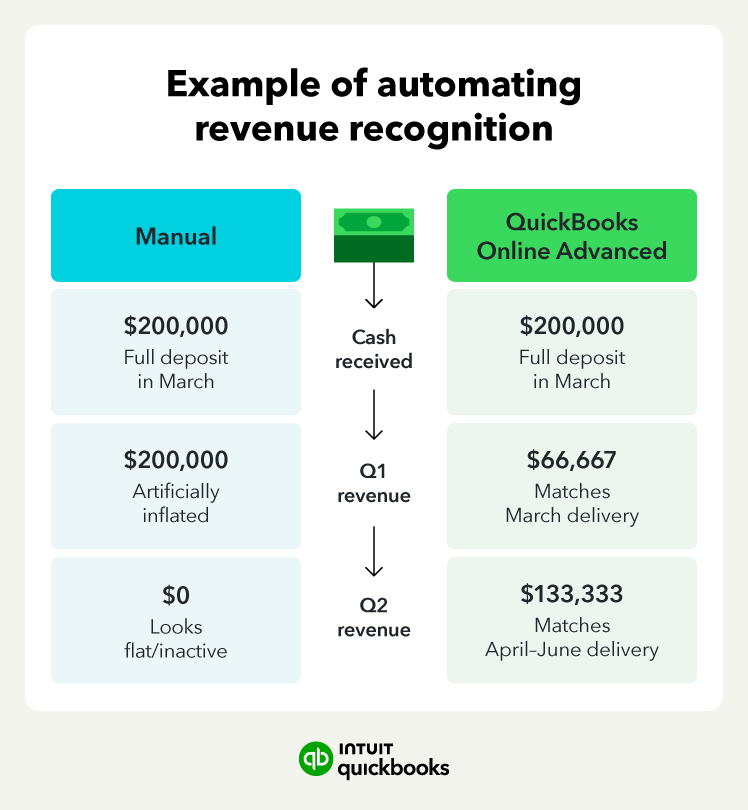
Example: A firm collects a $200,000 deposit in March for work delivered in April through June. Without a recognition schedule, the full amount hits Q1, and Q2 looks flat despite three months of delivery. With automated revenue recognition, income is recognized over the delivery period, so each quarter reflects the work actually completed.
As businesses scale, they acquire more equipment, vehicles, and technology. Tracking these in a spreadsheet leads to inaccurate book values, missed depreciation entries, and potential audit questions. Without a single asset register, finance has no reliable view of what the business owns, what it's worth, and what's already been purchased.
Fixed asset management in QuickBooks Online Advanced records each asset with its purchase price, useful life, and depreciation details. The system then automates monthly depreciation entries, keeping fixed-asset balances up to date without manual catch-up work.
You report asset values and depreciation that tie back to a single register, so the balance sheet holds up under audit.
Example: A growing business buys three delivery vehicles over 18 months, tracks them in a spreadsheet, and discovers at year-end that eight months of depreciation entries were never posted. With fixed asset tracking, those entries would have been automatically calculated and posted each month. The balance sheet stays current, and year-end closes without a backlog of catch-up adjustments.
As transaction volume grows, so does the risk of "mystery" changes in your books. Without a distinct trail for each user, you lose the ability to reconstruct a transaction's history. If an entry is edited or a payment is modified, you need a record of exactly when the change occurred and who made it.
Shared logins also destroy the integrity of your internal controls. To satisfy an auditor or an investor, you must be able to prove a clear separation of duties—showing that the person who initiated a payment isn't the same person who approved it.
QuickBooks Online Advanced supports up to 25 users, so every team member gets their own login. That means every transaction can be traced back to the person who made it, giving you a complete record of who did what without relying on memory or shared credentials.
Example: An auditor asks who approved a $15,000 vendor payment, and finance cannot answer because three people share the same login. With individual logins for each user, approval is tied to a single person, and the audit trail remains intact.
Even a team of five can split initiation, approval, and payment release across different logins. The goal is not bureaucracy. It is a clean audit trail that shows who did what, so a single mistake does not go undetected.
Permission gaps, outdated reports, reconciliation backlogs, and undetected errors add up to slower closes, weaker numbers, and less control over the decisions that depend on them. Solving them early gives you a finance function that keeps pace with transaction volume, team size, and reporting demands as the business grows.
QuickBooks Online Advanced gives you those controls without the cost or complexity of a full ERP migration. Book a call with one of our QuickBooks Online Advanced team to see how AI-assisted tools can streamline your month-end.

Call Sales: 1-800-285-4854