You could save up to 25% on transaction costs².
Speak with us now to see if you qualify.
Talk to sales 1-800-515-8366
Monday - Friday, 6 AM to 4 PM PT

Table of contents
Table of contents
At Intuit, we're committed to building the future together, turning your feedback into the tools, intelligence, and platform capabilities that help your business succeed. QuickBooks Online is improving on two fronts at once: launching new capabilities like Intuit Intelligence, and steadily improving the everyday workflows you count on. You can read about the latest product updates on the QuickBooks blog.
This article focuses on our ongoing commitment to valued customers like you. We've listened to your feedback on matching transactions, reconciling accounts, paying bills, helping to keep your books accurate, and other run-the-business needs. Here’s the feedback we’ve addressed so far, and what's still ahead.
Spend less time chasing matches and more time trusting your numbers. Matching now means cleaner books with far less back-and-forth. The most likely match appears first, highlighted by color confidence signals. That way, you can clear and reconcile your transactions faster. Key updates include:
“Recommendations for matching and classification are useful. We accept recommended classifications during the month and use the financials during the month for forecasting and monitoring.”
— Sai Akhil Pulikam, Applix Inc.
Real customer, compensated for their time.
QuickBooks is in the middle of an ongoing push to make categorization less manual, with smarter re-prediction, a modernized rules experience, and clearer handling of transfers and credit-card payments. Some of this is live, and some is still rolling out. Here’s what you can expect:
"The automatic categorization of bank transactions and reporting tools help me keep my income and expenses organized… saving me several hours each month."
— Laura Matadamas, LM Pro Enterprise Inc.
Real customer, compensated for their time.
Reconciliation is now protected against the most common causes of a broken beginning balance. When a client or staff member edits or deletes a cleared transaction after the fact, the issues often surface later, during the close. That's now harder to do by accident.
Paying bills now takes fewer steps, and QuickBooks no longer assumes every payment is a check. Most bill payments aren't made by check, and with more accurate categorization, we're cutting avoidable re-entry.
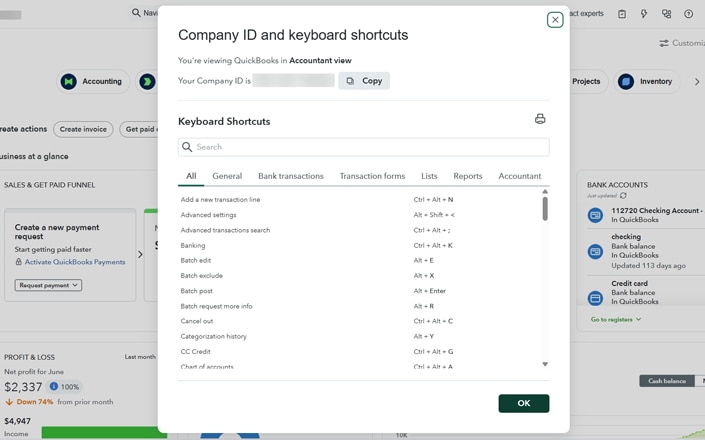
Fly through banking, reports, and the tasks you do with easy-to-use keyboard shortcuts for the tasks you repeat all day. Keep your hands on the keys and stay in your flow. Now you can get more done, work with fewer clicks and less switching between mouse and keyboard. The shortcuts cover the tasks you repeat all day and behave the same way wherever you are in QuickBooks. These improvements include:
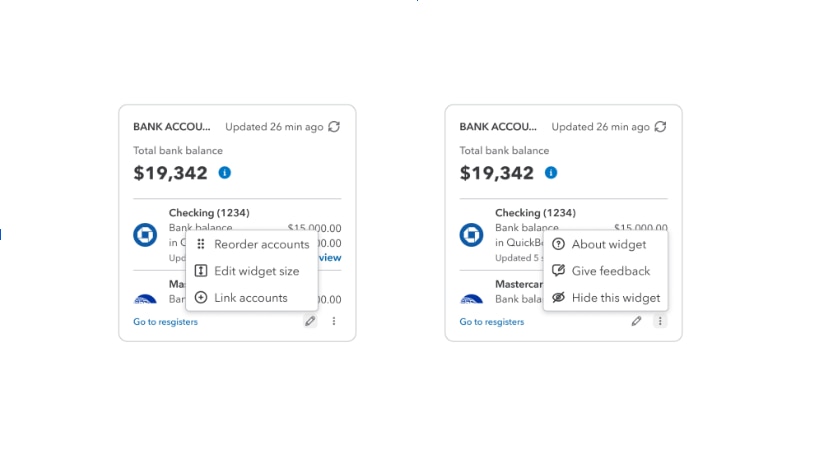
Now you can customize the layout of your QuickBooks Online homepage, so you’re in control of what it shows. You told us it was trying to do too much, and that the number of options felt overwhelming, so we’ve simplified the default view.
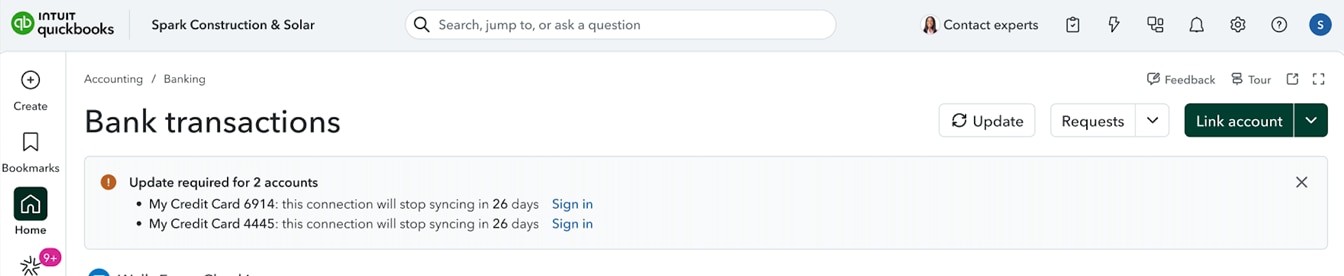
Bank connection errors are frustrating. QuickBooks is reducing the most common bank connection errors and warning you before a connection expires. This release targets the specific errors you run into most often, with more improvements planned in the months ahead. Improvements include:
Nothing is more frustrating than being locked out of your own books. If you've run into an "account not found" error, or found yourself repeatedly verifying your identity, we heard you. We're rolling out changes that keep you securely signed in longer on the devices you trust, so you're not re-verifying every time you step away. This is especially valuable for complex workflows. And if you're ever locked out, account recovery is now more straightforward. You can verify by phone without digging up sensitive personal information to prove it's you.
We heard you, loud and clear, that pop-ups, prompts, and suggestions were showing up in the middle of your work. We're working to make them less disruptive, so they don't get in the way of the task in front of you.
We've made the QuickBooks mobile app more reliable, with fixes to stability, sign-ins, and the everyday tools you use, including:
“The mobile app is a huge time-saver! I use it for invoices, expenses, and receipt uploads. Snapping photos and automatic categorization streamlines my bookkeeping, saving me 3 to 4 hours a week."
— Samarica M., Owner & Founder, SASA Salon & Spa
Real customer, compensated for their time.
QuickBooks improved modern reports across many of the top usability areas you flagged, from how reports display to how you find and export what you need. Many of these improvements are already live, with more rolling out soon, as part of our continued investment in reporting and business intelligence.
QuickBooks fixed a cluster of receipt-capture issues, so your receipts land where they should, with the right numbers.
"I've saved countless hours using the AI tools in QuickBooks Online to scan my expense receipts so they don't need to be manually entered."
— Tom Haines, Owner, Haines Drywall LLC
Real customer, compensated for their time.
You told us vendors were buried and hard to tell apart from contractors and customers. We fixed the classification confusion and made the vendor list easier to find. Expect more improvements soon.
Every improvement in this article happened because you told us what was slowing you down. The changes to matching, reconciliation, bill payments, categorization, and the rest didn't come from a roadmap drawn up in isolation. They came from the calls, surveys, and conversations you and your accountants had with us. The more QuickBooks does for you, the more you need complete trust in the reliability and accuracy underneath it all. This is an ongoing commitment to both, release after release.
You can also submit questions to Intuit leaders during our Reddit AMA on July 16.
The tools you use every day have to be rock-solid. We’re putting significant engineering effort into the everyday workflows that power your books. Getting the fundamentals right matters. When matching, reconciliation, and bill pay simply work, everything else you build on top of QuickBooks works better too.
This release is a milestone, not a finish line. We're continuing to invest in all core workflows, with more improvements already in progress. These will include smarter matching for deposits that don't line up exactly (like batched payouts from payment processors, with fees taken out), the ability for customers moving from QuickBooks Desktop to bring their categorization history with them, and continued work to make bank connections and reconciliation even more resilient. We'll keep listening, prioritizing your feedback, and sharing what we ship. If there's something you'd like to see improved, your voice is still the most important input we have.
QuickBooks Online is designed to be approachable for non-accountants. In 2026, we simplified the homepage, cut back on interruptive pop-ups, and added easy-to-use keyboard shortcuts, so everyday tasks take fewer clicks. Most new users can set up their bank connections and start categorizing transactions the same day.
For most small businesses, yes. This year's fixes to matching, reconciliation, and bill pay are concrete, not cosmetic. Bank connection reliability is improving too, and Intuit is devoting ongoing investment to keep improving the product. Expect continued, incremental fixes rather than a single "it's done" moment. Look at where these workflows stand today, not just what's been announced.
Yes. And we're not done. This year we shipped concrete fixes to the workflows customers use most: more accurate bank matching, new guardrails protecting bank reconciliation, and stability fixes to the mobile app. Bank connections are a longer investment. We're targeting the highest-volume error codes first, not claiming the disconnect/reconnect cycle is fully solved. This article documents what changed, workflow by workflow, and what's still in progress.
We heard this one directly, and it's fixed for the "account not found" lockout specifically. You can now recover your account by phone, without having to dig up sensitive personal information to prove it's you. Longer-lasting sessions on trusted devices are also in the works.
Yes. Matching got better in 2026. QuickBooks ranks match suggestions by confidence so the likeliest match appears first, widens the search window automatically when no nearby match is found, and highlights matches with color confidence signals to clear faster.
You compare your QuickBooks records against your bank statement so your books match your actual balance. In 2026, we added guardrails that flag edits or deletions to already-reconciled transactions and made Undo Reconcile available to any Primary Admin.
Yes. QuickBooks suggests categories for your bank transactions and, as part of ongoing 2026 work, recognizes patterns in how you categorize, handles transfers and credit-card payments more clearly, and applies the same logic to similar transactions automatically.
For most small businesses, QuickBooks Online now closes many former gaps with Desktop, and adds cloud access, a mobile app, and AI-assisted workflows Desktop doesn't have. Our 2026 improvements to matching, reconciliation, and categorization narrow the differences further.
We've made a lot of improvements: faster bank matching, more reliable reconciliation, and simpler bill pay with free ACH for all customers. Bill Pay Elite now included in QuickBooks Advanced1. You'll also find smarter categorization, more reliable bank connections, easy-to-use keyboard shortcuts for the tasks you repeat all day, a cleaner homepage, and a more dependable mobile app. Find out more about Intuit product updates on the QuickBooks blog.
Disclaimers
Money movement services are provided by Intuit Payments Inc. pursuant to IPI's licenses (NMLS #1098819, https://www.intuit.com/legal/licenses/payment-licenses).
August feature release dates and availability will vary by product. Not all features will be available on August 1.
This information is intended to outline our general product direction, but represents no obligation and should not be relied on when making a purchasing decision. Additional terms, conditions, and fees may apply with certain features and functionality. Eligibility criteria may apply. Product offers, features, and functionality are subject to change without notice.
“Intuit Intelligence” and “Conversational Business Intelligence" are currently available as beta releases. Features, availability, and capacity are subject to change. Intuit Intelligence chat is only available to admin users at this time. Capacity is limited. This feature is in Beta. Beta features have limited availability and are subject to change.
1Bill Pay Elite is expected to be included in QuickBooks Advanced on August 1, 2026; actual availability dates may vary and are not guaranteed. Additional terms, conditions, and fees may apply.
1Bill Pay Elite pricing and feature availability may vary based on your specific subscription plan and date of renewal. Please check your account settings for the most accurate details regarding your subscription tier.
QuickBooks Bill Pay: subject to eligibility, credit, and approval prior to first payment. Subscription to QuickBooks Online required. Bill Pay is included with QuickBooks Online when purchased directly from QuickBooks.com or QuickBooks Sales. Not available in U.S. territories or outside the U.S. Limits may apply on total number and amount of payments.

Call Sales: 1-800-285-4854