SUMMER SAVINGS 
90% OFF 

QuickBooks for 3 months*
Ends 8/27
QuickBooks Blog
What's new in QuickBooks Online for August 2026.
product update

Here’s what’s new in QuickBooks Online for August 2026

Table of contents

Table of contents

Here’s what’s new in QuickBooks Online for August 2026

August 8 is also known as National Take a Penny, Leave a Penny Day. This brings to mind the goodwill of organizations that provide funds to small businesses to help them grow. Has your business looked into applying for grants or funding? To start, check out How to find small business grants: A guide to free funding. In addition, you could consider less traditional ideas, such as crowdfunding. Along the way, take note of the important updates below.

Updates to QuickBooks Online

In a nutshell: The latest updates in QuickBooks help you standardize operations and grow your bottom line. 

You’ll also find new capabilities powered by Intuit Intelligence to help you automate costly, routine work and keep books up-to-date, surface insights, and answer important questions. Plus, QuickBooks Advanced has new and expanded capabilities across AI-powered bookkeeping, reporting, and more.

Foundational performance and experience updates:

  • Faster workflows: We’re continuing to invest in all core workflows. You’ll get quicker load times across banking, invoicing, and reporting workflows, for less lag and more billable hours.
  • Auto-categorization: Make categorization less manual with more suggestions that get the work done. QuickBooks now flags duplicate or conflicting rules rather than applying whichever comes first. Suggestions are designed to refresh faster, new predictions are smart, the rules experience is modernized, and transfers and credit card payments are handled more clearly. 
  • Improved bank connections: Get to the job at hand faster with tools designed to help reduce incidence of bank connection issues, including warnings about expiring connections and targeted fixes for the common connection error codes.

New Intuit Intelligence features and services:

  • When you put invoicing on autopilot, you can automate the most time-consuming parts of the invoice lifecycle by creating invoices with Intuit Intelligence chat.** You can even upload invoice data to the thread through supporting project documents, spreadsheets, or image files. 
  • You can create custom automations by building, configuring, scheduling, and running automations through Intuit Intelligence. To recapture time for your business, these automations can generate reports, send reminders, or summarize data. 
  • To help conversations stay on track, the Ask your accountant suggestion in QuickBooks will now result in a single thread that provides full context of your original question.
  • Conversational business
intelligence helps you spend less time pulling reports and more time on strategic decisions. Use it to get instant insights, compare scenarios, and plan next steps through Intuit Intelligence.**

New in QuickBooks Online Advanced:

  • Management reports is a full financial reporting suite built into Advanced, with custom management and industry-specific reports, self-serve analytics, and AI-powered forecasting.
  • Expert books upkeep works to keep your records categorized, matched, and accurate throughout the month by utilizing AI and an expert-verified automated transaction and posting service.

These are just a few of the new features and enhancements designed to give you the most up-to-date financial data for informed decisions, while reducing tedious work. 

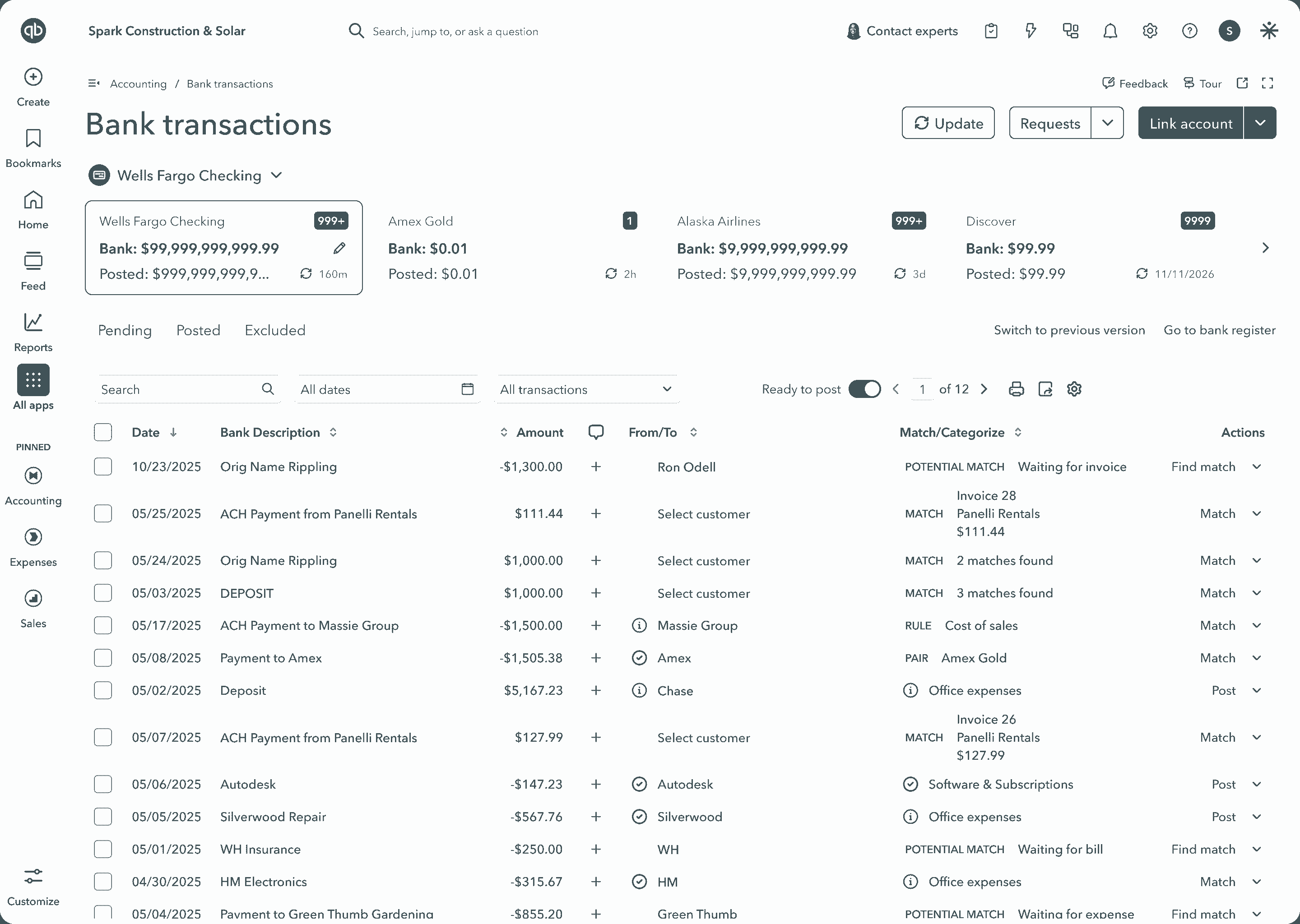
Online bank transactions dashboard interface screenshot
Get the details in the Summer Release Guide.

Important product and disclaimer information

Money movement services are provided by Intuit Payments Inc., licensed as a Money Transmitter by the New York State Department of Financial Services. For more information about Intuit Payments' money transmission licenses, please visit https://www.intuit.com/legal/licenses/payment-licenses/.

**Features

Intuit Intelligence chat is only available to admin users at this time. Prompt queries are limited. This feature is in Beta. Beta features have limited availability and are subject to change.

This information is intended to outline our general product direction, but represents no obligation and should not be relied on when making a purchasing decision.

Bill Pay Elite now included with Quickbooks Advanced

In a nutshell: QuickBooks Advanced plans now include Bill Pay Elite, so you’ll no longer need a standalone Bill Pay subscription.**

Rather than managing bills across disconnected tools, you can use the premium bill pay capabilities of Bill Pay Elite within QuickBooks:

  • Role-based controls let you assign who can create, approve, and release payments—so money doesn’t move without the right sign-off.
  • Custom approval workflows help prevent the back-and-forth, routing bills while creating audit trails to help you stay compliant.**
  • Efficient, automatic reconciliation of paid bills with your QuickBooks data, to help you close your books faster.**
  • Unlimited 1099 e-filing lets you e-file, print, and mail for no additional fee.**
  • More tools to help reduce manual work, like AI-powered invoice automation that converts vendor invoices into pre-filled bills ready for your review.

Plus, standard ACH payments through Bill Pay are now free—so you can stay focused on growing your business, not worrying about fees.

See how Bill Pay Elite can benefit your clients.

Important product and disclaimer information

Money movement services are provided by Intuit Payments Inc., licensed as a Money Transmitter by the New York State Department of Financial Services. For more information about Intuit Payments' money transmission licenses, please visit https://www.intuit.com/legal/licenses/payment-licenses/.

**Product information

QuickBooks Bill Pay: QuickBooks Bill Pay account subject to eligibility criteria, credit, and application approval. Subscription to QuickBooks Online required.

**Features

Roles and permissions and bill approval workflows: Available in QuickBooks Bill Pay Elite or QuickBooks Online Advanced. Not available for QuickBooks Online Simple Start customers

Unlimited 1099 e-file: Create and e-file unlimited 1099-MISC and 1099-NEC forms in QuickBooks. 1099 forms are e-filed only for the current filing year and for payments recorded in QuickBooks to your vendors or contractors. Includes state filings for eligible states participating in IRS Combined Federal/State Filing program; please check with your state agency on any additional state filing requirements. Additional fees apply to upgrades or add-on services. If you have the Bill Pay Basic plan, 1099 e-filing services will be charged at the standard 1099 E-file Service pricing.


Run payroll enhancements

In a nutshell: Several recent enhancements in QuickBooks Workforce can help you manage and run payroll more efficiently.

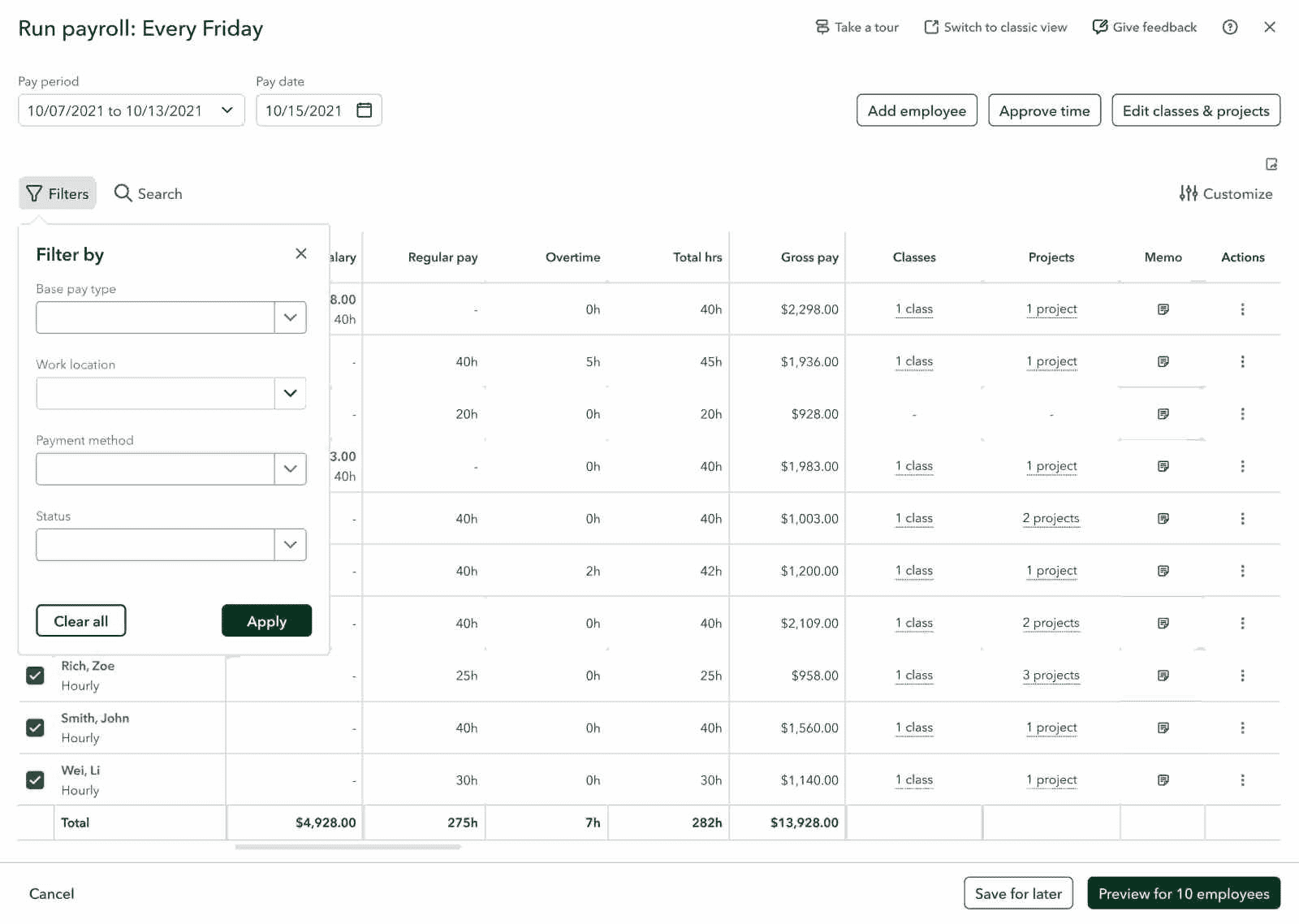
The refreshed Run payroll screen has been optimized with improved filters and search features. Updates include:

  • New batch actions and employee grouping and filtering—so you can break up larger organizations’ payroll runs into manageable batches.
  • Filter by base pay type, such as hourly, salary, and commission.
  • Filter by payment method, such as paper check vs direct deposit.
  • Filter by work location.
  • Employee-name search, so you can avoid scrolling through large lists.
  • Column header sorting, in ascending or descending order, based on the values of any column.
  • Customizable tables using row density, color, and column order as needed.
  • Exportable CSV tables, so you can work offline using a CSV of your Run payroll table.
Payroll management dashboard with employee pay details
Discover how QuickBooks Workforce works for your clients.

Important product and disclaimer information

Money movement services are provided by Intuit Payments Inc., licensed as a Money Transmitter by the New York State Department of Financial Services. For more information about Intuit Payments' money transmission licenses, please visit https://www.intuit.com/legal/licenses/payment-licenses/.

QuickBooks Payments through Claude and ChatGPT

In a nutshell: You can create and send QuickBooks estimates, invoices, and payment links using Claude and ChatGPT.

In QuickBooks, businesses can now manage their entire billing workflow through AI, from drafting an estimate, to sending a pay-enabled invoice or sharing a payment link, and chasing what’s overdue.

With this update, you can:

  • Get paid faster by sending an invoice or payment link right from Claude or ChatGPT the moment a job wraps up.
  • Stay in control. AI drafts of estimates, invoices, payment links, and reminders won’t go out without your approval.
  • Keep more of what you earn with competitive payment rates and no monthly fees or minimums; you can pay as you go.

Every payment you collect from Claude or ChatGPT records straight to your books—nothing to reconcile, nothing to double-check. It’s a seamless workflow across two platforms that keeps your books up to date with no switching.

You’ll also have real-time visibility into what’s been paid and what’s outstanding, so you always know where your cash stands.

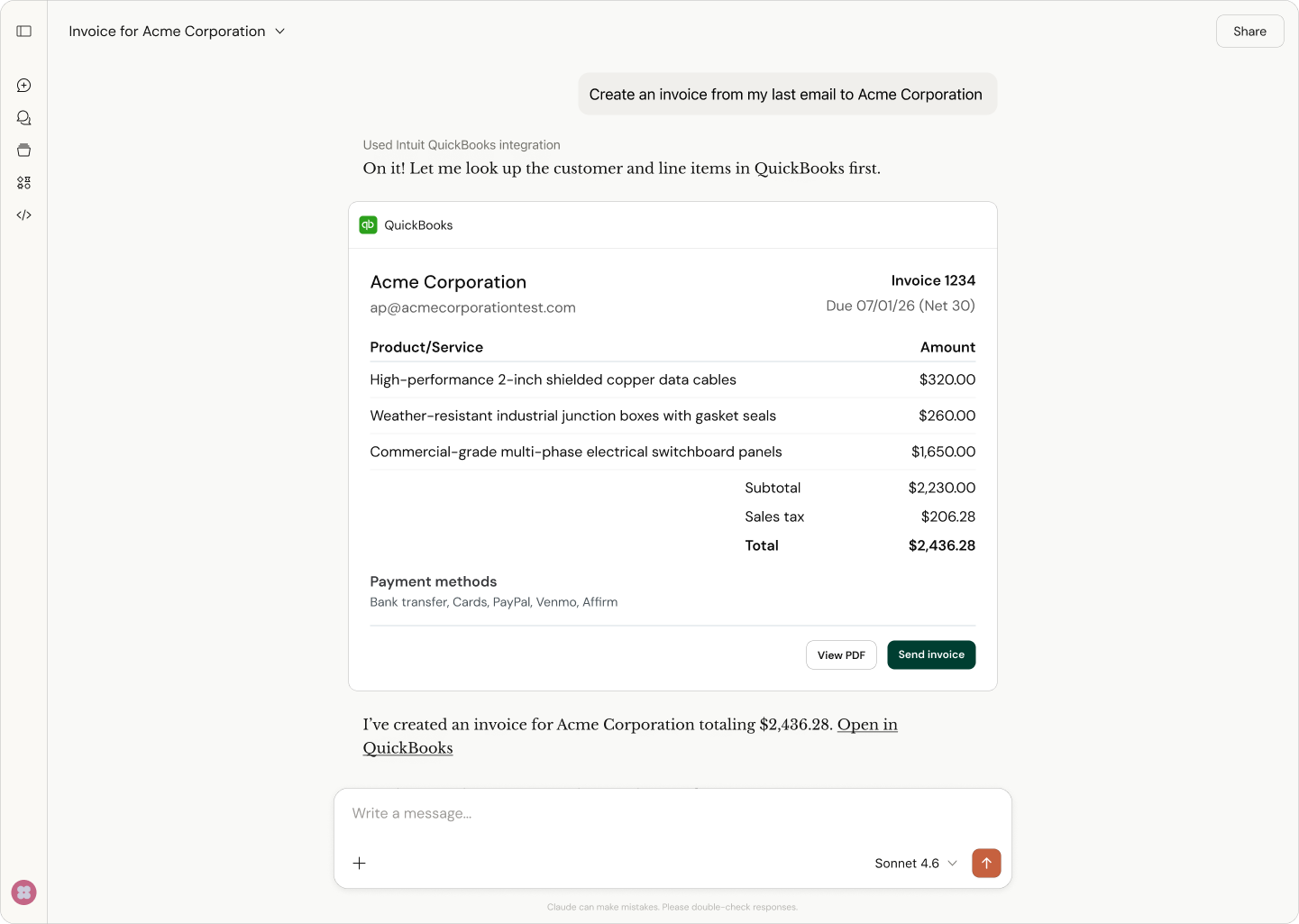
Invoice creation screen for Acme Corporation
Create and send invoices with AI.

Important product and disclaimer information

Money movement services are provided by Intuit Payments Inc., licensed as a Money Transmitter by the New York State Department of Financial Services. For more information about Intuit Payments' money transmission licenses, please visit https://www.intuit.com/legal/licenses/payment-licenses/.

Updates to Affirm buy now, pay later

In a nutshell: Updates to Affirm buy now, pay later can help you boost cash flow, land more sales, and increase order values.

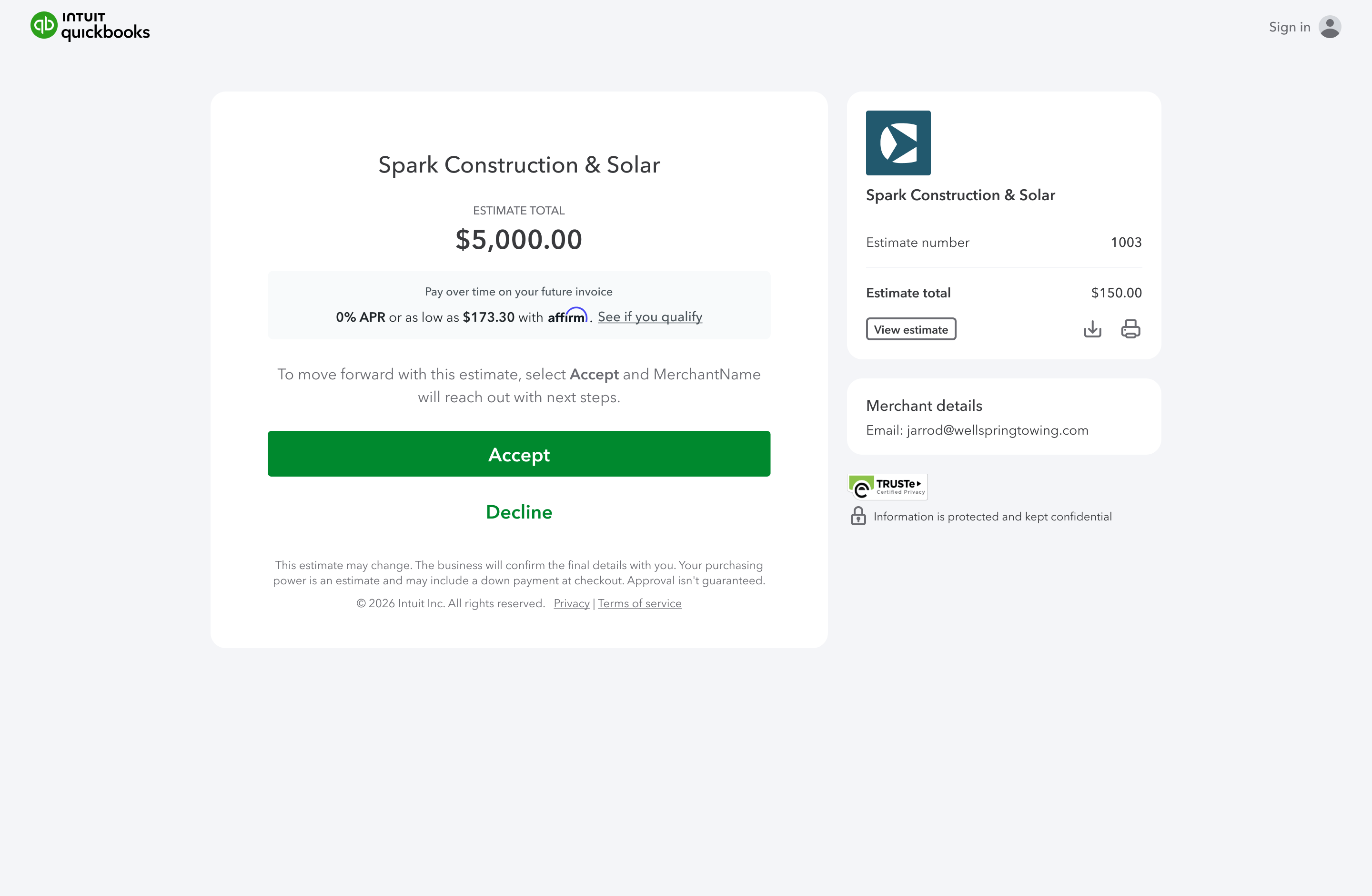
Businesses using QuickBooks Payments can show Affirm buy now, pay later on their estimates, encouraging customers to learn if they qualify before they accept. In fact, businesses can also share an Affirm pre-qualification link before sending an invoice, so customers can find out which buy now, pay later plans they qualify for before finalizing their purchase.

Buy now, pay later plans put more purchases within reach for customers, giving them the option to pay only part of the invoice up front. And you can help your business avoid lost sales and cash flow issues.

QuickBooks estimate example
Affirm buy now pay later is a payment option in QuickBooks.

Sales Tax Liability report

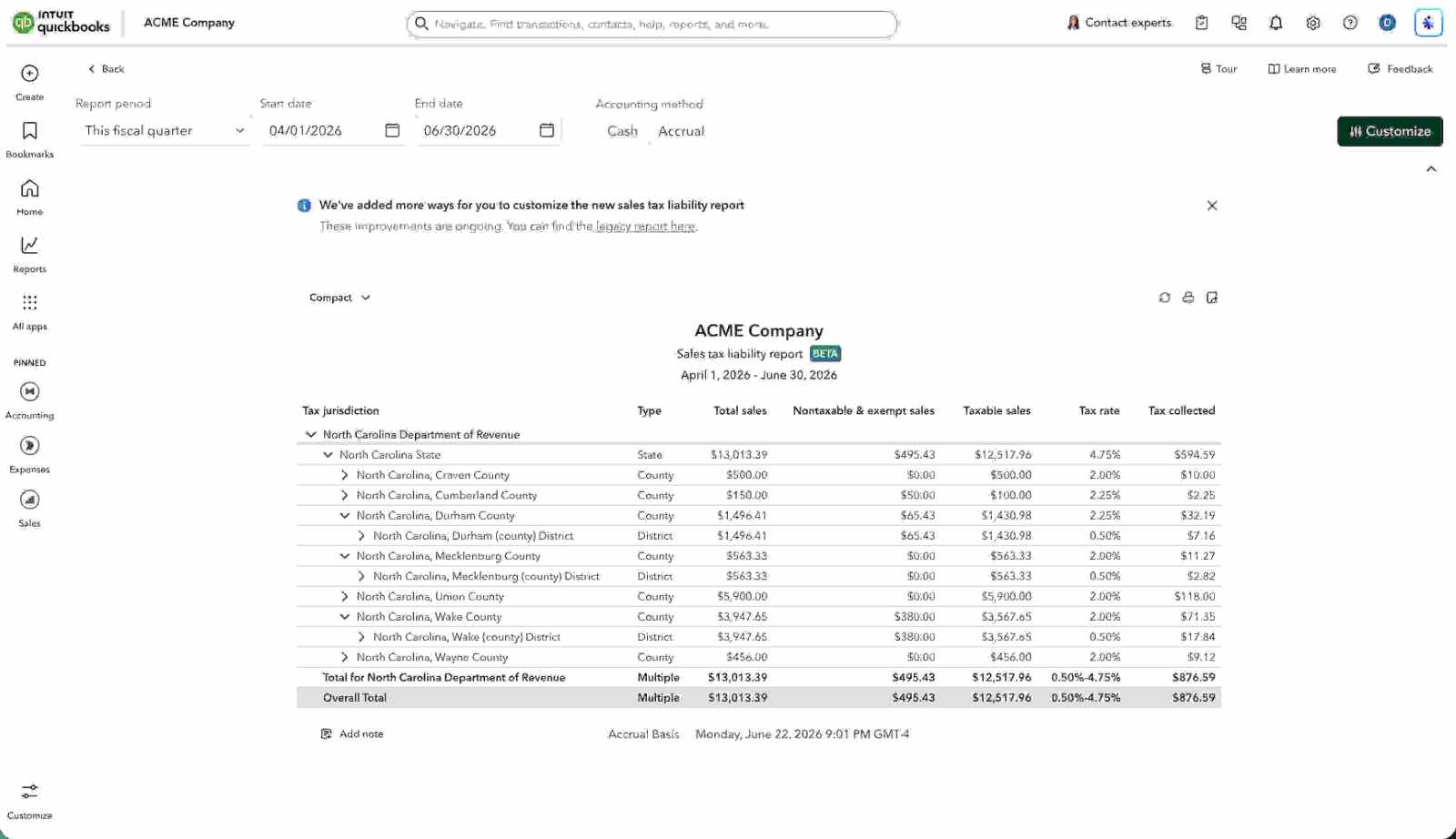
In a nutshell: If your business has enabled sales tax in QuickBooks Online, you can access a new Sales Tax Liability report that helps speed and simplify sales tax filing.

The Sales Tax Liability report aggregates sales tax-specific transaction data, including tax jurisdictions, total sales, taxable sales, sales tax rate, and sales tax collected. It’s the primary reference for the critical data required to file sales tax returns with state and local tax agencies.

The new Sales Tax Liability report brings data consistency and traceability while flexing to your reporting needs. In the report, you’ll find:

  • Totals and subtotals for all columns and rows.
  • In-line visibility of the transactions or customers associated with rows.
  • Drilldowns that provide a filtered set of transactions that contributed to a specific number, such as only the Nontaxable sales for a given jurisdiction or rate.
  • Added flexibility to combine rates as in-report calculations.
  • Pivot capabilities to change the entire report between tax jurisdictions and tax rates.
Tax liability report dashboard for ACME Company
Speed and simply filings with the Sales Tax Liability report.

Recommended for you

Looking for something else?

QuickBooks

From big jobs to small tasks, we've got your business covered.

Firm of the Future

Topical articles and news from top pros and Intuit product experts.

QuickBooks Support

Get help with QuickBooks. Find articles, video tutorials, and more.