QuickBooks Blog
A person sitting at a table with a laptop.
product update

Tired of chasing payments? There’s a better way with QuickBooks Payments

As a business owner, you wear a lot of hats. You’re the CEO, the head of marketing, the lead salesperson, and sometimes, the entire accounting department. With so much on your plate, the last thing you need is the stress of chasing down payments. Yet, for many small businesses, this is a weekly, if not daily, reality. 

Small businesses that have to wait longer to get paid are more likely to report cash flow problems, according to a recent Intuit QuickBooks report on late payments.

What if there’s a better way to get paid faster, streamline your bookkeeping, and gain greater control over your finances, all in one place on the Intuit QuickBooks platform you already know and trust? 

It’s time to try QuickBooks Payments.

This isn’t just another payment processor. It’s a fully integrated solution designed to save you time and give you a real-time view of your financial health. No more manual data entry and awkward follow-up emails. No more uncertainty waiting for checks to arrive and then clear. With QuickBooks Payments, you can transform your payment process from a source of frustration into a seamless, automated part of your business operations. No matter how you get paid, now you can manage it all in QuickBooks so you never miss a thing. 

Get paid faster with more digital payment options


"I highly recommend using QuickBooks (Payments) for creating, sending, and tracking invoices. The really cool part about them is if a client forgets to pay, you can set up automatic reminders so you don’t have to remind them awkwardly. Also, every time a client pays, my books automatically update in real time, which means less manual data entry and way fewer errors."

—Charlie Chang, entrepreneur


Create instantly payable invoices to speed payments

The most significant advantage of QuickBooks Payments is the speed at which you can receive your money. When you send an invoice with a “Pay Now” button, your customers can pay instantly online, and you can get paid up to 4x faster1 than with traditional paper invoices. This simple change can have a massive impact on your cash flow, ensuring you have the funds you need to cover expenses, invest in growth, and pay yourself.

Receive payments 4x faster

Add a Pay Now button to your invoices and let customers pay online 4x faster than with paper invoices.

Convenient digital payment options are a must for any business

Don’t lose another minute waiting on checks in the mail. With QuickBooks Payments, you can offer multiple payment options: Accept credit cards, debit cards, ACH bank transfers, PayPal, Venmo, and Apple Pay®. The more ways you let customers pay, the easier you make it for them to settle their invoices promptly.

Lock in projects faster with instantly payable deposits

Speed up your cash flow by making it easy for your clients to pay with deposits on estimates.* Send your customers an estimate with a deposit they can pay online, right away, through our secure online portal. 

Offer a range of payment options, including:

  • ACH
  • Apple Pay
  • PayPal
  • Venmo

See when customers view and pay their deposit, minimizing financial risks at the start of a new project. Your books update with every payment you take through QuickBooks. 

Accept payments anywhere, anytime

Your business doesn’t just happen behind a desk, and your payment solution shouldn’t be confined to one either. Whether you’re on a job site, at a client’s office, or at a pop-up market, QuickBooks Payments gives you the flexibility to get paid anywhere on the spot so you don’t need to wait for clients to pay you.

Get paid in-person with Tap to Pay on iPhone and the card reader, available on the QuickBooks mobile app.

With the QuickBooks mobile app, you can:

  • Use Tap to Pay on iPhone: Accept contactless payments right on your iPhone without any additional hardware. It’s a simple, secure, and private way to get paid on the go.
  • Utilize a mobile card reader: For customers who prefer to pay with a physical card, the mobile card reader is a convenient option for field or job site payments.
  • Create and send invoices from your mobile device: Don’t spend time reminding your client to pay. Create and send professional invoices directly from the QuickBooks mobile app and accept in-person payments on the spot.

Seamless automation saves you time

Automate payments from recurring customers

Make payments easier for everyone and get paid on time, every time. Set up recurring payments* that charge your customers on the schedule you set.  For retainers, subscriptions, or regular services, you can automate billing. Set it once, and your customers’ cards will be charged automatically on the schedule you choose. This feature alone can help save you hours of administrative work and eliminate the awkwardness of chasing late payments. 


With QuickBooks Payments, every time a client pays, my books automatically update in real time, which means less manual data entry and way fewer errors.

—Charlie Chang, entrepreneur


Bookkeeping without the busywork

How much time do you spend each week manually matching payments to invoices, reconciling your accounts, and correcting data entry errors? If you’re like most business owners, it’s probably more than you’d like to admit. In fact, business owners spend an average of 14.6 hours per week on accounts receivable processes.

QuickBooks Payments eliminates a significant portion of this busywork by automating your bookkeeping. When a customer pays an invoice through QuickBooks, the payment is automatically recorded, matched to the correct invoice, and your books are updated in real-time.

This means you:

  • Reduce time spent on matching by 60%:2 Imagine what you could do with that extra time.
  • Help eliminate data entry errors: Automatic reconciliation means fewer mistakes and more accurate financial records.
  • Stay organized all year: With your books up-to-date, you’ll be better prepared for tax time and have a clearer picture of your business’s financial health.

Introducing the AI Payments Agent

Get paid 5 days faster on average when you send invoice reminders with your Payments Agent, an AI-powered assistant right in QuickBooks.

Transform your cash flow

Real-time tracking for a more complete cash flow picture

In QuickBooks Payments, you can see exactly when an invoice is sent, viewed, and paid—all in one intuitive dashboard. Track cash flow in real time and send smart, automated reminders. You have the most up-to-date picture of your cash flow, so you can make smarter financial decisions.

Deposits that work as fast as you

Have money on hand when you need it. Eligible payments are deposited the next business day—or instantly for an extra 1.75% fee.**

Keep more of what you make

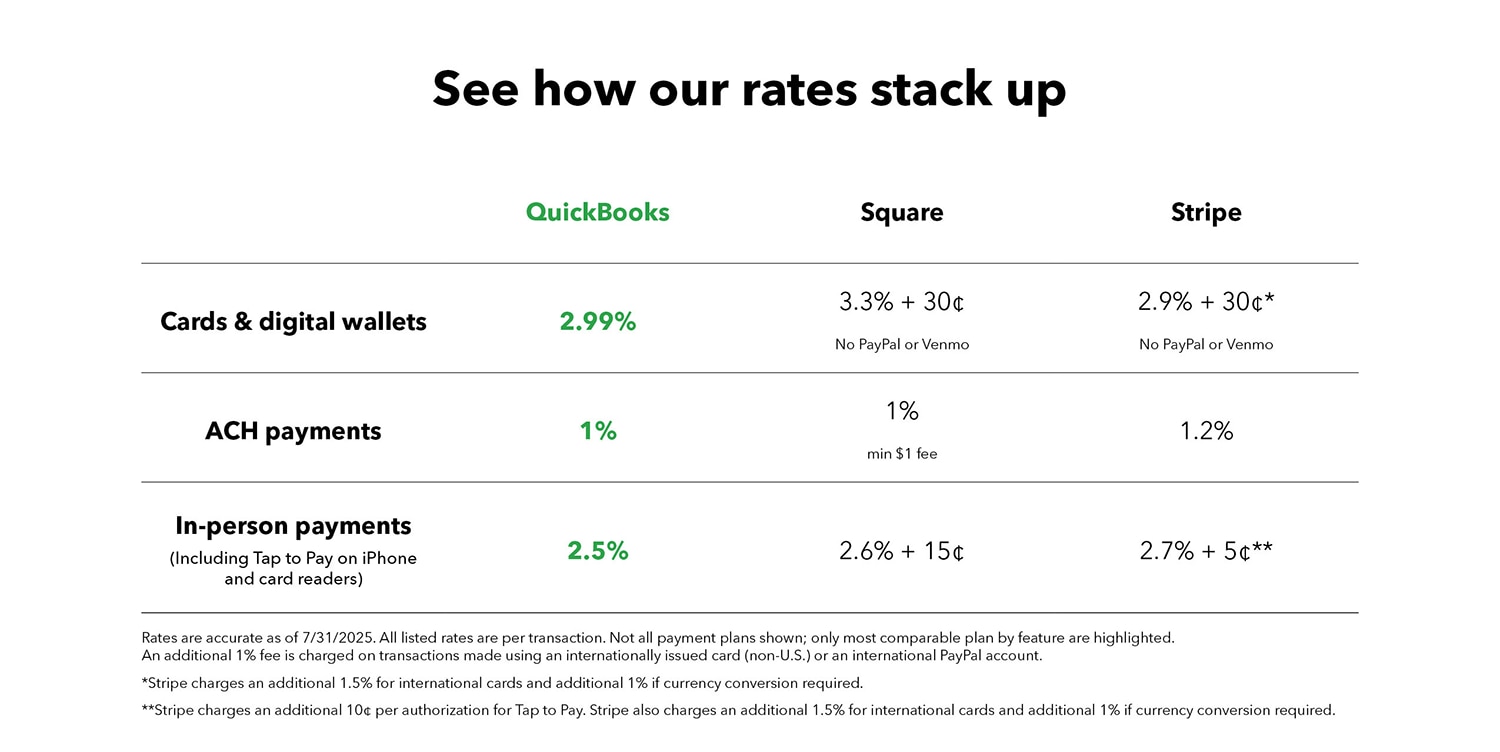
Get competitive payment processing rates with no setup costs or hidden fees—just pay as you go. With no monthly fees or minimums, QuickBooks Payments offers competitive, transparent pricing that scales with your business. 

See how our rates stack up

Getting started with QuickBooks Payments is easy

If you’re already a QuickBooks customer, you’re just a few clicks away from a more streamlined, efficient, and stress-free payment process, and with no monthly fees or minimums. Try QuickBooks Payments—here’s why now is the perfect time to make the switch:

  • Competitive, transparent pricing: You’ll find our rates3 are competitive, and there are no hidden fees. You only pay for what you use.
  • Seamless integration: Because QuickBooks Payments is built into the QuickBooks platform, you get a level of integration and automation that third-party payment processors simply can’t match.
  • Confidence in every transaction: With built-in security and chargeback protection, you can have peace of mind knowing your funds are secure. 

Run your business all in one place, making invoicing and cash flow tasks easier. Sign up for QuickBooks Payments today.

Accept payments all in one place

Accept cards, ACH, Apple Pay®, PayPal, and Venmo payments. No matter how you get paid, manage it all in QuickBooks so you never miss a thing.

Disclaimers:

*Limited availability. Features may be more broadly available soon.

Money movement services are provided by Intuit Payments Inc., licensed as a Money Transmitter by the New York State Department of Financial Services.

Savings vary monthly based on actual processing volume and transaction type. Results may vary and are not indicative or a guarantee of future performance. Terms and conditions apply.

**Product Information

QuickBooks Payments: QuickBooks Payments account subject to eligibility criteria, credit, and application approval. Subscription to QuickBooks Online required. Not available in US territories or outside the US

QuickBooks Card Reader: Data access subject to cellular/internet provider network availability and occasional downtime due to system and server maintenance. Separate card reader purchase, product registration and QuickBooks Payments account required. Terms, conditions, and features subject to change.

Apple Pay: Apple Pay is a registered trademark of Apple Inc.

Google Pay: Google Pay is a trademark of Google LLC.

Venmo is available only in the US. 

**Features

Automatic Matching: QuickBooks [Online/Money] will only match bank deposits with transactions processed through QuickBooks Payments. Not all transactions are eligible.

Tap to Pay on iPhone: Tap to Pay on iPhone requires a supported payment app and the latest version of iOS. Update to the latest version by going to Settings > General > Software Update. Tap Download and Install. Some contactless cards may not be accepted by your payment app. Transaction limits may apply. The Contactless Symbol is a trademark owned by and used with permission of EMVCo, LLC. Tap to Pay on iPhone is not available in all markets. For Tap to Pay on iPhone countries and regions, see https://developer.apple.com/tap-to-pay/regions/.

1’Four times faster’ is an average, based on time to receive payment from the date invoice was sent, for U.S. customers using QuickBooks Online invoice tracking and payment features, compared to customers not using these features, from Aug 2023 to Jul 2024. 

2Calculation based on a comparison of monthly QuickBooks Payments transactions with those that were automatically categorized from January 2024 through March 2024.

3Rates are accurate as of 7/31/2025. All listed rates are per transaction. Not all payment plans shown; only most comparable plan by feature are highlighted. An additional 1% fee is charged on transactions made using an internationally issued credit card (non-US) or an international PayPal account. 


Recommended for you

Ask about discounts

You could save up to 25% on transaction costs².

Speak with us now to see if you qualify.

Talk to sales 1-800-515-8366

Monday - Friday, 6 AM to 4 PM PT

More about payments
Mail icon
Get the latest to your inbox
No Thanks

Get the latest to your inbox

Relevant resources to help start, run, and grow your business.

By clicking “Submit,” you agree to permit Intuit to contact you regarding QuickBooks and have read and acknowledge our Privacy Statement.

Thanks for subscribing.

Fresh business resources are headed your way!

Looking for something else?

QuickBooks

From big jobs to small tasks, we've got your business covered.

Firm of the Future

Topical articles and news from top pros and Intuit product experts.

QuickBooks Support

Get help with QuickBooks. Find articles, video tutorials, and more.