









Lately, a growing number of professionals in a wide range of industries are talking about AI. Did you know that more than half of US small businesses say AI boosts their productivity? You may have even adopted AI without realizing it. Learn how to implement AI, and read more about the key ways small business owners are applying agentic AI and GenAI. You’ll also find some AI-related news in this month’s updates.
Get 50% OFF QuickBooks
for 3 months
for 3 months

product update
Here’s what’s new in QuickBooks Online for August 2025
Latest updates released in Intuit Enterprise Suite
In a nutshell: Check out all the latest updates to Intuit Enterprise Suite.
Intuit Enterprise Suite delivers a scalable, integrated multi-entity platform designed to enhance productivity and profitability. Our latest updates focus on growth, productivity, and business intelligence features that complement your expertise so you can deliver even better service.
We’re proud to share several updates in the July release, including these highlights:
- Intuit’s AI agents: Automate tedious manual tasks so you can save time and focus on what’s important. The Accounting Agent helps keep books clean and accurate by automatically categorizing transactions and reconciling accounts, while flagging what needs approval or attention. The Finance Agent continuously monitors financial performance, proactively identifies trends and deviations from goals and budgets, and consolidates P&L and Balance Sheet data to deliver monthly summaries.
- Multi-entity financial management: Standardize more financial reporting protocols across entities with shared dimensions and chart of accounts. Simplify the scalability of intercompany accounting with proactive done-for-you allocations based on past transactions that you can review and modify.** Also, generate four new consolidated reports, and take advantage of multi-entity reporting enhancements that provide more granular control and deeper insight into consolidated financial data.
- Enhanced dimensions: Improve efficiency, depth, and accuracy of your dimensional reporting and analysis by applying product and service and fixed-asset dimensions consistently across related transactions rather than assigning them one at a time.**
- Business intelligence: Use three-way financial planning to maintain a unified forecast across P&L, Balance Sheet, and Statement of Cash Flows by linking P&L accounts with the corresponding Balance Sheet accounts.** Also, create a KPI scorecard using an exclusive library of 30+ pre-defined KPIs to track your business’s performance quickly and effectively.**
Discover how small businesses are using AI to boost productivity.
Important pricing details and product information
**Features
Done-for-you allocations accuracy will increase as you perform intercompany allocations manually of similar, repeatable patterns. Automated allocations are not enabled until you have sufficient intercompany allocation history.
Enhanced dimensions functionality available at the entity level only.
3-way financial planning functionality available at the entity level only.
KPI scorecard functionality available at the entity level only.
Sales tax filing in QuickBooks Online
In a nutshell: Businesses in a handful of states can now file and pay their sales tax right in QuickBooks Online—and avoid having to visit their eligible state agency’s website to do so.
With QuickBooks, businesses in Iowa, Minnesota, North Carolina, Rhode Island, Vermont, and West Virginia can:
- Create sales tax returns automatically using QuickBooks data, formatted accurately for their state.**
- File and pay sales and use taxes for $40 per filing, without leaving QuickBooks.
- Track the status of a sales tax return with real-time updates.
- Securely store past returns filed via QuickBooks, so you can reference them any time.**
- Get timely reminders of sales tax deadlines to help stay compliant and maximize discounts.
Simplify the entire sales tax process right in QuickBooks to save time while staying compliant.
Note: Currently, Minnesota, North Carolina, Rhode Island, Vermont, and West Virginia support monthly and quarterly sales tax filing from QuickBooks Online. Iowa supports monthly filing only. QuickBooks will provide in-product notifications when new states are supported.

File your sales tax returns in QuickBooks.
Important pricing details and product information
Money movement services are provided by Intuit Payments Inc., licensed as a Money Transmitter by the New York State Department of Financial Services. For more information about Intuit Payments' money transmission licenses, please visit https://www.intuit.com/legal/licenses/payment-licenses/.
**Features
Sales tax returns formatted by state: Not all states support sales tax filing with QuickBooks Online. Additional states will become available on a rolling basis.
Coming soon: Payroll Agent, one of Intuit’s AI agents
In a nutshell: Free yourself from payday prep work while staying in control with Payroll Agent launching next month in QuickBooks Online Payroll.
Based on your QuickBooks Online Payroll data, the new Payroll Agent will be able to determine which data to collect to complete a draft of your payroll.
Then, the Payroll Agent will take care of these tasks:
- Collecting hours and data from employees through SMS or the Workforce app
- Sending employees reminders, clarifying data, and flagging anomalies to make sure data is complete for payday
- Providing the admin a status update of data collection upon request by text; for example, “Have my employees entered their time yet?"
- Preparing a draft of a payroll run, and notifying the admin
- Summarizing insights and key changes since last payday
- Scheduling a payroll run, after approval from an admin
- Summarizing next steps after payroll

Let Payroll Agent prepare your payroll.
Setting effective dates for pay types in QuickBooks Online Payroll
In a nutshell: Use QuickBooks Online Payroll to schedule the effective date for changes to employee compensation.
When you need to update an employee’s pay for a future date, you can skip outside solutions or setting manual reminders to correctly time these changes.
Now, you can plan and set base pay and additional pay types changes—like raises, bonuses, and minimum wage changes—ahead of time. Just choose the first pay period they’ll take effect for your employee. When assigning one-off pay types, choose the start and end dates for the change.
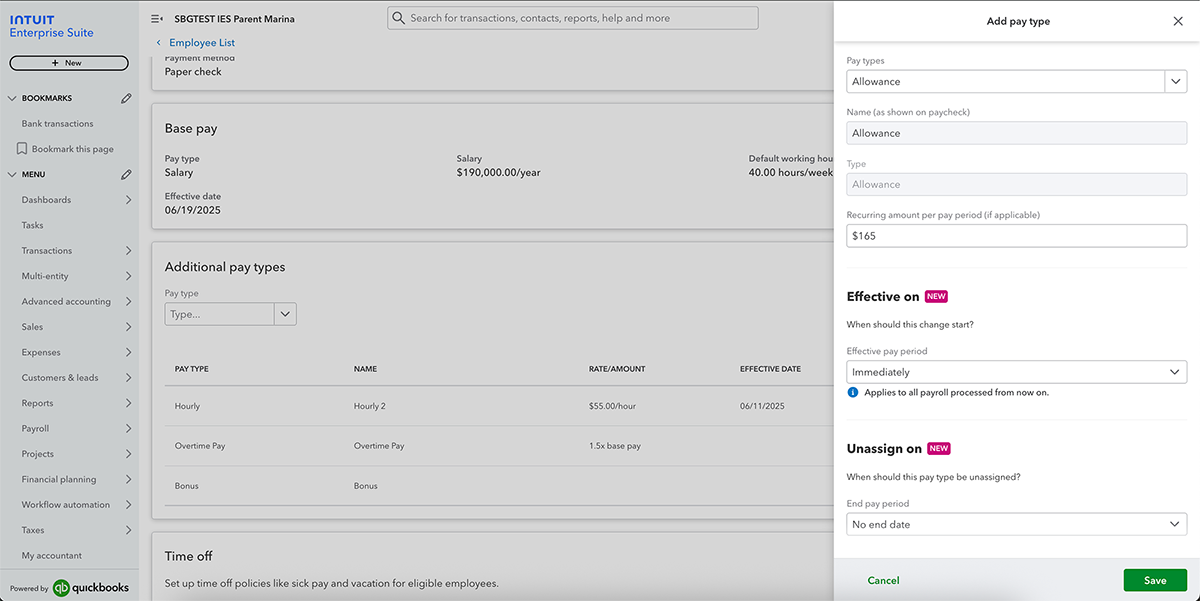
Find out more about scheduling pay types.
Important pricing details and product information
Money movement services are provided by Intuit Payments Inc., licensed as a Money Transmitter by the New York State Department of Financial Services. For more information about Intuit Payments' money transmission licenses, please visit https://www.intuit.com/legal/licenses/payment-licenses/.
Updates to employee compensation in QuickBooks Online Payroll
In a nutshell: In QuickBooks Payroll, you now have more flexibility with assigning employee compensation, and visibility into how each pay type maps to your chart of accounts.
When setting up or editing compensation in an employee’s profile, you can now:
- Add an hourly pay type for a salaried employee, for one or more payroll runs
- Check how each employee’s pay types map to your chart of accounts, and instructions to update mapping
- View tax settings for many additional pay types, to learn how they will be taxed and mapped to applicable tax forms**
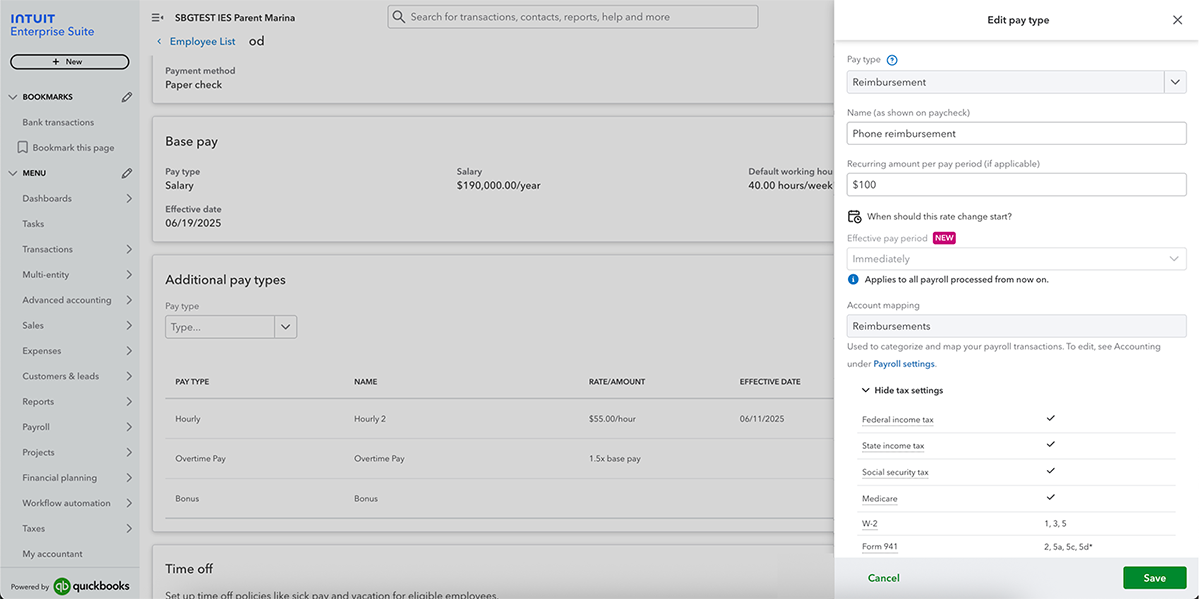
Add or change pay types in QuickBooks Online Payroll.
Important pricing details and product information
Money movement services are provided by Intuit Payments Inc., licensed as a Money Transmitter by the New York State Department of Financial Services. For more information about Intuit Payments' money transmission licenses, please visit https://www.intuit.com/legal/licenses/payment-licenses/.
**Features
Tax settings table: Not available for all pay types in the Pay types drawer.
Table of contents
Table of contents
Recommended for you


Get the latest to your inbox
No ThanksLooking for something else?
Call Sales: 1-800-285-4854




