









It’s already time to take on your end-of-year planning. We can help. To assist in reviewing your strategy and ensuring you’re ready for the coming year, take a look at this year-end checklist for small businesses. And if you haven’t already, start your year-end tax planning strategies now with these 5 QuickBooks reports to run in Q4. Then, be sure to check out this month’s updates.
Get 50% OFF QuickBooks
for 3 months
for 3 months

product update
Here’s what’s new in QuickBooks Online for December 2025
The latest updates to Intuit Enterprise Suite
In a nutshell: See several new updates to Intuit Enterprise Suite that were just released last month.
Intuit Enterprise Suite delivers enterprise-grade power to help future-proof your finances. It leverages AI to automate workflows and deliver real-time insights while connecting all your data—helping you close faster and plan smarter. Our latest updates focus on improved business intelligence, new and enhanced Intuit AI agents, multi-entity and dimension capabilities, all in a modernized platform experience delivering greater efficiency with enterprise-grade power.
We’re proud to share several updates in the fall release, including these highlights:
- Consolidated view: Get a single dashboard for multi-entity data and safely extend access beyond admins, making it easier to share work, strengthen controls, and boost productivity as you grow. You can now assign permissions to your team members (including bookkeepers and in-house accountants) to perform multi-entity tasks and view consolidated reports based on the companies they access.
- Multi-entity reporting enhancements: Get deeper insights with richer details in reports, expanded drill-down into consolidated reports, visibility into intercompany activity, and broader team access by role for more collaboration, informed decisions, and efficient processes.
- Dynamic allocations: Rather than spending hours processing repetitive entries, you can sum your balances and allocate them in one step with dynamic allocations to speed up month-end processes and boost productivity. Note: Intercompany account mapping must be set up before you can use allocation capabilities.
- Dimensions on Spreadsheet sync: Boost team efficiency, help ensure accurate financial reporting, and handle more data effortlessly with Spreadsheet Sync’s new dimensions functionality. Create and update dimension values for multiple transactions directly in Spreadsheet Sync—and seamlessly integrate the data with Intuit Enterprise Suite.
- AI-powered dimension recommendations: Allow your team to focus on higher-priority tasks with AI-driven dimension value suggestions that minimize manual effort and improve dimensional reporting accuracy. For products, services, and fixed assets without default dimensions values, you’ll get suggestions for your review and approval.
- Management reports: Turn standard financials into branded, presentation-ready packages that combine financial reports, KPIs, charts, and written insights into professional, ready-to-share packages with cover pages, branding, and executive summaries.
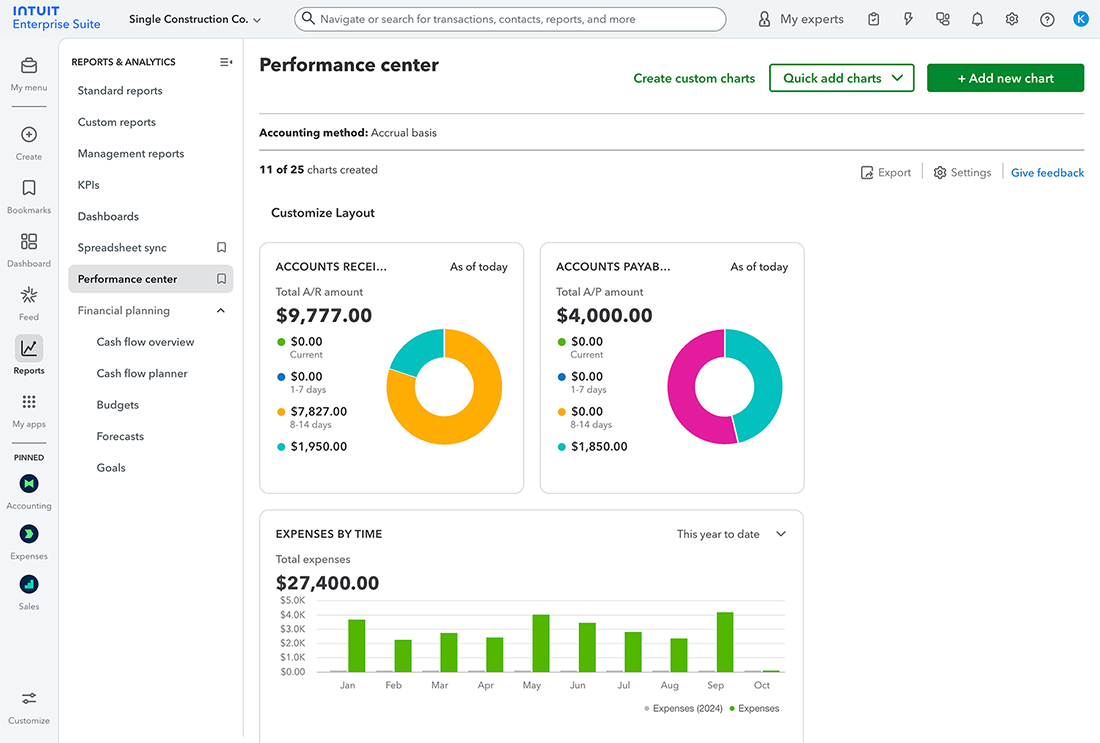
Find the latest updates to Intuit Enterprise Suite in the full release notes.
Bulk W-9 upload and automatic 1099s
In a nutshell: Save time and reduce errors from manual processes with automated 1099 and the new W-9 bulk upload capability in QuickBooks.
Skip manual data entry by uploading W-9 forms from vendors in bulk. You can review suggested vendor or contractor matches, which you can approve to update and automatically add to your vendor data in QuickBooks.
You can also fast-track 1099 preparation and filing by automating 1099s in QuickBooks. This AI-powered capability generates a list of vendors and your chart of accounts recommended for 1099 filing, according to IRS requirements, and drafts the 1099 forms using QuickBooks data. This simplifies and streamlines 1099 prep, so you can regain valuable time while ensuring accuracy.
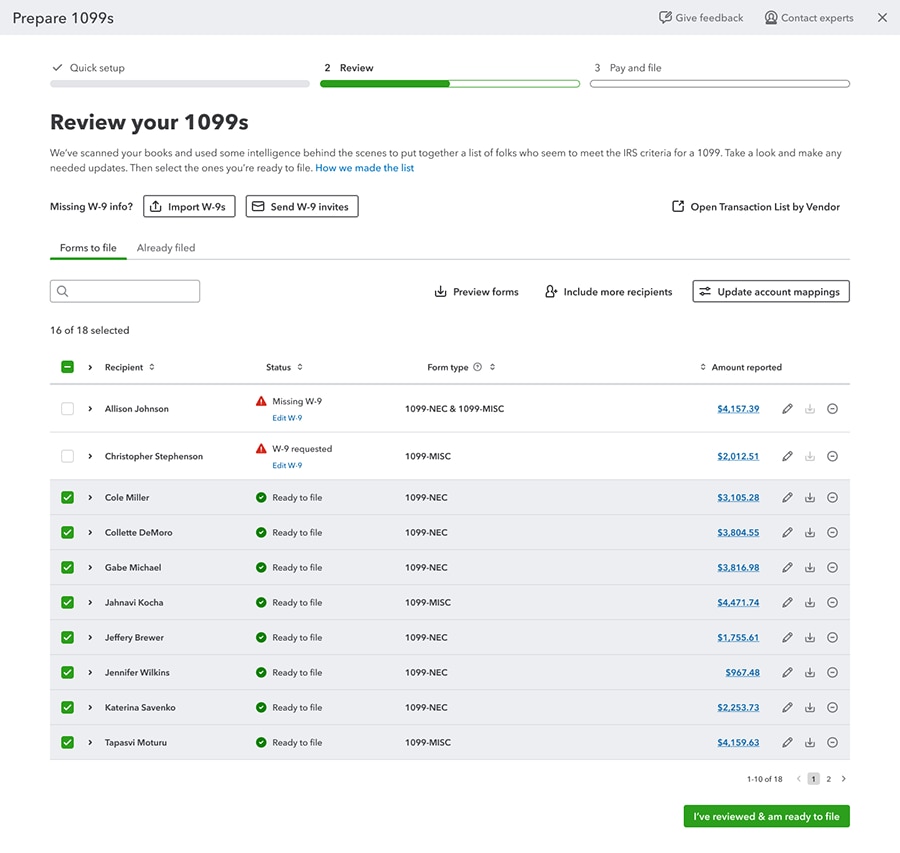
Learn more about automated 1099s.
Key updates we’ve made to QuickBooks Online
In a nutshell: Thanks to your valuable feedback, we continue to make improvements that make your QuickBooks experience faster, easier, and more reliable.
QuickBooks Online has added several feature updates over the past three months to enhance your workflows, including these highlights:
- The QuickBooks platform navigation and usability is easier and more customizable. For instance, you can view and work in multiple tabs by selecting Open link in new tab in the bookmark flyout.
- Accounting features are faster and more accurate, like PDF to transaction conversion that converts PDF bank statements directly into transactions ready to be posted through the bank feed.
- You can now create and manage bills on-the-go with the QuickBooks Online mobile app (iOS and Android).
- Streamline inventory accounting and tracking with the Moving Average Cost (MAC) inventory valuation method, now available to customers using Plus, Advanced, or the Inventory add-on.
- You can now offer your employees on-demand pay—access to a portion of their earned wages before payday—at no cost through our partnership with Clair.**
There are many free small business tools that integrate with QuickBooks Online.
Important disclaimer information
Money movement services are provided by Intuit Payments Inc., licensed as a Money Transmitter by the New York State Department of Financial Services. For more information about Intuit Payments' money transmission licenses, please visit https://www.intuit.com/legal/licenses/payment-licenses/.
**Product information
Mobile apps: The QuickBooks Online mobile and QuickBooks Self-Employed mobile companion apps work with iPhone, iPad, and Android phones and tablets. Devices sold separately; data plan required. Not all features are available on the mobile apps and mobile browser. QuickBooks Online mobile access is included with your QuickBooks Online subscription at no additional cost. Data access is subject to cellular/internet provider network availability and occasional downtime due to system and server maintenance and events beyond your control. Product registration required.
**Features
On-demand pay: Clair is a financial technology company, not a bank. All Advances are originated by Pathward®, N.A. All Advances are subject to eligibility criteria and application review. Terms and conditions apply.
Intuit Business Credit Card alpha launch
In a nutshell: Introducing the Intuit Business Credit Card, a credit card designed to empower small businesses with the funding they need to grow and the intelligent tools required to master their spend and operations—all fully integrated with QuickBooks.
Note: The Intuit Business Credit Card is currently in an alpha phase of development and will move into beta in early 2026. You may receive a card offer during these phases, so we wanted to inform you about the card and its benefits.
For small businesses, steady cash flow is a common challenge. Businesses short on cash often have limited access to capital and a lack of real-time visibility and control into their spending. And, manually tracking expenses and staying on top of employee spending takes precious time away from building a business.
The Intuit Business Credit Card integrates automatically with the QuickBooks bank feed, which means no more manual entry or broken bank connections.
The approval process leverages data that’s already in your QuickBooks account, so decisions are often fast-tracked. If approved, you would receive a credit line from $1,000 up to $50,000. You can check eligibility and get a card offer without completing a long form or adding a hard inquiry to your credit report. You can also assign free physical and virtual credit cards to employees, set monthly spend limits, and monitor their spending in real time.
The Intuit Business Credit Card has no annual fee.** It also features competitive rewards such as 5% cash back on eligible Intuit software and services and 2% cash back on all other completed purchases.** Plus, more benefits are coming online every month. By helping to put more money into your pocket, this card can lower the cost of running your business and improve cash flow.

Find out more about the Intuit Business Credit Card and how you can shape its journey.
Important product information
Money movement services are provided by Intuit Payments Inc., licensed as a Money Transmitter by the New York State Department of Financial Services. For more information about Intuit Payments' money transmission licenses, please visit https://www.intuit.com/legal/licenses/payment-licenses/.
**Features
Intuit Business Credit Cards are issued by WebBank. Mastercard and the circles design are registered trademarks of Mastercard International Incorporated.
No annual fee, 5% cash back does not include transactional fees (ex: merchant services). Refer to Cardholder Agreement and Reward Program Terms for additional details.
Cash back and rewards will be applied in the form of a statement credit to your Intuit Business Credit Card account.
Assign access to manage third-party integrations
In a nutshell: In QuickBooks Online and Intuit Enterprise Suite, you can now allow non-admin users to set up and manage your third-party integrations.
You can now create roles that include third-party access permissions, rather than assigning admin privileges in order to delegate these responsibilities. This can save you costs and headaches when assigning the roles you need for your team.
Help improve your workstreams and peace of mind by assigning access for third-party integrations.
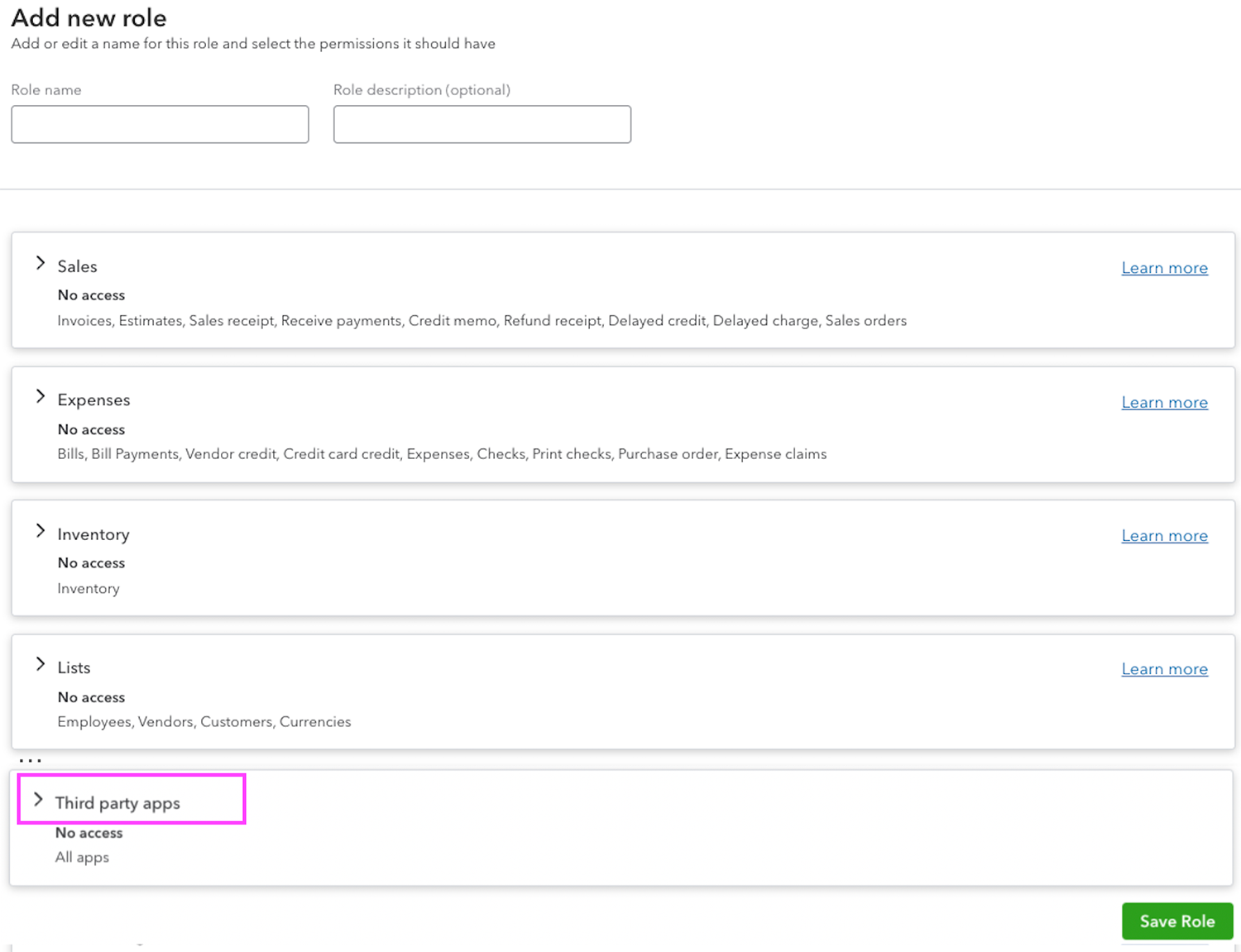
Learn more about third-party integrations.
Table of contents
Table of contents
Recommended for you


Get the latest to your inbox
No ThanksLooking for something else?
Call Sales: 1-800-285-4854




