









With November comes International Accounting Day on November 10 and Thanksgiving, of course. Accounting professionals dedicate their effort every day to help businesses thrive—and this work is certainly something to be grateful for. Now is a great time to thank the accounting professionals in your life for their continued partnership.
Get 50% OFF QuickBooks
for 3 months
for 3 months

product update
Here’s what’s new in QuickBooks Online for November 2025
If you aren’t already connected to a professional in your area, these resources can help you find one:
QuickBooks on the Intuit platform
In a nutshell: QuickBooks is the all-in-one platform where a virtual team of AI agents and trusted human experts do the work for all businesses.
Providing seamless data, automation, actionable business intelligence, and enhanced mobile tools and access in one connected system, QuickBooks on the Intuit platform is designed to make businesses even more capable, connected, and ready to grow.
QuickBooks’ advancements on the Intuit platform will make it easier to:
- Save time by eliminating repetitive manual tasks and reducing administrative burden.
- Simplify your day by connecting tools and workflows, all in one place.
- Inform decisions through actionable insights and trusted expertise.
- Improve money outcomes by streamlining processes, improving cash flow, saving costs, and increasing profitability.
QuickBooks on the Intuit platform also includes new and improved AI agents.
For example, you may know that the Payments Agent can learn more about your business to help you get paid faster and keep cash flow moving.** Now, the Payments Agent and Customer Agent in QuickBooks work together to turn customer emails into ready-to-review estimates in seconds to help you save time and convert your leads into customers.**
Coming soon is a new Sales Tax Agent that can boost your confidence in compliance by helping you charge the correct sales tax for your products and services, identifying potential sales tax issues, and suggesting fixes before you file.**
QuickBooks on the Intuit Platform makes you more productive.
Important product information
Money movement services are provided by Intuit Payments Inc., licensed as a Money Transmitter by the New York State Department of Financial Services. For more information about Intuit Payments' money transmission licenses, please visit https://www.intuit.com/legal/licenses/payment-licenses/.
**Features
Payments Agent is available in QuickBooks Essentials and up.
Customer Agent is available in QuickBooks Plus and up.
Sales Tax Agent is available in QuickBooks Plus and up.
Feature availability varies by product.
Modern reports help you work your way
In a nutshell: This month, you’ll find a series of improvements to reports in QuickBooks Online and Intuit Enterprise Suite.
Accessing timely financial insights can be inefficient and time-consuming if you’re faced with manual refresh requirements, loss of customized settings, and limited drilldown capabilities.
Reporting is now more powerful, flexible, and easier to use:
- Auto-refreshed reports help ensure you have the most accurate information. When you update a transaction and return to the report, that report will refresh automatically, so you always see the latest data.
- Persistent customizations streamline your workflow. All of your customizations—including filters, date ranges, and display settings—will now stay intact. Drill into transactions and return to your report with no need to reapply changes.
- Smarter navigation and drill-downs help you get deeper financial understanding. Get more financial visibility by drilling into aging bucket totals for your A/P and A/R Summary Reports with enhanced navigation. Examine $0 accounts with underlying transactions for more comprehensive financial context.
Note: You may opt to use the modern or classic reporting experience until December 2025. After that time, the modern experience will become the default view.
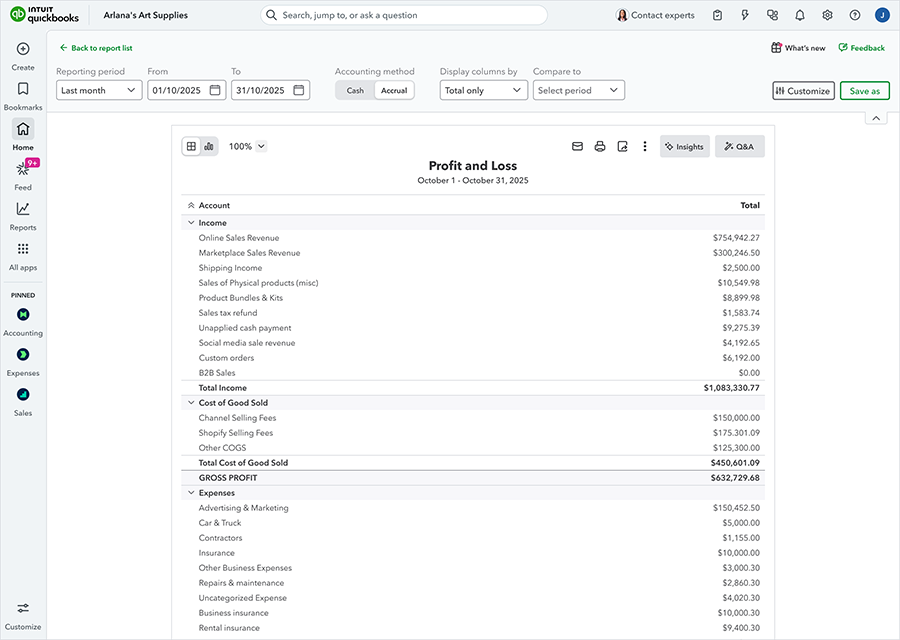
Try modern reports now.
AI-powered bank feeds
In a nutshell: The new AI-powered banking page includes features designed to help you manage your bank and credit card transactions efficiently.
This past summer, we launched a new AI-powered bank feed experience. For a limited time, QuickBooks Online customers can opt out and continue to use the previous experience. All customers will be moved to the new experience by mid-2026.
When working with bank feeds, you’ll see a refreshed look and feel that allows you to make quick inline edits to transactions. The AI-powered bank feeds have helped customers and accountants to work with transactions faster than ever before. Plus, the new AI-powered category and match suggestions have become more accurate than in the prior experience.
In the Pending tab, plain-language AI explanations and context-gathering features help you manage unfamiliar transactions quickly.**
With these new features, we’re confident you’ll find the new banking page a delight to use.

AI-powered bank feeds make reconciliation faster than ever.
Important disclaimer information
**AI explanations and context-gathering features: available with QuickBooks Online Essentials, Plus, and Advanced plans only.
Table of contents
Table of contents
Recommended for you


Get the latest to your inbox
No ThanksLooking for something else?
Call Sales: 1-800-285-4854




