QuickBooks Blog
A hand holding a green bag with a dollar sign emblem on it. Next to it is a growth chart and a pile of gold coins
Running a business

What is the profit first method? Formula, tips, and percentages

Many small business owners wonder if they’ll be paid each month. If you’re an entrepreneur, this common fear is likely all too real to you. Most small business owners practice the old-school GAAP rules where you earn revenue, pay your expenses, and whatever is leftover at the end becomes your profit.  


The profit-first method flips this concept on its side and puts you in the driver's seat of profit earning. Here we’ll investigate this method as well as how to get going, the pros and cons, and the tools you’ll need to help you make the switch.


What is the profit first method?

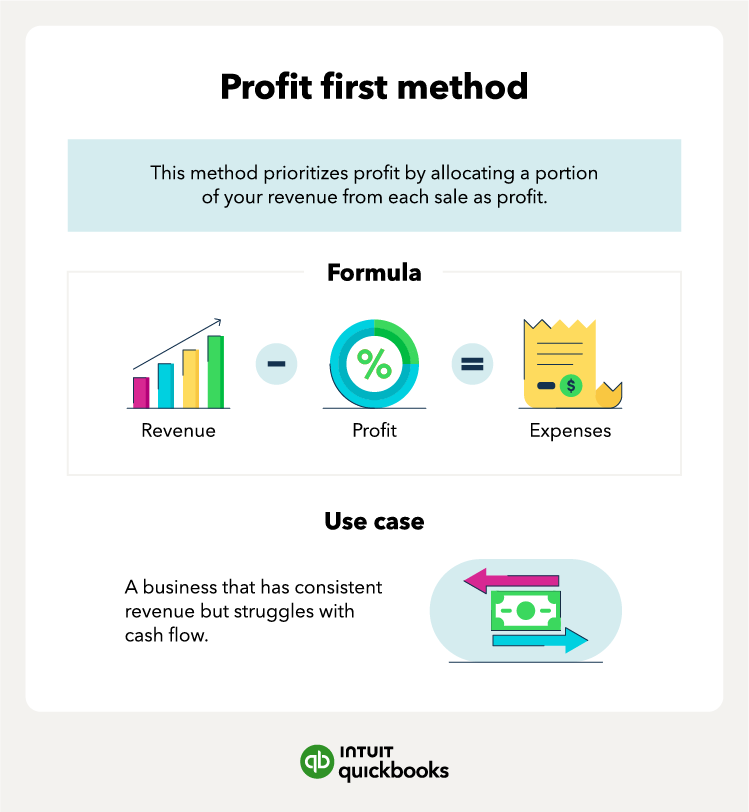
A summary of the profit first method. Including the definition, formula, and use case.

The profit first method is a tactic for small business owners that prioritizes overall profit by taking a portion of your revenue from each sale as profit. This profit comes before any expenses are paid for the business. Companies that have difficulty managing cash flow will benefit most from this method as it forces you to be conscious of your expense spending. For example, if you only have a set percentage of revenue that can be allotted to expenses, you are more likely to be conscious of your spending to avoid exceeding your expense allowance. 

Profit first method formula

The profit first method formula looks similar to the traditional accounting method formula, with expenses replacing profit as the primary goal. Here’s the profit first method vs. the traditional method: 


  • Profit first method = Revenue - profit = Expenses
  • Traditional method = Revenue - expenses = Profit

5 profit first accounts for small business owners

the five Profit first accounts you need to set up and an explanation for each

Having the proper banking system in place is crucial for the profit first method to succeed. Ideally, you’ll want a bank that doesn’t require a minimum balance to escape penalty fees. You’ll also need to be able to create multiple accounts and move money between them freely. Here are the accounts that all small business owners will need to set up: 


  • Income: This is your primary checking account where all your revenue will be deposited.
  • Operating expenses: This is the checking account where you will allocate money for all business expenses, including rent, utilities, and overhead costs.
  • Owner compensation: This is the checking account you pay yourself from. As the business owner, you will receive compensation for your work in the company.  
  • Profit: This is the savings account that will be used to house profits.
  • Tax: This is the savings account that will be used to store money for federal and state taxes.


This list includes three checking accounts and two savings accounts. Since checking accounts will get more use, it’s important that there are no limitations to how many transfers can be made in and out of each account per month. 


On the other hand, you'll want to limit withdrawals from the two savings accounts to avoid using the money for unintended purposes, such as using tax money to pay for overhead costs. This poses a problem when it comes time to pay taxes and the money is gone. 


It’s also important to note that savings accounts have a strict six-withdrawal limit per month that often results in penalties once the threshold is reached.

Move, manage, and grow your money

No matter what stage your business is in, QuickBooks can help you manage your business finances.

Profit first percentages

Profit first percentages specify the way you should allocate your revenue into the various business accounts. These profit first percentages are created with the mindset that you want to increase profits, improve cash flow, and influence growth. There are two allocations you need to be concerned about: current and target allocations. Let’s explore both.  

Current allocation

Current allocation is where your percentages for the five accounts mentioned above are currently residing. Fill in the chart below and compare it to target allocation, which we’ll get to next

Target allocation

The target allocation is the prime percentage that you want to achieve for each category to see growth in your company. Each is based on your business's revenue range with only the tax percentage remaining constant. For example, if your revenue range is $0 to $250,000, you may aim for profit of 5%, owner’s compensation of 50%, 15% for taxes, and 30% for owner’s expenses.

Pros and cons of the profit first system

The profit first method has been a proven success once implemented by businesses of all industries and sizes. However, it can be tricky for some to adapt. Let’s look at the pros and cons of the system.

 Pros

  1. Implementation is simple: The five accounts work to meet percentage allocation goals. 
  2. Consistent profits: Once enacted, the profit first method will enable you to see a steady profit, assuming you’re making sales. 
  3. Attracting investors: With the consistent bump to your profit and loss statement, attracting investors will not be as daunting since you can now prove your profits are strong.

 Cons

  1. Difficulty for newbies: Startups may find this method to be tricky since they have yet to produce a steady cash flow.
  2. Difficult to balance: Owners who take too much in profit may find it hard to grow if they aren’t prioritizing funds for expansion.

How to set up a profit first system

Setting up the profit first system for your small business is foundation focused, meaning that all the legwork is done on the front end with setting up bank accounts and working toward the right percent allocations. Here’s the breakdown:

1. Find a bank

Finding the right bank can be the difference between a headache in transaction fees and the freedom to move money the way you need to each month. As we touched on before, you want a bank that fits certain criteria:


  • FDIC insured: This guarantees your money is insured up to $250,000 per account.
  • Allows multiple checking accounts: This allows you to separate your money into five categories. 
  • Allows multiple savings accounts: This allows you to have two pots that won’t be drawn from as often.
  • No minimum balance: This allows you to avoid a fee that usually ranges from $5–$20 per month per account.

2. Set up your accounts

Once you’ve pinpointed your primary bank, you’ll want to set up all five accounts and name them. As a reminder, here are the five accounts you need:


  • Income: This is your primary checking account where all your revenue will be deposited.
  • Operating expenses: This is the checking account where you will allocate money for all business expenses.
  • Owner compensation: This is the checking account owners of the company will be paid from. 
  • Profit: This is the savings account that will be used to house profits.
  • Tax: This is the savings account that will be used to store money for federal and state taxes.

3. Inform your team

Don’t make the mistake of assuming that everyone will be on board with the profit first method straight from the start. It goes against the traditional accounting method that your accounting department is likely accustomed to. Here’s how to inform your team:


  1. Explain your reasoning: People like to feel like they’re in the loop, so send out a company email that addresses the change and the effects it will have on the different teams.
  2. Explain your plan: Inform employees of the benefits of this method switch and the growth the company will see because of it, then explain how and when the transition will occur. 

4. Find your current allocation

Go back to the current allocation chart we laid out above. Take the time to go through your finances and uncover your percentages for each category as it currently stands. This will give you the baseline to compare to the target allocation you’ll be aiming for. To find those current percentages you’ll need to:


  1. Run your company finances under the profit first system for one month to get a starting point. 
  2. Fill in the chart with the ending balance of each account at the end of the month.
  3. Take the balance from each category and divide it by the overall revenue to get the percentage. 

5. Adjust accordingly

Once you have your percentages in view, you can compare them to the target allocation chart to see where you’re missing the mark. From here, you can devise a plan of action to implement and see a change in your percentages. 


For example, let's say your operating expenses were 10% higher than the target recommendation for your revenue range. Here are some steps to correct this:


  1. Go through your profit and loss statement for the past three months. Look for increases in expenses in comparison to previous months and start there.
  2. Examine your fixed and variable costs for ways to cut back.
  3. Talk with suppliers and try to negotiate a price decrease in exchange for a long-term contract.

6. Assess monthly progress

You’ll find that progress doesn’t happen overnight—instead, you’ll be working to progress toward the target percentage over time. You should assess monthly by:


  • Rerunning your current allocation
  • Analyzing expense changes 
  • Talking with your team about ideas for improvement

Practicing the profit first system

Installing the profit first method as your primary accounting method can yield some great results for business owners who struggle with paying themselves each month. For even better results, incorporate strong accounting software. It can make all the difference between you managing your money and it managing you. 


Recommended for you

Mail icon
Get the latest to your inbox
No Thanks

Get the latest to your inbox

Relevant resources to help start, run, and grow your business.

By clicking “Submit,” you agree to permit Intuit to contact you regarding QuickBooks and have read and acknowledge our Privacy Statement.

Thanks for subscribing.

Fresh business resources are headed your way!

Looking for something else?

QuickBooks

From big jobs to small tasks, we've got your business covered.

Firm of the Future

Topical articles and news from top pros and Intuit product experts.

QuickBooks Support

Get help with QuickBooks. Find articles, video tutorials, and more.