You could save up to 25% on transaction costs².
Speak with us now to see if you qualify.
Talk to sales 1-800-515-8366
Monday - Friday, 6 AM to 4 PM PT

Table of contents
Table of contents
Estimating is the engine of a profitable plumbing business. Whether you're swapping out a faucet or tackling a full kitchen rough-in, your numbers decide if the job pays you properly. Plenty of plumbers start out estimating by instinct, but as your workload grows, guessing gets expensive fast. A professional estimate covers materials and labor, sets expectations, and protects you from scope creep.
Whether you are just starting out or looking to refine your operations, creating your next plumbing estimate is easier with a free estimate template. For those ready to streamline the entire process, estimating software offers a powerful alternative.
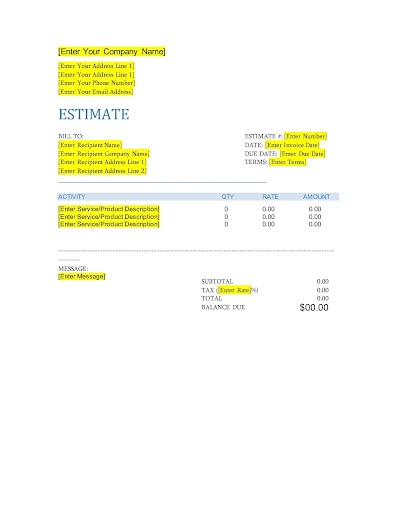
An estimate sets a roadmap for the job. It protects your business by clearly defining the scope of work, pricing, and assumptions before tools ever come out, while also giving the customer a clear picture of what they’re agreeing to. Including these 12 essential elements helps prevent misunderstandings and safeguard your time, margin, and reputation.

An estimate sets a roadmap for the job. It protects your business by clearly defining the scope of work, pricing, and assumptions before tools ever come out, while also giving the customer a clear picture of what they’re agreeing to. Including these 12 essential elements helps prevent misunderstandings and safeguard your time, margin, and reputation.
These terms are often used interchangeably, but they have distinct legal and practical meanings in the trades.

A well-built estimate does more than share numbers. It demonstrates to customers you’ve thought through the details and that you run a reputable business. Here are a few tips for ensuring your plumbing estimate template is professional, organized, and easy to understand.
Each estimate should include your company name, logo, and contact details. Customers should be able to quickly see who it’s from and how to get in touch. Consistent branding reinforces credibility and presents your business as organized and established.
Display your plumbing license number prominently. It reassures customers that you’re qualified and meet any state and local requirements. This information also reinforces transparency and accountability.
Break down your charges by category, such as labor, materials, and any additional fees. Show labor rates, detail main parts (like pipes and fixtures), and outline extra costs such as after-hours service or debris removal. A straightforward breakdown prevents confusion and makes it easier for customers to understand exactly the job costs involved.
For larger or more complex jobs, include relevant attachments with your estimate, such as signed work orders, photos, or permits. Supporting paperwork can resolve questions up front, justify your recommendations, and serve as helpful records down the road.
State the conditions on which your price is based. For example, "Assumes existing shut-off valves are operational." If you touch a valve and it crumbles, that’s a change order, not a freebie.
Double-check all estimated information before you hit send. Confirm every name, address, cost, and calculation is correct. Accurate estimates reduce back-and-forth, protect your pricing, and help customers approve the job faster.
Send your estimate as a PDF to preserve its formatting. PDF documents appear polished and consistent on any device, ensuring you and your customer have a reliable record to refer to later.
Free estimate templates can work when you’re just getting started, but as your plumbing business grows, you need tools that can keep pace. QuickBooks estimating software helps you create estimates faster, maintain pricing consistency for standard tasks, and track job costs as work progresses.
When jobs multiply and scope changes become routine, templates can slow you down. QuickBooks keeps estimates connected to customer details, job information, and future invoices, helping you stay organized as your operations expand.
With QuickBooks, you can easily convert an approved estimate into an invoice. You don't need to retype the customer's information or the line items. Pricing stays aligned, and all job details remain linked from start to finish.
Templates require you to format and paste logos manually. QuickBooks allows you to save your customization settings. Set it up once, and every estimate you send will automatically feature your logo, brand colors, and business information.
Email estimates that customers can review and approve online. Include a deposit request that they can pay through a secure portal. You’ll be able to see when the estimate is viewed and the payment comes through. Knowing where things stand makes it easier to follow up at the right time and move ahead with scheduling or purchasing materials.
Plumbing jobs don’t always go exactly as planned. If a customer requests changes or new issues are discovered, you can update the original estimate instead of starting from scratch. With QuickBooks, you can edit line items, adjust quantities, and resend the revised estimate for approval.
Whether you’re in the office, on a job site, or in your truck waiting for a permit inspection, QuickBooks lets you create and send estimates from your phone, tablet, or computer. You can also capture photos of the site and attach them to the estimate for reference, keeping everything organized in one place.
Create a custom plumbing estimate online with our free generator. You can autofill job details, add your branding, and send it directly to your customer. If you prefer a blank template, use our free printable versions in Word, Excel, or PDF format.
For plumbers seeking an easier way to manage estimates, QuickBooks offers a comprehensive solution. Our software simplifies the entire process, from creating estimates and accepting deposits to tracking expenses and getting paid. It integrates with financial reporting, centralizing your business management and giving you the insights to make smarter decisions. The more streamlined your estimating is, the more freedom you have to focus on serving customers and growing your plumbing business.

Call Sales: 1-800-285-4854