You could save up to 25% on transaction costs².
Speak with us now to see if you qualify.
Talk to sales 1-800-515-8366
Monday - Friday, 6 AM to 4 PM PT

Table of contents
Table of contents
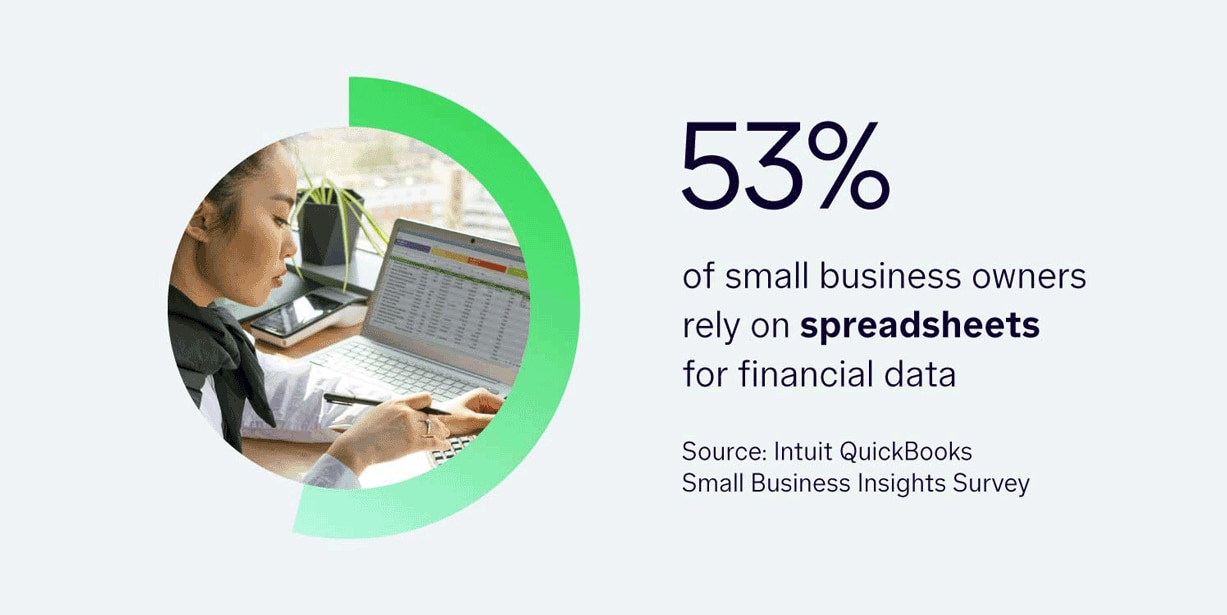
Generic accounting software may be okay at startup, but as your company grows, the absence of advanced tools can result in the need for manual workarounds. For this reason, spreadsheets remain common across small businesses. A recent business insights survey across industries found that 53% of decision-makers still rely on spreadsheets to manage their financial transactions.
For manufacturers, this manual accounting approach is not scalable. Issues like calculating product costs or needing greater visibility into job profitability are strong indicators that it's time to upgrade to accounting software designed for manufacturing.
To help you decide when it's time to make the switch, we’ll review the signs you’ve outgrown your current accounting solution, what the best accounting software for a manufacturing business looks like, and which questions you should ask before upgrading.
As manufacturers expand operations, they often find that the software they have been using for bookkeeping and accounting no longer works. This is not because the software itself is broken; rather, the system just can’t keep pace with increasing transaction volume and complexity.
When that happens, finance teams tend to fill the gaps with spreadsheets and manual reconciliation.
For manufacturing finance teams, there are four core challenges:
When expansion drives operational complexity beyond your system's capabilities, your finance team can lose vital visibility. This can make it difficult to manage working capital, protect cash flow, and control margins without relying on spreadsheets and manual reconciliations. Reaching this threshold is a strong signal that your business has outgrown generic accounting software.
Often, the cost of sticking with generic software that no longer meets your business needs remains unseen. It can be hard to define the costs of things like manually reconciling inventory counts or calculating product costs. However, the downstream effects are measurable.
To help you nail down these unseen expenses, here are some sample problems and their associated hidden costs:
Let's take a closer look at the math. Say your five-person finance team spends 10 eight-hour days on the month-end close. That's 400 hours of labor per close (5 people × 10 days × 8 hours). At an overhead rate of $50 an hour, each close costs $20,000, or $240,000 a year across 12 closes.
Every day you take out of that modeled close cuts the labor cost by 10%, because each day represents 40 hours of team time. Add the working capital tied up in over-ordered raw materials and the margin lost on unprofitable SKUs, and the true cost of an outgrown system reaches well beyond close labor.

To estimate your own close cost, multiply the number of people involved in the close by the hours each spends on it, then by your fully loaded hourly rate. Run the number for both month-end and year-end, since year-end closes typically take longer.
Recognizing the signs that you’ve outgrown your current small manufacturing accounting software can be difficult. To help you determine this, here are some situations that may be red flags, along with their associated expense:
If you find that your business is suffering from three or more of the issues on this list, you should start evaluating alternatives now. It's best to act before your next close to prevent these issues from compounding further.
When evaluating and comparing accounting software for manufacturing companies, you should look for specific capabilities rather than general feature categories.
Having customizable fields gives you the ability to tag transactions like sales, purchase orders, and expenses by SKU, product line, work center, or job. For example, you can use custom fields to organize transactions by product line, work center, or job.
With custom fields, you can view real-time numbers—no more manually reconstructing profitability data with spreadsheets after close. This gives you valuable real-time insights into your business performance while eliminating the time your finance team spends rebuilding data.
As a manufacturer, there are many reports that are beneficial to your operations. This is why it's important to look for software with prebuilt KPI libraries and visual reporting that produce profitability views without manual assembly. For example, customizable dashboards and KPIs can help teams monitor gross margin, cash flow, and performance by product or location.
With generic software, finance teams often need to rebuild these reports and dashboards by hand each month because the system cannot generate them. When switching to software with prebuilt KPI libraries, you can access all your metrics in real time, improving forecast accuracy and giving you more confidence when making business decisions.
Instead of forcing your team to collapse distinct plants or lines into a single bucket, accounting software should broaden visibility. With unlimited classes, you can track individual shifts, product lines, and locations. This means fewer manual workarounds and tracking structures will be needed, which is especially important as you work towards scaling your business.
Before you start tracking by plant, product line, or shift, you need to map out the hierarchies so that the resulting data is well-organized and provides the insights you want.
Sometimes accounting mistakes happen. Perhaps a set of purchasing transactions got miscoded as inventory transactions, and now you have to fix them. With generic software, you are often stuck fixing errors like this line by line, which can negatively impact your end-of-month close timeline.
Finding software that offers efficient transaction cleanup that allows you to reclassify miscoded entries in batches is a game-changer for improving and protecting your close speed.
Different teams have different duties, and role-based software permissions help ensure that necessary tasks are completed by those with the experience to handle them.
For example, purchasers will have access to purchase raw materials but not to receive them, helping prevent inventory issues.
Generic software can’t help with that, potentially leaving you in hot water when auditors inquire about duty segregation. In contrast, software with role-based permissions improves your audit readiness while reducing reporting risk.
Modern accounting software for manufacturing should include forecasting that accounts for working capital tied up in inventory and outstanding purchasing commitments, not just receivables and payables.
As a manufacturer, the standard cash flow view of generic software misses the mark, with the potential to leave you blindsided by working capital crunches. With software designed with manufacturing in mind, you get better forecasting. And better forecasting leads to improved working capital control.
QuickBooks Online Advanced supports the core finance and accounting workflows growing manufacturers rely on: product-line profitability, cost tracking, close cleanup, permissions, and cash flow visibility.
It also includes core inventory accounting, including FIFO and moving average costing, raw materials tracking, purchase orders, sales orders, item receipts, units of measure, and low-stock alerts.
Here are some specific features of the software, along with how they support efficient accounting and operations.
The right setup depends on where your complexity sits. Most growing manufacturers move through three layers:
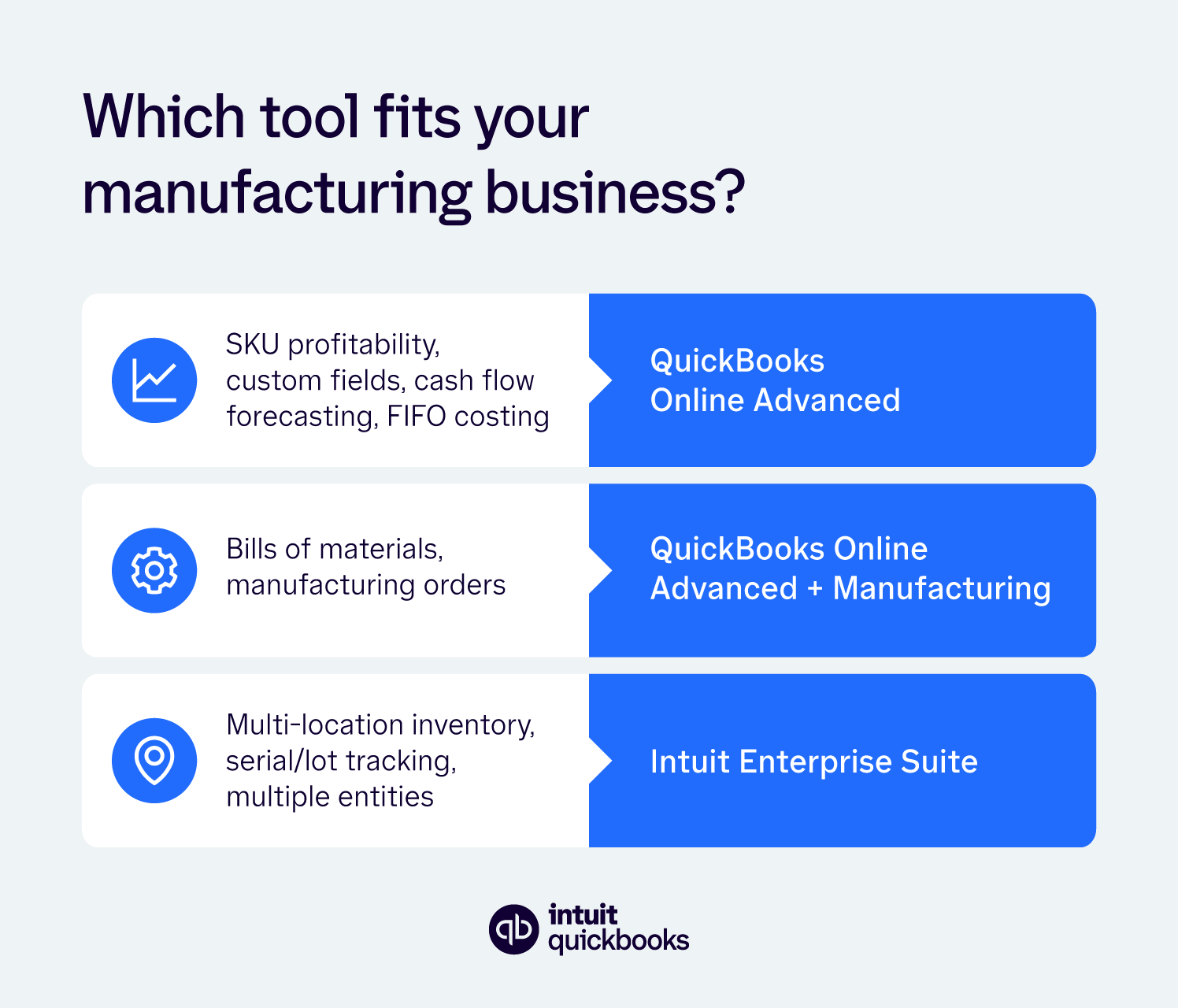
Start by mapping your current workflows and bottlenecks against these layers to decide which one you need now and which one you're likely to need in two to three years.
As you evaluate different accounting software for manufacturing business solutions, here are six questions to ask before committing.
1. Can I track profitability by product line, SKU, or work center without custom development?
2. How many classes, locations, or tracking categories does the platform support, and what happens if I exceed that limit?
3. Can I fix miscoded transactions in bulk instead of one at a time before close?
4. Does the system support segregation of duties across purchasing, receiving, and approval?
5. Can I forecast cash flow with visibility into inventory and purchasing commitments?
6. Will this system still fit my business in two to three years, or am I buying another short-term fix?
More than simply reading through feature lists, getting a direct answer to each of the above questions is insightful. The capabilities covered here meet the accounting needs of most growing, single-entity manufacturers.
If your needs include multiple entities, consolidation, intercompany accounting, or higher-complexity manufacturing requirements, Intuit Enterprise Suite may be the better fit.
Relying on spreadsheets in a modern accounting world is both time-consuming and risky.
To better protect your business and improve your workflows, consider moving to QuickBooks Online Advanced. The platform provides the custom fields, reporting, and role-based permissions you need to improve product-line visibility, strengthen controls, and forecast working capital with greater confidence.
Stop wasting time on manual reconciliation, and learn how QuickBooks Online Advanced can help streamline accounting workflows as your manufacturing business grows.

Call Sales: 1-800-285-4854