QuickBooks Blog
Hands typing on laptop with digital arrows
Midsize business

Moving to more advanced accounting software? 8 data migration best practices for growing businesses

Table of contents

Table of contents

Ask about discounts

You could save up to 25% on transaction costs².

Speak with us now to see if you qualify.

Talk to sales 1-800-515-8366

Monday - Friday, 6 AM to 4 PM PT

More about payments

Key takeaways:

  • Migration goes more smoothly when preparation follows a clear sequence. Each phase addresses a distinct layer of data quality.
  • Early decisions about report targets and historical data scope shape every step that follows.
  • A methodical approach produces a faster go-live and a platform that works as intended from the start.

When a business outgrows its accounting setup, the decision to move to a more advanced platform is usually straightforward. The migration itself can sometimes get complicated.

Most migration problems stem from unresolved data issues. Accounts that were never reconciled, duplicate records, and inconsistent reporting structures don't disappear during a migration. They move into the new platform and continue creating problems there.

If you’re moving to a new system, the eight practices below can help set your team up for a clean migration.

Signs it may be time to move to more advanced accounting software

Before getting into migration preparation, it helps to confirm that the decision to switch is grounded in specific operational pain rather than general dissatisfaction. Common indicators include:

  • Spreadsheet dependency. Your team builds custom reports outside the accounting system because it can't segment by department, location, or project.
  • Slow month-end close. Closing the books consistently takes longer, often because reports require manual assembly from various sources.
  • Shared credentials. Multiple people use the same login because the system doesn't support role-based access, creating both a security gap and an audit trail problem.
  • Email-based approvals. Bills, expenses, or purchase orders are approved over email with no formal record.
  • Integration gaps. Connections to payroll, inventory, or CRM systems require duplicate data entry to keep records in sync.
  • Chart of accounts clutter. Redundant, inconsistent, or poorly named accounts have accumulated to the point where reporting is unreliable.

These issues can limit reporting visibility, weaken financial controls, and make it more difficult for growing businesses to scale their accounting processes.

If several of these describe your current setup, upgrading to a more advanced accounting platform may be the next logical step. The rest of this article focuses on doing the migration right.
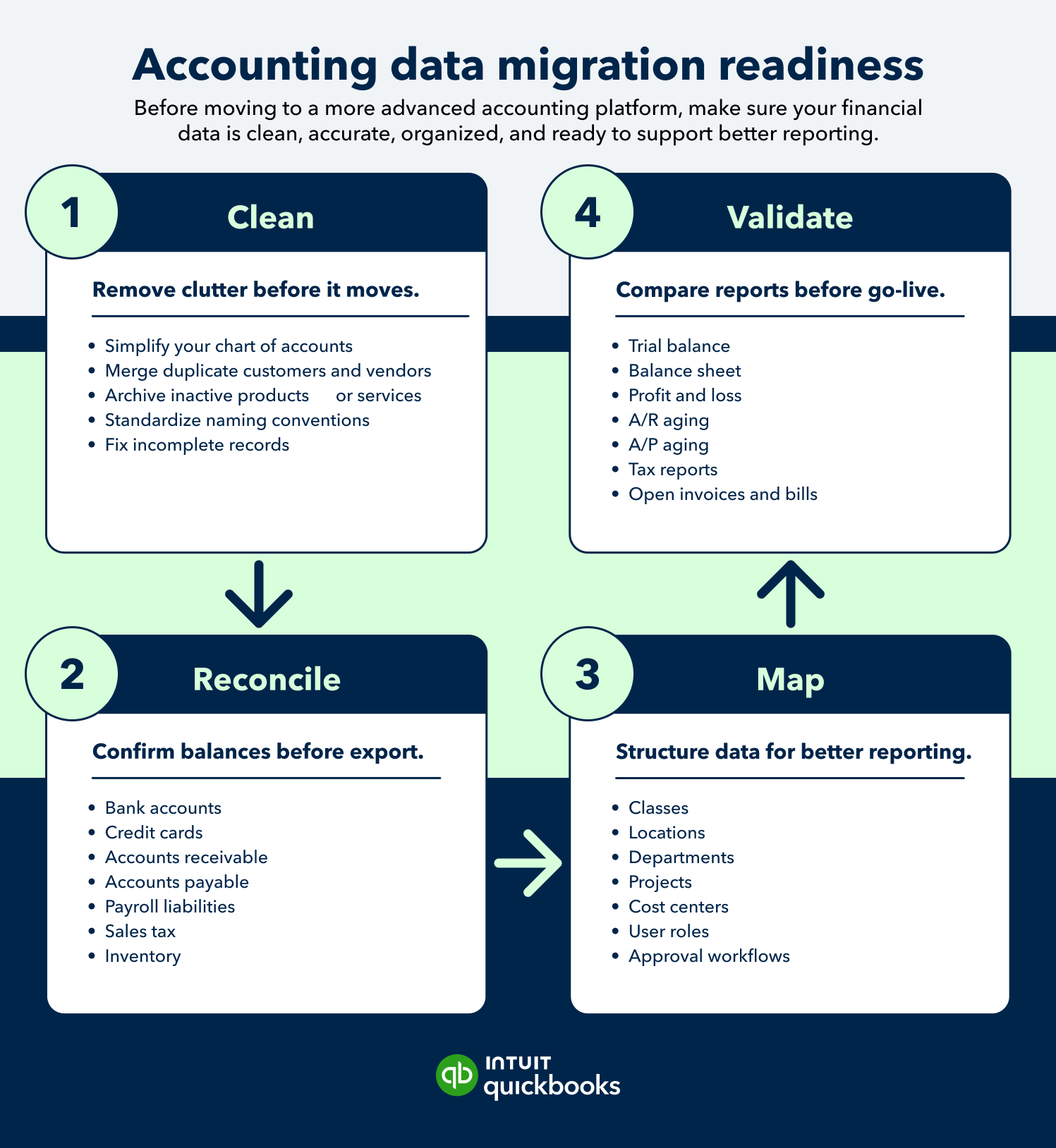
Accounting data migration readiness step-by-step guide

8 data migration best practices for switching accounting systems

The following eight practices are organized in the order they should be completed. Each one addresses a distinct phase of preparation, from planning through final validation.

1. Start with the reporting you need after migration

Most migration planning starts with the question: what data do we need to move? A more useful starting point is: what reports do we need to trust when this is done?

Defining your target reports before touching any data gives the entire migration a measurable outcome. It also surfaces problems early. If a report you depend on requires data that wasn't tracked cleanly in the old system, it’s better to discover it in the planning phase than after go-live.

The reports most businesses need to validate post-migration include:

  • Balance sheet
  • Profit and loss
  • Cash flow
  • A/R aging
  • A/P aging
  • Sales by customer, product, class, location, or department
  • Budget vs. actuals
  • Management reports

Budget vs. actuals deserves specific attention. Many businesses track budgets in spreadsheets rather than in their accounting system, so this report may not exist in the old platform at all. A migration is a practical opportunity to build it into the new system from the start rather than continuing to maintain it separately.

Pull each of these reports from your current system before migration begins. They become the benchmarks you'll use in Practice 8 to confirm the migration worked.

2. Clean up your chart of accounts before switching

The chart of accounts is the structural foundation of your financial reporting. Migrating a disorganized account structure to a more advanced platform will yield the same unreliable reports in the new environment.

Focus on:

  • Duplicate or near-duplicate accounts: "Office Supplies" and "Office Expenses" as separate accounts, or the same bank account listed under two slightly different names, are common examples.
  • Merging is appropriate for true duplicates: same type, same purpose, different name. But since merging is permanent, verify the accounts before proceeding. For accounts where the distinction might matter later, deactivating preserves the history without cluttering the active account list.
  • Inactive accounts: Deactivating rather than deleting keeps historical data intact while removing the account from active use.
  • Account naming conventions: Inconsistent names make reports harder to filter and reconcile. Standardize before migration.
  • Account type classification: A misclassified account, for example, an expense coded as a liability, creates balance sheet errors that can be difficult to trace after the fact.
  • Account category separation: Operating, payroll, tax, loan, and owner/equity accounts should be clearly distinct. This separation becomes more important when adding role-based access in the new system, since permissions are often assigned at the account level.

note icon A more advanced accounting platform can give you better reporting, but only if the underlying account structure is clean.


Flexible solutions for growing businesses

Get the tools you need to streamline your business and the insights to drive it forward. All in QuickBooks Online Advanced.

3. Reconcile key accounts before exporting data

Once the account structure is clean, the next step is to confirm that the balances in those accounts are accurate. Unreconciled balances don't stabilize in a new system. They migrate as-is, creating discrepancies that are harder to resolve once the old system is no longer the primary record.

Reconcile the following before exporting:

Core accounts

  • Bank accounts
  • Credit cards
  • Loans
  • Accounts receivable
  • Accounts payable

Areas that often require additional review

  • Payroll liabilities: Verify that accrued liabilities align with payroll tax payments and filings.
  • Sales tax payable: Review balances carefully, especially if the business collects and remits sales tax in multiple states.
  • Inventory (if applicable): Confirm quantities and valuations, and consider a physical count aligned with the migration cutoff date.

4. Decide what historical data actually needs to move

Not every migration needs to include the business's full transaction history. The right approach depends on reporting needs, compliance requirements, and the complexity the organization is willing to manage.

The following comparison highlights the tradeoffs between the three most common migration approaches:

The decision should be made before migration work begins because it affects:

  • Reconciliation: The amount of data that must be reviewed and balanced before cutover
  • Validation: The time required to verify that migrated data is accurate
  • Reporting: The availability of historical trends and transaction-level detail in the new platform
  • Legacy system access: How long the prior system must remain available for compliance, audits, and historical reference

Before selecting an approach, confirm record-retention requirements with an accountant or tax advisor. Also, ensure stakeholders understand what historical data will and will not be available after go-live.

5. Standardize customer, vendor, product, and service records

The chart of accounts cleanup in Practice 2 addresses account structure. This section addresses the master data attached to individual transactions—the customers, vendors, products, and services that appear on invoices, bills, and reports.

Records that weren't maintained consistently create problems that follow the data into the new system. Common issues to resolve before migration:

  • Duplicate records: A customer appearing under "Acme Corp," "Acme Corporation," and "ACME" splits their A/R balance across three records, making the aging report misleading and collections harder to manage.
  • Inactive records: Distinguish between records that should be archived (no future activity expected) and those that are simply dormant. Migration is a practical time to formalize that distinction.
  • Missing tax details: Vendor records with incomplete W-9 or 1099 classification information create compliance gaps that surface at year-end. Resolve these before they move to the new system.
  • Incorrect payment terms: A vendor set to Net 30 when the actual agreement is Net 15 produces inaccurate cash flow forecasts. Check terms against contracts.
  • Discontinued products or services: Retired items that remain active clutter reports and create confusion in the new system. Deactivate rather than delete to preserve historical reporting integrity.

Tipbox: Clean master records before migration so the new system does not inherit the old system's clutter.

6. Map tracking categories before you migrate

The chart of accounts defines what money was spent on or earned from. Tracking categories add a second dimension. It segments that data by where, for whom, or within which part of the business a transaction occurred.

Different platforms call this layer different things: classes, locations, cost centers, departments, funds, entities. But the terminology matters less than the timing. Tracking categories must be designed before migration begins. Transactions that arrive without category assignments are difficult to tag retroactively at scale.

Before data export, confirm:

  • Which tracking dimensions the business needs (department, location, project, fund, etc.)
  • How those dimensions map to the current operating structure
  • Whether any existing categories from the old system should carry forward or be redesigned

If the old system had no tracking structure at all, that's a clean starting point. Build the category design around how the business reports today.

7. Review user roles, permissions, and approval workflows

This practice focuses on preparing people and controls. A migration is a natural checkpoint for reviewing who has access to financial systems and whether that access reflects how the business actually operates.

Work through the following before configuring the new system:

  • Access inventory: Who currently has access to the accounting system, and why? Migrations frequently surface credentials held by former employees or contractors that were never deactivated.
  • Permission levels: Define who can create, edit, approve, and delete transactions. The person who enters a bill should not be the same person who approves payment. Having a separation of duties is both a financial control principle and a practical risk management decision.
  • Reporting-only access: Department heads or executives who need visibility into reports but shouldn't interact with transactions need a distinct permission level.
  • Approval workflow design: For businesses that have been running approvals over email, define the workflow before configuring the new system. Specify who approves which types of transactions, at what dollar threshold, and what the escalation path is when the primary approver is unavailable.

A migration is a good time to tighten financial controls.


8. Validate reports before going live

In Practice 1, you identified the reports stakeholders rely on most. Now it's time to validate them. Run those same reports in both the legacy and new system for the same date range, then compare the results before completing the transition.

The validation checklist:

  • Compare trial balance totals: old system vs. new system as of the migration date.
  • Compare balance sheet totals, confirming assets equal liabilities plus equity in both systems.
  • Compare P&L totals for two to three periods (spot-checking prior year quarters is more reliable than checking only the most recent month).
  • Check A/R and A/P aging balances match exactly, since aging buckets can calculate differently if the migration date doesn't align with statement cycles.
  • Confirm open invoices and unpaid bills transferred completely.
  • Verify payroll liability balances.
  • Check sales tax balances.
  • Confirm inventory quantities and values, if applicable.
  • Test recurring transactions before any automated processing runs.
  • Review connected apps and bank feeds in a test environment before connecting to live accounts.

Running both systems in parallel for a defined period is often the most reliable way to validate a migration. The legacy system stays active while the new platform processes live transactions. It requires additional time and may increase short-term costs, but it can uncover issues before the final transition.

Flexible solutions for growing businesses

Get the tools you need to streamline your business and the insights to drive it forward. All in QuickBooks Online Advanced.

What to do after the migration

Once the migration is complete and validated, the first 30 to 60 days in the new system require deliberate attention.

  • Close the first month carefully. Reconcile accounts and review reports with an accountant or finance lead before the second month opens. The first close is the earliest signal that something was missed during migration.
  • Train users on new workflows. Platform training covers how the software works. Workflow training covers how your team specifically uses it, including approval sequences, period-close steps, expense submission procedures. Both are necessary.
  • Document new processes while they're fresh. Approval workflows and period-close procedures are easiest to document immediately after setup, before institutional knowledge becomes informal and undocumented.
  • Monitor integrations through the first few processing cycles. Payroll, inventory, CRM, and bank feed integrations should be verified against source data before they're treated as reliable.
  • Set a specific review date for legacy system access. Keep the old platform accessible until historical records are confirmed and retention requirements are satisfied—but schedule a defined date to reassess rather than leaving the subscription running indefinitely.

Choosing accounting software that can support your next stage

A migration creates an opportunity to address the operational challenges that have accumulated in the current system. Many businesses use the transition to improve reporting, strengthen financial controls, and reduce manual work.

The right accounting platform should also help your business maintain those improvements. As reporting needs become more complex, teams expand, and financial processes evolve, QuickBooks Online Advanced provides capabilities that support those next-stage requirements, including:

  • Up to 25 users with custom roles and permissions
  • Process automation for bills and approvals
  • Custom reporting and dashboard capabilities
  • Unlimited chart of accounts entries
  • Unlimited tracked classes and locations
  • Spreadsheet Sync to connect QuickBooks data with Excel for reporting and analysis

For businesses that have outgrown their current setup and are ready to migrate cleanly, QuickBooks Online Advanced provides the reporting depth and operational controls that make the move worth making.

Run and grow your business, unlock deeper insights, and work like you have a larger team behind you

Recommended for you

Mail icon
Get the latest to your inbox
No Thanks

Looking for something else?

QuickBooks

From big jobs to small tasks, we've got your business covered.

Firm of the Future

Topical articles and news from top pros and Intuit product experts.

QuickBooks Support

Get help with QuickBooks. Find articles, video tutorials, and more.