You could save up to 25% on transaction costs².
Speak with us now to see if you qualify.
Talk to sales 1-800-515-8366
Monday - Friday, 6 AM to 4 PM PT

Table of contents
Table of contents
Growth can expose financial workflow weak spots before anything fully breaks. Sales may close deals in one system while payroll, purchasing, inventory, and operations run through others. Finance then has to stitch the data together before leadership can see the full picture.
Accounting integrations can reduce that lag by connecting the systems where transactions, costs, payments, and operational activity start. But the real test is whether your integrations make the business easier to run at higher volume. If reports still need heavy cleanup, teams debate which number is right, or the month-end close keeps taking longer, leadership loses time validating data instead of driving the business forward. A stronger strategy may be in order.
Standard accounting workflows often start to strain when transaction volume, team size, and operational complexity increase simultaneously. More people create, approve, and update financial activity, while more tools hold pieces of the same story. Without the right connections, reporting increasingly relies on exports, spreadsheet fixes, and manual review.
Higher volume gives finance more records to check before reports are ready. A single invoice, payment, vendor bill, payroll run, or project cost may pass through several systems before it reaches the books. Common pressure points include:
A growing team usually means more people entering, approving, and reviewing financial data. But even high-performing teams can create inconsistencies if each function uses its own process or naming structure. Finance may need to resolve differences between:
Spreadsheets can help with analysis, but they create extra work when they become the bridge between disconnected systems. Finance may spend close cycles validating formulas and reconciling report versions that don’t tie back to the general ledger.
Leaders need numbers they can use with confidence when decisions need to be made. Teams cannot move quickly if every report requires validation against source systems before use.
Accounting integrations are most useful when they strengthen a specific control point: revenue, cost, or reporting. Here’s a look at the main types of accounting integrations for scaling businesses:
CRM and accounting integrations connect sales activity to the financial workflow. Customer records, invoices, payment status, billing terms, credits, and revenue details can move between sales and accounting.
For example, QuickBooks Online Advanced, a cloud-based accounting solution, can help connect sales and financial data, reducing the need for finance to rebuild the story after a deal closes.
With CRM integrations, sales and finance can work from aligned customer and billing data. Leadership also gets more reliable reporting around revenue, accounts receivable, collections, and cash timing.
Finance teams can use that information to forecast revenue, prioritize collections, and monitor cash flow more accurately. This ability to track from sale to payment becomes especially valuable when deal volume rises, billing terms vary by customer, or account ownership changes.
The integration should keep customer, invoice, billing, and payment data consistent across sales and finance. A standardized structure helps leadership monitor revenue and collections without extra reconciliation work.

Payroll and operations integrations help address cost attribution. This category can include payroll, HR, time tracking, expense, purchasing, inventory, project, and location systems.
A reliable connection between operations and accounting helps finance identify margin drivers earlier. Other benefits may include:
For payroll and operations integrations, confirm that labor, vendor, inventory, and project costs post directly to the right accounts, departments, locations, or projects. Finance should be able to review margin by segment without reclassifying costs at close.
The goal is to keep payroll, expenses, purchasing, and accounting data connected so finance can review costs without additional reconciliation. In QuickBooks Online Advanced, that may include tracking costs by project, department, or location.
Reporting and spreadsheet integrations connect accounting data to the planning and analysis layer. They support the work finance leaders rely on after transactions post, including board reporting, cash forecasts, budget updates, KPI packs, and scenario planning. For teams that rely on Excel, tools such as Spreadsheet Sync in QuickBooks Online Advanced can help cut down on manual data transfers while keeping budgets and reports up to date.
By connecting reporting tools and spreadsheets to accounting data, finance can keep spreadsheet models, dashboards, and forecasts aligned to updated financial information. This integration can also:
For reporting and spreadsheet integrations, consider whether reports can stay tied to a consistent financial source. The goal is to reduce recurring exports, limit version-control issues, and help leaders make decisions based on reporting that reflects current financial activity.
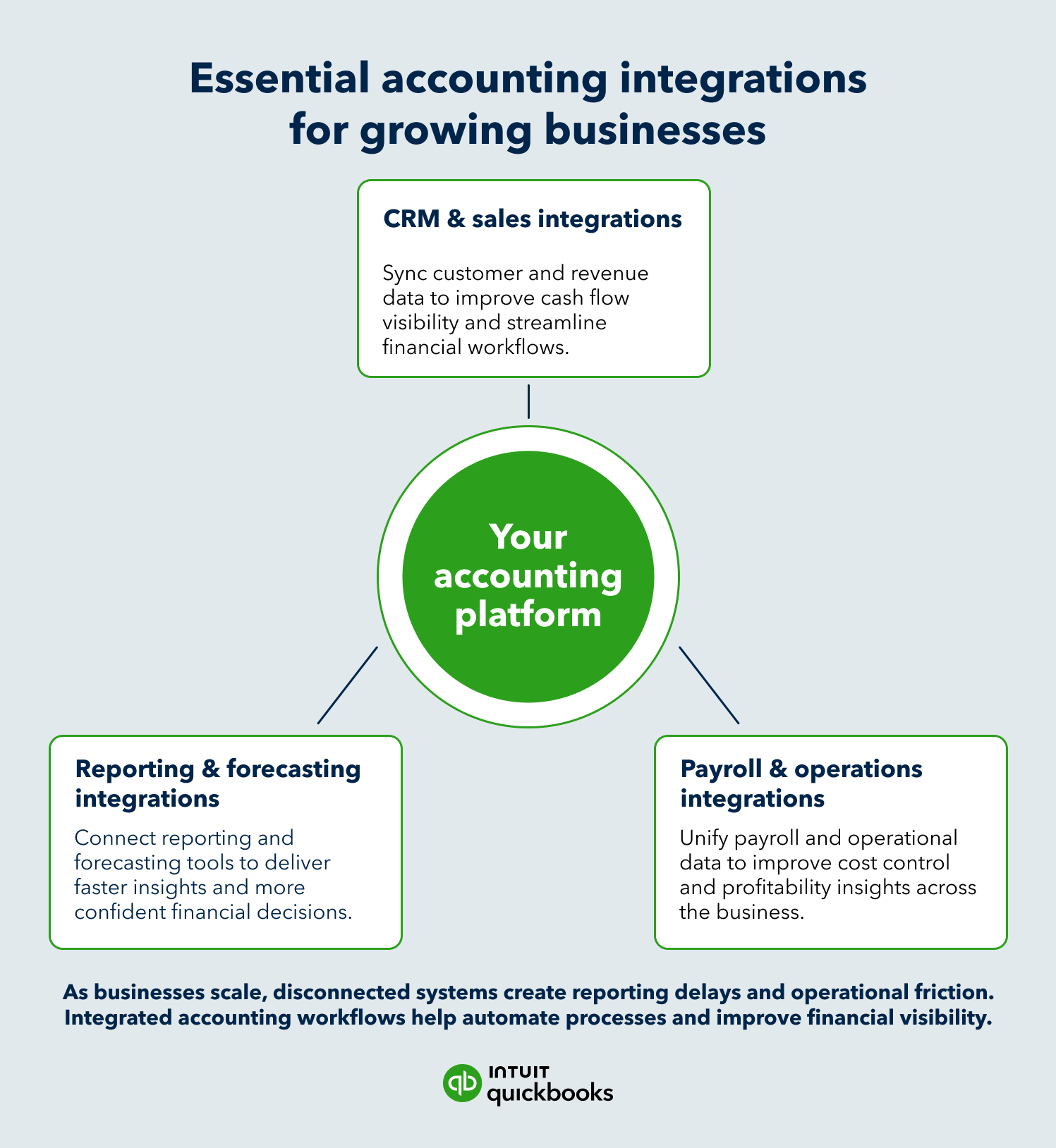
The best accounting integrations don’t simply move data faster. They help finance teams keep that data accurate, consistent, and ready for decision-making. When they don’t, the warning signs usually show up in close quality, forecast reliability, and how often teams challenge the numbers.
A connected financial system should reduce off-system work. Integration issues may be slowing the team down if finance still depends on:
A sales report, operations dashboard, and finance report may each be useful on its own. Problems start when leaders have to reconcile those views before making a decision. Watch for:
Close should not slow down every time the business adds more transactions, users, or locations. If integrations are working well, finance should spend less time tracing data movement and more time reviewing exceptions.
Common signs of strain include:
Leaders should feel comfortable using reports without second-guessing where the numbers came from. If every major decision still requires a manual finance check, it may be a sign that data is moving between systems but not showing up in a trusted, actionable format.
Questions like these can point to the issue:
More connected apps do not automatically create a better financial workflow. Integrations can create new inefficiencies if ownership, permissions, sync rules, and reporting structures are unclear.
And if volume increases, those gaps become even harder to ignore. Finance may spend more time reconciling data, explaining differences, and confirming which numbers leaders should use.
An accounting integration strategy should prioritize the decisions finance needs to support. From there, identify the systems and data behind them. For midmarket companies, the goal is a finance architecture that can handle more activity without adding unnecessary review layers, access issues, or reporting workarounds.
Begin where finance loses the most time or where delayed information affects cash, revenue, or margin decisions. The highest-priority integrations usually sit near customer billing, collections, payroll allocation, purchasing, expense management, or recurring reporting.
Useful questions to consider include:
Automation only helps if the resulting data is usable. An integration that moves incomplete or poorly structured data can accelerate reporting without making it more reliable.
Evaluate each integration by the outcome it supports. A revenue integration should improve order-to-cash alignment. A payroll or operations integration should strengthen cost attribution. A reporting integration should help leadership work from a governed financial view.

Integrated systems need shared rules. Customer names, vendor records, payroll categories, departments, locations, classes, projects, and reporting periods should follow the same structure regardless of where the data starts.
Finance should define:
A growing company needs systems that support more users, locations, entities, transactions, and controls without adding complexity. Look for infrastructure that helps finance govern access, preserve data quality, and adapt reporting as the business changes.
Consider QuickBooks Online Advanced, designed to help growing businesses gain more control, deeper insight, and scale with confidence.
Every integration needs an owner, a review cadence, and a process for handling exceptions. Finance should know what syncs, when it syncs, who can change it, and how issues are escalated.
That governance turns integrations from a convenience into financial infrastructure. The business gets a stronger foundation for real-time reporting, cleaner data, and better control as activity expands.
Reliable reporting depends on reliable data. Accounting integrations help connect revenue, cost, and reporting information across the business, giving finance teams a clearer view of performance. The result is greater confidence in forecasts, stronger financial control, and reporting leaders can trust.

Call Sales: 1-800-285-4854