You could save up to 25% on transaction costs².
Speak with us now to see if you qualify.
Talk to sales 1-800-515-8366
Monday - Friday, 6 AM to 4 PM PT

Table of contents
Table of contents
Fumbling for cash or even swiping a difficult card at the register can be a headache for your customers, and it can slow down your lines. Contactless payments—also known as tap-to-pay—have changed how customers shop and how businesses accept credit cards.
This convenient technology allows customers to complete purchases by tapping a card, smartphone, or wearable device near a compatible terminal.
According to QuickBooks Small Business Insights, more than 2 in 5 (44%) small businesses report cash flow problems, so anything that makes it easier for customers to pay can only help.
This guide covers what contactless payments are, and how to accept them in your business.
Contactless payments include any method that allows customers to check out without inserting a card or handing cash to another person. Instead, contactless payment methods use near-field communication (NFC), a type of radio-frequency identification (RFID), to complete transactions.
Contactless payments occur in two forms:
If a merchant’s check-out terminal has contactless technology, customers can hold their contactless payment form—whether a credit card or smartphone—near the terminal to complete the transaction. The convenience and added security for customers may be a draw for all types of retailers.
While mobile payments are technically contactless, the term "contactless payments" commonly refers to in-person transactions made in close proximity without physical contact.
Typically, consumers make contactless payments at a point of sale and rely on technology that works at close distances. Mobile payments use cellular or Wi-Fi networks and don't require close physical proximity to enable payments.
Contactless payments aren’t new, but they are becoming the new normal for purchases. The technology that serves as the basis for contactless payments has evolved over the decades to become more convenient and secure.
To understand the evolution of contactless payments, you first need to look at where it started.
The integrated circuit chip technology that enabled the first chip cards has been in use since the 1960s. The Europay Mastercard Visa (EMV) standards for smart card specifications were developed in the 1990s and became the foundation for both contact and contactless card technology.
EMV chip cards were widespread in many European countries well before the US, which reached its key EMV milestone in October 2015 when card networks shifted fraud liability to merchants without chip-enabled terminals; contactless adoption in the US followed its own, slower timeline in the years that followed
Contactless payment technology has come a long way from fobs, and touch-free phone payments are no longer strictly used by early adopters.
This technology isn’t new, but the ins and outs of this transaction process are new for many.
Contactless payments have two aspects: the payment system and the payment method.
NFC technology is the key to contactless payments. This advanced form of radio signal technology allows for short-range transmissions, which, in this case, receive data from the customer's card or phone.
This technology allows your payment system to communicate with their phone or card to complete the transaction.
The contactless payment system is an NFC reader, which communicates with the payment method once it’s within one or two inches. Once the NFC reader collects the data from the customer's payment method, it transfers that data to the merchant’s point-of-sale system.

Contactless cards have a built-in antenna and chip to pick up signals from NFC readers. When a consumer puts the card over the payment system, it will communicate with the card reader via radio signal and process the payment.
For mobile device contactless payments, the technology is built into the phone's capabilities, so it communicates with the payment system the same way.
Beyond the convenience, one of the most compelling aspects of contactless payments is their strong security. This is largely thanks to EMV chip technology and tokenization, two related but distinct safeguards.
When a customer taps an EMV chip card, the chip generates a unique, one-time cryptogram for every transaction, essentially a code tied to that specific purchase that's never reused. Even if a fraudster intercepted it, it would be useless for any other transaction.
Mobile wallets add a second layer through tokenization: Instead of storing the actual card number on the phone, the wallet stores a substitute "token" value that stands in for it. If that token were ever compromised, it couldn't be used to access the real card number or account.
Together, these two mechanisms make contactless payment one of the safest forms of payment available.
Here's how contactless cards and mobile wallets compare to traditional magnetic stripe swipes:
The primary requirement for accepting contactless payments is an NFC-enabled point-of-sale (POS) terminal. These modern terminals are equipped with the technology to communicate wirelessly with a customer's contactless card or mobile device, completing the transaction with a simple tap.
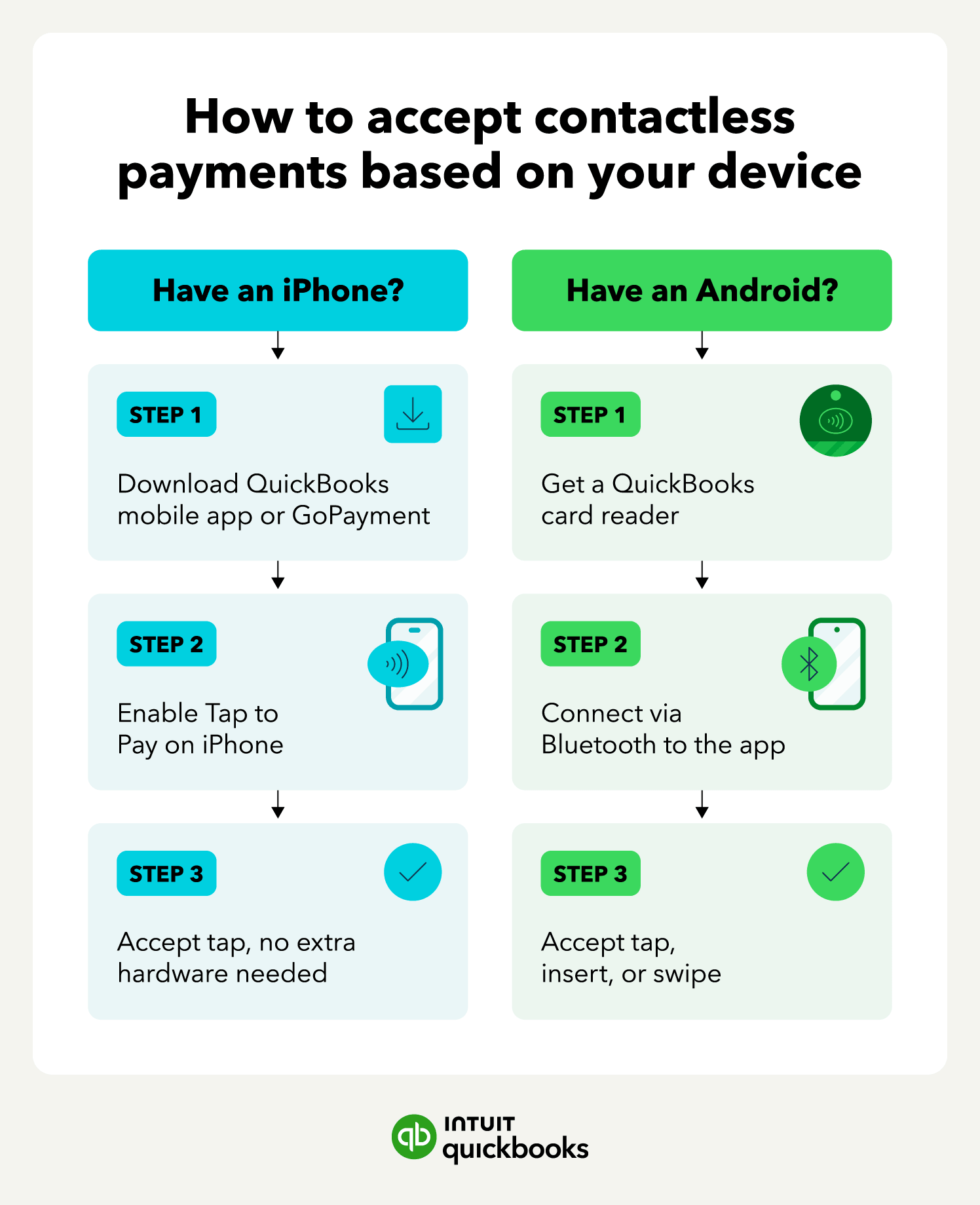
iPhone users can turn their phone into a payment reader using Tap to Pay in the QuickBooks mobile app or GoPayment; no separate card reader needed. This requires an iPhone XS or later running the latest iOS version.
Android users can accept contactless payments too, but they’ll need a QuickBooks card reader that connects to the QuickBooks mobile app or GoPayment via Bluetooth. Customers can tap, insert, or swipe their card, or use a mobile wallet.

To set up Tap to Pay on iPhone for the first time:
1. Open the QuickBooks mobile app or GoPayment and select the Menu icon.
2. Go to Settings, then select Tap to Pay on iPhone.
3. Select Enable Tap to Pay on iPhone and confirm the Apple ID you want to use.
4. Wait for the "Tap to Pay on iPhone is here" confirmation. You can optionally test it with a $1.00 charge.
Once it's set up, accepting a payment takes just a few steps:
1. Go to Sales, then select the + button and New sale (or open an existing invoice).
2. Enter the amount or select the products/services for the sale, then select Review and Charge.
3. Select Tap to Pay.
4. Ask the customer to tap their card or mobile wallet to your iPhone to complete the payment.
It's that easy to accept contactless payments anywhere your business takes you, whether you're using Tap to Pay on an iPhone or a card reader with Android.
Accepting contactless payments typically doesn't require any additional hardware beyond what you already need for card processing. Tap to Pay on iPhone uses a phone that merchants likely already own, while card readers are a one-time hardware cost.
Processing fees for contactless transactions generally match standard card-present rates, since the underlying card networks (Visa, Mastercard, etc.) treat a tap the same as a chip or swipe for pricing purposes.
Customers with a contactless-enabled payment card can follow these steps to complete a payment:
1. They'll need to look for the contactless symbol on their card and the merchant's checkout terminal.
2. Then they'll hold the card within a couple of inches of the contactless symbol.
3. If their purchase is approved, they'll hear a beep or see a checkmark or green light.
The tap itself typically takes just one to two seconds, and the full checkout interaction, from total to confirmation, usually wraps up in 10 to 15 seconds, about half the time of a typical chip-card transaction.
Just be sure to provide clear instructions at your checkout terminal to help customers use this technology, especially if you haven't offered this type of transaction.

Customers can use a smartphone or cards to complete a contactless payment. They first need to set up their digital wallet (Apple Pay, Google Pay, etc.) with card or bank account information.
This process is fairly simple. The customer downloads a wallet app and adds their card or bank information. Once the card or bank information has been verified, they can start using their mobile phone to make contactless payments.
If they're using their phone as a contactless payment method, they may need to unlock the mobile wallet (usually using their phone's face scan feature). Then they should hold the phone in front of the reader and wait for the reader to beep or signal, confirming the payment has been accepted and the transaction is complete.

Most major banks and card issuers now support adding cards to Apple Pay, Google Pay, and Samsung Pay, so customers don't need a dedicated contactless card to pay with their phone.
Contactless payments offer cardholders and business owners many advantages, from added security to faster, more convenient transactions.

Contactless payments use advanced technology to make transactions more secure. From EMV chips that generate unique, one-time transaction codes for every purchase to strong encryption protocols, your customers' information remains safe the whole time.
Some of the most beneficial security features of contactless payments include:
Contactless payments dramatically improve your business's operational efficiency, benefiting both your team and your customers. They drastically reduce checkout times—when transactions complete in mere seconds, your business can process more customers quickly, especially during peak hours, and effectively manage queues.
Imagine a busy coffee shop during the morning rush. Customers tapping their phones or cards could complete payments almost instantly, keeping the line moving swiftly.
Contactless payments offer real convenience for your business by simplifying the checkout process.
When you consider the time customers waste fumbling through their bags or wallets for a card while you watch, it's easy to see how that can lead to impatience, longer lines, and noticeably slower operations.
Offering contactless options cuts down on that friction, keeping lines moving and improving overall customer satisfaction.
Contactless payments help reduce hygiene-related risks often associated with handling physical cash or inserting cards into shared terminals.
Since customers can simply tap to pay, this eliminates the need to directly touch a communal payment pad or exchange items with a cashier. This "touch-free" approach is a simple yet effective measure for maintaining a more hygienic environment for both customers and staff.
The frictionless nature of contactless payments can also directly contribute to a higher revenue potential for your business. When customers can complete transactions easily, they’re more likely to make impulse purchases, as the payment process feels less like a hurdle and more like a natural extension of their shopping experience.
Overall, contactless technology has made payments quicker and safer.
Contactless payments aren't without a few constraints business owners should know about:
According to McKinsey's Digital Payments Report, digital payment adoption in the US reached a record 92% in 2024. So there's significant demand for digital payment options anywhere consumers spend money.
That demand is being met quickly. Visa, Mastercard, American Express, and Discover all support contactless payments across their card networks, and most major issuing banks, including Chase, Bank of America, Citi, Capital One, and Wells Fargo, now issue contactless-enabled cards by default.
From self-checkout stations and cash registers to contactless payment systems on restaurant tables, touchless checkout is only growing in popularity. If your business hasn't already embraced it, now may be the time.
Embracing contactless payments is now essential for businesses looking to attract new customers and retain existing ones. Technologies like NFC and tokenization let you enhance convenience, speed, and safety at the point of sale.
Contactless payments work best when they connect directly to the rest of your finances. With QuickBooks Payments, you can accept tap, chip, and mobile wallet payments and see every sale land in your books automatically.

Call Sales: 1-800-285-4854