QuickBooks Blog
A businesswoman calculates payroll taxes in Pennsylvania
Pennsylvania

Pennsylvania payroll taxes: Your 2026 guide to staying compliant

Pennsylvania is a powerhouse of industrial diversity and innovation. Its economy thrives on a rich mix of manufacturing giants, from food processing and chemical production to machinery and electronics, alongside burgeoning sectors such as energy, life sciences, robotics, and tech. According to Pennsylvania Business One-Stop Shop, approximately 1.1 million small businesses, which account for 99.6% of all companies, employ nearly 2.5 million residents, fueling both urban centers like Philadelphia and rural communities alike. For small business owners, this landscape offers a vast opportunity. However, it also carries a vital responsibility: understanding and managing payroll taxes. 

In this guide, we’ll walk you through the critical components of Pennsylvania payroll taxes for 2025 so you can stay compliant, avoid costly penalties, and ensure your employees are paid accurately and on time.

Jump to:

What are payroll taxes?

Payroll taxes are taxes based on wages, salaries, or other compensation that both employers and employees must pay. While income taxes are also withheld through payroll, payroll taxes specifically fund programs like Social Security, Medicare, and unemployment insurance.

Understanding Pennsylvania payroll taxes

When starting a business in Pennsylvania, staying compliant means understanding both federal and state payroll tax obligations. Each has its own rules, rates, and filing requirements that directly impact your business and your employees.

Federal payroll taxes

Payroll taxes are mandatory and encompass both federal and state requirements. 

Federal payroll taxes include:

  • Federal income tax: This is withheld from each employee's paycheck based on their W-4 form and the current IRS tax brackets. You'll be responsible for calculating the correct amount, withholding it, and then sending it to the IRS. 
  • Social Security and Medicare taxes: Both of these taxes have a portion paid by the employee and a matching portion paid by you, the employer. For Social Security, the combined rate is 12.4% on the first $176,100 of wages in 2025. For Medicare, it's 2.9% on all wages, with an extra 0.9% for higher earners. You'll withhold the employee's portion and match it. 
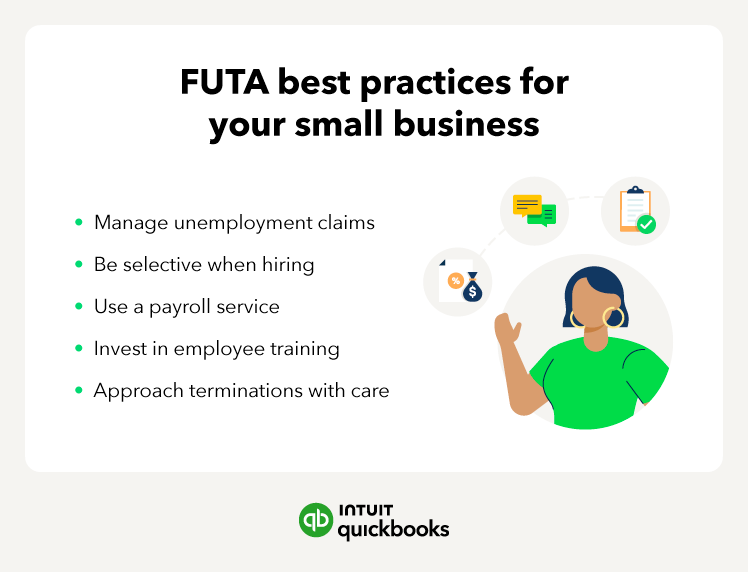
  • Federal Unemployment Tax (FUTA): This is paid solely by you at a rate of 6% on the first $7,000 of each employee's wages. However, most employers get a 5.4% credit, reducing the rate to 0.6%. The graphic below lists some best practices for managing your FUTA obligations. 
Futa best practices for small businesses

Pennsylvania state payroll taxes

In addition to federal payroll taxes, Pennsylvania employers must also account for state-specific payroll taxes. 

  • Pennsylvania Personal Income Tax (PIT): This is a flat-rate tax of 3.07% that you are required to withhold from your employees’ wages and remit to the state. 
  • Local Earned Income Tax (EIT): In most Pennsylvania municipalities, you must also withhold local income taxes from your employees’ pay. Rates vary depending on where the employee lives and works.
  • Unemployment Compensation (UC): As an employer, you pay Pennsylvania Unemployment Compensation Tax on the first $10,000 of each employee’s wages.
  • Employee UC Contribution: Employees also contribute a small portion toward UC, which you must withhold from their paychecks. For 2025, this rate remains at 0.07% of gross wages.

Pennsylvania local payroll taxes

In addition to federal and state payroll taxes, some Pennsylvania cities and counties impose their own local payroll taxes. These taxes can vary significantly depending on the location of your business. Here are ways to determine any local payroll taxes you may be liable for:

  1. Check with your local government to find out if your business is subject to any local payroll taxes. Your city or county government can directly provide the most up-to-date information on applicable rates and regulations.
  2. Consult a tax professional if you need clarification on local payroll tax requirements or assistance with compliance. An accountant specializing in Pennsylvania payroll taxes can help you identify any local taxes that apply to your business and ensure you meet all your obligations.

Other important tax considerations

Multiple locations

If your business has employees working in multiple jurisdictions, you may be subject to different local payroll taxes for each location.

Changing rates

Local payroll tax rates can change over time, so it's important to stay informed about any updates that may affect your business.

Employer responsibilities for payroll taxes in Pennsylvania

As a Pennsylvania employer, you're responsible for managing a complex array of federal and state payroll taxes, which involves careful calculation, timely withholding, and accurate reporting to various government agencies. Here’s an overview of what you should know.

Registering for payroll taxes

To comply with Pennsylvania state regulations, employers must register for payroll taxes before beginning business operations. This critical first step ensures you're set up to handle requirements like unemployment compensation, state income tax withholding, and wage reporting. Here are the three key steps to get started:

  • Get an Employer Identification Number (EIN): Before registering with the state, you’ll need a Federal Employer Identification Number (EIN) from the IRS. This number identifies your business for federal tax purposes. You can apply for an EIN quickly and easily through the IRS website.
  • Register with the Pennsylvania Department of Revenue and the Department of Labor & Industry]: Once you have your EIN, register your business with the Commonwealth using the PA-100 Enterprise Registration Form. This unified registration allows you to set up your accounts for Pennsylvania employer withholding tax and unemployment compensation. You can complete this registration online through the Pennsylvania Department of Revenue.
  • Report New Hires: Within 20 days of hiring a new employee, you must report them to the Pennsylvania New Hire Reporting Program. This helps support child support enforcement and other state-administered programs.

Calculating payroll taxes

Accurately calculating payroll taxes is essential for Pennsylvania employers, not only to ensure employees are paid correctly, but also to avoid costly penalties and interest. Fortunately, you have several reliable options to get it right:

  • Check government websites: The Pennsylvania Department of Revenue and the Department of Labor & Industry provide up-to-date tax tables, wage limits, and guidance to help you calculate state income tax withholding and unemployment compensation contributions.
  • Payroll software: Some small business software payroll programs have built-in Pennsylvania tax tables that automate calculations, saving you time and minimizing the chance for errors.
  • Professional services: If you prefer to outsource payroll, a professional payroll service can handle everything for you.

Whichever method you choose, make sure you stay updated on the current tax rates and wage limits, as these can change every year.

Withholding state payroll taxes

Once you've accurately calculated the correct payroll tax amounts, the next step is to withhold the proper amounts from your employees' wages and remit them to the appropriate Pennsylvania authorities. This includes state income tax, local Earned Income Tax (EIT), and unemployment compensation contributions.

Pennsylvania Personal Income Tax (PIT):  You must withhold 3.07% of taxable wages for state income tax from each employee’s paycheck. Withholding should be calculated based on gross compensation and remitted according to the Pennsylvania Department of Revenue’s deposit schedule—either semi-weekly or monthly, depending on your total withholding amount.

  • Example:  If an employee earns $5,000 in a month, you would withhold: $5,000 × 3.07% = $153.50 in PIT.

Local Earned Income Tax (EIT) and Local Services Tax (LST): Most Pennsylvania municipalities impose a local EIT, typically 1% to 3.8712%, which must be withheld and submitted to a designated local tax collector. You may also need to withhold the Local Services Tax, which can be up to $52 annually, usually deducted in equal amounts per pay period.

  • Example: For an employee who lives and works in a municipality with a 1.5% EIT and earns $1,000 per week: $1,000 × 1.5% = $15 withheld per week for EIT.

Unemployment Compensation (UC): As the employer, you're responsible for paying state UC taxes. For 2025, new employers generally pay 3.822% on the first $10,000 of each employee’s wages. Employees also contribute at a rate of 0.07%, which you must withhold from their paychecks.

  • Example: If an employee earns $1,000:
  • Employee UC contribution = $1,000 × 0.07% = $0.70 withheld
  • Employer UC contribution = $1,000 × 3.822% = $38.22 paid by employer

By applying these calculations to each paycheck, you ensure accurate withholdings and compliance with state requirements.

Remitting state payroll taxes

In Pennsylvania, if your business withholds taxes from employee paychecks, you'll need to file tax returns with the state.


Filing payroll tax returns in Pennsylvania

In Pennsylvania, employers must meet both quarterly and annual payroll tax return requirements to stay compliant with state and federal regulations. Staying on top of these filing deadlines ensures that you're reporting wages, submitting taxes, and maintaining accurate records for your employees. Here's a clear breakdown of what’s required in 2025:

Quarterly requirements

Penalties for late filing or non-compliance and tips for staying organized

Missing payroll tax deadlines or failing to remit taxes on time can have serious financial consequences for your Pennsylvania business. The state imposes penalties and interest on late or missing filings, which can quickly add up and strain your cash flow. On the federal side, the IRS enforces strict payroll tax regulations and may assess substantial fines for noncompliance or late payments.

To keep your business on track and avoid costly mistakes, consider these practical tips:

Set reminders

Mark all payroll tax deadlines clearly on your calendar, set alerts on your phone or computer, and leverage task management or payroll software tools to ensure nothing slips through the cracks.

Consider payroll software

Invest in trusted payroll software that automatically calculates taxes and provides timely reminders about upcoming deadlines. This not only reduces errors but also saves you valuable time.

Outsource payroll

If managing payroll feels overwhelming, partnering with a reputable payroll service provider can be a game-changer. They’ll take care of all tax calculations, filings, and payments on your behalf, which can help you maintain compliance with confidence and ease.

Seek professional help

If you have any questions or concerns about payroll taxes, don't hesitate to consult with a tax professional or accountant. They can provide expert guidance and help you tackle the complexities of payroll tax compliance.

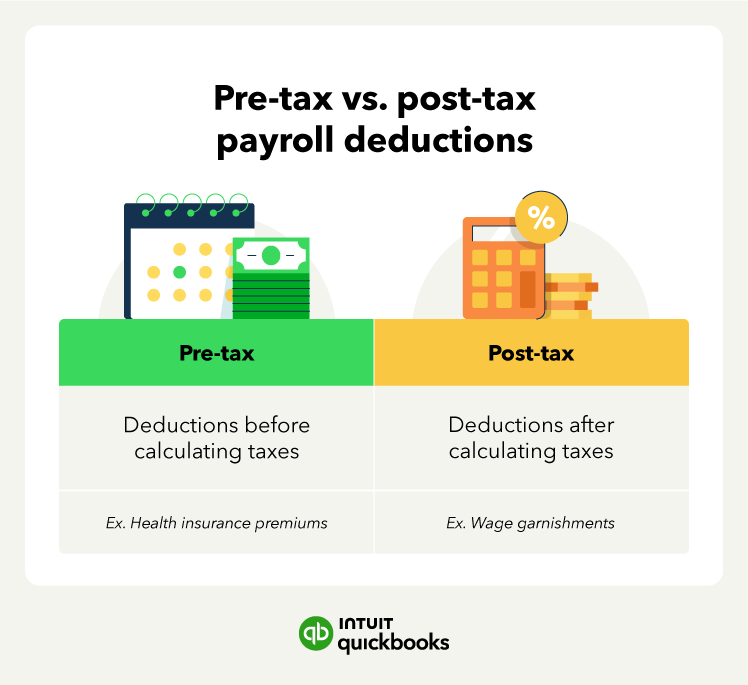
Pre-tax vs post-tax payroll deductions

Payroll tax credits and incentives

Pennsylvania offers a range of tax credits and incentive programs designed to support business growth, encourage job creation, and strengthen communities across the Commonwealth. These programs can help you lower your overall tax burden while contributing to Pennsylvania’s economic development and workforce advancement. Here are some of the tax credits available to Pennsylvania employers:

Keystone Opportunity Zone (KOZ) Program

The KOZ program offers tax exemptions, deductions, abatements, and credits for businesses operating in designated economically distressed areas. These zones aim to revitalize communities by attracting new investment and jobs.

Research and Development (R&D) Tax Credit

The R&D Tax Credit helps businesses offset costs associated with research and innovation. Qualified R&D expenditures can be partially credited against state taxes.

WOTC – Work Opportunity Tax Credit

While federally administered, Pennsylvania employers who hire individuals from targeted groups (such as veterans, long-term unemployed, or SNAP recipients) can benefit from significant tax savings through the WOTC credit.

Neighborhood Assistance Program (NAP)

NAP encourages businesses to invest in projects that improve distressed communities. In return, they receive tax credits up to 65% of the approved contribution for eligible projects in education, community services, job training, or housing.

Manufacturing and Investment Tax Credits

Manufacturing tax credits are available for businesses that invest in new equipment or expand manufacturing operations in the state, helping to offset part of the capital costs.

Industries frequently benefiting from Pennsylvania business tax credits

  1. Technology and Research & Development (R&D) Firms. Pennsylvania offers a Research and Development Tax Credit for businesses investing in innovation, new product development, or technical improvements. This credit encourages companies to stay competitive through discovery and design, especially in sectors like biotech, software, and engineering.
  2. Green and Sustainable Businesses. Companies focused on renewable energy, energy-efficient technology, or environmental improvements may qualify for incentives under programs like Alternative Energy Production Tax Credits and High Performance Building Credits. These initiatives support investments in clean energy and sustainable building practices.
  3. Film and Digital Media Production Companies. The Pennsylvania Film Production Tax Credit provides incentives for film, TV, and digital media companies that produce projects within the state. This program promotes in-state production, job creation, and the use of Pennsylvania-based vendors and talent.
  4. Manufacturers. Pennsylvania’s Manufacturing and Investment Tax Credit programs assist manufacturers that invest in equipment, expand operations, or modernize facilities. The Keystone Opportunity Zone (KOZ) program is also frequently used by manufacturers seeking tax relief while establishing or relocating in underdeveloped areas.

Consult with a tax professional to understand what tax credits and incentives you could potentially apply to your business. 

Common payroll tax mistakes in Pennsylvania (and how to avoid them)

Navigating Pennsylvania’s complex payroll tax landscape can be challenging. Here are the most frequent errors employers make.

Misclassifying workers

Incorrectly classifying employees as independent contractors is one of the costliest mistakes Pennsylvania employers make. Misclassification can lead to penalties for unpaid taxes and missed unemployment contributions. Use Pennsylvania’s specific guidelines to determine worker status, and when in doubt, consult with a tax advisor or legal expert.

Missing deadlines

The Pennsylvania Department of Revenue and Department of Labor & Industry have strict filing and payment deadlines. Missing a deadline can result in penalties and interest. Set up digital reminders and consider payroll software that tracks due dates and sends alerts automatically.

Incorrect withholding calculations

Pennsylvania has a flat state income tax rate, but errors still happen, especially when factoring in local Earned Income Tax (EIT), which varies by municipality. Use up-to-date state and local tax tables, and verify employee worksite and residence locations to apply the correct rates.

Overlooking local taxes

Pennsylvania's local tax system is unique. Most employees owe EIT and may also be subject to the Local Services Tax (LST). Failing to withhold or remit local taxes can result in noncompliance. Be sure you’re registered with the appropriate local agencies and remitting accurately.

Failing to update employee forms

Using outdated or incorrect employee forms, like W-4s or residency certificates for local taxes, can lead to inaccurate withholdings. Review and update these forms regularly, especially when employees move or experience major life changes.

Miscalculating unemployment compensation (UC) rates

Employers sometimes apply the wrong unemployment compensation contribution rate, especially when rates change from year to year or when transitioning from the new employer rate. Always check your current UC rate notice from the Pennsylvania Department of Labor & Industry and update your payroll system accordingly.

Poor recordkeeping

Pennsylvania requires employers to maintain detailed payroll records for at least four years. Failing to keep adequate documentation can hurt you during audits or employee disputes. Use payroll software or secure digital storage to organize wage reports, tax filings, and withholding records.

Tip: QuickBooks Payroll can help you avoid these common mistakes by automating calculations, tracking deadlines, and keeping accurate records.

How to manage your small business payroll obligations 

Understanding the nuances of Pennsylvania's payroll taxes and regulations can take some time. Follow our small business tax preparation checklist and these steps to help you manage your payroll taxes.

Step 1. Partner with a tax professional

Consult a tax professional familiar with Pennsylvania’s payroll taxes and regulations. They can guide you through compliance requirements, local tax nuances, and potential tax benefits for your business.

Step 2. Explore payroll software

Consider using payroll software to streamline your payroll processes. Tools like QuickBooks automate tax calculations, minimize errors, and ensure compliance with Pennsylvania laws.

Step 3. Proactively plan for compliance

Stay informed about Pennsylvania’s payroll tax deadlines and updates. Payroll software combined with expert guidance can help ensure you meet state and local requirements.

Step 4. Optimize your tax strategy

Work with your tax professional to uncover deductions, credits, or other incentives that could benefit your business. Leverage software reports to better understand your payroll data and identify opportunities for savings.

Step 5. Build a financially strong foundation

By combining expert guidance with the right tools, you can efficiently manage payroll taxes and focus on growing your business in The Keystone State.

What are the payroll taxes in Pennsylvania?

Pennsylvania’s payroll tax system involves several components at both the state and local levels. These include State Income Tax, Unemployment Compensation (UC), and Local Earned Income Tax (EIT). There is also the Local Services Tax (LST) in some municipalities. Each has specific rates, wage limits, and payment responsibilities.

Calculating payroll taxes in Pennsylvania

Payroll tax calculations in Pennsylvania depend on several factors, including:

  • The employee’s gross wages
  • The employer’s assigned Unemployment Compensation (UC) tax rate
  • Applicable federal, state, and local taxes

For employees, the main payroll taxes include:

  • Pennsylvania State Personal Income Tax (PIT)
  • Unemployment Compensation Employee Contribution
  • Local Earned Income Tax (EIT)
  • Local Services Tax (LST)
  • Federal income tax 
  • FICA (Social Security and Medicare)

For employers, the main payroll taxes include:

  • Unemployment Compensation (UC)
  • Federal Unemployment Tax (FUTA)
  • Employer share of FICA (Social Security and Medicare)

To calculate Pennsylvania payroll taxes accurately, you can use the PA Department of Revenue's Employer Withholding Guide, refer to UC rate notices from the Pennsylvania Department of Labor & Industry, leverage payroll software with Pennsylvania-specific settings, and consult a qualified payroll or tax professional.

It’s essential to stay updated on the current rates and regulations, as they can change annually.

Leverage payroll software for compliance in Pennsylvania

Managing payroll in Pennsylvania requires accuracy due to complex regulations. Errors can lead to penalties and legal risks, but QuickBooks streamlines payroll management to ensure compliance. It automatically calculates, files, and pays federal and state payroll taxes—with a 100% accuracy guarantee.** You'll stay current with Pennsylvania tax law changes, easily generate reports for filings, and get up to $25,000 in penalty coverage if issues arise.**


Disclaimer: 

**Accuracy Guaranteed: Available with QuickBooks Online Payroll Core, Premium, and Elite. We assume responsibility for federal and state payroll filings and payments directly from your account(s) based on the data you supply. As long as the information you provide us is correct and on time, and you have sufficient funds in your account, we’ll file your tax forms and payments accurately and on time or we’ll pay the resulting payroll tax penalties. Guarantee terms and conditions are subject to change at any time without notice. 

Tax penalty protection: If you receive a tax notice and send it to us within 15 days of the tax notice we will cover the payroll tax penalty, up to $25,000. Additional conditions and restrictions apply. Only QuickBooks Online Payroll Elite users are eligible to receive tax penalty protection.

This content is for information purposes only and information provided should not be considered legal, accounting or tax advice or a substitute for obtaining such advice specific to your business. Additional information and exceptions may apply. Applicable laws may vary by state or locality. No assurance is given that the information is comprehensive in its coverage or that it is suitable in dealing with a customer’s particular situation. Intuit Inc. does not have any responsibility for updating or revising any information presented herein. Accordingly, the information provided should not be relied upon as a substitute for independent research. Intuit Inc. cannot warrant that the material contained herein will continue to be accurate, nor that it is completely free of errors when published. Readers should verify statements before relying on them.


Recommended for you

Mail icon
Get the latest to your inbox
No Thanks

Looking for something else?

QuickBooks

From big jobs to small tasks, we've got your business covered.

Firm of the Future

Topical articles and news from top pros and Intuit product experts.

QuickBooks Support

Get help with QuickBooks. Find articles, video tutorials, and more.