









You could save up to 25% on transaction costs².
Speak with us now to see if you qualify.
Talk to sales 1-800-515-8366
Monday - Friday, 6 AM to 4 PM PT

Table of contents
Table of contents
This August release improves on two fronts at once. It starts with core workflows done right: faster performance and improvements to the tools you use most. It extends to new AI-powered capabilities from Intuit Intelligence that automate routine work, surface insights, and help you grow. The result: cleaner books, faster payments, and confident decisions.
This is ongoing work, not a one-time fix. There's more detail in our full rundown of 2026 product improvements.

Intuit Intelligence** is a connected intelligence layer that does the work for you while keeping human experts within reach. It's built on 40 years of financial data from millions of businesses and trained on what businesses in your industry actually need. It identifies risks, uncovers opportunities, and recommends personalized actions, all with high standards for security, privacy, accuracy, and compliance.
QuickBooks can scan your saved documents, like statements of work or sales orders, and draft invoices for you to review and send, then line up ready-to-send reminders on your own schedule. Invoicing on autopilot is in beta and subject to monthly usage limits. (Essentials, Plus, Advanced)
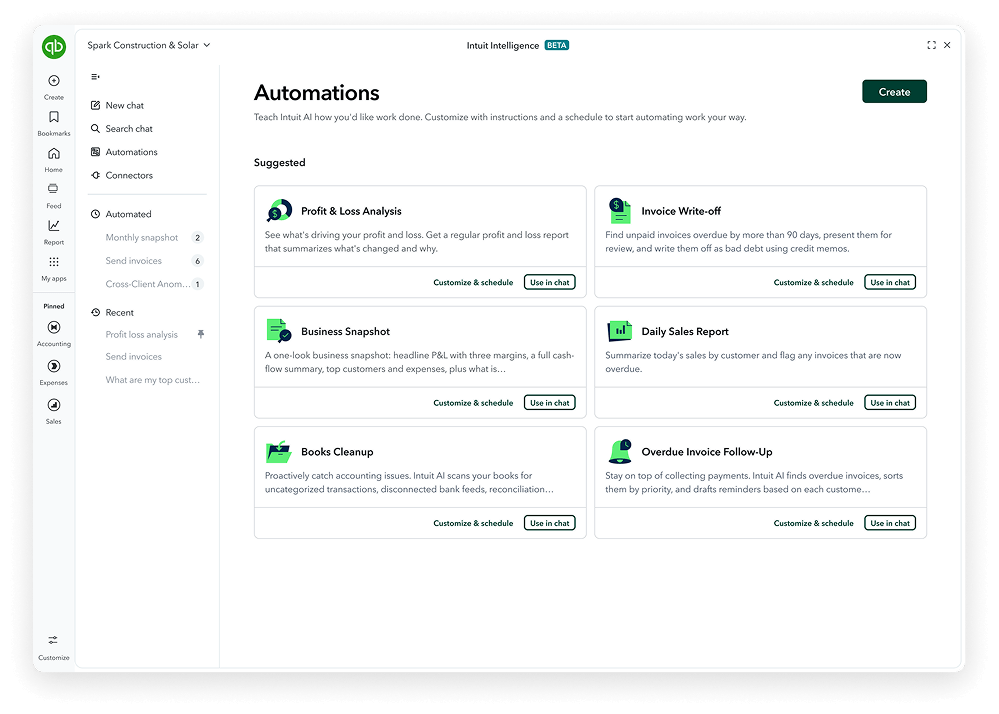
Tell Intuit Intelligence chat what you want done in plain language, and set a schedule as needed. Turn answers into actions by creating your own custom automations or start from a template—like sending overdue reminders or flagging duplicate bills. When Intuit Intelligence spots a recurring task, it offers to automate it; say yes once and it handles it from there. (All plans, limited capacity by plan)
Intuit Experts can help you get set up correctly in QuickBooks, validate and help ensure accuracy of AI-powered work, and keep your books in good shape to help prevent surprises at month-end. If you work with an accountant, check with them first about access to experts.
Note: For Smart Expert Categorization and Books Upkeep, if your business is billed for QuickBooks, the service is ready to switch on. If your accounting firm is billed for your subscription, coordinate with your accountant to enable these features.
QuickBooks Online Advanced is getting a significant enhancement this August across AI-powered bookkeeping, reporting, Bill Pay, and industry-specific solutions.

Intuit Intelligence provides a unified view of your business by more securely connecting your accounting, payments, payroll, bill pay, and tax data into a single, intelligent experience to help improve how you run and grow your company. Intuit Intelligence now offers:
This revolutionary system of intelligence gives you the best of both worlds:
Designed to make tax season simpler and smarter, Deduction Maximizer in QuickBooks Business Tax AI (beta)** is an always-on assistant that finds and suggests ways to help improve your deductions year round. Integration with Intuit Expert Business Tax, powered by TurboTax, allows for a smooth handoff to human experts.
QuickBooks has a number of foundational improvements to help ensure it's fast, accurate, and reliable, including:

Payroll AI frees up time with automated payroll for less prep with full control.** It works with employees and admins to provide updates, insights, and payroll drafts—whether you're at your desk or on the go. It proactively collects hours directly from employees of QuickBooks Online Payroll customers, spots anomalies and insights, and sends a ready-to-approve payroll draft via text.
Sales Tax AI helps you stay confident in your compliance by charging the correct sales tax for your products and services, flagging potential sales tax issues, and suggesting fixes before you file.**
Existing AI within QuickBooks is equipped to help you run more of your business in one place with connected data and insights.
Agentic AI completes work for you, handling the day-to-day tasks on your behalf. AI agents can be seamlessly paired with additional trusted experts** to deliver the guidance you need when you need it—all in the Intuit platform.
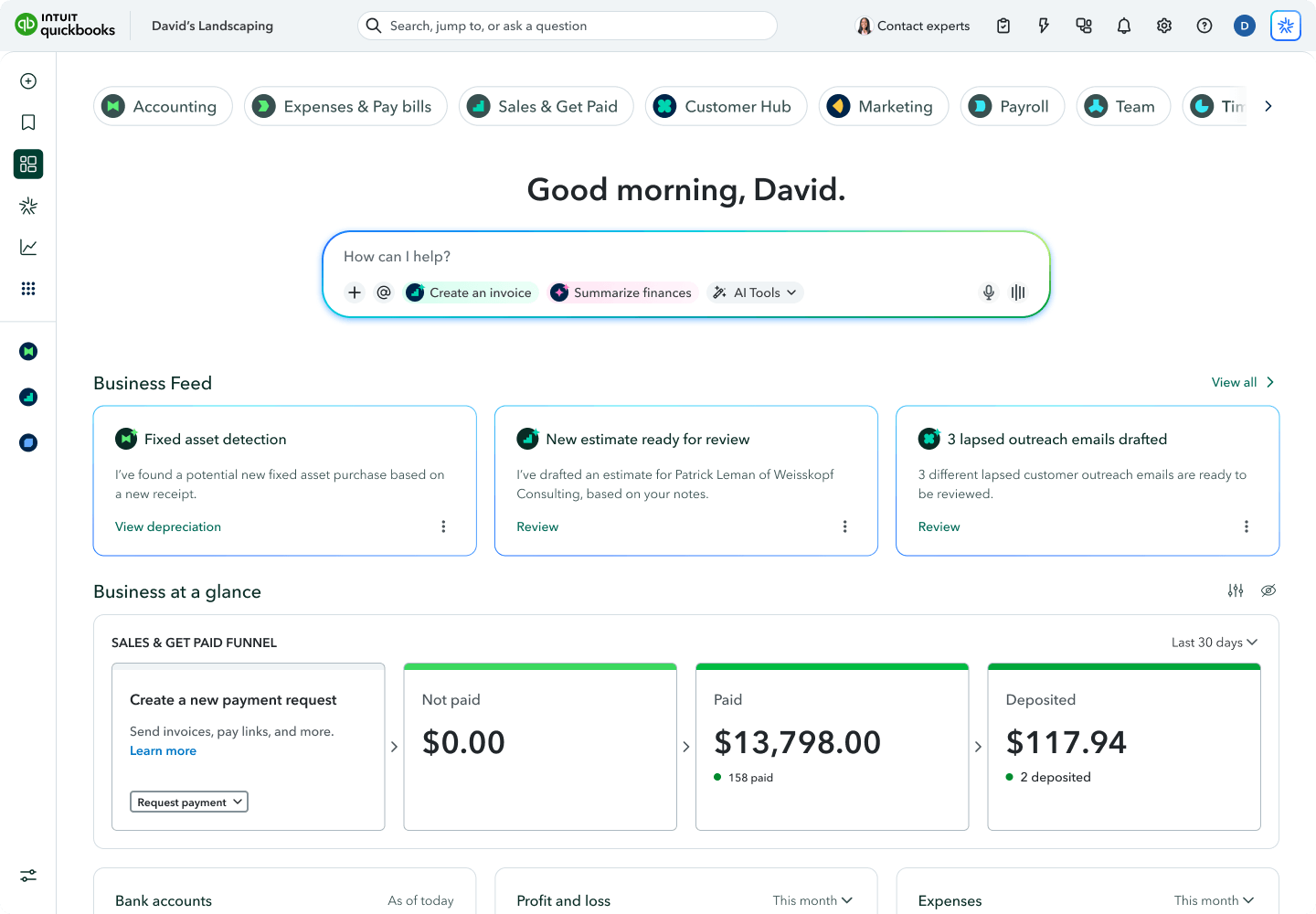
An updated, customizable QuickBooks dashboard design connects more of your tools and data in one place to help you see what's happening now—and surfaces insights on what to focus on next.

QuickBooks plans can be configured "just right" for your business at every stage, with new benefits and even more improvements. With even more confidence, you can choose the perfect plan that gives you the best value.
Important product and disclaimer information
Money movement services are provided by Intuit Payments Inc., licensed as a Money Transmitter by the New York State Department of Financial Services. For more information about Intuit Payments' money transmission licenses, please visit https://www.intuit.com/legal/licenses/payment-licenses/.
QuickBooks Lending Overview page: Business health factors are available on the QuickBooks Lending Overview page and inside Intuit Intelligence chat. Results are based on your QuickBooks business data and are for informational purposes only.
**Product information
QuickBooks Bill Pay: Subject to eligibility criteria, credit, and approval prior to first payment. Subscription to QuickBooks Online required. Bill Pay Basic is included with QuickBooks Online when purchased directly from QuickBooks.com or QuickBooks Sales. Not available in US territories or outside the U.S. Limits may apply on total number and amount of payments. Transaction based fees apply based on usage. Bill Pay Elite is expected to be included in QuickBooks Advanced on August 1, 2026. Actual availability dates may vary and are not guaranteed.
Unlimited 1099 e-file: 1099 forms are e-filed with the IRS only for the current filing year and for payments recorded in QuickBooks. Includes state filings for eligible states participating in IRS Combined Federal/State Filing program. If you have Bill Pay, which is included with QuickBooks Online, 1099 e-filing services will be charged at the standard 1099 E-file Service pricing.
Intuit Expert Assisted: QuickBooks Online subscription required. Supported topics subject to change. Excludes bookkeeping and tax preparation services, each of which are sold separately. Additional terms and conditions apply.
Intuit Expert Full Service Bookkeeping: QuickBooks Online subscription required. Cleanup is required prior to commencement of bookkeeping services and charged as a one-time fee. Monthly bookkeeping pricing is based on your business’s average monthly expenses and may be reassessed at Intuit’s sole discretion. Excludes tax preparation services, which are sold separately. Additional terms, conditions and eligibility requirements apply.
Intuit Expert Business Tax, powered by TurboTax: QuickBooks Online subscription required. Not eligible to non-admin users in QuickBooks Online. Actual prices are determined at the point of print or e-file and are subject to change. For more info about Intuit Expert Business Tax, see the QuickBooks Terms of Service and TurboTax Terms of Service. For guarantee details, see: turbotax.com/guarantees.
Intuit Expert Cleanup: Applies to bookkeeping records for the prior and/or current financial year. Eligibility for prior year or current year cleanup depends on the date of purchase. Does not cover bookkeeping records used for any previously filed tax return. Onboarding call required within 60 days of purchase. Timely cleanup is subject to timely delivery of requested information. QuickBooks Online subscription required. Additional terms, conditions and eligibility requirements apply.
Disclaimer: This information is intended to outline our general product direction but represents no obligation and should not be relied on in making a purchasing decision. Additional terms, conditions and fees may apply with certain features and functionality. Eligibility criteria may apply. Product offers, features, and functionality are subject to change without notice.
**Features
Beta features have limited availability and are subject to change or discontinue at any time, and Intuit may introduce fees or other pricing requirements for such features in the future.
Invoicing on Autopilot will launch in Beta. Each account gets limited capacity each month. Beta features have limited availability and are subject to change. Bulk invoice creation requires a Google Drive account; clients without Google Drive will not be able to use this capability.
Intuit Intelligence features may differ based on product. Not available with QuickBooks Self-Employed.
AI Agents (Excl. Sales Tax AI Agent): While available in all QuickBooks-supported languages, the agent’s output will be English-only at launch. Localization for other languages will roll out gradually thereafter. We recommend you review all outputs carefully.
Buy Now, Pay Later via Affirm subject to eligibility. See lending terms at affirm.com/disclosures
Tap to Pay on iPhone requires a supported payment app and the latest version of iOS. Some contactless cards may not be accepted by your payment app. Transaction limits may apply. The Contactless Symbol is a trademark owned by and used with permission of EMVCo, LLC. Tap to Pay on iPhone is not available in all markets. For Tap to Pay on iPhone countries and regions, see https://developer.apple.com/tap-to-pay/regions/ Apple Pay is a service provided by Apple Payments Services LLC, a subsidiary of Apple Inc. Neither Apple Inc. nor Apple Payments Services LLC is a bank. Any card used in Apple Pay is offered by the card issuer. Tap to Pay on Android requires an NFC-enabled device running Android 9 or later. Android™ is a trademark of Google LLC.
Intuit Intelligence and certain other Al features are currently available at no additional cost at this time. Pricing, terms, conditions, and service options are subject to change without notice.
Intuit Intelligence chat is only available to admin users at this time. Prompt queries are limited. This feature is in Beta.
Business Tax AI is available in QuickBooks Essentials and up. The Deduction Maximizer is also available as a feature in QuickBooks Simple Start.
Intuit Experts: Feature availability may vary by product.
Payroll AI is available in QuickBooks Essentials and up. Also requires a subscription to QuickBooks Payroll.
Sales Tax AI is available in QuickBooks Plus and up.
Accounting AI is available in QuickBooks Essentials and up.
Payments AI is available in QuickBooks Essentials and up.
Customer AI is available in QuickBooks Plus and up.
Finance AI is available in QuickBooks Advanced and up.
Information, ideas and opinions expressed on this website should not be regarded as professional advice or our official opinion and you are strongly advised to consult your professional advisor before taking any course of action related to them. Each financial situation is different, the advice provided is intended to be general, and as such, you are advised to consult your financial or legal advisors for information specific to your situation. The information contained in this website is provided ‘as is’ and your use of and reliance on the information is entirely at your own risk.

Call Sales: 1-800-285-4854







