To recap, you’ll need to obtain:
- A bank statement for the current period (the one you’re reconciling)
- A bank statement for the previous period
- Your cash book showing all of your transactions, deposits, and withdrawals
You’ll use these three items to create a bank reconciliation statement, which you can complete in just seven steps.
The bank reconciliation process in 7 steps
Bank reconciliations are important because they help ensure that your recorded account balance per the bank statement is correct. Once you receive your bank statement, follow these seven steps to reconcile with your bank:
1. Download your most recent bank statement
Whether you receive bank statements at the end of the month, end of the week, or any other interval, your first move in reconciliation is to download your statement.
- Tip: Download bank statements as frequently as possible to ensure that you quickly catch any mistakes.
2. Match recorded deposits
Begin with deposits, and match each of the deposits recorded in your books to the ones reflected in your bank statement, including the dollar amounts. Mark any deposits in transit that the bank hasn’t yet received or deposits that the bank denied as items to be reconciled—these should be added back to the bank’s closing cash balance for your account.
- Tip: Banks can make errors, too. If you find an error in the bank statement, inform the bank about the mistake and include the difference as a reconciling item.
3. Match bank-cleared payments
- The statement will include reference numbers for all payments that the bank cleared, including checks. Compare dollar amounts as well, then note any differences and make necessary corrections.
- Tip: Save copies of deposited checks for your records. If there’s a discrepancy in the value of a deposited check, the record will help you identify the source of the error.
4. Prepare a list of outstanding checks
Checks presented but not cleared are called outstanding checks, and they’re reconciling items. These need to be deducted from the bank’s closing cash balance for your account.
- Tip: Create this list while matching your bank-cleared checks to save time—but don’t rush through the process. Reconciliation is about finding mistakes, not creating new ones!
5. Review debits and credits
Check the miscellaneous debits and credits listed on your bank statement, such as:
- Overdraft charges
- Bounced check charges
- Account maintenance fees
Adjust your cash balance to account for these items in case they aren’t recorded in your cash book.
6. Make final adjustments
Add or subtract all the items marked as reconciling items from your bank’s closing cash balance. Then, compare the cash book balance with the final balance on your bank statement.
- Tip: Make sure that beginning balances match as well. If not, you’ll need to reconcile your bank statement with your books for the previous period.
7. Finalize your reconciliation
Once you identify all the differences and prepare a bank reconciliation statement, save the statement with the rest of your accounting records for future reference.
- Tip: If completing the reconciliation yourself, share a copy with your bookkeeper for transparency.
Use virtual accounting services to have access to detailed bank statements that update automatically, making bank reconciliation a breeze.
3 common bank reconciliation problems
Reconciliation is important to determine the source of errors in your cash book or bank statement. Timing differences, bank errors, and business bookkeeping errors can all account for mistakes that require reconciliation.
Timing differences on recorded transactions
One of the primary reasons for discrepancies in a bank reconciliation is the time gap in recording payments and receipts. Various factors can affect this time gap, including:
- Checks issued by the bank but not yet presented for payment
- Checks deposited to the bank but not yet collected or credited
- Debits made by the bank, like collection or overdraft fees
- Unrecorded direct deposits made into your account
- Any interest or dividends collected by the bank
- Unrecorded automatic withdrawals made from your bank account
- Dishonored checks or bills that have matured and aren’t valid
Each of these different factors will only show up on your bank statement once the bank officially receives a record of the occurrence. For that reason, reviewing your bank statement frequently can help your cash book balance stay current with your bank account balance.
- Tip: Keep your cash book current and balanced. Your bank statement may take time to reflect a pending bank transaction, causing reconciliation errors.
Bookkeeping errors on the business side
Human error may cause your business to omit transactions or record incorrect ones. You may miss a check, record a deposit twice, or include the wrong amount for a deposit. Be sure to double-check commas and decimal places—one wrong record could cause a significant error throughout your books.
- Tip: Have monthly check-ins with a bookkeeper who can review your cash book and bank statements to spot and correct any errors.
Recording errors on the bank side
Banks aren’t perfect, and although it’s an uncommon occurrence, it’s certainly possible that your bank statements include errors. For example, they may incorrectly record the dollar value of a deposited check or miss a deposited check entirely.
- Tip: Reach out to your bank as soon as you spot an error. Bank adjustments take a few business days to correct at the very least.
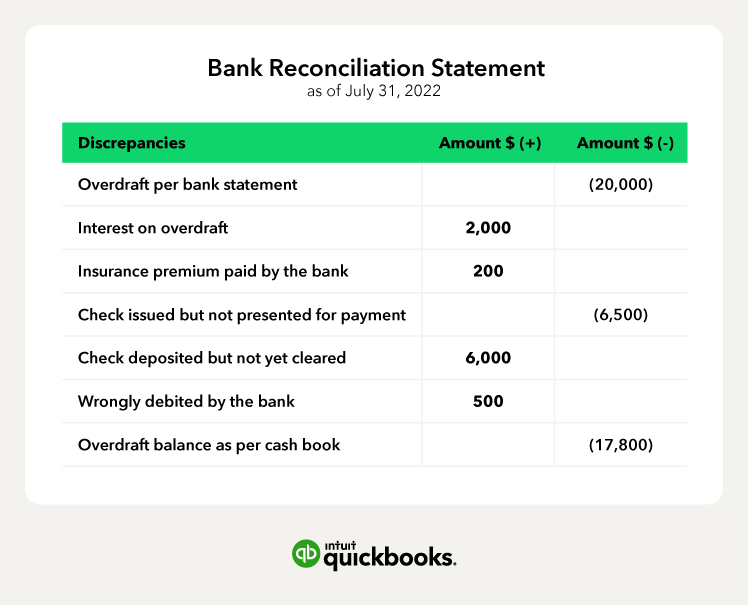
Bank reconciliation example
With the following discrepancies from the books of Zen Business, LLC, we’ve prepared a bank reconciliation statement as of July 31, 2022.