- Start Your BusinessStart Your Business
- Starting a BusinessThe tools and resources you need to get your new business idea off the ground.
- PaymentsEverything you need to start accepting payments for your business.
- Funding & CapitalResources to help you fund your small business.
- Small Business StoriesCelebrating the stories and successes of real small business owners.
- Self-EmployedThe tools and resources you need to run your own business with confidence.
- Run Your BusinessRun Your Business
- Running a BusinessThe tools and resources you need to run your business successfully.
- AccountingAccounting and bookkeeping basics you need to run and grow your business.
- Cash FlowTax and bookkeeping basics you need to run and grow your business.
- PayrollPayroll essentials you need to run your business.
- TaxesTax basics you need to stay compliant and run your business.
- EmployeesEverything you need to know about managing and retaining employees.
- Grow Your BusinessGrow Your Business
- Growing a BusinessThe tools and resources you need to take your business to the next level.
- Sales & MarketingSpread the word: What you need to know about marketing your small business.
- FundingHow to find funding and capital for your new or growing business.
- Midsize BusinessesThe tools and resources you need to manage your mid-sized business.
- Enterprise Suite BlogThe tools and resources you need to grow your own business with confidence.
- E-CommerceHow to start and run a successful e-commerce business.
- TaxesTaxes
- How to fill out a 1099-NEC formLearn how to fill out and file 1099-NEC forms for independent contractors and freelancers.
- How to file small business taxesLearn how to navigate tax season with confidence and minimize your tax liability with this guide.
- Small business 1099: What you need to know for 2025Navigate the complexities of small business 1099 forms and filings with our comprehensive guide.
- 13 documents to give your accountant for small business taxesYour accountant will need these documents to file your small business taxes successfully.
- What's NewWhat's New
- NewsBrowse the latest news, press releases, and reports from QuickBooks.
- AI Resource HubFind the latest on Artificial Intelligence.
- Small Business DataThe latest research and insights for Small Businesses from QuickBooks.
- Small Business StoriesCelebrating the stories and successes of real small business owners.
- Holiday SuccessEverything you need to thrive during your business's busiest seasons.
- AI InnovationsBrowse the latest AI innovations in QuickBooks on the Intuit platform.
- ToolsTools
- All ToolsFree accounting tools and templates to speed up and simplify your workflow.
- AI-Powered Invoice GeneratorTry out this free invoice generator to create an invoice online using Intuit Intelligence.
- Payment Cost CalculatorFind out how much you could save by switching to QuickBooks Payments.
- Paycheck CalculatorAccurately estimate pay for all your employees.










Key takeaways:
- With a few smart habits, like keeping personal and business expenses separate, you can stay organized and save time.
- Tracking your expenses and reviewing reports regularly helps you spot trends early. That means fewer surprises and better decisions for your business.
- From calendar reminders to cloud accounting software, automation helps you avoid errors and focus on growth.
- When bookkeeping eats into your day, it might be time to bring in a pro or explore tools.
Bookkeeping is a necessary part of running a small business, but it can be tricky. Many business owners manage their own bookkeeping because they have to, not because they feel confident with business accounting.
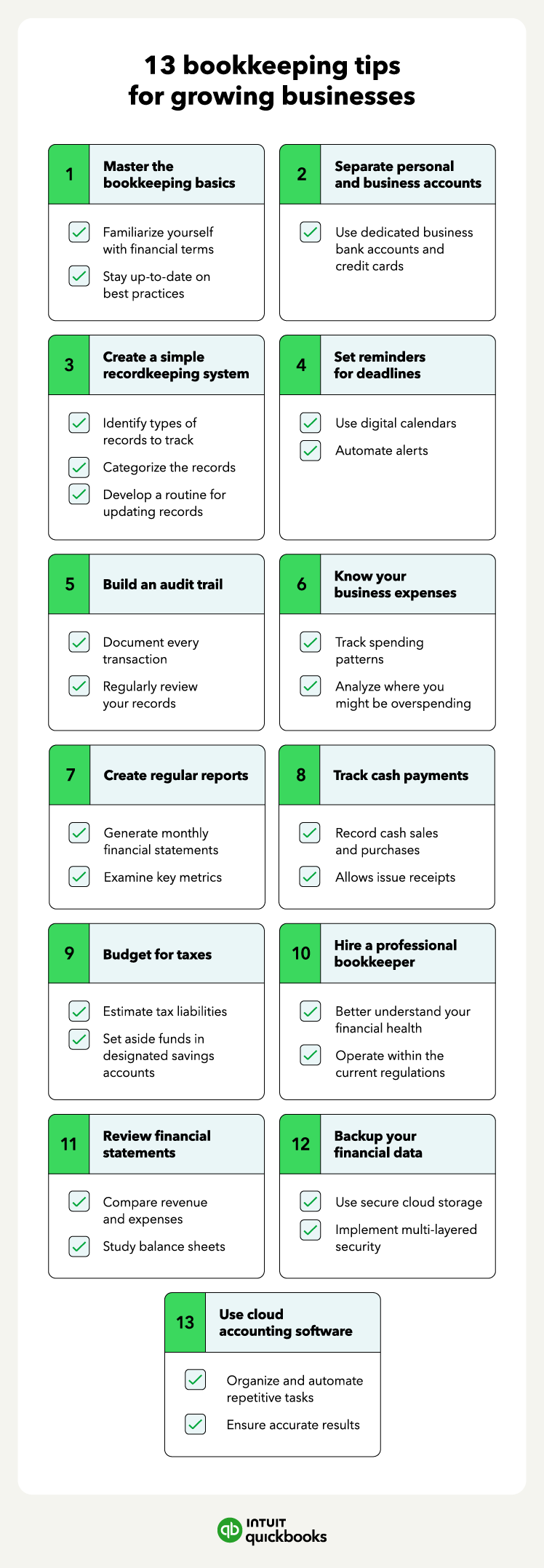
Everyone wants to know how they can be compliant and avoid penalties. And it all starts with a reliable accounting system and accurate bookkeeping. We compiled these bookkeeping tips to help small business owners navigate the bookkeeping process:
Jump to:
- Master the bookkeeping basics
- Separate personal and business accounts
- Create a simple record-keeping system
- Set reminders for deadlines
- Build an audit trail
- Know your business expenses
- Create regular reports
- Track cash transactions
- Budget for taxes
- Hire a professional bookkeeper
- Review financial statements
- Backup your financial data
- Use cloud accounting software
1. Master the bookkeeping basics
Developing a strong foundation in accounting empowers you to confidently navigate the financial world. Understanding key accounting principles, like accrual accounting or the matching principle, will help you interpret financial statements and make informed decisions.
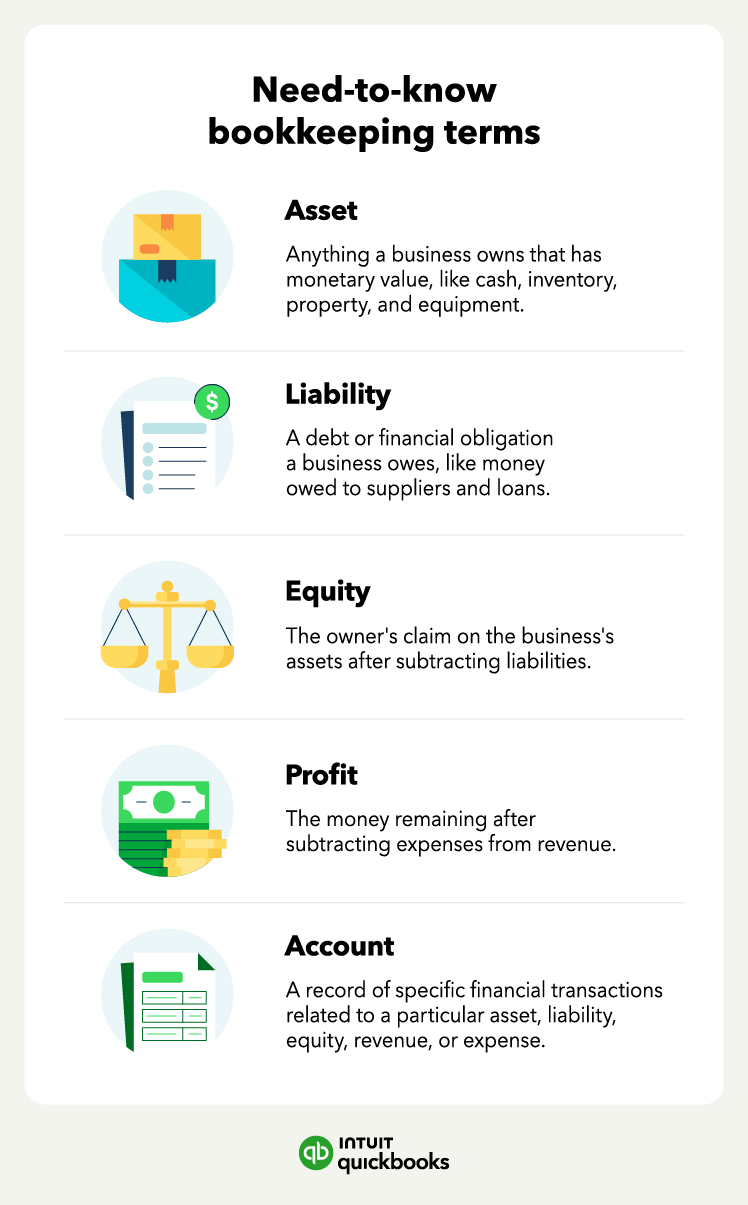
Familiarizing yourself with common financial terms allows you to decipher financial news and reports. Most importantly, staying updated on best practices ensures your bookkeeping methods are efficient and compliant with regulations.
Basic steps of bookkeeping
Bookkeeping starts with just a few essential steps:
- Track every financial activity—sales, expenses, bill payments—so nothing slips through the cracks.
- Sort each transaction into income, expenses, assets, liabilities, or equity to keep your records organized and tax-ready.
- Use clear labels in your digital or physical filing system so receipts and documents are easy to find.
- Compare your records to bank and credit card statements to spot errors or missing items early.
Building these habits gives you a solid process for staying accurate and audit-ready.
How to improve your bookkeeping skills
Here are three smart ways to grow your bookkeeping skills:
- Sharpen your accounting knowledge: Learn core principles like double-entry bookkeeping and how to read financial statements.
- Communicate clearly: Whether you're explaining reports to a partner or preparing for tax season, being able to explain your numbers in simple terms is essential.
- Keep learning: Bookkeeping tools evolve quickly. Stay ahead by trying new accounting software and taking workshops or certifications to deepen your knowledge.
2. Separate personal and business accounts
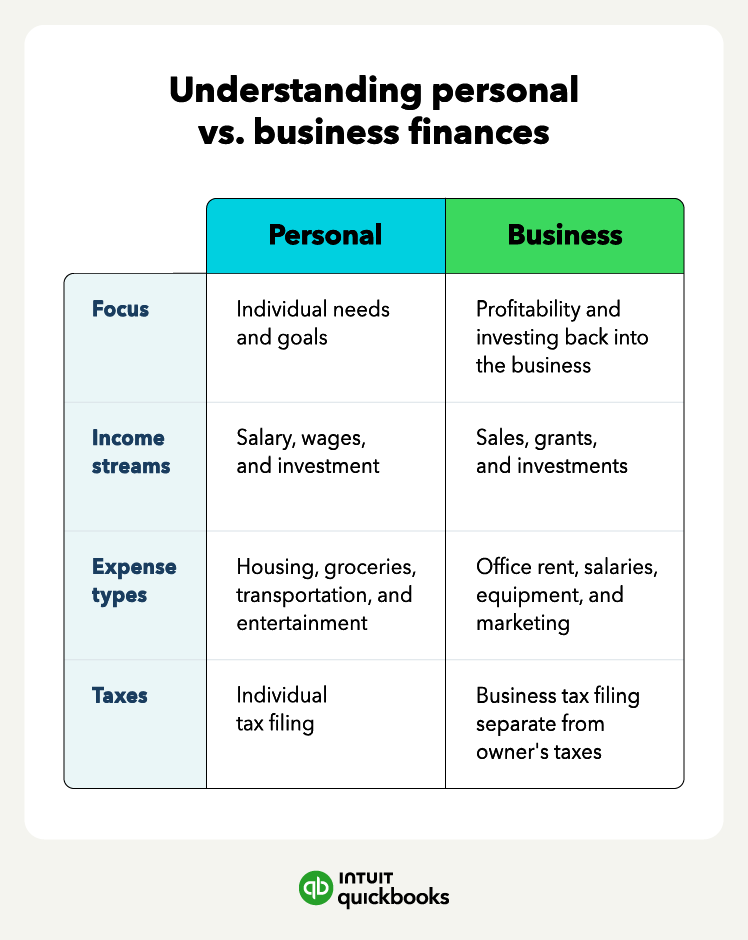
A separate business bank account is a good idea for any small business. In fact, if you’ve registered as an LLC or corporation, you’re required to have a separate small business bank account for business finances. Bingham says that the bookkeeping community frowns upon commingling business and personal funds.
The same goes for using dedicated business credit cards instead of your personal cards, so you leave a clear spending trail. If the IRS audits you and your bank statements have personal and business transactions, the IRS may disallow everything.

Set up a separate business bank account on day one.
Doing this early prevents you from having to untangle personal and business expenses later, which can be a nightmare during tax season. Many banks offer business checking accounts with no monthly fees for new small businesses.
3. Create a simple record-keeping system
The key to effective record-keeping is consistency and organization. Begin by identifying the types of records you'll need to track. This could be anything from receipts and bills to medical documents or personal project notes.
Then, create consistent categories for these records. For example, categorize expenses by rent, utilities, and inventory to make finding information easier later.

Record keeping methods
Maintaining organized files is equally important. Whether you prefer physical folders or digital filing systems, ensure everything is clearly labeled and stored according to your categories.
- Paper filing system: Traditional folders and binders can be effective if you prefer hard copies. Store receipts, invoices, and statements by category or date, and keep them in a secure, fireproof cabinet.
- Spreadsheet tracking: Using tools like Excel or Google Sheets allows you to manually track expenses, income, and other records in one place. This method works best for small businesses with fewer transactions.
- Accounting software: Platforms like QuickBooks automate much of the process by importing transactions, categorizing expenses, and generating reports. This method is efficient, accurate, and scalable as your business grows.
Finally, develop a routine for updating your records. Consider scheduling a weekly or monthly task, depending on the volume of your records. Regularly updating ensures your information is accurate and up-to-date, saving you time and frustration in the long run.
4. Set reminders for deadlines
Incorporating deadline reminders into your bookkeeping routine can help you avoid missing crucial tax filings or accruing late fees. Use a digital calendar, like the one on your smartphone or computer, to schedule entries for upcoming due dates. Set alerts for these entries to give yourself ample time to prepare and submit necessary documents.
Use recurring calendar reminders to stay ahead of tax and filing deadlines. Tools like Google Calendar or QuickBooks can automatically notify you of upcoming payroll tax filings, estimated tax payments, or state compliance deadlines. Staying proactive avoids costly penalties and stress.
5. Build an audit trail
Building a strong audit trail is essential for financial transparency and simplifies future reviews. This involves documenting every transaction, whether it's a purchase, a sale, or a transfer, as well as keeping the corresponding receipts and invoices.
Regularly reviewing your records allows you to identify discrepancies or missing information early on, ensuring your audit trail remains accurate and complete.
6. Know your business expenses
By tracking your spending patterns over time, you can gain valuable insights into where your money goes. Regularly analyze your expenses to identify where you might be overspending. This can reveal opportunities to:
- Cut back on unnecessary subscriptions
- Find cheaper alternatives for recurring purchases
- Negotiate better deals with vendors
By understanding your spending habits, you can make informed decisions and free up resources to allocate towards your financial goals.

7. Create regular reports
Taking your record-keeping a step further involves generating monthly financial statements. These reports, like a balance sheet or income statement, summarize your financial health.
Key metrics to analyze within financial statements include:
- Profit margins
- Debt-to-equity ratio
- Inventory turnover
You can adjust your strategies by identifying trends and areas for improvement. Perhaps you'll focus on increasing sales efforts if profits are lagging, or explore how to reduce operating costs if expenses are on the rise.

8. Track cash transactions
Meticulously record every cash transaction, whether it's a sale or a purchase, to accurately track your cash flow. Always issue receipts to customers for their records and yours.
Regularly reconcile your records with your bank statements to ensure all deposits, withdrawals, and bank fees are accounted for. This process will identify any discrepancies, like missing checks or deposits, and maintain a clear picture of your actual cash balance.
Use a mobile receipt scanning app to track small cash purchases on the go. This reduces lost receipts and helps ensure you properly record every transaction—even if you're buying office supplies or client lunches with cash.
9. Budgeting and forecasting
Effective budgeting and forecasting give you a clear picture of your business’s financial health—both in the short term and long term. By planning ahead, you can better manage cash flow, prepare for expenses, and make confident decisions about growth opportunities.
Budget for things like taxes
Proactively budgeting for taxes throughout the year can prevent a stressful scramble come filing season. Estimate your potential tax liabilities based on your income and deductions. Periodically set aside funds in designated savings accounts to cover this estimated tax burden.
Staying informed of any changes in tax regulations through resources like the IRS website or a tax professional ensures you're using the most up-to-date information for the most accurate estimates and deductions possible.
Financial forecasting
Financial forecasting helps you predict your future revenue, expenses, and cash flow so you can plan strategically rather than reactively. By analyzing past performance alongside market trends, you can anticipate potential challenges, allocate resources effectively, and identify when to invest in growth.
Reliable forecasts also provide clarity for lenders and investors, making it easier to secure funding and build confidence in your business plan.
10. Hire a professional bookkeeper
At the end of the day, business owners want to build their businesses, not manage their books. If you find you’re spending too much time trying to work through your finances, it might be time to consider investing in bookkeeping services.
A bookkeeper can help:
- Ensure you have the most up-to-date financial information for your business
- Organize your books and find mistakes that can stem from using Excel as your primary bookkeeping system
- Prepare your income statements, balance sheets, cash flow statements, and other financial reports correctly
- Acquire business loans
Most of all, a bookkeeper helps you understand your small business’s financial health, allowing you to make smarter financial decisions.

Run your business with confidence
Get help and guidance when you need it from real Intuit Experts.
11. Review financial statements
By analyzing income statements and balance sheets over multiple periods, you can gain valuable insights to guide strategic business decisions. Comparing revenue and expenses in income statements across months or years reveals trends in sales growth, profitability, and cost management.
Similarly, reviewing balance sheets for changes in assets, liabilities, and equity highlights fluctuations in inventory levels, debt obligations, and overall financial strength. Identifying these trends allows you to make informed choices, such as adjusting marketing campaigns to capitalize on rising sales trends.
12. Backup your financial data
Safeguarding your financial data is paramount, and regular backups are the cornerstone of financial security. Use secure cloud storage to ensure your information is accessible from anywhere in case of local hardware failure.
Schedule automatic backups to eliminate the risk of forgetting and create multiple copies, both on the cloud and potentially on a physical drive.
This multi-layered approach protects your data from unforeseen circumstances like natural disasters or data security threats. By prioritizing backups, you guarantee the peace of mind that your financial records are always recoverable, allowing you to focus on your financial goals with confidence.
One of the hardest parts of bookkeeping is keeping everything accurate, especially when transactions come from multiple sources like cash, cards, or bank transfers.
Even small data entry errors or miscategorized expenses can later lead to major reporting issues. That’s why using modern bookkeeping software is so important. It helps track receipts, invoices, and statements more efficiently, especially if your business handles a high volume of transactions.
13. Use cloud accounting software
Selecting reliable cloud accounting software is vital for efficient and secure bookkeeping. These tools offer significant advantages over traditional methods. Accounting software, like QuickBooks Online, helps you organize and automate repetitive tasks related to your financial data, prepare small business taxes, run payroll, and manage invoicing with dedicated invoicing software.
Additionally, the cloud allows you to access your financial data from any device with an internet connection, granting you flexibility and remote access. Use these tips to successfully bookkeep for your business with confidence and accuracy.
Spend more time growing your business
By prioritizing these bookkeeping tips, you can establish a strong financial foundation that promotes informed decision-making and growth.
Virtual bookkeeping software, like QuickBooks Live, empowers you to streamline these tasks, saving valuable time and resources. Consider exploring these solutions to unlock new efficiency and peace of mind in managing your business finances.
Recommended for you




Explore what you can do with QuickBooks
Explore what you can do with QuickBooks

See profit at a glance


Get expert help
Looking for something else?
Firm of the Future
Topical articles and news from top pros and Intuit product experts.
QuickBooks Support
Get help with QuickBooks. Find articles, video tutorials, and more.
Call Sales: 1-800-285-4854





© 2026 Intuit Inc. All rights reserved.
Intuit, QuickBooks, QB, TurboTax, Credit Karma, and Mailchimp are registered trademarks of Intuit Inc.
Money movement services are provided by Intuit Payments Inc., licensed as a Money Transmitter by the New York State Department of Financial Services. For details about our money transmission licenses, or for Texas customers with complaints about our service, please click here.
By accessing and using this page you agree to the Website Terms of Service.