- Start Your BusinessStart Your Business
- Starting a BusinessThe tools and resources you need to get your new business idea off the ground.
- PaymentsEverything you need to start accepting payments for your business.
- Funding & CapitalResources to help you fund your small business.
- Small Business StoriesCelebrating the stories and successes of real small business owners.
- Self-EmployedThe tools and resources you need to run your own business with confidence.
- Run Your BusinessRun Your Business
- Running a BusinessThe tools and resources you need to run your business successfully.
- AccountingAccounting and bookkeeping basics you need to run and grow your business.
- Cash FlowTax and bookkeeping basics you need to run and grow your business.
- PayrollPayroll essentials you need to run your business.
- TaxesTax basics you need to stay compliant and run your business.
- EmployeesEverything you need to know about managing and retaining employees.
- Grow Your BusinessGrow Your Business
- Growing a BusinessThe tools and resources you need to take your business to the next level.
- Sales & MarketingSpread the word: What you need to know about marketing your small business.
- FundingHow to find funding and capital for your new or growing business.
- Midsize BusinessesThe tools and resources you need to manage your mid-sized business.
- Enterprise Suite BlogThe tools and resources you need to grow your own business with confidence.
- E-CommerceHow to start and run a successful e-commerce business.
- TaxesTaxes
- How to fill out a 1099-NEC formLearn how to fill out and file 1099-NEC forms for independent contractors and freelancers.
- How to file small business taxesLearn how to navigate tax season with confidence and minimize your tax liability with this guide.
- Small business 1099: What you need to know for 2025Navigate the complexities of small business 1099 forms and filings with our comprehensive guide.
- 13 documents to give your accountant for small business taxesYour accountant will need these documents to file your small business taxes successfully.
- What's NewWhat's New
- NewsBrowse the latest news, press releases, and reports from QuickBooks.
- AI Resource HubFind the latest on Artificial Intelligence.
- Small Business DataThe latest research and insights for Small Businesses from QuickBooks.
- Small Business StoriesCelebrating the stories and successes of real small business owners.
- Holiday SuccessEverything you need to thrive during your business's busiest seasons.
- AI InnovationsBrowse the latest AI innovations in QuickBooks on the Intuit platform.
- ToolsTools
- All ToolsFree accounting tools and templates to speed up and simplify your workflow.
- AI-Powered Invoice GeneratorTry out this free invoice generator to create an invoice online using Intuit Intelligence.
- Payment Cost CalculatorFind out how much you could save by switching to QuickBooks Payments.
- Paycheck CalculatorAccurately estimate pay for all your employees.










Table of contents
Table of contents
What is an accounting ledger?
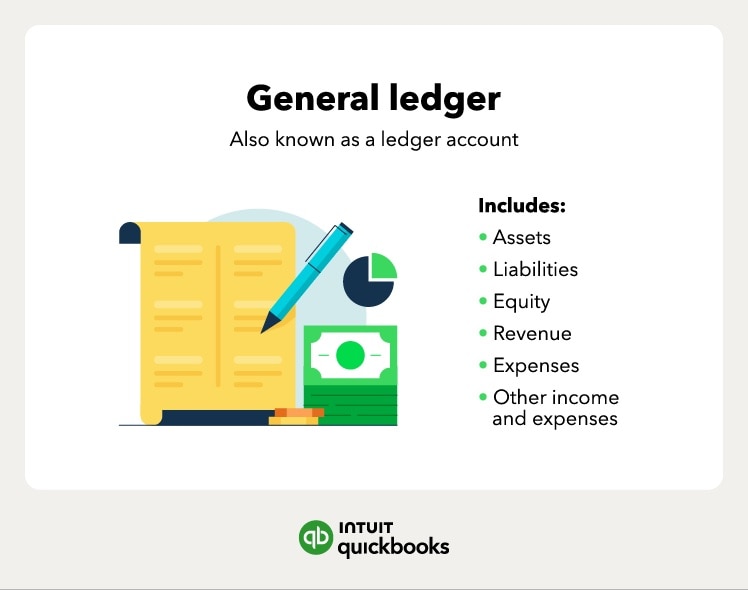
An accounting ledger, also known as a general ledger, is the physical or digital record of a company's finances. It can include liabilities, assets, equity, expenses, and revenue.
Financial confidence remains a major hurdle for new business owners. In fact, according to QuickBooks report on Business Ownership in 2026 more than half of U.S. adults say they lack confidence in key business finances, from cash flow management to taxes. This uncertainty often stems from not having a clear source of truth for their data.
A general ledger, or an accounting ledger, is the main record of your business’s financial standing that centralizes all your financial transactions. Businesses use an accounting ledger to help keep finances in order and prepare several reports, such as balance sheets and income statements.
By maintaining an accurate accounting ledger, you move past the guesswork that impacts 70% of owners' ability to reach their goals. This record is the foundation used to prepare critical reports, such as balance sheets and income statements, ensuring you always have a clear view of your financial health.

How general ledgers work
A general ledger records transactions and helps generate financial statements for investors, creditors, or even regulators. This information can help management make financial and data-based decisions.
For example, a bookkeeper or accountant could use an accounting ledger or general ledger to identify the source of increased expenses and make the necessary corrections.
How businesses use accounting ledgers in double-entry bookkeeping
Double-entry bookkeeping relies on ledgers to track credits and debits, using a trial balance to make sure everything stays balanced. Tools like AI-powered financial assistants can help you streamline this process by automating many tedious tracking tasks.

Take time back with AI agents in your corner
Let QuickBooks AI agents handle the busywork so you and your team can focus on what really matters.
A general ledger uses the double-entry accounting method for generating financial statements. Double-entry bookkeeping keeps the accounting equation, or balance sheet equation, in equilibrium by recording both debits and credits.
If the accounting equation is not balanced, there might be a mistake in your accounting. The balance sheet formula adds liabilities and equity to determine a business’s assets.
The balance sheet formula is:
Liabilities + Owner’s equity = Assets
The double-entry accounting method requires every transaction to have at least one debit (incoming money) and one credit (outgoing money) entry, which must always balance out.

It's important to note that the number of debit and credit entries does not have to be equal, as long as the trial balance is even.
What's included in an accounting ledger
The purpose of general ledger accounting is to create a full record of a business’s transactions, which it can use to prepare its financial statements.
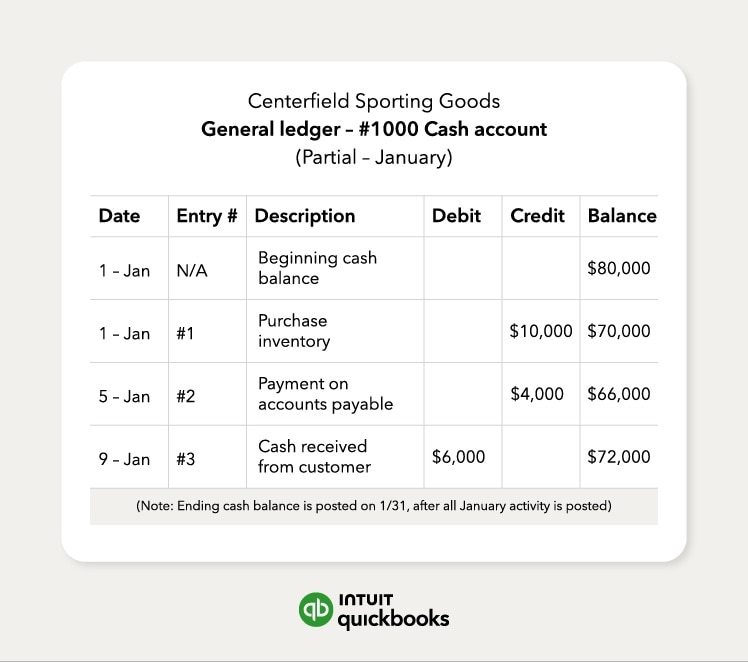
The key information included in an accounting ledger includes:
- A journal entry number and date
- A description of the transaction
- Debit column
- Credit column
- Account balance
The general ledger also contains a chart of accounts, which contains the account names and numbers for categories, such as:
- Assets
- Liabilities
- Equity
- Revenue
- Expenses
- Other income and expenses

Keep your books in order with QuickBooks Free
Staying on top of your finances shouldn't cost you a thing to start.* Track every transaction and see where your business stands with free accounting software.
**Products and features
**QuickBooks Free: Free is currently available at no charge and may be offered for a limited time. Features and availability, are subject to change or discontinuation at any time, with or without notice. If the Free plan is discontinued, we will notify you in advance and provide you with comparable options to transition to another QuickBooks plan that meets your business needs. Certain add-on products may be eligible for use with the Free plan. To utilize any add-on products, you must agree to additional terms and conditions, and limitations and fees for and any selected add-ons will apply.
Terms, conditions, pricing, special features, service and support options are subject to change without notice.
How to create an accounting ledger
Making an accounting ledger is straightforward. To create and format a general ledger to accurately track your business’s financial situation, follow these four steps:
- Set up ledger accounts. These are assets, liabilities, equity, revenue, and expenses.
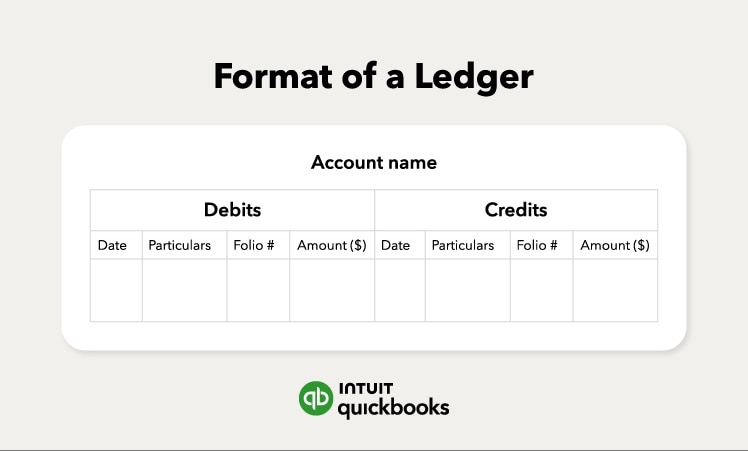
- Create columns. It helps to create your ledgers in the double-entry style. This means you’ll need to create two sides on a ledger—one for credits and one for debits. Each side will have columns for the date, description, the ledger or folio number, and an amount.
- Record transactions. As you conduct business, record the transactions in the appropriate ledger. If you are using cloud-based software, many of these entries will be captured automatically via bank feeds. At the end of your reporting period, you’ll consolidate the data from all ledgers into the general ledger.
- Create a trial balance. The trial balance is the record of all credits and debits in your general ledger. If everything has been accounted for and recorded correctly, the balance of the credit and debit columns should be equal. When your trial balance is equal, your books are balanced.
Your ledgers should always have the information you need to accurately track where money is coming from and where it's going.
Common mistakes to avoid
Even with a solid ledger, small errors can throw off your books. Watch out for:
- Skipping transactions, which causes your books to be incomplete
- Mixing personal and business expenses makes it hard to track profitability
- Forgetting to reconcile your accounts, which can hide mistakes until year-end
Regularly reviewing your ledger and using accounting software like QuickBooks can help you catch errors before they become bigger problems.
The shift to cloud-based ledgers
Modern bookkeeping has moved beyond physical books and static spreadsheets. With the integration of cloud-based ledgers that enable multi-user access, you and your accountant can simultaneously view and update financial data from any location.
One of the most significant advantages of a cloud ledger is instant reconciliation. These systems pull in transactions from your bank accounts and credit cards in real-time. This reduces manual data entry and ensures your trial balance is always up to date, rather than waiting until the end of the month to spot discrepancies.

The difference between journals and accounting ledgers
If you look at the information that’s recorded in an accounting journal and an accounting ledger, a lot of it would look the same. But there are some differences between how the two records function.
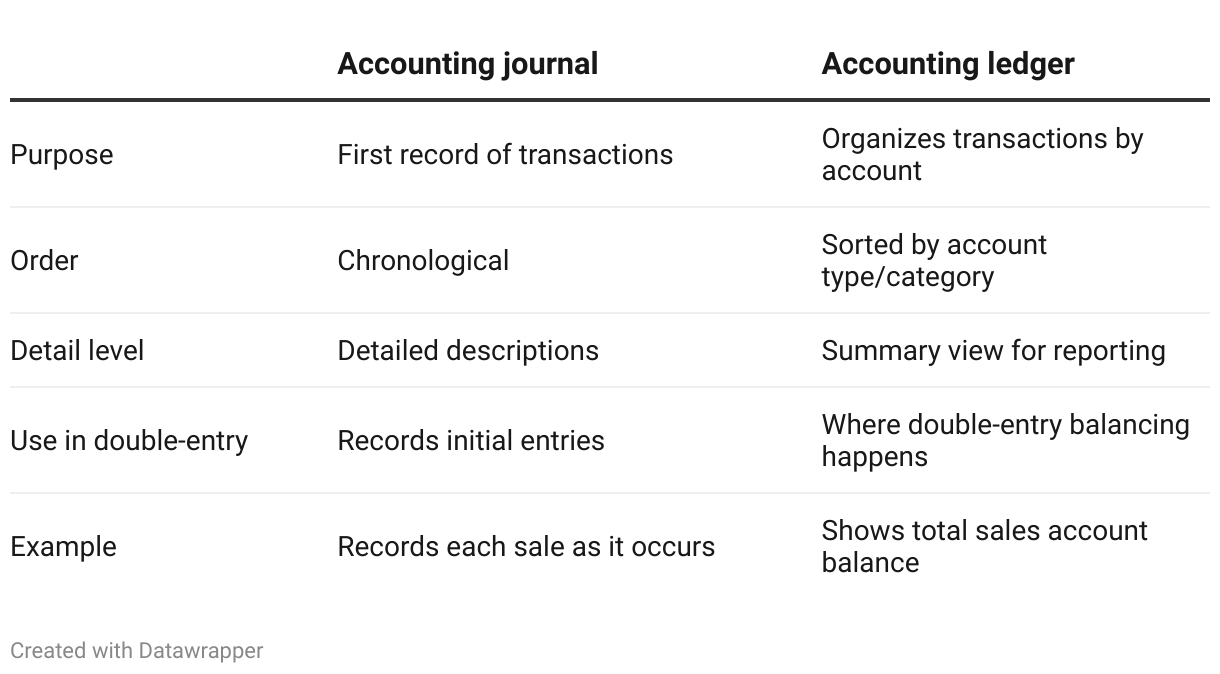
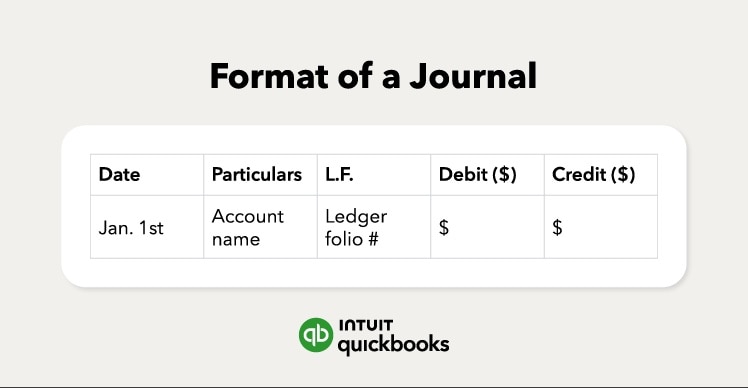
Think of your accounting journal as the first record of each transaction. Try to record every transaction in chronological order with as much detail as possible to ensure it can serve as a resource for anyone who needs more information about an entry and you can easily transfer it to a ledger.
A ledger is an aggregation of data from relevant journals. One key difference between a journal and a ledger is that the ledger is where double-entry bookkeeping takes place. That's why there are two sides to a ledger, one for debits and one for credits.
A general ledger, or accounting ledger, is one type of ledger. It's where the data from other ledgers is consolidated.
The difference between a general journal and a general ledger
A general journal is the first step for recording your business transactions in chronological order. It’s the initial point of entry into your company’s accounts. After you record transactions in the journal, add them to the general ledger, which organizes them by account to prepare financial statements and maintain balance. Accounting software can do this for you manually.
Other types of business ledgers
In addition to the accounting ledger, there are several kinds of ledgers that you might use in the course of bookkeeping for your business. Most accounting software will compile some of these ledgers while still letting you view them independently. Depending on the size of your business and what your business does, you might not need to use all of them. Here are some common types of ledgers and when to use them.
Purchase ledger
Your purchase ledger is there to help you keep track of items your business buys. If your business doesn’t make enough purchases to warrant keeping them in their own ledger, you can include them in your general ledger.
Purchase ledgers can contain:
- Date of purchase
- Supplier name
- Invoice or purchase order number
- Amount paid
- Tax paid
Sales ledger
A sales ledger is a detailed list in chronological order of all sales made. This ledger is often also used to keep track of items that reduce the number of total sales, such as returns and outstanding amounts still owed.
Sales ledgers can contain:
- Date
- Customer name
- Invoice number
- Number of items sold
- Tax charged on items sold
- Shipping cost
See how this voiceover artist uses Intuit Experts.
Sub-ledgers
A sub-ledger, or subsidiary ledger, provides more detailed tracking for specific accounts. For example, you might have a sub-ledger for accounts payable or inventory purchases.
These ledgers break down transactions so you can see individual activity without crowding your main general ledger. Sub-ledgers ultimately support the entries in your general ledger by offering more granular detail.
Cash book
A cash book is a unique type of record because it acts as both a journal and a ledger. It logs cash receipts and payments as they happen, maintaining a running balance similar to a bank account.
Because it’s updated daily, errors are easier to catch and fix in real time, rather than waiting for a monthly close. This makes it a vital tool for businesses that handle a lot of cash transactions.
Why do general ledgers matter for small businesses
Keeping an accurate general ledger does more than fulfill tax requirements—it gives you a clear picture of how your business is doing. A well-maintained ledger helps you:

- Spot cash flow problems early by tracking incoming and outgoing money.
- Make smarter decisions about spending, hiring, and investments.
- Prepare reliable financial statements for lenders or investors.
- Stay organized at tax time and avoid scrambling for missing details.
With an organized ledger, you can focus more on growing your business instead of fixing errors or hunting down missing transactions.
Streamline your accounting and save time
Understanding what an accounting ledger is and its importance to your business finances can help you organize and track transactions more easily.
You can save time on bookkeeping tasks with experts by your side. QuickBooks Online users have access to Intuit Expert Assisted Bookkeeping, where experts provide guidance, answer questions, and show you how to do tasks in QuickBooks. Have more time to work on what you love when you spend less time on bookkeeping.
Disclaimers:
Intuit Expert services require QuickBooks Online subscription. Additional terms, conditions, limitations, and fees apply.
You could save up to 25% on transaction costs².
Speak with us now to see if you qualify.
Talk to sales 1-800-515-8366
Monday - Friday, 6 AM to 4 PM PT
Tax Resources

Small business tax preparation checklist for 2026: 8 things business owners should know

The ultimate guide to small business tax forms and filing deadlines

Self-employed tax survival kit: what to have ready before you file
Bookkeeping

How much does a bookkeeper cost? Understanding bookkeeper pay rates in 2026

Should you outsource bookkeeping? Benefits, costs, and how it works
Customer Stories

Why Amborella Organics trusts QuickBooks AI to handle the heavy lifting of a $10M+ vision
At Petal Salon, Amanda Lee Harvey keeps her clients in the pink

Normal Ice Cream saves 7 hours a week on banking admin thanks to QuickBooks Bill Pay

How The Baby Pantry shows up for families in need
Recommended for you



Explore what you can do with QuickBooks
Explore what you can do with QuickBooks

See profit at a glance


Get expert help
Looking for something else?
Firm of the Future
Topical articles and news from top pros and Intuit product experts.
QuickBooks Support
Get help with QuickBooks. Find articles, video tutorials, and more.
Call Sales: 1-800-285-4854





© 2026 Intuit Inc. All rights reserved.
Intuit, QuickBooks, QB, TurboTax, Credit Karma, and Mailchimp are registered trademarks of Intuit Inc.
Money movement services are provided by Intuit Payments Inc., licensed as a Money Transmitter by the New York State Department of Financial Services. For details about our money transmission licenses, or for Texas customers with complaints about our service, please click here.
By accessing and using this page you agree to the Website Terms of Service.