- Start Your BusinessStart Your Business
- Starting a BusinessThe tools and resources you need to get your new business idea off the ground.
- PaymentsEverything you need to start accepting payments for your business.
- Funding & CapitalResources to help you fund your small business.
- Small Business StoriesCelebrating the stories and successes of real small business owners.
- Self-EmployedThe tools and resources you need to run your own business with confidence.
- Run Your BusinessRun Your Business
- Running a BusinessThe tools and resources you need to run your business successfully.
- AccountingAccounting and bookkeeping basics you need to run and grow your business.
- Cash FlowTax and bookkeeping basics you need to run and grow your business.
- PayrollPayroll essentials you need to run your business.
- TaxesTax basics you need to stay compliant and run your business.
- EmployeesEverything you need to know about managing and retaining employees.
- Grow Your BusinessGrow Your Business
- Growing a BusinessThe tools and resources you need to take your business to the next level.
- Sales & MarketingSpread the word: What you need to know about marketing your small business.
- FundingHow to find funding and capital for your new or growing business.
- Midsize BusinessesThe tools and resources you need to manage your mid-sized business.
- Enterprise Suite BlogThe tools and resources you need to grow your own business with confidence.
- E-CommerceHow to start and run a successful e-commerce business.
- TaxesTaxes
- How to fill out a 1099-NEC formLearn how to fill out and file 1099-NEC forms for independent contractors and freelancers.
- How to file small business taxesLearn how to navigate tax season with confidence and minimize your tax liability with this guide.
- Small business 1099: What you need to know for 2025Navigate the complexities of small business 1099 forms and filings with our comprehensive guide.
- 13 documents to give your accountant for small business taxesYour accountant will need these documents to file your small business taxes successfully.
- What's NewWhat's New
- NewsBrowse the latest news, press releases, and reports from QuickBooks.
- AI Resource HubFind the latest on Artificial Intelligence.
- Small Business DataThe latest research and insights for Small Businesses from QuickBooks.
- Small Business StoriesCelebrating the stories and successes of real small business owners.
- Holiday SuccessEverything you need to thrive during your business's busiest seasons.
- AI InnovationsBrowse the latest AI innovations in QuickBooks on the Intuit platform.
- ToolsTools
- All ToolsFree accounting tools and templates to speed up and simplify your workflow.
- AI-Powered Invoice GeneratorTry out this free invoice generator to create an invoice online using Intuit Intelligence.
- Payment Cost CalculatorFind out how much you could save by switching to QuickBooks Payments.
- Paycheck CalculatorAccurately estimate pay for all your employees.











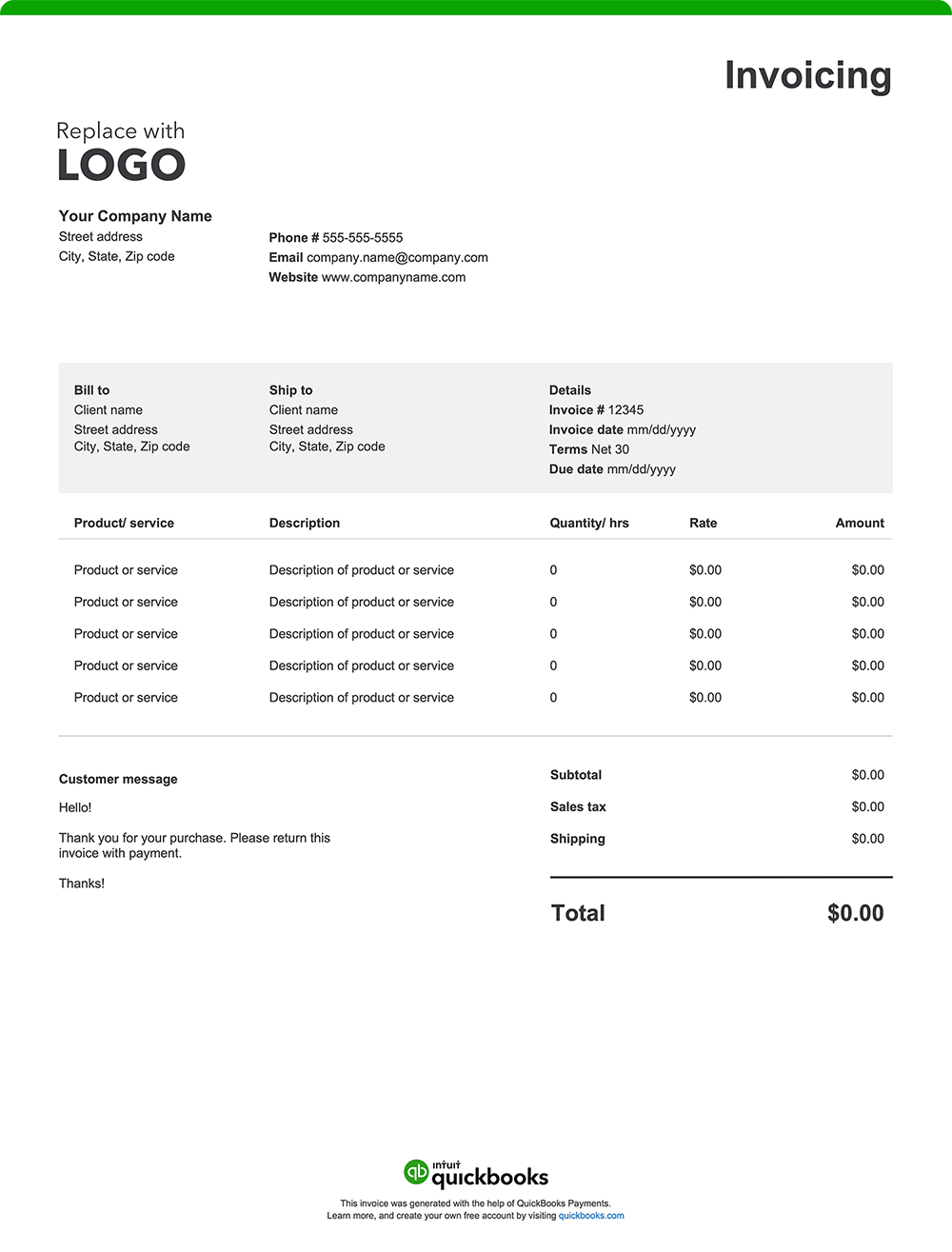
You’ve finished your project. The big renovation, complex repair, or challenging remodel is now complete. Now it’s time to get paid for your labor and expertise. Whether you create an invoice using a free invoice template or invoicing software, an invoice provides transparency and helps ensure accountability. Download a free, customizable, and printable contractor invoice template from QuickBooks.
*See invoice template | Generate free invoice*
Jump to:
8 things contractor invoices should include
Whether you're a general contractor managing large-scale projects or a specialized tradesperson handling smaller jobs, you'll need an invoice that outlines services and deliverables to ensure smooth transactions. Here are eight essential elements every contractor invoice should include:
1. Business details
Your invoice should include your contracting company’s name, address, contact information, and any relevant licensing details. This makes it easy for clients to identify your business, while the licensing information provides reassurance that you’re a qualified professional. Enhance your brand recognition by adding a logo.
2. Date
Both contractors and customers rely on the invoice date for various purposes.
Contractors use it to track when services were provided, set payment terms, and support cash flow management. Customers look to the date to determine payment deadlines, manage budgets, and resolve disputes if necessary.
The invoice date also plays a role in tax compliance, determining the correct tax period for reporting income or claiming business expenses and ensuring adherence to legal and financial regulations.
3. List of the work completed
Describe your work in detail, such as installing flooring, upgrading an electrical panel, or repairing a roof.
An inclusive list helps the client fully understand the work completed, reducing the likelihood of disputes over charges.
4. Cost of labor breakdown
Break down your labor costs. How you do this can vary depending on how you bill, for example:
- Hourly rates
- Flat project rates
- Team labor rate, which might be calculated as a combined rate or listed per worker
- Additional charges such as overtime, specialty labor, rush fees, etc.
Be specific and itemize each task separately to ensure accurate pricing. Labor rates can differ significantly depending on the trade. For example, you might have different hourly rates for electricians, plumbers, carpenters, and other specialized technicians.
5. Cost of products and materials used
List the materials used for the project, such as lumber, paint, or tiles. Consider how you will specify pricing. A common method is to detail costs as follows:
- The type and quantity of products or materials used
- The price charged per unit
- The cumulative total of units
6. Any additional charges incurred
Be sure to include any supplemental charges. Some examples include costs related to:
- Permits
- Inspections
- Filing
- Delivery or disposal fees
- Specialized equipment rentals
7. The total amount due
The "Amount Due" section of your invoice should outline the final total, incorporating:
- The initial subtotal of materials used and services provided
- Applicable taxes based on local requirements
- Additional fees, such as delivery or handling charges
- Any discounts applied to the original cost
- Any other adjustments impacting the total amount owed
8. Payment terms and instructions
Your invoice should include straightforward payment terms and instructions that outline exactly how and when you expect to be paid. Be sure it lists the following:
- Payment timeframe: Specify the timeframe for payment, such as "Net 30" (payment due within 30 days of the invoice date), "Due on Receipt," or any other agreed-upon terms.
- Accepted payment method: List the payment types you accept, such as checks, credit cards, online payments, or cash.
- Payment details: Include all required information for each payment method, like your check mailing address or online payment portal link.
- Late payment penalties: If you charge penalties for late payments, state the penalty amount or percentage.
- Early payment discount: Mention any discount available for early payment and eligibility criteria.
How often should contractor invoices be sent to clients?
The frequency with which you should send an invoice varies greatly depending on the project type and the agreement you have set with your client. For smaller or one-time jobs, you may want to send the invoice upon project completion. For ongoing or larger projects, contractors often bill on a weekly, biweekly, or monthly basis, depending on the project's milestones or payment schedule.
Do contractors give itemized invoices?
Yes, contractors often provide itemized invoices. Breaking down labor and material costs provides a record for both you and your customers. Itemization can be helpful for budgeting, accounting purposes, and future project planning and scoping.
Contracting invoice template best practices
As a contractor, you want to make it easy for your clients to understand their invoices and pay on time. Follow these best practices to create professional invoices and maintain a steady cash flow.
Add business branding
Reinforce your professional image by including your business logo and consistent brand colors on your invoices.
Date the invoice and assign an invoice number
Date and number each invoice to keep billing organized and simplify recordkeeping and referencing.
Include client details
List your client’s full name, address, and contact information.
Display licensing and certification information
Include your contracting license number and any relevant certifications.
Include project details
If applicable, add the project name, location, and job reference number. This information is especially important if you're handling multiple jobs for the same client.
Separate labor and material costs
Differentiate between labor charges and material costs. Include labor hours worked, hourly rates, and a breakdown of material expenses.
Add milestone or phase information
If the project is billed in stages, avoid confusion by specifying which phase or milestone the invoice covers.
Attach supporting documents
Include any supporting documents like receipts, architectural drawings, timesheets, purchase orders, or material invoices as attachments.
Define payment terms
State the due date, accepted payment methods, and any penalties for late payments. Clear terms help manage client expectations and encourage prompt payment.
Double-check for accuracy
Proofread the invoice. Mistakes can cause payment delays and affect client satisfaction.
Save and share as a PDF
Export the completed invoice as a PDF to preserve formatting and ensure compatibility on any device.
Contractor invoice template vs. QuickBooks contracting invoicing software
As a contractor, you want to ensure that you get paid promptly—and that starts with creating and sending your invoice. Using an Excel, Word, or PDF invoice template is a basic solution for designing and sending invoices. The problem is it lacks the efficiency and functionality offered by QuickBooks invoicing and accounting software.
Customize without repetitive manual entry
Traditional invoice templates allow contractors to personalize invoices with branding elements like a logo or contact details. However, each invoice will require manual input for listing customer details, project descriptions, specific services provided, and materials used.
QuickBooks invoicing eliminates repetitive manual entry by automatically populating customer details, project descriptions, and pricing information, saving contractors time and reducing the risk of errors. Its automation and streamlined processes ensure professional, accurate invoices with minimal effort.
Automate invoices
Contractors constantly juggle complex projects — often simultaneously. Standard invoice templates often fall short as they require manual tracking of payments, updates, and adjustments. QuickBooks automates these processes with features like:
- Progress invoicing. With progress invoicing, you can easily create invoices for different project phases, ensuring you get paid as the work progresses.
- Automatic payment matching. Transactions are automatically recorded and linked to the correct job or client, eliminating manual reconciliation and reducing errors.
- Batch invoicing. Generate multiple invoices from a single-entry input, as opposed to manually entering information per individual invoice.
- Manage change orders. Contractors can make changes to an existing estimate right in the software. When a change order is generated, it integrates into the invoice, helping to track costs and streamline communication regarding scope-of-work modifications.
- Real-time tracking. Manage project timelines and avoid delays with real-time tracking of outstanding payments and project expenses. This ensures better cash flow management, allowing you to address delays efficiently and keep projects moving forward.
Leveraging advanced automation tools with QuickBooks reduces administrative work and eliminates delays, so you can focus on completing your projects.
Facilitate cash flow management
Contractors often deal with staggered payments or milestones, which can make cash flow management challenging. Unlike manual invoice templates, QuickBooks integrates invoicing with bookkeeping, offering tools to track unpaid invoices, monitor due dates, and view payment histories. These features help contractors maintain steady cash flow, plan for expenses, and ensure financial stability throughout a project lifecycle.
Send or schedule invoices
Whether you’re in the office or on a project site, QuickBooks makes it easy for you to send invoices directly via email or SMS for one-time services or ongoing projects. For regular clients, automated recurring invoices can save time, especially for services like monthly maintenance or phased project payments.
Invoice from anywhere
Create and send invoices or estimates from your phone or tablet. Attach plans, contracts, or photos, and get notified when they're viewed or paid.
Track invoices
Contractors can stay organized and on top of their payments—and their cash flow—with QuickBooks' tracking features. You'll know when your clients view or pay invoice and follow up on overdue accounts confidently.
Get paid faster
QuickBooks can help you get paid faster by giving you the ability to offer multiple payment options, including credit/debit cards, ACH, Apple Pay®, PayPal, and Venmo.
How does progress invoicing work in contracting?
Progress billing allows contractors to invoice clients at different stages of a project instead of waiting until the end. This involves sending invoices that reflect the percentage of work completed, along with any necessary supporting documentation. Clients pay for the completed portion of the work, helping you sustain cash flow and manage expenses throughout the project's duration.
Try our free invoice generator powered by AI
Create a custom contractor invoice online with our free generator — autofill job details, add branding, download, and send. Prefer a downloadable blank invoice template? Use our free printable invoice templates in Word, Excel, PDF, and other formats.
For contractors seeking an easier and faster way to handle invoicing, QuickBooks offers a practical solution. Our invoicing software simplifies the billing process by automating the creation of professional, instantly payable invoices. It also integrates seamlessly with expense tracking and reporting tools, centralizing your financial management. This streamlined approach helps with tax preparation, improves organization, and provides valuable insights to support smarter business decisions.
Recommended for you



Explore what you can do with QuickBooks
Explore what you can do with QuickBooks

See profit at a glance


Get expert help
Looking for something else?
Firm of the Future
Topical articles and news from top pros and Intuit product experts.
QuickBooks Support
Get help with QuickBooks. Find articles, video tutorials, and more.
Call Sales: 1-800-285-4854





© 2026 Intuit Inc. All rights reserved.
Intuit, QuickBooks, QB, TurboTax, Credit Karma, and Mailchimp are registered trademarks of Intuit Inc.
Money movement services are provided by Intuit Payments Inc., licensed as a Money Transmitter by the New York State Department of Financial Services. For details about our money transmission licenses, or for Texas customers with complaints about our service, please click here.
By accessing and using this page you agree to the Website Terms of Service.