You could save up to 25% on transaction costs².
Speak with us now to see if you qualify.
Talk to sales 1-800-515-8366
Monday - Friday, 6 AM to 4 PM PT

Table of contents
Table of contents
Turning an initial conversation into a professional proposal can make all the difference when you’re trying to win new business. That’s where a quote comes in. It helps you lay out the scope of work, pricing, and expectations upfront so both you and your client are aligned from the start.
A quote template makes that process faster and more consistent. Whether you’re a freelancer, small business owner, or part of a sales team, using a template can help you respond quickly and create a positive first impression.
In this guide, you’ll learn what a quote template is, how to use one step by step, and how it compares to an invoice so you know when to use each.
A quote template is a pre-formatted document used to outline the cost of a product or service before any work begins. It helps you communicate what you’re offering and how much it will cost in an organized, professional way from the very first interaction.
Using a template lets you skip rebuilding each quote from scratch. Add the project details—such as services, quantities, and pricing—into a consistent format. This helps keep everything accurate and easy for clients to review.
The following quote template is an example of how you can lay out key project details, pricing, and terms for a potential client.

No matter your industry, when a potential client asks for pricing, your response sets the tone for everything that follows. A well-prepared quote shows you’re organized, thoughtful, and ready to deliver. It also helps prevent back-and-forth later by answering questions before they come up.
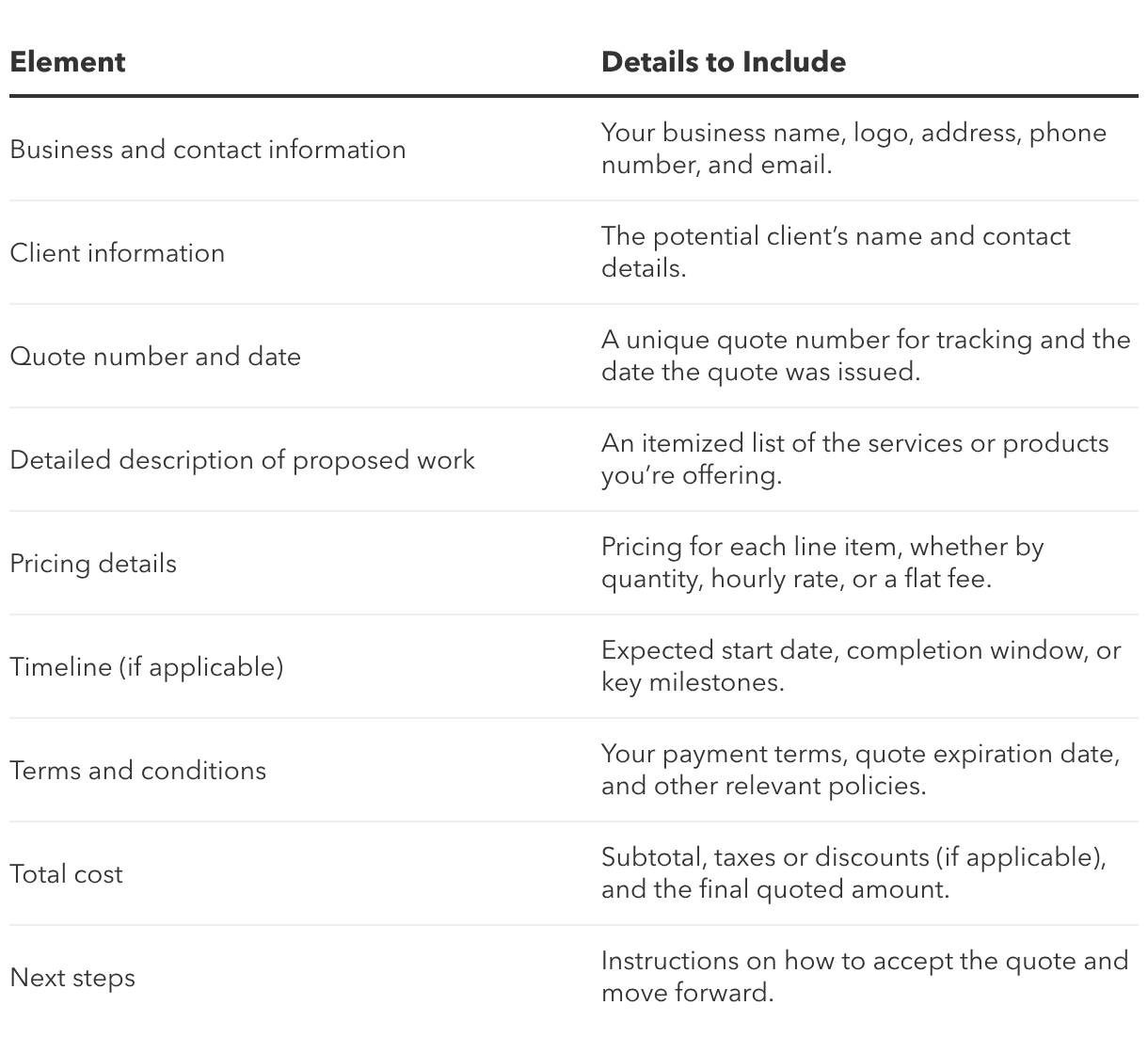
Using a standardized template makes it easier to cover all the right details every time. Here’s what to include:
Start with the basics: your business name, address, phone number, and email. Adding your logo reinforces your brand and makes your quote easy to recognize.
Include your client’s name and contact details so the quote is clearly tied to the correct person or business.
Assign a unique quote number for tracking. This makes it easier to reference later, especially if the quote is approved and turned into an invoice. Include the issue date as well.
List out exactly what you’re offering. Break it into line items so clients can quickly see what’s included. Clear descriptions help avoid confusion later on.
Show how each item or service is priced, whether by quantity, flat rate fee, or hourly rate. Transparent pricing builds trust and reduces questions.
If timing matters, include an expected start date, completion window, or key milestones.
Add any important details about payment, revisions, or policies. You can also note how long the quote is valid (for example, 30 days).
Include a total at the end. Break out subtotals, taxes, or discounts if needed, so the final number is easy to review.
Let the client know how to proceed. For example, you could ask them to sign the quote, confirm by email, approve it through your system, or pay a requested deposit.
Quote templates are used by a wide range of professionals who need to share pricing before work begins. They’re especially helpful in industries where services or project scope can vary from one client to the next.
Once you have a template in place, creating a new quote becomes a quick, repeatable process. The goal is to tailor the details for each client while keeping your format consistent and easy to follow.
Start by filling in your business information, including your name, contact details, and branding if applicable. Then add your client’s name and contact information.
This step may seem basic, but it sets the foundation. It ensures your quote is tied to the proper project and gives your client an easy way to reach you with questions or approval.
Next, break down what you’re offering. List each product or service as a separate line item, including a short description and pricing.
Itemization helps clients understand exactly what they’re getting. It also makes it easier to adjust the scope or pricing if the project changes before approval.
If you need help wording descriptions, AI tools can be useful. They can help you draft concise, client-friendly language that accurately reflects your offering.
Outline the key details that guide how the work will move forward. This includes payment terms, any required deposits, and the validity period of the quote.
Adding a validity period is especially important. It protects you if costs change and encourages clients to make a timely decision.
Before sending the quote, take a moment to review everything. Double-check pricing, descriptions, and totals to make sure they’re accurate and complete.
Once it’s ready, send the quote using your preferred method, such as email, PDF, or directly through your accounting software.
A quote template and an invoice template may look similar, but they serve different purposes at different stages of a project.
A quote is shared before any work begins. It outlines what you plan to deliver and how much it will cost, much like how you would create an estimate or proposal. An estimate may be a rougher calculation, while a proposal can include more context or strategy, but all serve a similar purpose: setting expectations before work starts.
An invoice comes after the work is completed (or at agreed milestones). It’s a request for payment based on what was delivered.
In simple terms:
A quote gets the conversation moving, but the real value comes from what happens next. Once your client is ready to move forward, having a connected system in place can make the transition from planning to payment feel seamless.
With QuickBooks accounting software, you can create estimates to send quotes and manage everything from approval to payment in one place.
Design quotes that reflect your business and the job at hand. Customize with your logo and branding and add details like pricing, discounts, and payment terms so each quote feels complete and client-ready.
Lock in work sooner by adding a deposit requirement directly to your quote in QuickBooks (created as an estimate). Customers can pay the deposit online, and when you convert that estimate to an invoice, the paid deposit is automatically applied as a partial payment. This helps confirm commitment upfront and reduces the risk of starting work without payment in place.
Email your quote so clients can review the details, approve, and submit a deposit through a secure online portal.
Track when quotes are viewed, accepted, and paid. QuickBooks gives you real-time visibility so you can follow up at the right time and better manage incoming payments.
When the work is ready to be billed, convert your quote into an invoice without starting over. This keeps your records consistent and saves time on admin work.
Connecting your quotes and approvals while speeding up payments helps create a more efficient workflow. With less time spent on admin tasks, you can stay focused on running your business.
Try our free generator to create quotes, estimates, and invoices. Autofill job details, add branding, download, and send.
For an even faster way to manage quotes, QuickBooks quote and estimating software makes it easy to build, send, and track quotes all in one place. Convert approved quotes into invoices, stay organized, and get a real-time view of your cash flow—all inside QuickBooks.

Call Sales: 1-800-285-4854