









You could save up to 25% on transaction costs².
Speak with us now to see if you qualify.
Talk to sales 1-800-515-8366
Monday - Friday, 6 AM to 4 PM PT

Table of contents
Table of contents
Things to remember about finance process automation:
Every new customer, vendor, and transaction can add work to your team's week. As volume grows, processes that once worked well can start taking more time, and hiring another person may begin to look like the obvious answer.
But before adding headcount, it’s worth looking at the work already on your team’s plate. Repetitive reporting, approvals, reconciliation, and administrative tasks can consume capacity that automation may help free up.
QuickBooks Online Advanced customers report closing their books 2.2 days faster on average each month, the equivalent of saving approximately $5K in time per year. That time can create more room for work such as analysis, planning, and decisions that require human judgment.
Finding that capacity starts with knowing where the bottleneck is: the workflow, the system, or a genuine need for more people.
As a business grows, more customers, vendors, transactions, approvals, and reporting requirements can create more work for the people managing the financial operation. Eventually, the workload can make another hire feel inevitable.
Before assuming the problem is headcount, look at where the team's time is actually going. If people are repeatedly rebuilding reports, chasing approvals, entering the same information in multiple places, or working through routine transactions one at a time, part of the capacity problem may be the workflow itself.
That doesn't mean automation replaces the need to hire. Growing businesses eventually need new skills and additional people. But understanding how much time recurring financial processes consume can help you distinguish between work that genuinely requires more people and work that could be handled more efficiently.
Metrics such as processing time, transaction volume, close timing, and the cost of recurring finance work can give you useful context for that decision.
Certain recurring workflows can consume more of a team’s capacity as transaction volume and reporting needs grow. Here are four useful places to look for manual work that may be worth standardizing or automating.
The board wants numbers, and getting them means exporting data from multiple systems, rebuilding it in a spreadsheet, and doing it all again next cycle. By the time leadership sees the report, the numbers are already stale, and the hours spent building it are hours nobody gets back.
Your team can use customizable reporting and dashboards in QuickBooks Online Advanced to reduce repeated report rebuilding and make frequently reviewed financial information easier to access.
When approval requests live primarily in inboxes, ownership and status can become harder to track. Payments may wait while teams determine who needs to review them or whether the request meets the business's approval rules.
With QuickBooks Online Advanced, you can use custom approval workflows to move requests to the right approver automatically and log each sign-off.
As accounts, transactions, and connected systems increase, reconciliation can take more time, especially when the same information has to be compared across multiple sources.
Connecting financial data across more of the tools your team uses can reduce duplicate entry and make reconciliation easier to manage. With QuickBooks Online Advanced, growing businesses can reduce how often the same information needs to be moved manually between separate tools.
When recurring invoices, transactions, and data entry are handled one at a time, the manual workload can increase as transaction volume grows. Highly repetitive, rules-based work is often a good place to evaluate automation as transaction volume grows.
You can reduce the number of individual steps required for repeatable transaction work with QuickBooks Online Advanced’s batch and recurring transaction capabilities.

Start by looking at the transaction types your team handles most often each week, such as invoicing, bill entry, or recurring transactions. High-volume, repeatable work can be a useful place to evaluate whether batch or recurring workflows could reduce manual effort.
One of these issues may be manageable on its own. When several start showing up together, it’s worth taking a closer look at the process behind them.
Run through the checklist before you draft a job requisition. Each item points to a workflow worth investigating for standardization or automation.

The more boxes checked, the stronger the case for evaluating whether better-connected workflows could create capacity before you add headcount.

A connected platform can reduce administrative work by limiting how often the same information needs to be entered, transferred, or reconciled across separate tools. When financial data moves through connected workflows, teams can spend less time maintaining the flow of information and more time using it.
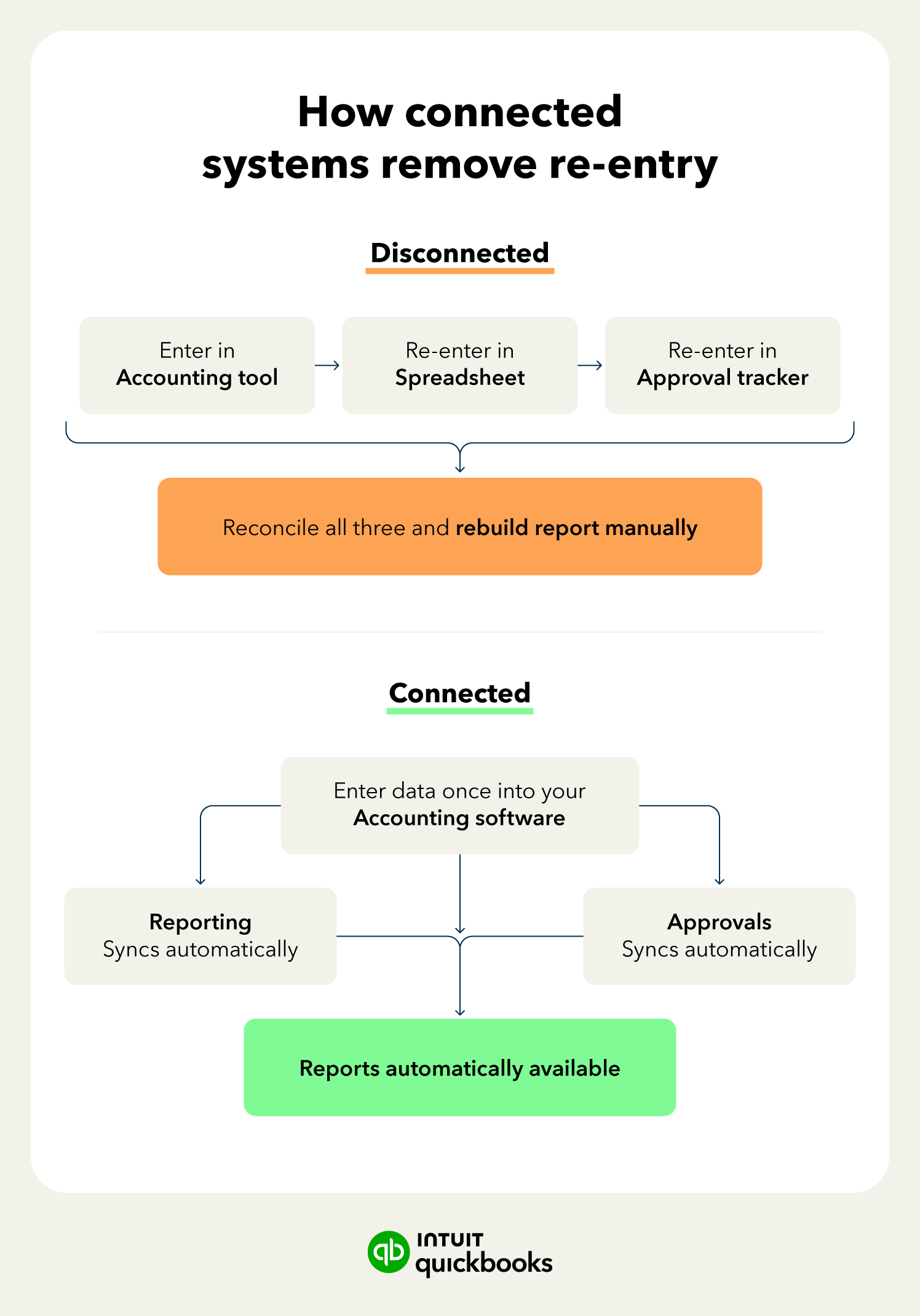
Connected workflows can also make financial performance easier to see. Growing businesses can use customizable reporting in QuickBooks Online Advanced to make frequently reviewed financial information easier to access across classes, locations, projects, and other relevant views. That gives owners and teams more direct visibility into performance and can reduce recurring requests for one-off reports.
One sign your systems may be disconnected is how often your team has to reconcile two versions of the same number. Track that for one close, and you’ll have a clearer idea of where to start.
Automation speeds up whatever you give it, so automating a broken process won’t fix the problem underneath it. Start by mapping and fixing the workflow before you decide what to automate.
Not sure where to start? Track how your team actually spends the next two weeks, then rank recurring tasks by how often they happen and how much time they consume. The work near the top of that list is worth evaluating for standardization or automation first.
Manual work can pile up as the business grows, but adding headcount isn’t always practical.
Before assuming every increase in workload requires another hire, look at the process underneath it. Standardizing repeatable work, automating appropriate tasks, and connecting financial information can reduce administrative effort and give your existing team more capacity for analysis, planning, and decisions that require human judgment.
With QuickBooks Online Advanced, growing teams can use customizable reporting, batch and recurring transaction tools, permissions, and connected workflows to reduce repetitive financial work and create more room for analysis and decision-making.
Explore QuickBooks Online Advanced to see how connected financial workflows can help your team manage growing complexity with less manual work.

Call Sales: 1-800-285-4854







