QuickBooks Blog
Illustration of an electronic  1099-NEC form.
taxes

What is a 1099-NEC form? How it works and when to file


Key takeaways:

  • What is a 1099-NEC? A U.S. tax form that reports nonemployee compensation, helping the IRS track independent contractors' earnings and collect the correct taxes.
  • Businesses must issue Form 1099-NEC to any independent contractor or freelancer paid $600 or more for services during the year.
  • The deadline to file Form 1099-NEC and provide copies to recipients is February 2, 2026.


If you're a small business owner who works with freelancers, you may need to file Form 1099-NEC. Introduced in 2020, this form reports income paid to independent contractors, helping the IRS track their earnings and ensure the correct amount of taxes is collected.

In this article, we'll explore the details of Form 1099-NEC, including how it works, how to fill it out, and key differences from other 1099 forms. By understanding Form 1099-NEC, you can ensure compliance with tax regulations and maintain a smooth business operation.

Jump to:

When you need to file a 1099-NEC

How does Form 1099-NEC work?

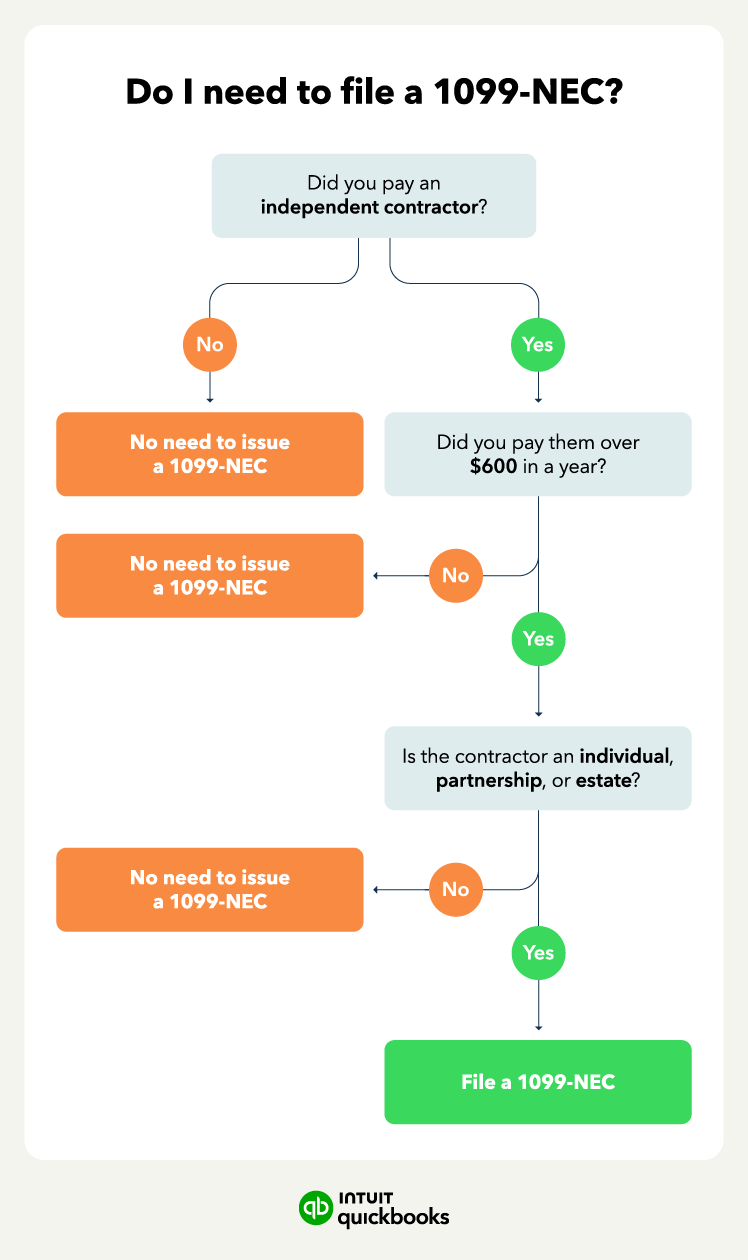
Businesses must issue a 1099-NEC to independent contractors earning over $600 annually. If you pay an independent contractor more than $600 in a year, the IRS requires you to file a Form 1099-NEC with the IRS and provide a copy to the contractor.

This applies to all types of independent contractor payments, such as those made to freelancers, consultants, and other nonemployees.


note icon

Example: If you have 10 freelance graphic designers who each earned more than $600 from you in a year, you would need to send a Form 1099-NEC to each designer. Note that this applies to businesses of all sizes.


What is nonemployee compensation?

Nonemployee compensation refers to payments made to individuals classified as independent contractors or freelancers rather than employees. This includes work such as freelancing, consulting, and contract labor.

Nonemployee compensation is reportable if it meets the following criteria:

  • The payment is made to an individual who isn't an employee.
  • The payment is made in the course of a trade or business.
  • The total payments made to the individual in a year exceed $600.
  • The recipient is an individual, partnership, or estate.

If you pay an independent contractor more than $600 in a year for work related to your business, you generally must report this income on Form 1099-NEC.

Do contractors have to pay taxes on 1099-NEC income?

When a business pays a contractor, it does not withhold any money for taxes (unlike with regular employees). This means the person who receives the 1099-NEC form is responsible for setting aside their own funds to pay taxes later.

Your accounting, your taxes. All in one place.

Save time by seamlessly moving from books to taxes in QuickBooks, then file your return with unlimited expert help and your maximum refund.*

What’s the difference between 1099-MISC and 1099-NEC?

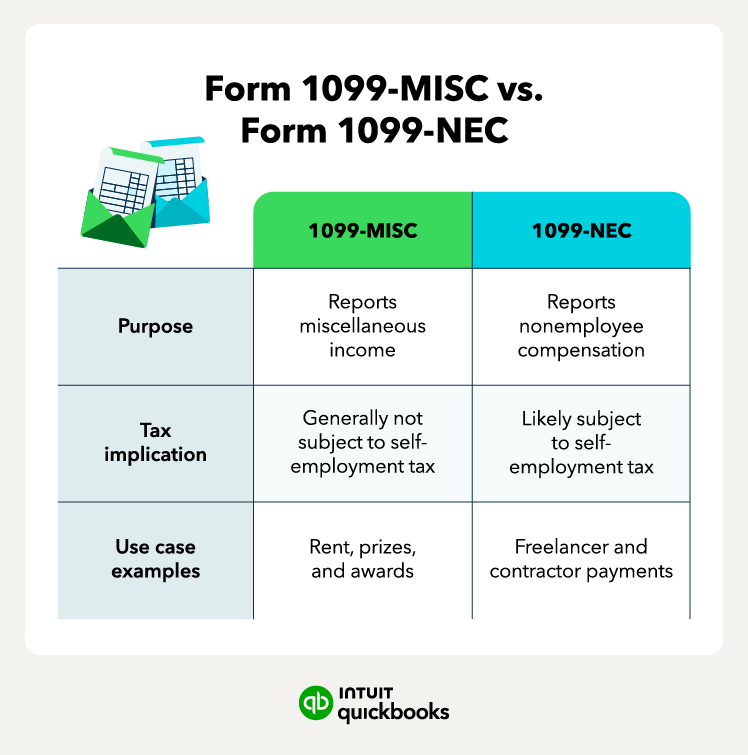
Form 1099-MISC and Form 1099-NEC are both used to report nonemployee compensation, but they serve different purposes.

  • Form 1099-MISC: Reports payments like rent or prizes that aren't subject to self-employment tax.
  • Form 1099-NEC: Reports nonemployee compensation likely subject to self-employment tax. Introduced in 2020, it helps the IRS track income from independent workers more effectively.


Differences between 1099-NEC and 1099-MISC

Remember to choose the correct form based on the type of payment you're reporting.


note icon

The 1099-K rule: If you pay a contractor via credit card, debit card, or a third-party payment network (like PayPal, Venmo, or Stripe), do not issue a 1099-NEC. The payment processor is responsible for reporting those funds on Form 1099-K, and reporting these payments yourself on a 1099-NEC can cause double-reporting.


What are the filing requirements and deadlines for filing Form 1099-NEC?

To properly file Form 1099-NEC, you'll need the following information:

  • The TIN of the recipient
  • Your business’s TIN and information
  • Payment amounts made to the independent contractor during the year

Also, note that under current IRS regulations, businesses filing 10 or more information returns (including W-2s and all types of 1099s) are now required to file electronically. So if you are filing 10 or more returns, you will need to plan to e-file.

QuickBooks Bill Pay helps you see your vendors and everyone who needs a 1099 in one place, helping you stay compliant. You can get unlimited 1099 e-filing, with printing and mailing, for no additional fee. This ensures your forms are automatically submitted to the IRS and state agencies, meeting the electronic mandate without manual paperwork.


note icon

Remember to provide recipients with their Form 1099-NEC and file it with the IRS by February 2, 2026. The deadline is typically January 31st, but since that date falls on a weekend, it is extended to the next business day in 2026.


How to fill out a 1099-NEC form

Learning how to fill out Form 1099-NEC is a straightforward process, provided your bookkeeping is organized and up to date. As you fill it out, remember that accuracy is paramount; even a small typo in a TIN can lead to IRS notices and potential penalties.

If you're worried about getting it right, you can download an informational copy of Form 1099-NEC directly from the IRS website to review before you get started filing.

1. Gather necessary information

To properly file Form 1099-NEC, you'll need the following information:

  • The TIN of the recipient
  • Your business’s TIN and information
  • Payment amounts made to the independent contractor during the year

2. Complete the 1099-NEC form

Once you have gathered the necessary information, you can begin filling out Form 1099-NEC.

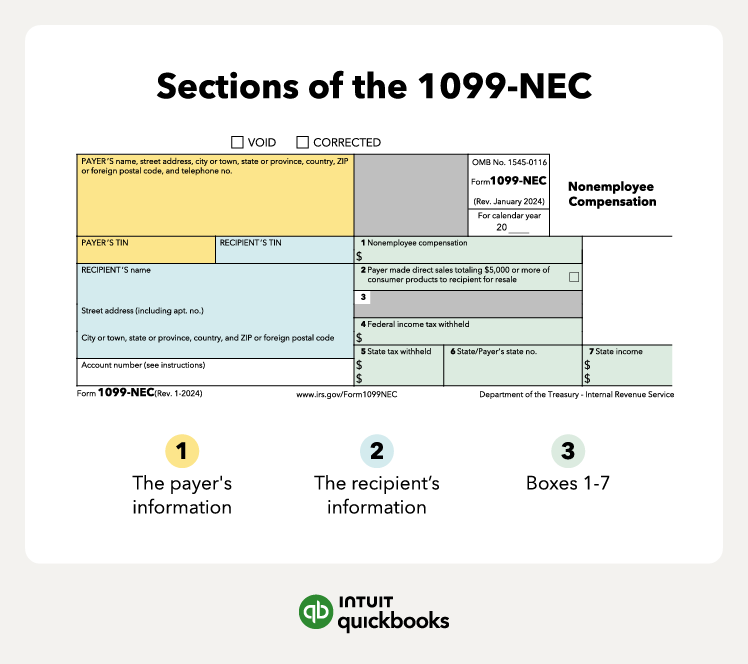
  • Payer’s information: Fill in the top portion of the 1099-NEC with your business's information, including your name, address, and Employer Identification Number (EIN). Double-check this information for accuracy to avoid errors and potential penalties.
  • Recipient information: Identify all independent contractors you paid more than $600 in the year. Before starting work with each contractor, collect a Form W-9. This form will provide the necessary information to fill out the recipient's portion of the 1099-NEC.
  • Boxes 1-7: Box 1 is the primary box to complete on a 1099-NEC, reporting the total amount paid to the independent contractor during the year. If any of the other boxes (2-7) apply to your situation, refer to the IRS website for specific instructions for completing them.
Sections of the 1099-NEC.

3. Verify and distribute form copies

Review and distribute form copies based on the number of independent contractors you pay over $600.

There are five copies of Form 1099-NEC:

  • Copy A: For the IRS
  • Copy 1: For your state tax department
  • Copy B: For the recipient (the person you paid)
  • Copy 2: Also for the recipient
  • Copy C: For payer (your copy for recordkeeping)

Taking the time to verify the details up front ensures a seamless filing process—and helps maintain a professional, transparent relationship with your contractors.


Stay on top of 1099s with Bill Pay

See your vendors and everyone who needs a 1099 all in one place. Plus, get unlimited 1099 e-filing, with printing and email, for no additional fee.

What are the penalties for not filing a 1099-NEC form?

Missing the Form 1099-NEC filing deadline can result in fines that increase with each day the form is late, so meeting the due date is essential to avoid penalties.

The IRS imposes varying penalties for late submissions:

  • Starting at $60 per form if you file up to 30 days after the due date
  • Starting at $130 per form if over 30 days late but before Aug 2
  • Starting at $340 per form after Aug 1 or if you don’t file at all
  • Starting at $680 per form for intentionally disregarding filing requirements

To avoid these penalties, file your 1099-NEC accurately and on time. If unexpected delays occur, you can request an extension using Form 8809 for additional time.

Common challenges with filing 1099-NEC forms

Navigating tax season is often the most stressful part of running a business, *especially* when paperwork doesn't go as planned.

Here are some of the most common complications you might experience when filing 1099-NEC forms, and what to do about them:

You received a 1099-NEC in error

If you receive a 1099 tax form by mistake, immediately contact the sender to request the correct form. Receiving a 1099-NEC in error can result in overpaying taxes or underreporting your income, both of which can have serious financial consequences.

You can find the issuer’s information in the top left corner of the 1099-NEC under “Payer’s information.”

Your 1099-NEC did not arrive in time for the deadline

If you haven't received your 1099-NEC form and the tax filing deadline is approaching, take immediate action.

Contact your employer or payer directly and request a copy of the missing form. If you still haven't received it by the tax deadline, call the IRS at 800-829-1040. Be prepared to provide the following information:

  • Your name, address, phone number, Social Security number, and dates of employment.
  • Your employer's or payer's name, address, and phone number.

note icon

Note: It's important to file your tax return on time, even if you're still waiting for a missing form. You can always file an amended return later if the form arrives.


You earned income as both an employee and a contractor

Receiving both a W-2 and a 1099-NEC Form indicates that you earned income from both employment and self-employment during the year. This is common among individuals who hold full-time jobs and also work as freelancers or independent contractors.

To file a W-2 and a 1099-NEC together:

1. Report your W-2 income: This includes your wages, tips, and other compensation from your employer.

2. Report your 1099-NEC income: This includes your earnings from self-employment activities, such as freelance work.

3. Calculate self-employment tax: You'll need to pay both the employer and employee portions of Social Security and Medicare taxes on your self-employment income. You can use a self-employment tax calculator for this step.

4. Include all additional forms: This may include Schedule C to report your self-employment income and expenses.

Find peace of mind come tax time

To streamline your tax preparation, especially when dealing with 1099-NEC income and calculating tax deductions, consider using accounting software with integrated payroll functions.

These tools can automate many tasks, saving you time and reducing the risk of errors. By automating payroll functions and calculations like self-employment tax and generating tax forms, you can focus on growing your business and enjoy a less stressful tax season.


Recommended for you

Mail icon
Get the latest to your inbox
No Thanks

Get the latest to your inbox

Relevant resources to help start, run, and grow your business.

By clicking “Submit,” you agree to permit Intuit to contact you regarding QuickBooks and have read and acknowledge our Privacy Statement.

Thanks for subscribing.

Fresh business resources are headed your way!

Looking for something else?

QuickBooks

From big jobs to small tasks, we've got your business covered.

Firm of the Future

Topical articles and news from top pros and Intuit product experts.

QuickBooks Support

Get help with QuickBooks. Find articles, video tutorials, and more.