- Start Your BusinessStart Your Business
- Starting a BusinessThe tools and resources you need to get your new business idea off the ground.
- PaymentsEverything you need to start accepting payments for your business.
- Funding & CapitalResources to help you fund your small business.
- Small Business StoriesCelebrating the stories and successes of real small business owners.
- Self-EmployedThe tools and resources you need to run your own business with confidence.
- Run Your BusinessRun Your Business
- Running a BusinessThe tools and resources you need to run your business successfully.
- AccountingAccounting and bookkeeping basics you need to run and grow your business.
- Cash FlowTax and bookkeeping basics you need to run and grow your business.
- PayrollPayroll essentials you need to run your business.
- TaxesTax basics you need to stay compliant and run your business.
- EmployeesEverything you need to know about managing and retaining employees.
- Grow Your BusinessGrow Your Business
- Growing a BusinessThe tools and resources you need to take your business to the next level.
- Sales & MarketingSpread the word: What you need to know about marketing your small business.
- FundingHow to find funding and capital for your new or growing business.
- Midsize BusinessesThe tools and resources you need to manage your mid-sized business.
- Enterprise Suite BlogThe tools and resources you need to grow your own business with confidence.
- E-CommerceHow to start and run a successful e-commerce business.
- TaxesTaxes
- How to fill out a 1099-NEC formLearn how to fill out and file 1099-NEC forms for independent contractors and freelancers.
- How to file small business taxesLearn how to navigate tax season with confidence and minimize your tax liability with this guide.
- Small business 1099: What you need to know for 2025Navigate the complexities of small business 1099 forms and filings with our comprehensive guide.
- 13 documents to give your accountant for small business taxesYour accountant will need these documents to file your small business taxes successfully.
- What's NewWhat's New
- NewsBrowse the latest news, press releases, and reports from QuickBooks.
- AI Resource HubFind the latest on Artificial Intelligence.
- Small Business DataThe latest research and insights for Small Businesses from QuickBooks.
- Small Business StoriesCelebrating the stories and successes of real small business owners.
- Holiday SuccessEverything you need to thrive during your business's busiest seasons.
- AI InnovationsBrowse the latest AI innovations in QuickBooks on the Intuit platform.
- ToolsTools
- All ToolsFree accounting tools and templates to speed up and simplify your workflow.
- AI-Powered Invoice GeneratorTry out this free invoice generator to create an invoice online using Intuit Intelligence.
- Payment Cost CalculatorFind out how much you could save by switching to QuickBooks Payments.
- Paycheck CalculatorAccurately estimate pay for all your employees.











Table of contents
Table of contents
You could save up to 25% on transaction costs².
Speak with us now to see if you qualify.
Talk to sales 1-800-515-8366
Monday - Friday, 6 AM to 4 PM PT
Key 1099-S updates for 2026:
- The sale or exchange of digital assets in real estate transactions will need to be reported on the new 1099-S form for 2026.
- E-filing 1099-S returns will be handled exclusively on IRIS, with the legacy FIRE system being retired on December 31st, 2026.
- Penalties for not filing a 1099-S or filing it with errors are the same, and can exceed $680 for each missed deadline.
- Automation and syncing in QuickBooks can make your 1099-S filings faster and error-free.
Changes are coming in 2026 to how 1099-S forms are filled out and filed. Digital assets sales and exchanges in real estate will now need to be recorded, and the legacy FIRE system is being retired. Along with these changes come increased penalties for filing late or with errors.
Here’s what the deadlines and penalties look like for 2026:
So, if you fixed an error on a 1099-S on April 28th, you’d get hit with one $60 penalty for the IRS filing and one $130 penalty for furnishing the seller copy.
To avoid these costly penalties and ensure you are filing your Form 1099-S on time and accurately, we’ll explore what you need to know about the changes for 2026, what the exemptions are, and how you can file your 1099-S returns with automated help from QuickBooks.
What is a 1099-S?
A 1099-S is an IRS tax form used to document the gross proceeds from the sale of real estate. This can include mortgages, commercial buildings, and land. While traditionally issued in relation to mortgages and cash sales, with the 2025 tax law changes, a 1099-S is now crucial for documenting digital asset exchanges in real estate.
It is the responsibility of the settlement agent to accurately fill out all parts of the 1099-S and file it with the IRS in a timely manner. As digital asset exchanges become more common in real estate, small-firm lawyers and solo title professionals may find they need help handling the reporting in a scalable way.
Key 2026 changes to 1099-S filing
Digital asset reporting was initially added to the tax code by the Infrastructure Investment and Jobs Act in 2021. Over the last few years, tax forms have been updated, and reporting requirements have been further detailed.
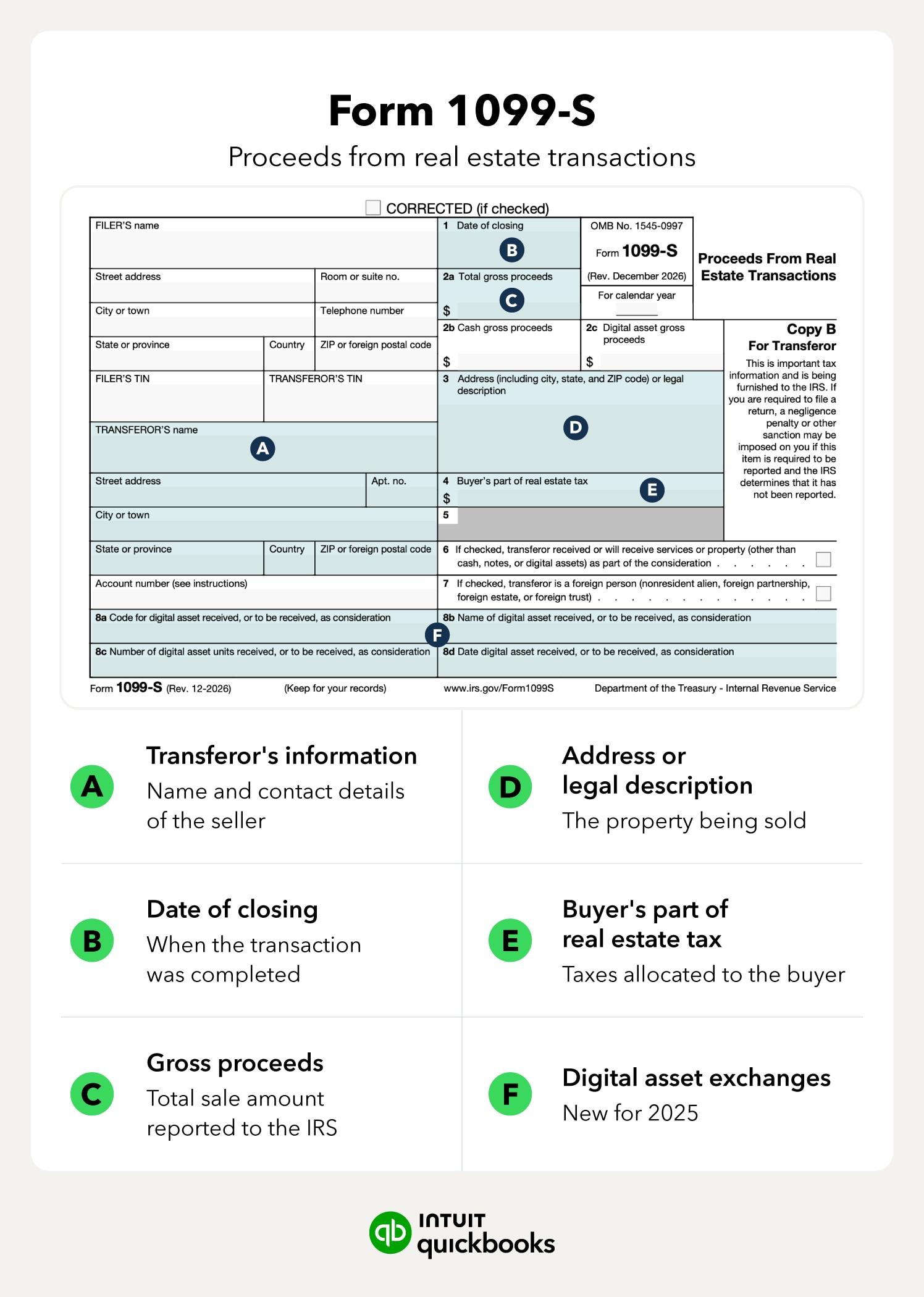
For 2026, the new 1099-S form will include two key changes: [image2]
- Digital Asset Gross Proceeds (Box 2c): In this box, you will need to report the fair market value of digital assets used in the sale or exchange of real estate.
- Identifying digital assets (Box 8a-8d): These new boxes will record the digital token identifier, asset name, number of units received, and the date the digital assets were received.
In addition to the changes related to digital assets, the legacy Filing Information Returns Electronically (FIRE) system is being officially retired in 2025. If you haven’t already made the switch to the new Information Returns Intake System (IRIS) introduced in 2023, you will need to do so ahead of filing 1099s for 2026.
The good news is that the new system lets you file up to 100 returns at a time and provides you with real-time validation. For small businesses that need to file more than 10 returns (1099-S, 1099-K, 1095-C, 1099-NEC, 1099-MISC, etc.) in 2026, the IRS requires you to use IRIS.
- Digital Asset Gross Proceeds (Box 2c): In this box, you will need to report the fair market value of digital assets used in the sale or exchange of real estate.
- Identifying digital assets (Box 8a-8d): These new boxes will record the digital token identifier, asset name, number of units received, and the date the digital assets were received.
In addition to the changes related to digital assets, the legacy Filing Information Returns Electronically (FIRE) system is being officially retired in 2025. If you haven’t already made the switch to the new Information Returns Intake System (IRIS) introduced in 2023, you will need to do so ahead of filing 1099s for 2026.
The good news is that the new system lets you file up to 100 returns at a time and provides you with real-time validation. For small businesses that need to file more than 10 returns (1099-S, 1099-K, 1095-C, 1099-NEC, 1099-MISC, etc.) in 2026, the IRS requires you to use IRIS.

Stay on top of 1099s with Bill Pay**
See your vendors and everyone who needs a 1099 all in one place. Plus, get unlimited 1099 e-filing, with printing and email, for no additional fee.
How to file a 1099-S in 4 automated steps
Filing a 1099-S is not as complicated as other tax forms, but you’ll need to gather and store specific information, such as seller data and gross proceeds. Failing to do so can result in significant IRS penalties exceeding $680. Fortunately, software and automation can make the information-gathering and form-filling process a breeze.
Below, we’ll explore how you can fill out and file your 1099-S returns on time using the QuickBooks system.

Step 1: Collect seller data via digital W-9s
The first step in filing a Form 1099-S is to gather the seller’s information. This includes their name, current address, and most importantly, their TIN (Taxpayer Identification Number).
If the seller was an individual, this will most likely be a Social Security Number or Individual Taxpayer Identification Number (ITIN). But if the seller was a business, this would be their EIN (Employer Identification Number).
The best way to obtain this information is through a W-9 prior to or at closing. QuickBooks will store the information from the W-9s for you, so that it is available when you are ready to file the 1099-S.
Step 2: Track gross proceeds and box 2c data
The second key element to the 1099-S is the gross proceeds. For each sale, you’ll need to record and track the total gross proceeds as well as the individual amounts for cash proceeds and digital asset proceeds. These need to be reported separately, and accurately, or you could get hit with a penalty ranging from $60 upt to $680+.
For QuickBooks users, the software will not only track different gross proceeds amounts but also flag transactions involving tokens or virtual currency to make your January tax filing easier.

If you discover you’ve made an error on a 1099-S, get it fixed and re-file ASAP, as penalties begin to increase at the 30-day mark.
Step 3: Automate the settlement ledger in QuickBooks
Once you have gathered all your information, you need to verify it to ensure accuracy. This includes reconciling the gross proceeds reported against the actual movement of funds. Doing this helps ensure your 1099s are accurate and can decrease your audit risk.
Automation can save you significant time. QuickBooks offers instant reconciliation when closing occurs, leaving you one less thing to worry about at tax time. And setting up a dedicated escrow account in your chart of accounts can help you easily track which transactions will require a 1099-S.

Smarter automation. Expert support.
From clean books to more leads, QuickBooks agents work for you when you need them.
Step 4: E-file via IRS integration
The final step in the process is actually to file the 1099-S. This is done electronically through the IRIS system. Up to 100 returns can be filed at a time using a CSV format, or you can manually enter each 1099-S on the IRIS portal. Once submitted, you’ll receive confirmation within 24-48 hours.
To streamline the process, QuickBooks allows you to sync your 1099-S data directly to IRIS-compatible filing partners like IRIS Payroll Solutions and Tax1099. Using one of these partners, your 1099 information is transmitted directly to the IRS, without the need to download CSV files or log in to the IRIS portal.
When do 1099's need to be mailed in 2026? If you are filing a 1099-S by mail, it will need to be postmarked by February 28th. For 2027, the postmarked date will be March 1st.
Common 1099-S exemptions and how to document them
Before you prepare your 1099-S filing, it's important to know that not all real estate sales require a Form 1099-S. To save yourself some time, here are the six exemptions the IRS lists:
As a law firm or title professional, you need to ensure you’ve gathered all the information necessary for the exemption. For example, for the primary residence exemption, you’ll need to have a signed Certificate of Exemption from the seller on file. In QuickBooks, to help declutter your year-end reporting list, you can flag these sellers as exempt in the Vendor Center.
When in doubt, it's better to file the 1099-S to avoid potential penalties. If the seller is exempt, they can note this on their tax return.
Find peace of mind come tax time
Tax time for a small business owner can be stressful and time-consuming. But what if it didn’t have to be? With QuickBooks Online, your data will be reconciled and ready instantly, so you can knock out all your filings in a fraction of the time while avoiding accuracy-related IRS penalties. It's a win-win scenario for tax season.
Payroll Compliance

Details on the One Big Beautiful Bill Act and how it affects payroll

USPS changes may affect your postmark date

Mandatory State Paid Family Leave Programs
Accounting
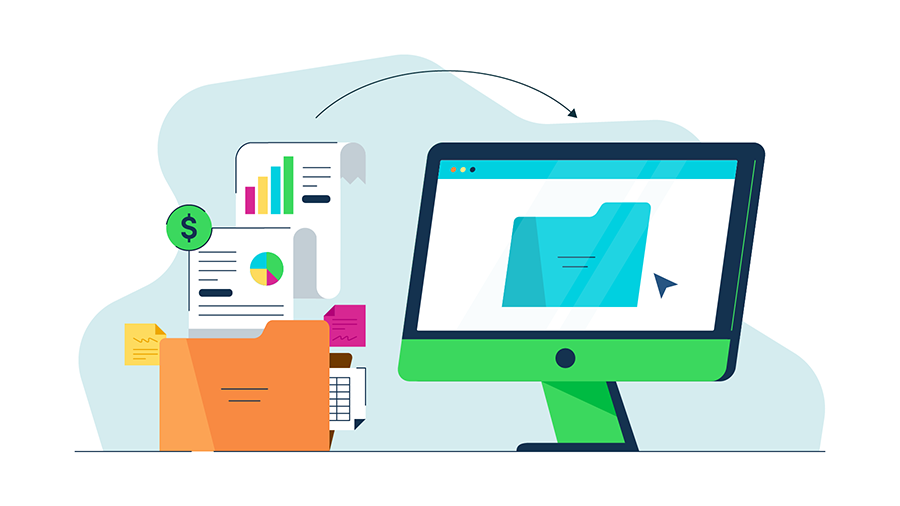
Paperless accounting: What it is and tips on making the switch

The accounting equation: A beginner’s guide with examples
Customer Stories

Why Amborella Organics trusts QuickBooks AI to handle the heavy lifting of a $10M+ vision
At Petal Salon, Amanda Lee Harvey keeps her clients in the pink

Normal Ice Cream saves 7 hours a week on banking admin thanks to QuickBooks Bill Pay

How The Baby Pantry shows up for families in need
Recommended for you



Explore what you can do with QuickBooks
Explore what you can do with QuickBooks

See profit at a glance


Get expert help
Looking for something else?
Firm of the Future
Topical articles and news from top pros and Intuit product experts.
QuickBooks Support
Get help with QuickBooks. Find articles, video tutorials, and more.
Call Sales: 1-800-285-4854





© 2026 Intuit Inc. All rights reserved.
Intuit, QuickBooks, QB, TurboTax, Credit Karma, and Mailchimp are registered trademarks of Intuit Inc.
Money movement services are provided by Intuit Payments Inc., licensed as a Money Transmitter by the New York State Department of Financial Services. For details about our money transmission licenses, or for Texas customers with complaints about our service, please click here.
By accessing and using this page you agree to the Website Terms of Service.