QuickBooks Blog
A person and person sitting next to each other.
Texas

Texas payroll taxes: Your 2025 guide to staying compliant

Texas boasts one of the most dynamic business environments in the U.S., with over 3.3 million small businesses fueling its entrepreneurial ecosystem. In 2024, Texas recorded a gross domestic product (GDP) of approximately $2.71 trillion, making it the eighth-largest economy in the world if it were a country. The state’s leading industries include energy (oil, gas, and renewable energy), advanced manufacturing, aerospace and aviation, biotechnology, food and livestock, tourism and hospitality, and professional and corporate services, collectively creating a diversified and resilient landscape. This economic vitality makes Texas an appealing place to run a business, yet navigating its unique payroll tax regulations demands careful attention.

Now, let’s dive into the key aspects of Texas payroll taxes so you can keep your business compliant, on track, and set up for success.

Jump to:

What are payroll taxes?

Payroll taxes are taxes based on wages, salaries, or other compensation that both employers and employees must pay. While income taxes are also withheld through payroll, payroll taxes specifically fund programs like Social Security, Medicare, and unemployment insurance.

Understanding Texas state payroll taxes

When starting a business in Texas, it is essential to understand both federal and state payroll taxes to remain compliant and avoid costly mistakes.

Federal payroll taxes

Payroll taxes are mandatory and encompass both federal and state requirements.

Federal payroll taxes include:

  • Federal income tax: This is withheld from each employee's paycheck based on their W-4 form and the current IRS tax brackets. You'll be responsible for calculating the correct amount, withholding it, and then sending it to the IRS. 
  • Social Security and Medicare taxes: Both of these taxes have a portion paid by the employee and a matching portion paid by you, the employer. For Social Security, the combined rate is 12.4% on the first $176,100 of wages in 2025. For Medicare, it's 2.9% on all wages, with an extra 0.9% for higher earners. You'll withhold the employee's portion and match it. 
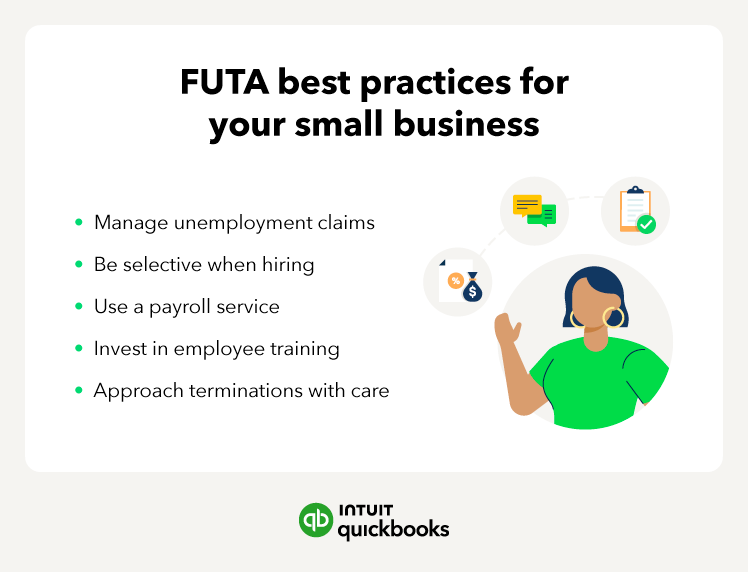
  • Federal Unemployment Tax (FUTA): This is paid solely by you at a rate of 6% on the first $7,000 of each employee's wages. However, most employers get a 5.4% credit, reducing the rate to 0.6%. The graphic below lists some best practices for managing your FUTA obligations. 
A person is preparing a video for a class.

Texas state payroll taxes

In addition to all federal payroll, you must also cover state-specific payroll taxes as a Texas employer.

  • Texas Unemployment Insurance (UI) Tax: This is the only state payroll tax in Texas. It's entirely employer-paid and levied by the Texas Workforce Commission (TWC) to fund the Texas Unemployment Compensation (TUC) program. In 2025, Texas UI tax rates range from 0.25% to 6.25% on the first $9,000 of each employee's wages. New employer rates typically start at 2.7% until they establish experience and receive a new rate from the TWC.

Texas local payroll taxes

Some counties or cities in Texas may impose unique local payroll taxes, which you would need to cover in addition to federal and state payroll taxes. These taxes can vary based on the location of your business. Here are a few ways to determine if there are any local payroll taxes you could be liable for:

  1. Check with your local government to find out if your business is subject to any local payroll taxes. Your city or county government can provide the most up-to-date information on applicable rates and regulations.
  2. Consult a tax professional if you need clarification on local payroll tax requirements or assistance with compliance. An accountant specializing in Texas payroll taxes can help you identify any local taxes that apply to your business and ensure you meet all your obligations.

Other important tax considerations

Multiple locations

If your business has employees working in multiple cities or counties, you may be subject to different local payroll taxes for each location.

Changing rates

Local payroll tax rates can change over time, so it's important to stay informed about any updates that may affect your business. For example, the Texas Workforce Commission recalculates the Texas UI tax rate employers must pay annually, using several factors to determine the year's rate. It's vital to stay informed about these changes and apply calculations based on your current rate.

Employer responsibilities for payroll taxes in Texas

As a Texas employer, you're responsible for managing a complex array of federal and state payroll taxes, which involves careful calculation, timely withholding, and accurate reporting to various government agencies. Here’s an overview of what you should know.

Registering for payroll taxes

Texas state regulations, in accordance with the Texas Unemployment Compensation Act, require employers to complete unemployment tax registration within 10 days of becoming liable for this payroll tax. You may be able to register online; the Texas Workforce Commission website's Frequently Asked Questions page outlines the criteria for this. Unlike other states, Texas doesn't have income tax. Therefore, the registration process is only for reporting and paying the employer-paid Texas UI tax. As an employer, you’re required to register and pay the UI tax if you paid at least $1,000 for domestic labor ($6,500 for ranch or farm labor) in any given calendar quarter. To pay the tax, you must first register. Here are the three steps you need to take:

  • Get an Employer Identification Number (EIN): Before registering with the state and getting your Texas payroll tax rate, you need an EIN from the Internal Revenue Service (IRS). This nine-digit number identifies your business for state and federal tax purposes. It’s required to successfully complete the registration process. You can apply for an EIN directly through the IRS website.
  • Register with the Texas Workforce Commission: With your EIN in hand, you can register with the Texas Workforce Commission (TWC), the organization that administers the payroll taxes in Texas. You can complete the registration process online through the Unemployment Tax Registration (UTR) portal. The TWC recommends online registration for security, speed, and simplicity. However, if you can’t use the UTR portal, you can complete and submit Form C-1 (Status Report).
  • Report New Hires: After registering your business, you must report new hires to the Texas Office of the Attorney General, which you can do entirely online. Alternatively, you can report new hires by mailing the Texas New Hiring Reporting form or contacting the Child Support Division of the Office of the Attorney General via phone. You must report new hires within 20 calendar days of the hire date to avoid penalties.

Calculating payroll taxes

Accurately calculating payroll taxes is essential to avoid penalties. You have a few options for calculating applicable taxes while avoiding errors:

  • Check government websites: The TWC website offers numerous online resources, including a comprehensive Texas Guidebook for Employers. You can also find a computation worksheet for unemployment tax. This Texas payroll tax calculator can help you determine taxes owed, interest, and possible penalties.
  • Payroll software: Some small business software payroll programs have built-in Texas tax tables that automate calculations, saving you time and minimizing the chance for errors.
  • Professional services: If you prefer to outsource payroll, a professional payroll service can handle everything for you.

Whichever method you choose, make sure you stay updated on the current tax rates and wage limits, as these can change every year.

Withholding state payroll taxes

Once you learn how to figure payroll taxes in Texas, you must determine how much you'll need to pay. Remember: Texas does not have a state income tax. Therefore, there's nothing you need to withhold from employee pay other than the Federal taxes. The only payroll tax in Texas is the state's Unemployment Insurance tax, which is an obligation that employers must pay. How much is the payroll tax in Texas? Here's a quick breakdown of how to determine the amount to pay:

Texas Unemployment Insurance (UI) Tax: The UI tax rate varies based on the age of your business and several factors. The TWC calculates and assesses a new tax rate annually, typically providing that information to employers at the end of the calendar year. You can find yours when you log into the Unemployment Tax Services (UTS) system. New employers typically receive an introductory rate of 2.7% for the first four quarters of doing business. 

  • Example: Let's say you're a new employer with an employee who earns $12,000 in wages during the first quarter of the year. Your UI tax obligation for that single employee would be $243 during your first-quarter report. Why that amount? The Texas UI Tax only applies to the first $9,000 of an employee's annual wages, at a rate of 2.7% for new employers. Therefore, 2.7% of $9,000 is $243. Because that employee already crossed the wage base for the year, you would owe no more UI taxes on that employee's earnings for the rest of the year.

By applying these calculations to each paycheck, you ensure accurate withholdings and compliance with state requirements. 

Remitting state payroll taxes

Next, you'll need to submit Texas payroll taxes (UI tax payments) to the Texas Workforce Commission. The easiest way to do this is through the Unemployment Tax Services portal. You must file and pay this tax every quarter.


Filing payroll tax returns in Texas

In Texas, employers must comply with quarterly and annual payroll tax return requirements to fulfill their state and federal obligations. Here's a breakdown of 2025 requirements:

Quarterly requirements

Annual requirements


Penalties for late filing or non-compliance and tips for staying organized

Failing to file Texas payroll tax reports or submit payments on time can lead to costly penalties and interest charges. The Texas Workforce Commission (TWC) enforces these rules to ensure employers remain compliant with UI tax obligations.

The TWC provides a computation worksheet for calculating interest and penalties. Failing to file quarterly reports (Form C-3) on time will result in a penalty of $15.00, but only if the TWC receives your report within 15 days of the due date. Any later, and the penalties increase significantly. Penalties will be 0.5% of the total taxable wages plus $30.00 if you file no later than the last date of the month following the due date. If you file the report during the second month after its due date, the penalty climbs to 0.15% of taxable wages plus $60.00. Finally, the penalty is as high as 0.35% of taxable wages, plus an additional $90.00, if you file your report within the third month after its due date.

These reports are due every quarter, regardless of whether you owe UI taxes or not. Even if you owe zero taxes after employees reach the annual wage base, you will still face penalties for filing late.

You’ll also incur penalties if you pay your UI taxes late. Late payments will accrue interest at a rate of 1.5% for each full or partial month after the due date. The maximum interest rate is 37.5%.

Paying and filing your Texas payroll taxes late can be costly to your business. Follow these tips to stay organized and pay on time.

  • Set reminders: Mark all payroll tax deadlines on your calendar, set reminders on your phone or computer, and use task management or payroll software tools to stay on top of due dates.
  • Consider payroll software: Invest in reliable payroll software that automatically calculates taxes and reminds you of upcoming deadlines. You’ll minimize calculation mistakes and missed payments.
  • Use the UTS System: The Unemployment Tax Services system allows you to file reports and make payments electronically. Consider using it to reduce errors and delays associated with paper filing.
  • Outsource payroll: If managing payroll seems overwhelming, consider outsourcing to a reputable payroll service provider. They will handle all tax calculations, filings, and payments on your behalf, ensuring compliance.
  • Seek professional help: If you have any questions or concerns about payroll taxes, don't hesitate to consult with a tax professional or accountant. They can provide expert guidance and help you tackle the complexities of payroll tax compliance.
Image Alt Text

Payroll tax credits and incentives

Texas has a business-friendly tax environment with no state income tax and minimal payroll tax obligations. While the state does not offer many payroll-specific tax credits, Texas employers can still benefit from federal incentives and state-administered programs. These programs are especially valuable for small businesses seeking to expand their workforce or invest in employee development. Here are some of the most relevant credits and incentives available to Texas employers. 

Work Opportunity Tax Credit (WOTC)

The WOTC allows you to reduce your federal tax liability by up to $9,600 per qualified new hire from specific target groups, including veterans, long-term unemployed individuals, and recipients of public assistance. This credit encourages inclusive hiring and helps employers offset the costs of onboarding. Employers must submit appropriate paperwork to the TWC within 28 days of an eligible hire’s start date.

Federal Unemployment Tax Act (FUTA) Credit

If you pay your Texas unemployment insurance (UI) taxes in full and on time, you may qualify for the full 5.4% FUTA credit, reducing your federal FUTA tax rate from 6.0% to 0.6% on the first $7,000 in wages per employee. Because Texas isn't a FUTA credit reduction state, employers can generally receive the full credit.

Federal Research and Development (R&D) Payroll Tax Credit

Eligible Texas startups and small businesses can apply up to $500,000 per year of the federal R&D tax credit toward their share of Social Security payroll taxes. This credit helps reduce employment costs and encourages continued investment in innovation during the early stages of growth.

Industries frequently benefiting from Texas business tax credits

  • Technology and R&D companies. Businesses engaged in technology and the creation of new products may qualify for the Research & Development Tax Credit to offset franchise taxes or gain sales tax exemptions.
  • Clean energy businesses. Companies that invest in clean energy may qualify for a franchise tax credit. Eligible businesses awarded this credit may carry it forward for up to 20 years.
  • Logistics and transportation companies. Firms that invest in economically distressed parts of the state may qualify for the Texas Enterprise Zone Program to get a state sales and use tax refund. They may also be eligible for the freeport and goods in transit exemptions.

Consult with a tax professional to understand what tax credits and incentives you could potentially apply to your business. 

Common payroll tax mistakes in Texas (and how to avoid them)

Navigating Texas payroll tax requirements may seem straightforward compared to other states, but employers can still make costly mistakes. Here are the most frequent errors and how to avoid them to keep your business compliant.

Misclassifying Workers

Improperly labeling employees as independent contractors can result in audits and back taxes. The Texas Workforce Commission (TWC) uses specific criteria to determine employment status. When unsure, consult the TWC’s classification guidelines.

Missing quarterly deadlines

The TWC requires quarterly unemployment tax reports and payments. Late filings can trigger penalties and interest. Set calendar alerts or use payroll software to track and automate filing deadlines.

Incorrect UI rate application

Many employers mistakenly apply outdated or incorrect unemployment insurance (UI) rates. Your UI tax rate is assigned annually by the TWC. Always check your rate letter or TWC employer account to verify your rate annually before processing payroll.

Failing to report new hires promptly

Texas law requires employers to report all new hires and rehires within 20 days. Failing to comply can result in fines. Report new hires to the Texas Office of the Attorney General.

Neglecting Recordkeeping Responsibilities

According to Texas General Recordkeeping Requirements, employers must maintain unemployment tax records, as well as records of employee wages and compensation, for a minimum of four years. Maintain accurate documentation of wages, hours, and tax filings using secure digital payroll systems to ensure audit readiness.

Tip: QuickBooks Payroll can help you avoid these common mistakes by automating calculations, tracking deadlines, and keeping accurate records.

How to manage your small business payroll obligations 

Understanding the nuances of Texas's payroll taxes and regulations can take some time. Follow our small business tax preparation checklist and these steps to help you manage your payroll taxes.

Step 1. Partner with a tax professional

Consult a tax professional familiar with Texas’ payroll taxes and regulations. They can guide you through compliance requirements, local tax nuances, and potential tax benefits for your business.

Step 2. Explore payroll software

Consider using payroll software to streamline your payroll processes. Tools like QuickBooks automate tax calculations, minimize errors, and ensure compliance with Texas laws.

Step 3. Proactively plan for compliance

Stay informed about Texas’ payroll tax deadlines and updates. Payroll software combined with expert guidance can help ensure you meet state and local requirements.

Step 4. Optimize your tax strategy

Work with your tax professional to uncover deductions, credits, or other incentives that could benefit your business. Leverage software reports to better understand your payroll data and identify opportunities for savings.

Step 5. Build a financially strong foundation

By combining expert guidance with the right tools, you can efficiently manage payroll taxes and focus on growing your business in the Lone Star State.

What are the payroll taxes in Texas?

Texas payroll taxes only consist of a single tax, the UI tax, which is funded entirely by employers. 

Calculating payroll taxes in Texas

Payroll tax calculations in Texas depend on several factors, including:

  • Employee's wages
  • Employer's Unemployment Insurance (UI) tax rate
  • Applicable federal taxes

For employees, the main payroll taxes are: 

  • Federal income tax
  • FICA (Social Security and Medicare taxes)

For employers, the main payroll taxes are:

  • Texas UI Tax
  • Federal Unemployment Tax (FUTA)

To accurately calculate Texas payroll taxes, you can use the Texas Workforce Commission's online resources, payroll software configured with Texas-specific data, or consult a tax professional. These tools can help ensure that you calculate accurate Texas UI taxes correctly for your business and meet all payroll tax requirements.

It’s essential to stay updated on the current rates and regulations, as they can change annually.

Leverage payroll software for compliance in Texas

Managing payroll in Texas requires accuracy due to complex regulations. Errors can lead to penalties and legal risks, but QuickBooks streamlines payroll management to ensure compliance. It automatically calculates, files, and pays federal and state payroll taxes—with a 100% accuracy guarantee.** You'll stay current with Texas tax law changes, easily generate reports for filings, and get up to $25,000 in penalty coverage if issues arise.**


Disclaimer: 

**Accuracy Guaranteed: Available with QuickBooks Online Payroll Core, Premium, and Elite. We assume responsibility for federal and state payroll filings and payments directly from your account(s) based on the data you supply. As long as the information you provide us is correct and on time, and you have sufficient funds in your account, we’ll file your tax forms and payments accurately and on time or we’ll pay the resulting payroll tax penalties. Guarantee terms and conditions are subject to change at any time without notice.

Tax penalty protection: If you receive a tax notice and send it to us within 15 days of the tax notice we will cover the payroll tax penalty, up to $25,000. Additional conditions and restrictions apply. Only QuickBooks Online Payroll Elite users are eligible to receive tax penalty protection.

This content is for information purposes only and information provided should not be considered legal, accounting or tax advice or a substitute for obtaining such advice specific to your business. Additional information and exceptions may apply. Applicable laws may vary by state or locality. No assurance is given that the information is comprehensive in its coverage or that it is suitable in dealing with a customer’s particular situation. Intuit Inc. does not have any responsibility for updating or revising any information presented herein. Accordingly, the information provided should not be relied upon as a substitute for independent research. Intuit Inc. cannot warrant that the material contained herein will continue to be accurate, nor that it is completely free of errors when published. Readers should verify statements before relying on them.


Recommended for you

Mail icon
Get the latest to your inbox
No Thanks

Get the latest to your inbox

Relevant resources to help start, run, and grow your business.

By clicking “Submit,” you agree to permit Intuit to contact you regarding QuickBooks and have read and acknowledge our Privacy Statement.

Thanks for subscribing.

Fresh business resources are headed your way!

Looking for something else?

QuickBooks

From big jobs to small tasks, we've got your business covered.

Firm of the Future

Topical articles and news from top pros and Intuit product experts.

QuickBooks Support

Get help with QuickBooks. Find articles, video tutorials, and more.