QuickBooks Blog
A businesswoman calculating payroll taxes in Arkansas
Arkansas

Arkansas payroll taxes: Your 2026 guide to staying compliant

Running a small business in Arkansas comes with plenty of advantages, but also a few responsibilities you can’t afford to ignore. With low operating costs, straightforward regulations, and state-backed programs that support growth, Arkansas gives entrepreneurs room to thrive. Core industries like agriculture, manufacturing, retail, and logistics keep the economy moving, and small businesses account for 99.3% of all employers in the state, according to a U.S. Small Business Administration report. Whether you’re serving up barbecue in Little Rock or managing a shop in Fayetteville, understanding your payroll tax obligations is a must for staying compliant and taking care of your team.

This guide walks you through payroll taxes in Arkansas, including what to withhold, how to register, and when to file.

Jump to:

What are payroll taxes?

Payroll taxes are taxes based on wages, salaries, or other compensation that both employers and employees must pay. While income taxes are also withheld through payroll, payroll taxes specifically fund programs like Social Security, Medicare, and unemployment insurance.

Understanding Arkansas state payroll taxes

When starting a business in Arkansas, you'll need to understand both federal and state payroll taxes.

Federal payroll taxes

Payroll taxes are mandatory and encompass both federal and state requirements.

Federal payroll taxes include:

  • Federal income tax: This is withheld from each employee's paycheck based on their W-4 form and the current IRS tax brackets. You'll be responsible for calculating the correct amount, withholding it, and then sending it to the IRS.
  • Social Security and Medicare taxes: Both of these taxes have a portion paid by the employee and a matching portion paid by you, the employer. For Social Security, the combined rate is 12.4% on the first $176,100 of wages in 2025. For Medicare, it's 2.9% on all wages, with an extra 0.9% for higher earners. You'll withhold the employee's portion and match it.
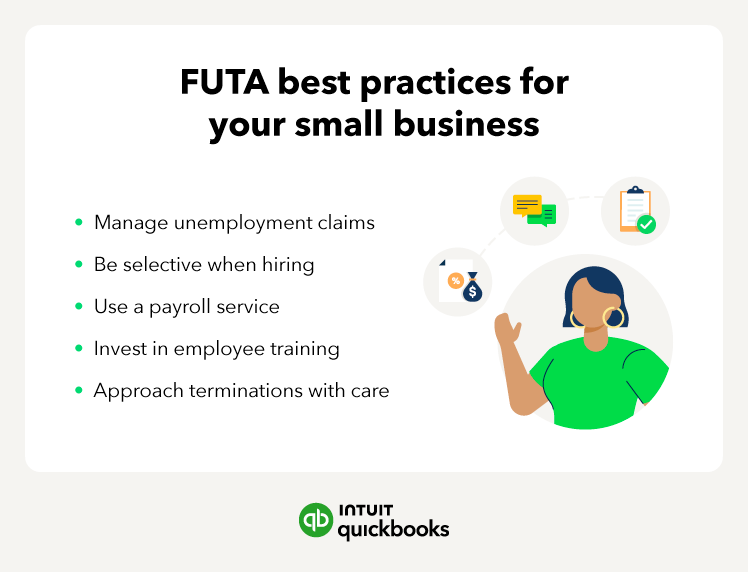
  • Federal Unemployment Tax (FUTA): This is paid solely by you at a rate of 6% on the first $7,000 of each employee's wages. However, most employers get a 5.4% credit, reducing the rate to 0.6%. The graphic below lists some best practices for managing your FUTA obligations.
Futa best practices for small businesses list

Arkansas state payroll taxes

In addition to federal payroll taxes, Arkansas employers must also account for state-specific payroll taxes.

  • State income tax: Arkansas has a progressive income tax structure with rates ranging from 0% to 3.9%. Employers are required to withhold state income tax from employee wages and remit payments to the Arkansas Department of Finance and Administration.
  • State unemployment insurance (UI): Arkansas employers must pay unemployment insurance tax, also called the State Unemployment Tax Act (SUTA) tax, on the first $7,000 of each employee’s wages.

Arkansas local payroll taxes

Along with federal and state payroll taxes, certain cities or counties in Arkansas may have their own local payroll tax rules. These local taxes aren’t the same everywhere; they depend on where your business operates. To find out if you owe any local payroll taxes, use the following steps:

  1. Check with your local government to determine whether your business owes any local payroll taxes. The most accurate and current details about local tax rules and rates come directly from your city or county offices.
  2. Consult a tax professional if you're unsure about your local payroll tax responsibilities. An accountant specializing in Arkansas payroll taxes can guide you through any local requirements and help keep your business in compliance.

Other important tax considerations

Multiple locations

If your business has employees working in multiple cities or counties, you may be subject to different local payroll taxes for each location.

Changing rates

Local payroll tax rates can change over time, so it's important to stay informed about any updates that may affect your business.

Employer responsibilities for payroll taxes in Arkansas

As an Arkansas employer, you're responsible for managing a complex array of federal and state payroll taxes, which involves careful calculation, timely withholding, and accurate reporting to various government agencies. Here’s an overview of what you should know.

Registering for payroll taxes

Before you can pay wages and withhold taxes in Arkansas, you’ll need to register for the appropriate federal and state payroll tax accounts. Here are the key steps to get set up.

  1. Apply for a federal employer identification number (EIN). If you haven’t already, get an EIN from the IRS. This ID is required for reporting and paying federal payroll taxes, including Form 941 filings and tax deposits. You can apply online at the IRS website.
  2. Register with the Arkansas Department of Finance and Administration (DFA). Employers must open a withholding tax account with the DFA to remit Arkansas income tax withheld from employee wages. You can register online through the Arkansas Taxpayer Access Point (ATAP) or file a paper Form AR1R.
  3. Register with the Arkansas Division of Workforce Services (DWS). Businesses with at least one employee working 10 or more days in a calendar year must register for a state unemployment account. You can apply online via the DWS EZ Tax portal or contact the DWS Employer Contribution Unit. Once registered, you’ll file wage reports and pay unemployment insurance contributions quarterly.
  4. Report new hires. Arkansas employers must report all new hires within 20 days to the Arkansas New Hire Reporting Center. This report includes the employee’s name, address, Social Security number, and your EIN. You can submit it online, by fax, or by mail. This is required by both state and federal law to support child support enforcement.

By completing these steps, you’ll be ready to process payroll and stay compliant with Arkansas tax laws.

Calculating payroll taxes

When it's time to calculate Arkansas payroll taxes, you have several options to choose from.

  • Government websites: The Arkansas Department of Finance and Administration publishes detailed withholding tables and a formula method for weekly, biweekly, and monthly payroll periods. You can use this information to make manual calculations.
  • Payroll software: Some small business software payroll programs have built-in Arkansas tax tables that automate calculations, saving you time and minimizing the chance for errors.
  • Professional services: If you prefer to outsource payroll, a professional payroll service can handle everything for you.

Whichever method you choose, make sure you stay up to date on the current tax rates and wage limits, as these can change every year.

Withholding state payroll taxes

Once you've calculated the correct amounts, you'll need to withhold these taxes from your employees’ wages and remit them to the appropriate authorities.

Arkansas state income tax: Employers are required to withhold state income tax from employee wages based on the Arkansas Form AR4EC completed by each employee. Arkansas uses a progressive tax rate ranging from 0% to 3.9% in 2025. The state also allows a standard deduction of $2,410, plus a $29 exemption per claimed allowance.

  • *Example: An employee earning $3,000 per month who claims two exemptions would have a lower withholding amount compared to another employee with the same income and no exemptions. Accurate completion of the AR4EC form is key to proper withholding.*

Unemployment insurance (UI) tax: Although UI tax is paid solely by employers, it's part of the broader payroll tax structure and must be budgeted for. The Arkansas Division of Workforce Services assigns new employers a rate of 2.0% on the first $7,000 of each employee’s wages, including a temporary 0.1% administrative assessment. Experienced employers receive a rate between 0.2% and 10.1%, depending on their claims history.

  • *Example: If you're a new employer with five employees each earning at least $7,000, you would owe $700 in UI tax (2.0% x $7,000 x 5 employees) annually.*

By applying these calculations to each paycheck, you ensure accurate withholdings and compliance with state requirements.

Remitting state payroll taxes

Once you've withheld the proper amounts from employee wages, you’ll need to send those funds, along with any employer contributions, to the Arkansas Department of Finance and Administration (DFA). The easiest way to submit payments is through the Arkansas Taxpayer Access Point (ATAP) system.

Filing payroll tax returns in Arkansas

In Arkansas, employers must comply with quarterly and annual payroll tax return requirements to meet state and federal obligations. Here's a breakdown of the 2025 requirements.

Quarterly and monthly requirements:

Annual requirements:

Penalties for late filing or non-compliance and tips for staying organized

Both the IRS and Arkansas impose penalties for missed deadlines. The IRS can charge 5% of the unpaid tax per month (up to 25%) for failing to file a return, and 2% to 15% of any missed deposit, depending on how late the payment is. Arkansas’s penalty for late withholding payments is 5% per month, up to a maximum of 35% of the tax due, plus 10% annual interest on the overdue amount. Follow these tips to avoid penalties.

Set reminders

Add all key Arkansas payroll tax due dates to your calendar and set alerts to stay ahead, whether you're filing monthly, quarterly, or annually.

Consider payroll software

Invest in reliable payroll software that automatically calculates taxes and reminds you of upcoming deadlines. You’ll minimize calculation mistakes and missed payments.

Use ATAP for filing and payment

The Arkansas Taxpayer Access Point (ATAP) makes it easy to file and pay payroll taxes online. It’s faster and more accurate than mailing forms, and you’ll receive confirmation when submissions are complete.

Track deadlines with payroll software

Consider using payroll software that automatically calculates Arkansas taxes, tracks due dates, and files electronically.

Outsource your payroll

If handling the payroll yourself is too time-consuming or confusing, outsource to a trusted payroll service. They’ll manage everything from tax withholdings to timely filings.

Double-check your tax rates and account numbers

Arkansas assigns unique employer account numbers and updates UI tax rates annually. Make sure you're using the correct numbers and rates for the current year to avoid errors.

Seek professional help

If you have any questions or concerns about payroll taxes, don't hesitate to consult with a tax professional or accountant. They can provide expert guidance and help you tackle the complexities of payroll tax compliance.

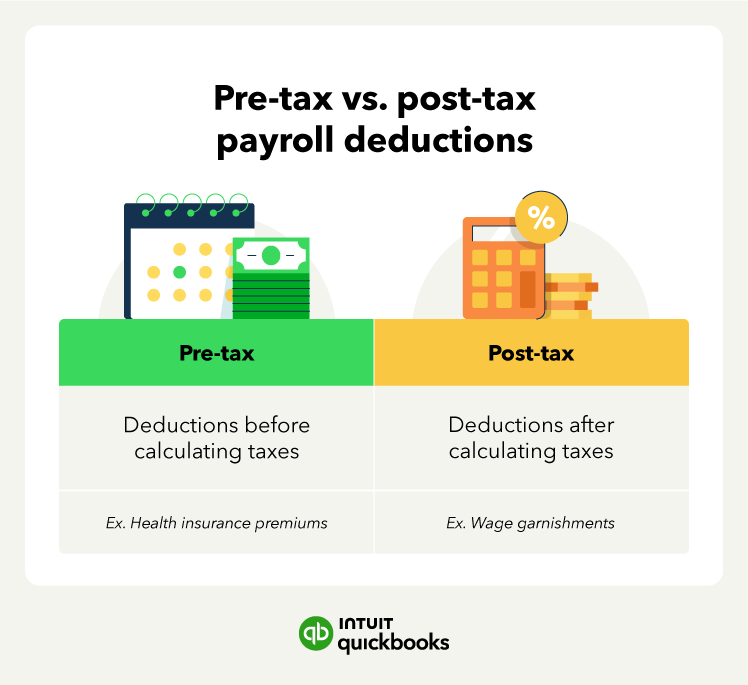
Pre-tax and post-tax payroll deductions

Payroll tax credits and incentives

Arkansas offers several state-level business tax credits to support local investment, job creation, and innovation. These sit alongside federal credits. To explore opportunities or apply, visit the Arkansas Department of Finance and Administration or the Arkansas Economic Development Commission.

Advantage Arkansas income tax credit

Arkansas grants the Advantage Arkansas income tax credit to businesses that agree to create new, full‑time jobs through a formal incentive agreement. The credit equals a percentage of payroll expenses for up to five years and can be carried forward for nine years. Businesses must meet county-level payroll thresholds.

ArkPlus investment income tax credit

Under the ArkPlus investment income tax credit, companies expanding or investing at a new site can claim a 10% credit on qualifying investments and increased payroll, according to an agreement with the Economic Development Commission.

Research and development tax credit

Arkansas offers a state R&D tax credit in addition to the federal credit, worth 20–33% of in‑state qualified research spending, depending on program type.

Federal Research and Development (R&D) Tax Credit

The R&D tax credit allows businesses to reduce their tax liability based on qualifying R&D expenses, such as wages, supplies, and contract research.

Work Opportunity Tax Credit (WOTC)

The Work Opportunity Tax Credit provides a tax incentive for hiring individuals from specific target groups, including veterans, the long-term unemployed, and individuals receiving government assistance.

Federal Unemployment Tax Act (FUTA) Credit

Employers who pay Arkansas state unemployment taxes on time may qualify for a credit of up to 5.4% against their FUTA tax, reducing the effective rate from 6.0% to 0.6%.

Disabled Access Credit

Small businesses that make their facilities more accessible to people with disabilities may receive a non-refundable Disabled Access Credit of up to $5,000.

Small Business Health Care Tax Credit

If you have fewer than 25 full-time equivalent employees, pay average wages below a certain threshold, and cover at least 50% of employee health premiums, you may qualify for a Small Business Health Care tax credit worth up to 50% of your premium contributions.

Employer-Provided Childcare Credit

Businesses that provide childcare facilities or referrals for employees may be eligible for a credit of up to 25% of facility expenses plus 10% of resource and referral expenses.

Fuel Tax Credit and Clean Vehicle Incentives

Businesses that use fuel for off-road purposes or invest in clean vehicles may be eligible for federal tax credits or refunds.

Advanced Energy Project Credit

The Advanced Energy Product Credit supports businesses that invest in qualified advanced energy projects in manufacturing and clean technology.

Industries frequently benefiting from Arkansas business tax credits

  • Manufacturing and logistics. These sectors frequently benefit from Advantage Arkansas and ArkPlus credits by creating new jobs and investing in facilities.
  • Technology and innovation. Companies in fields like biotech or IT that engage in qualified R&D may qualify for the R&D credit, especially if they partner with Arkansas colleges or conduct research in areas of strategic value.
  • Tourism and agritourism. Businesses investing in facilities like museums or heritage sites may qualify for tourism and geotourism credits, which assist in marketing Arkansas’ natural and cultural assets.
  • Film and motion picture production. Arkansas offers a 20% base tax credit (or rebate) on eligible production costs, with additional bonuses, up to 10%, for hiring local residents, veterans, or operating in Tier 3 or 4 counties. Details are available at the Arkansas Economic Development Commission Film Office.
  • Affordable housing development. Businesses that invest in low-income housing projects approved by the Arkansas Development Finance Authority (ADFA) may claim a state credit of up to 30% of their total investment.
  • Rehabilitation of historic or heritage properties. Property owners completing certified rehabilitation of eligible buildings can receive a 25% income or premium tax credit on qualified expenses.
  • Environmental and recycling equipment investment. Companies purchasing equipment for pollution control, recycling, or waste reduction may qualify for a tax credit to encourage sustainable business practices.

Consult with a tax professional to understand what tax credits and incentives you could potentially apply to your business.


Common payroll tax mistakes in Arkansas (and how to avoid them)

Staying up-to-date with tax guidelines can be complicated for small business owners. Here are the top errors to look out for when completing payroll taxes in Arkansas.

Misclassifying employees

Labeling someone as an independent contractor when they should be an employee can trigger back taxes, penalties, and fines. Always use IRS and state guidelines when classifying workers.

Missing or late filings

Forget to file or deposit taxes on time, especially quarterly UI or AR941M, and you risk Arkansas’s 5% per-month penalty (up to 35%) plus interest. Set reminders or use software.

Using outdated tax tables or rates

Arkansas updates its UI rates and withholding rules annually. Employers using last year’s tables may under-withhold or overpay. Update your payroll software each January.

Neglecting new hire reports

Failure to report new hires within 20 days can result in compliance issues. Use the Arkansas New Hire Reporting Center to stay current.

Incorrect account numbers

Using the wrong DFA withholding number or DWS UI account can delay or misapply your payments. Double-check account IDs each time you file.

Tip: QuickBooks Payroll can help you avoid these common mistakes by automating calculations, tracking deadlines, and keeping accurate records.

How to manage your small business payroll obligations

Understanding the nuances of Arkansas's payroll taxes and regulations can take some time. Follow our small business tax preparation checklist and these steps to help you manage your payroll taxes.

Step 1. Partner with a tax professional

Consult a tax professional familiar with Arkansas’s payroll taxes and regulations. They can guide you through compliance requirements, local tax nuances, and potential tax benefits for your business.

Step 2. Explore payroll software

Consider using payroll software to streamline your payroll processes. Tools like QuickBooks automate tax calculations, minimize errors, and ensure compliance with Arkansas laws.

Step 3. Proactively plan for compliance

Stay informed about Arkansas’s payroll tax deadlines and updates. Payroll software combined with expert guidance can help ensure you meet state and local requirements.

Step 4. Optimize your tax strategy

Work with your tax professional to uncover deductions, credits, or other incentives that could benefit your business. Leverage software reports to better understand your payroll data and identify opportunities for savings.

Step 5. Build a financially strong foundation

By combining expert guidance with the right tools, you can efficiently manage payroll taxes and focus on growing your business in Arkansas.

What are the payroll taxes in Arkansas?

Calculating payroll taxes in Arkansas

Payroll tax calculations in Arkansas depend on several factors, including:

  • Payroll frequency and the number of employees
  • Filing and deposit schedules assigned by the state and federal authorities
  • Each employee’s IRS Form W-4 and Arkansas Form AR4EC (for income tax withholding)
  • Eligibility for tax credits that affect net payroll tax liability

For employees, the main payroll taxes are:

  • Federal income tax
  • FICA (Social Security and Medicare taxes)

For employers, the main payroll taxes are:

  • Social Security and Medicare taxes
  • Federal Unemployment Tax (FUTA)
  • Arkansas state income tax withholding
  • Arkansas unemployment insurance (SUTA)

It’s essential to stay updated on the current rates and regulations, as they can change annually.

Leverage payroll software for compliance in Arkansas

Managing payroll in Arkansas requires accuracy due to complex regulations. Errors can lead to penalties and legal risks, but QuickBooks streamlines payroll management to ensure compliance. It automatically calculates, files, and pays federal and state payroll taxes—with a 100% accuracy guarantee.** You'll stay current with Arkansas tax law changes, easily generate reports for filings, and get up to $25,000 in penalty coverage if issues arise.**


*Disclaimer:*

****Accuracy Guaranteed**: Available with QuickBooks Online Payroll Core, Premium, and Elite. We assume responsibility for federal and state payroll filings and payments directly from your account(s) based on the data you supply. As long as the information you provide us is correct and on time, and you have sufficient funds in your account, we’ll file your tax forms and payments accurately and on time or we’ll pay the resulting payroll tax penalties. Guarantee terms and conditions are subject to change at any time without notice.

Tax penalty protection: If you receive a tax notice and send it to us within 15 days of the tax notice we will cover the payroll tax penalty, up to $25,000. Additional conditions and restrictions apply. Only QuickBooks Online Payroll Elite users are eligible to receive tax penalty protection.

*This content is for information purposes only and information provided should not be considered legal, accounting or tax advice or a substitute for obtaining such advice specific to your business. Additional information and exceptions may apply. Applicable laws may vary by state or locality. No assurance is given that the information is comprehensive in its coverage or that it is suitable in dealing with a customer’s particular situation. Intuit Inc. does not have any responsibility for updating or revising any information presented herein. Accordingly, the information provided should not be relied upon as a substitute for independent research. Intuit Inc. cannot warrant that the material contained herein will continue to be accurate, nor that it is completely free of errors when published. Readers should verify statements before relying on them.*


Recommended for you

Mail icon
Get the latest to your inbox
No Thanks

Get the latest to your inbox

Relevant resources to help start, run, and grow your business.

By clicking “Submit,” you agree to permit Intuit to contact you regarding QuickBooks and have read and acknowledge our Privacy Statement.

Thanks for subscribing.

Fresh business resources are headed your way!

Looking for something else?

QuickBooks

From big jobs to small tasks, we've got your business covered.

Firm of the Future

Topical articles and news from top pros and Intuit product experts.

QuickBooks Support

Get help with QuickBooks. Find articles, video tutorials, and more.