QuickBooks Blog
An image of a small business owner evaluating W2 and W4 forms.
manage employees

W-2 vs W-4: Which forms to use for payroll withholding and annual reporting


Key takeaways:

  • Starting in 2027, W-2s will include a new 14b box for specifying tipped workers.
  • New codes will be added to box 12 of the W-2 for reporting tips, overtime pay, and Trump account contributions.
  • The W-4 will feature a new, detailed calculation that includes the deduction changes, like no tax on tips that were part of the OBBBA.


As a business owner, knowing the difference between a W-2 vs. W-4 is crucial for accurately calculating payroll taxes and avoiding IRS penalties. A W-4 collects an employee's tax withholding details so you can calculate their payroll taxes, while a W-2 reports the wages you paid and the taxes you withheld during the year. 

With the average small business having 11 employees, setting up withholding can be time-consuming and confusing. To make the process easier, this article will explore the key differences between a W-4 vs. W-2 and walk you through the payroll tax setup steps.

Understanding the core differences between W-2 vs. W-4

What is a W-4 form?

What is a W-2 form?

A step-by-step guide to the payroll process

Find peace of mind come tax time

Understanding the core differences between W-2 vs. W-4

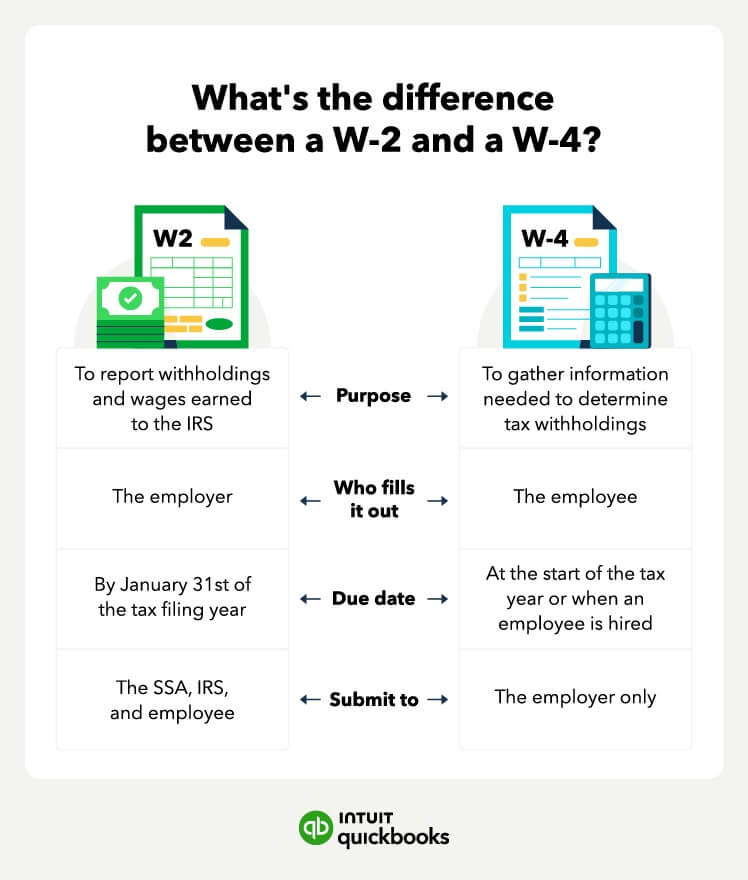
Both the W-2 and W-4 forms are used in the payroll tax process for employees of a business, but who completes the form, when, and how it is used differs. 

W-4 form

A W-4 is the form the employee fills out and tells the employer which tax adjustments to apply. For instance, an employee may claim a dependent, or note whether they have a working spouse. This W-4 information is key to ensuring an employee’s withholding for the year is correct, which is why it is generally filled out or updated at the beginning of the year. 

W-2 form

A W-2, on the other hand, is created by the employer. This tax document records taxes withheld from the employee’s paycheck during the year, along with wages (and tips) earned. It also reports information on benefit withholdings, like contributions to a retirement account or health coverage costs. This form must be submitted to the Social Security Administration (SSA) ahead of tax filing.

A chart showing the differences between the W2 and the W4 form

What is a W-4 form?

The Employee's Withholding Certificate, or W-4 tax form, helps calculate federal income tax withholding. 

Employers need to collect a completed form from all new employees upon hire. Employees can use the form to adjust their tax withholding based on their family size, income, or potential deductions. This form is used internally for payroll purposes and is not sent to the IRS. 

It also helps request updated forms from existing employees at the start of the year. This way, they can adjust their tax withholding for major life changes, like getting married or having a baby. 

The goal in filling out the W-4 is to ensure the tax withheld during the year matches the anticipated tax liability. This can help prevent unexpected tax bills or large refunds. 

Key elements of the Form W-4

A Form W-4 includes a series of questions for your employee to fill out to help them determine the number of allowances to withhold from their paycheck. The information the employee needs to provide includes:

  • Name and address
  • Social Security number (SSN)
  • Filing status or marital status — single, married, or married filing separately
  • Whether the employee has more than one job or a spouse who works
  • If they are eligible for dependent or other credits
  • The additional amount they wish to have withheld from their paycheck
  • Whether they’re exempt from having to make tax payments

The employer must complete lines 8-10 at the bottom of the form. Here, you’ll enter your company name, address, employer identification number (EIN), and the employee’s starting date.

W-4 deductions

Part of accurately calculating tax liability is determining which deductions are applicable. The W-4 form offers a deductions worksheet to help employees calculate this, but employees may also want to review their previous year’s 1040. 

Important deductions that can decrease an employee’s withholding include: 

  • Claiming a dependent - employees may receive a $2,200 tax credit for each qualifying child, plus a $500 deduction for other dependents. 
  • Itemized deductions - employees can estimate itemized deductions for the year, such as mortgage interest, charitable contributions, and state taxes. 
  • Student loan interest - up to $2,500 in student loan interest may be deductible, depending on their household income. 
  • IRA contributions - this deduction is based on income, filing status, and employer benefits.
  • Other deductions from Schedule 1 - this can include educator expenses, HSA contributions, and alimony paid (divorce agreements before 2019). 

For the 2026 tax year, there will be new deductions added to the W-4 form as part of the One Big Beautiful Bill Act (OBBBA). 

These will include: 

  • Qualified Tips Deduction (up to $25,000).
  • Qualified Overtime Deduction (up to $12,500 or $25,000 joint).
  • Senior Deduction (an additional $6,000 for eligible individuals age 65+).
  • New Car Deduction (up to $10,000 in interest).
  • Non-Itemized Charitable Deduction (up to $1,000 or $2,000 joint)

The goal of this section is to determine if these deductions exceed the standard deduction amounts. Here’s a quick overview of the amounts for 2025 & 2026.

If an employee’s deductions exceed the standard deduction for their filing status, then their tax withholding need to be reduced accordingly. This deduction calculation process replaces the old, less accurate allowances method used on pre-2020 W-4 tax forms.


Note for employees: Many of the deductions available are income-limited. You should check the eligibility criteria before adding the deduction to your W-4 to prevent an unexpected tax bill.


W-4 state-specific forms

Employers must also make sure that employees complete state-specific W-4 forms as well. Remember that employees must pay both federal and state taxes in most states. A state-specific form determines tax withholding at the state level. States don’t necessarily refer to these forms as “W-4” forms, though. For instance, California refers to it as a DE-4 Withholding Certificate. In Kansas, it’s a KW-3 Withholding Tax Return.

For a complete listing, take a look at state-specific tax forms. As a business owner, you should learn about state tax laws and forms even if you operate in a state with no income tax.

W-4 forms and independent contractors

The W-4 form only applies to employees. If small business owners elect to hire self-employed individuals or independent contractors, they’ll need to navigate the IRS Form W-9 and 1099s.

The W-9 is similar to the W-4 in that it collects necessary information, such as the worker’s (or business entity’s) name, address, and taxpayer ID. The employer uses this information to report to the IRS how much they paid the individual for their services. The Form W-9 does not include withholding or deduction information since the employer is not required to withhold taxes.

At the end of the year, independent contractors receive a 1099 from each of their clients, stating how much they were paid. The independent contractor is responsible for paying the entire tax burden on these wages. Independent contractors must pay all income taxes, and both the employer and worker’s portion of Social Security and Medicare taxes.

This is noticeably different from an employee. Not only does an employer withhold taxes from an employee’s paycheck, they also pay half of the employee’s Social Security and Medicare taxes.

W-4 responsibilities as a business owner

Hiring employees is a big responsibility. Many new business owners don’t understand how much maintenance and compliance comes with hiring employees. Owners must make sure that each new employee fills out a W-4 so that they can fulfill their responsibility of withholding money for the employee’s income tax liability each pay period.

The IRS recommends that employees submit a new W-4 each year. Although uncommon, if an employee chooses not to complete a W-4, the IRS suggests you withhold taxes as if your employee were single with no deductions or adjustments.

To guarantee the accuracy of your withholding calculations, consider using QuickBooks Payroll. This software automates withholding calculations based on the W-4 data and helps ensure timely compliance with tax reporting deadlines.

Your accounting, your taxes. All in one place.

Save time by seamlessly moving from books to taxes in QuickBooks, then file your return with unlimited expert help and your maximum refund.*

What is a W-2 form?

The IRS Form W-2 is an informational return. It’s also known as a Wage and Tax Statement. This is the year-end form that employers use to report earnings and the amount of taxes withheld to the IRS. Employers submit a Form W-2 for each employee they paid throughout the year.

So, the W-4 instructs employers how much to withhold from an employee’s earnings. And the W-2 is a summary of how much was paid and withheld throughout the last year.

Specifically, the W-2 reports information on employees' earnings (gross pay, tips, and bonuses), and their contributions to federal taxes, Social Security, and Medicare (FICA), and any additional withholdings such as retirement plans. Both the IRS and the employee receive a copy of this completed form. The employee uses the form to file their year-end taxes.

Employers must provide copies of Form W-2 to all employees by January 31 each year. Otherwise, they face a W-2 filing penalty. They must also submit copies to the IRS and Social Security Administration by this date.

Much like the W-4 form, W-2 forms also exist at the state level. Employers must inform their respective states how much employees earned during the previous tax year. Employers must understand that federal income tax and state income tax are different payments, and they need to file a Form W-2 with both entities.

A step-by-step guide to the payroll process

Sometimes, to better understand the purpose of both the W-2 and W-4 forms, it helps to understand the payroll process. 

An image showing the four steps of the payroll process.

Broadly speaking, payroll processing includes these four steps:

Step 1: Data collection

When an employee is hired, you need to collect information (via the W-4) on federal and state tax withholding. You also need to collect permission to withhold for company-provided benefits, like healthcare coverage, retirement plans, or dependent care. 

For example, let’s say you hire a new employee, Laura. After reviewing the benefits, she decides she wants healthcare coverage just for herself and to contribute 2% of her pay to her 401(k). These benefit elections, along with her completed W-4, are used to calculate her payroll deductions

If you use a tool like QuickBooks Payroll, employees like Laura provide all this information quickly and accurately through the employee portal. 

Step 2: Net pay calculations

The next step is to calculate an employee's pay using their benefit selections, tax withholding information, and any post-tax deductions. The result is the employee’s take-home pay, that is, the dollar total of the paycheck you will issue them. 

Let’s take another look at Laura. Her salary is $50,000/year, and she is paid biweekly. This means her gross pay (total before taxes and deductions) is $1,923. First, you would subtract $38.46 for her 401(k) contribution, then subtract $45 for healthcare coverage, leaving $1839.54 in taxable income. 

Next, subtract income taxes and FICA taxes, which are: 

  • Federal Income Tax - $142.35
  • Social Security Tax - $116.44
  • Medicare Tax - $27.23
  • Illinois State Income Tax - $91.06

This brings the tax total to $377.08. As Laura has no wage garnishments or other post-tax deductions, nothing else needs to be subtracted. This brings her net pay amount to $1,462.54. 

This net pay calculation must be exact every time. Mistakes could result in a tax bill for Laura and IRS penalties for you. Instead of doing the math by hand, consider using software like QuickBooks Payroll to calculate withholdings and net pay automatically. 

Step 3: Payments

After you have calculated each worker's net pay, you can issue payroll. This can be done using a physical check or via electronic transfer (ACH) to the employee’s bank account. If you choose the second option, you need the employee’s permission and their account information. You should also provide them with electronic access to a paystub. 

In the new hire example, Laura opts to have her check deposited electronically. So, you will need to initiate a transfer from your business bank account to her bank account for the amount owed. To simplify the process, QuickBooks Payroll lets you auto-issue payroll for all employees for next-day (or same-day) deposit. And the employee portal lets employees like Laura view their pay stubs.


note icon The day you issue payment affects the day you need to remit tax payments to the IRS. For instance, if you are on a monthly schedule, for a paycheck issued on Friday, October 24, taxes need to be deposited by November 15.


Step 4: Reporting

At the end of the year, all wage information, including wages paid and withholdings, must be reported to the IRS and to any state or local department of revenue. This is where the W-2 comes in. 

The W-2 you generate for an employee includes the year-end totals for tax withholdings, benefit costs, and gross wages paid. This form must then be sent to the Social Security Administration (SSA), which forwards the information to the IRS. A copy must also be made available to your employees. The due date for sending/submitting W-2s is January 31 with varying due dates for different states. 

Let’s take another look at Laura. The W-2 generated for her would show data like $50,000 in wages, $47,828.04 in taxable pay, $999.96 in 401(k) contributions, and $3,701.01 in federal income tax. You need to send this form to the SSA and Laura by Jan. 31. Laura can then use this form to file her taxes. 

With QuickBooks Payroll software, the W-2 is automatically filled out for you using payroll data recorded throughout the year. You can then print and send them, or let QuickBooks handle the process electronically.

Find peace of mind come tax time

Tax time can be stressful for business owners. You need to prepare tax forms for all your employees, calculate your tax deductions, and navigate the complex process of actually filing your taxes. Fortunately, QuickBooks can help you breathe easier this tax season. For help sorting out complex tax situations like sales tax, employee expenses, and 1099s, check out QuickBooks Advanced.


Recommended for you

Mail icon
Get the latest to your inbox
No Thanks

Get the latest to your inbox

Relevant resources to help start, run, and grow your business.

By clicking “Submit,” you agree to permit Intuit to contact you regarding QuickBooks and have read and acknowledge our Privacy Statement.

Thanks for subscribing.

Fresh business resources are headed your way!

Looking for something else?

QuickBooks

From big jobs to small tasks, we've got your business covered.

Firm of the Future

Topical articles and news from top pros and Intuit product experts.

QuickBooks Support

Get help with QuickBooks. Find articles, video tutorials, and more.