You could save up to 25% on transaction costs².
Speak with us now to see if you qualify.
Talk to sales 1-800-515-8366
Monday - Friday, 6 AM to 4 PM PT

Table of contents
Table of contents
Your team’s wages are only part of what it costs to keep your business running. Employer-paid taxes, benefits, and insurance also contribute to labor spending, while changes in overtime and staffing can push costs above your budget.
Calculating total labor cost helps you understand what your workforce costs each month and how that spending compares with the revenue it supports. You can also track costs by department or job to see where adjustments may be needed.
This guide explains how to calculate labor cost, measure labor cost percentage, and use those figures to inform everyday business decisions.
Looking to estimate the cost of an individual employee? Use our employee cost calculator to enter pay, tax, and benefit information.
Labor cost is the total cost of employing your workforce, including gross wages and additional employer-paid expenses such as payroll taxes, benefits, and insurance.
You can calculate labor cost for your entire business or a smaller group, such as a department, location, or project team. The scope depends on the question you want to answer:
Using the same scope and calculation method over time makes it easier to compare results and identify changes.
Start with employee pay, then account for the additional costs your business covers.
Count each expense once. If paid time off, overtime, or bonuses are already included in gross wages, do not add them again. Similarly, employee deductions withheld from gross pay are not additional employer expenses.
For a broader workforce budget, you may also track recruiting, onboarding, and employee equipment costs. Keep these categories consistent across reporting periods so a change in your calculation method doesn’t look like a change in spending.

Direct labor costs are tied to a specific job, project, or product. Examples include wages paid to a construction employee for installing cabinets at a customer’s property or a production employee for assembling products.
Indirect labor costs support business operations rather than a specific job, project, or product. Examples include an office manager’s salary or wages paid to a supervisor for time spent scheduling employees.
Businesses that bill by the job or project often track direct and indirect labor separately. Accounting for both provides a more complete picture of what it costs to deliver the work.
Use the following formula to calculate labor cost for your business or a selected team:
Total labor cost = Gross wages + Employer payroll taxes + Employer-paid benefits and insurance + Other employment costs not already counted
Decide whether you’re measuring labor cost for a pay period, month, quarter, or year. Then identify the employees included in the calculation.
For example, you might calculate monthly labor costs for your entire business or quarterly costs for your customer service department.
Use the same period for every expense. If a benefit or insurance cost is recorded annually, allocate the appropriate portion to the period you’re measuring.
Add the gross wages for all employees in your selected group during the period. Include regular pay and any overtime, bonuses, commissions, or paid leave recorded in those wages.
Use pay before employee deductions. Check your payroll records to avoid adding any pay category twice.
Add the employer payroll taxes associated with those wages, plus employer-paid benefits and insurance for the same employees and period.
Include only the business’s share of these expenses. Amounts deducted from employee pay are already part of gross wages.
Include any additional employment costs within your chosen scope, such as external training fees or onboarding materials. Exclude amounts already captured in wages or another category.
Add these amounts to determine your total labor cost.
Example: Calculating monthly labor cost for a team
A business calculates the following costs for its team during one month:
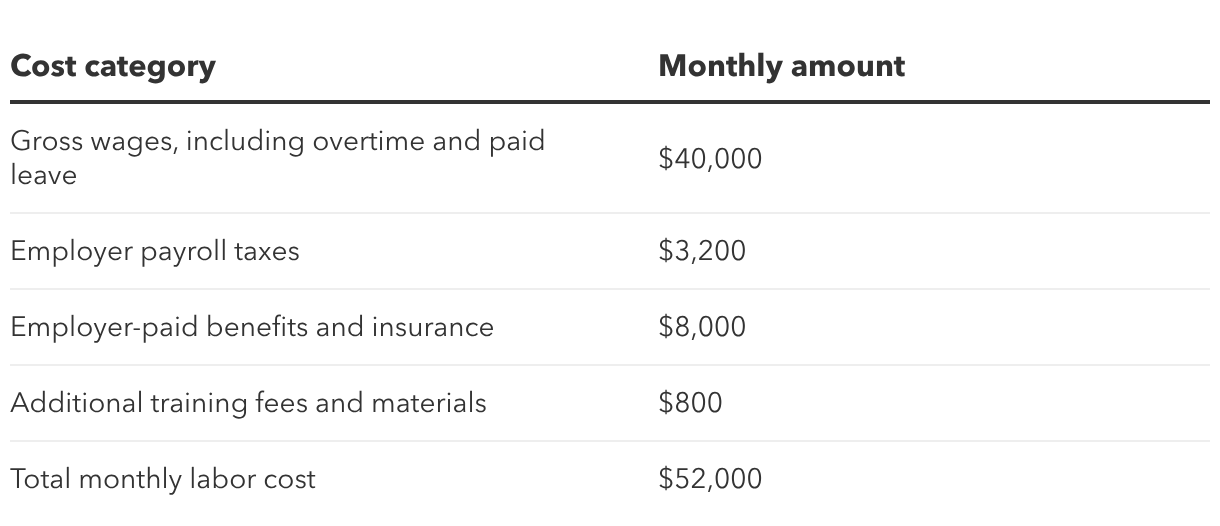
Total labor cost = $40,000 + $3,200 + $8,000 + $800 = $52,000
This gives the business a monthly labor spending figure it can compare with its budget and revenue.
Labor cost percentage shows how much of your revenue goes toward labor.
Labor cost percentage = (Total labor cost ÷ Total revenue) × 100
Use labor costs and revenue from the same period and business scope. For example, compare a location’s labor costs with that location’s revenue.
Using the example above, the business has $52,000 in monthly labor costs. If it generates $200,000 in revenue that month:
Labor cost percentage = ($52,000 ÷ $200,000) × 100 = 26%
That means the business spends 26 cents on labor for every dollar of revenue.
There isn’t one labor cost percentage that works for every business. Your business model, staffing needs, and mix of other expenses influence how much revenue needs to cover labor.
Start by comparing your results with your budget and previous periods. If labor cost percentage rises, look at both sides of the formula:
A higher percentage doesn’t automatically mean you need fewer employees. It signals that you should review what changed and whether the spending supports your business needs.

Once you understand your labor costs, use that information to identify specific adjustments.
Accurate time records help you understand where labor hours go. Comparing estimated and actual hours can reveal jobs that consistently take longer than expected or activities that need a closer review.
Look for recurring overtime by role, shift, or department. Repeated overtime may point to scheduling gaps, staffing shortages, or work that takes longer than planned.
Understanding the cause helps you decide whether to adjust schedules, improve a process, or add capacity.
Review busy and slow periods when building schedules. Sales patterns, upcoming projects, and seasonal demand can help you plan coverage and reduce avoidable last-minute changes.
Training employees to cover related responsibilities can make it easier to manage absences and workload changes. Account for the initial training time when evaluating the potential benefit.
Compare the labor costs you planned for with what you actually spent. If certain jobs consistently require more hours than estimated, update future estimates and review whether your pricing covers the work.
For business-wide budgeting, track both total labor spending and labor cost percentage. Together, they show how costs are changing and whether revenue is keeping pace.
Calculating labor costs is easier when employee hours and payroll information are organized and accessible. Reliable records help you compare spending across periods and understand how staffing decisions affect your budget.
QuickBooks Workforce can help support payroll and time management. Connecting time tracking with payroll helps reduce manual entry and gives you a clearer view of employee hours.
For businesses that manage projects, job costing can also help connect labor spending to the work it supports.
With consistent labor cost tracking, you can build more informed budgets, review pricing, and plan staffing around your business’s needs.










Call Sales: 1-800-285-4854