You could save up to 25% on transaction costs².
Speak with us now to see if you qualify.
Talk to sales 1-800-515-8366
Monday - Friday, 6 AM to 4 PM PT

Table of contents
Table of contents
Most small business owners define stability as having enough cash in the bank. While that is a starting point, it's not a strategy. A late payment to your top supplier, a vendor who stops delivering without warning, or a sudden staff departure can derail a business that looks healthy on paper.
According to a QuickBooks report, a single late payment put payroll or bills at risk for 39% of owners in 2025. Knowing how to measure financial stability means tracking the ratios, reserves, and systems that determine whether your business can absorb those hits and keep moving.
Start with a simple audit. Which vendor relationship, if disrupted, would stop your operations? Who holds knowledge that only exists in one person's head? Once you know where the weak points are, you can close them.
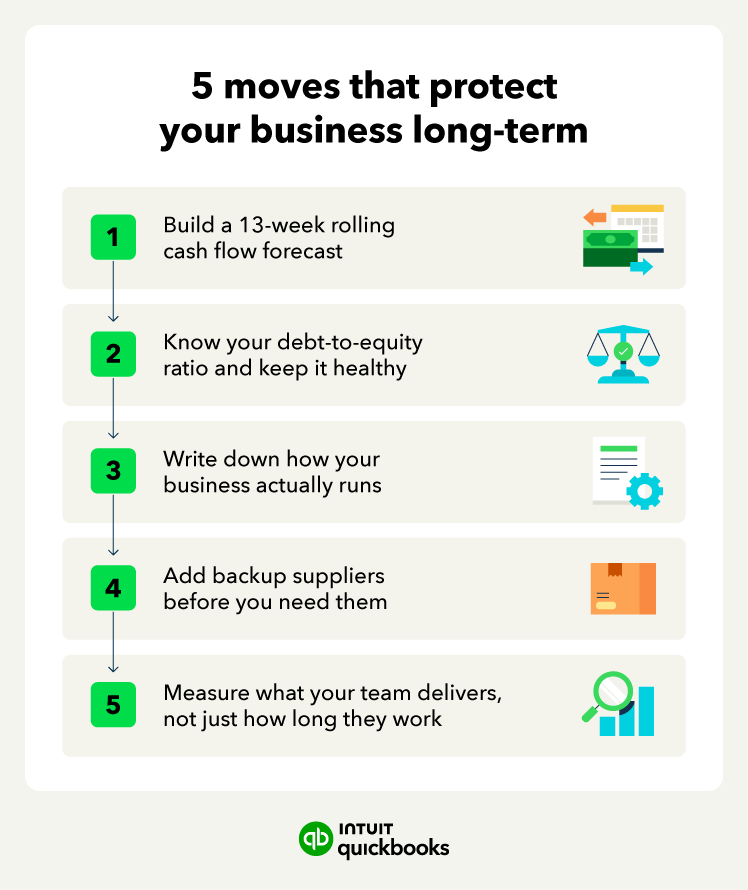
Your monthly P&L tells you what happened. A 13-week rolling forecast tells you what's coming.
This forecast maps your expected cash inflows and outflows week by week, giving you a clear view of your short-term runway before problems surface. It catches cash shortfalls weeks before they hit, giving you time to collect early, delay a purchase, or draw on a credit line at a reasonable rate, rather than scrambling. Set an alert in your accounting software so you're notified before your cash runway drops below a set threshold.
The key difference between this approach and a standard budget is that it updates continuously. You're always working from current numbers, not projections built three months ago.
In today's tighter credit environment, lenders closely examine debt-to-equity ratios before approving a term loan.
They typically calculate this ratio by dividing your total liabilities by shareholders' equity, showing how much debt your business carries for every dollar you own. Keeping that ratio low means your options stay open.
If your ratio falls in the at-risk or critical range, prioritize paying down high-interest debt first. From there, stress test your numbers quarterly:

As of early 2026, high-yield business savings accounts can earn around 3% to 4% APY, depending on the provider and balance. On a $50,000 reserve, that’s roughly $1,500 to $2,000 a year for simply moving the money.
If your business depends on you being there every day, it's fragile. Most owners find that out the hard way.
Document the five functions that keep your business running: Sales, Fulfillment, Payroll, Support, and Risk response. These don't need to be long. A one-page document for each function that a new employee can follow is enough.
After documenting those processes, you can identify which tasks require human input and which you can streamline through accounting automation. Now your team’s time can be better spent on work that requires judgment.
Where automation delivers the most return:
If one supplier handles a critical input, a single disruption can stall your entire operation. Identifying a backup source for each of your top five inputs takes a few hours of research upfront and can prevent a much bigger problem down the road.
Managing those vendor relationships and moving a meaningful portion of your sourcing closer to your primary market also reduces exposure to shipping delays and port disruptions. In early 2025, fewer than 1 in 7 ocean shipments arrived on time, forcing small importers to carry extra inventory just to stay stocked.
Finally, keep a one-page emergency plan somewhere your team can find it. It only needs to cover the most likely scenarios:
Knowing the first three steps in each situation is enough to prevent panic.

Before your next contract renewal, check for and read the force majeure clause, which outlines the conditions that allow either party to suspend or exit the agreement without penalty.
Hours logged are a weak proxy for performance. It doesn't tell you whether the work moved the business forward.
Shifting to goals tied to specific, measurable results gives employees clearer targets and gives you a more accurate picture of what's working. It also opens the door to flexible arrangements that retain good people without adding headcount.
Financial transparency is a management habit most small business owners skip. Sharing the numbers, even at a high level, builds trust. So does offering competitive employee benefits and paying invoices and contractors promptly, which also keeps your own cash flow more predictable.
AI tools now catch financial warning signs that used to slip through until the month-end review. An aging receivable or an unexpected expense spike can trigger an alert the moment it moves outside a normal range.

You don't need many tools to make this work. A few that connect to your core financial system are more useful than a dozen that don't talk to each other. Start with your accounting software. Add others when you can point to a specific problem they solve.
Automation handles volume well, but it's less reliable on nuance. Keep a person in the loop for compliance decisions, sensitive customer situations, and anything where context matters.
Managing company finances gets harder as your business grows, and reacting to problems after the fact is rarely enough. QuickBooks Online Advanced gives you the tools to stay ahead of issues before they become costly, with real-time visibility into your numbers and smarter forecasting built in.
QuickBooks Online Advanced gives you a centralized view of your business finances the moment you log in. The dashboard surfaces key metrics like income, expenses, profit and loss, and bank account balances in real time, so you always know where your business stands. That consistent visibility is the foundation of a stable, well-managed business.
Setting it up is straightforward. Once you connect your bank accounts and chart of accounts, QuickBooks automatically pulls in transactions and organizes them into visual summaries you can act on. These dashboards are available with the QuickBooks Online Advanced plan.
The Cash Flow Planner in QuickBooks Online Advanced goes beyond reporting what has already happened. It projects upcoming cash gaps based on your current income and expenses, then suggests specific actions like following up on a large outstanding invoice through your accounts receivable aging report, rather than just flagging a number that looks off.
To access it, log in to your QuickBooks Online account, navigate to the Cash Flow menu, and open the Planner. From there, you can view projections, adjust assumptions, and model different scenarios based on your business activity.
What makes this especially powerful is Intuit Intelligence. This agentic AI monitors 1099 status, automates transaction tagging, and predicts cash flow gaps before they become critical. It turns financial stability from something you have to manage manually into a passive benefit of using the software, so your business stays on solid footing without the constant effort.

Stability is less about what happens to your business and more about how prepared you are when it does. Small steps reduce more risk than most owners expect. Using QuickBooks Online Advanced to keep cash flow, payroll, and benchmarks in one place also helps prevent surprises when something goes wrong.

Call Sales: 1-800-285-4854