QuickBooks Blog
Two individuals are engaged in a collaborative work session in a modern office setting. The focus is on a laptop screen, with one person pointing to it while the other observes. The workspace includes colorful stationery and a bright, organized environment with sticky notes visible in the background.
Invoicing

What is a proforma invoice? Definition, purpose, and how to create one in 2026

Global trade has been booming. The United Nations Conference on Trade and Development (UNCTAD) reported that it grew by about $300 billion in just the first half of 2025. With so much buying and selling across borders, the paperwork that keeps those deals moving is more important than ever. One of those documents is the proforma invoice.

If you run a business, you’ve probably dealt with plenty of invoices, but proforma invoices are a little different. Keep reading, and we’ll explain what a proforma invoice is, how it’s different from other invoices, when to use it, and how to create one.

Jump to:

Defining proforma invoice

A proforma invoice is essentially a preview version of a sales invoice. It’s sent by a seller to a buyer before the goods or services are actually delivered. Instead of being a demand for payment, it’s more like a detailed estimate. It shows the expected cost, quantities, shipping details, and other terms so both sides know what to expect.

The key thing to remember is that a proforma invoice isn’t recorded in the books, so it doesn’t count as revenue for the seller or an expense for the buyer. And to avoid confusion, it’s always marked clearly as “Proforma Invoice” so it’s not mistaken for a regular sales invoice.


A pair of black leather bank reconciliatory cards.

Tools plus experts, together

Confidently manage your finances with QuickBooks experts by your side.*

The purpose of a proforma invoice

A proforma invoice has a few practical uses, including:

Sets expectations up front

A proforma invoice acts like a detailed preview of the deal. It outlines what’s being sold, the quantities, prices, shipping terms, and any other important conditions. When you put everything in writing before money changes hands, both you and your buyer know exactly what to expect. That clarity helps prevent issues like disputes over pricing or confusion about delivery terms.

Helps with international trade

If you’re selling or buying across borders, a proforma invoice can make the process a lot easier. Plus, customs offices usually ask for it. Why? A proforma invoice includes details like product descriptions, values, weights, and the country of origin. That way, you give officials what they need to calculate the proper duties and taxes.

It’s also beneficial for buyers and sellers. Buyers can use a proforma invoice to apply for import permits or arrange payment in the right currency, while sellers can use it to help prevent border delays and reassure the buyer that everything is in order.

Facilitates approvals

Big purchases usually need a green light before they move forward. A proforma invoice gives buyers something solid to take to their manager, finance team, or bank. And because it shows the full breakdown of costs, shipping, and terms, it works as an official-looking document that can be used to get budget approval, secure a purchase order, or apply for financing.

For sellers, this step is just as valuable. It helps the buyer move through their internal process faster. That means fewer back-and-forth emails, less guesswork, and a quicker path to closing the deal.

Builds trust

When you provide buyers with a clear, detailed breakdown of the costs, terms, and shipping details before asking for payment, it shows that you value transparency. That kind of openness helps build stronger buyer-seller relationships. Buyers know exactly what they’re agreeing to, and sellers show they can be counted on to deliver what’s promised.

What a proforma invoice should look like

Even though a proforma invoice isn’t legally binding, it should still look professional and cover all the important details. What information is required on a proforma invoice? Here are some key aspects you’ll want to include:

Title and disclaimer

Always label it “Proforma Invoice” right at the top, so no one mistakes it for a final invoice. Also, adding a note like “This is not a tax invoice” can help clarify the document.

Parties’ contact information

Include your company name, address, phone, and email. Then, do the same for your buyer.

Reference number and date

Give the proforma its own reference number (not the same as a final invoice number) and include the date you created it. This helps keep the paperwork organized.

Detailed breakdown of goods or services

List each item or service with a clear description, quantity, unit price, and the total price for that line.

Estimated charges and totals

Include estimated shipping costs, applicable taxes, discounts, handling fees, and the grand total. If you’re dealing with international sales, specify the currency.

Terms of sale and validity

Define payment terms, delivery or shipping method, expected delivery timeframe, and how long the quote remains valid (usually 30–60 days)

Trade or custom details

For international shipments, include Incoterms (like FOB or CIF) to show who’s responsible for shipping and insurance. Customs may also require HS codes, country of origin, and weights.

Extra notes

Add disclaimers or special conditions, such as "prices subject to change" or notes on return policies or packaging instructions.

Invoice vs. a proforma invoice

At first glance, a proforma invoice can look almost identical to a regular invoice. Both list items, prices, terms, and shipping details. But here’s the key difference: when you receive a proforma invoice, you’re not being asked to pay yet. Instead, you’re getting a detailed preview of what the transaction will look like. It’s a tool to help you confirm the terms, prevent misunderstandings, and decide whether to move forward.

A regular invoice is different. Once the seller delivers the goods or services, they send you a formal invoice that requests payment. This document isn’t just informational like a proforma invoice. It’s legally binding. It shows up in the seller’s accounts receivable and in your accounts payable. In other words, it officially affects both sides’ books.

Essentially, it boils down to this:

  • Proforma invoice = a draft that sets expectations
  • Invoice = the real deal that requires payment

Commercial invoice vs. proforma invoice

A commercial invoice is a specialized type of invoice that’s used for international shipments and required for customs clearance. It contains itemized, finalized details about the shipment, including description, value, quantity, shipping terms, and total payment due. Customs officials use this information to calculate taxes and duties and verify that the transaction is legal and above board. Essentially, it acts as both a payment demand for the buyer and a compliance document for customs.

As mentioned previously, a proforma invoice comes earlier in the process. Instead of being a final bill, it’s more like a detailed quote that shows the buyer what to expect. It outlines prices, shipping terms, and other details, but it isn’t legally binding and doesn’t get recorded in the books.

The key difference is this:

  • Proforma invoice = a preview that helps you plan and prepare.
  • Commercial invoice = the final document that confirms the sale, demands payment, and clears goods through customs.


Common examples for when a business should use a proforma invoice

A proforma invoice can be a powerful tool to make business transactions clearer and more organized. You won’t need it for every sale, but there are certain situations where it can save time, build trust, and avoid confusion. Here are some scenarios where this type of invoice can be beneficial.

When you’re quoting or negotiating

If a buyer is interested but hasn’t committed yet, send a proforma invoice. It works like a detailed quote, showing prices, quantities, and terms so both sides know what’s on the table before moving forward.

For custom orders or project work

When you’re creating something tailored (like a custom product or service package), a proforma invoice lets the buyer see the full scope, costs, and delivery expectations before you get started.

When buyers need approvals or a budget sign-off

Big purchases sometimes require internal approval. A proforma invoice gives your buyer something official to take to their finance team, manager, or board to secure a budget or issue a purchase order.

When you’re asking for a deposit or prepayment

When you need to accept payments up front, proforma invoices can be helpful. It explains the deposit amount and terms clearly, so the buyer understands what’s expected and feels confident making that first payment.

For international shipments

Proforma invoices are especially useful in global trade. Customs authorities typically need them to estimate duties and taxes before a shipment leaves port. They make cross-border transactions easier and faster.

When buyers need financing

Sometimes, a buyer needs a bank loan or letter of credit to complete the purchase. A proforma invoice gives lenders the details they need to approve the financing before the deal is finalized.

How to create a proforma invoice

Creating a proforma invoice is straightforward if you follow a few key steps:

Step 1: Calculate costs

First, calculate the full price of the deal. List the products or services and their costs, then add in anything the buyer should know about, including:

  • Shipping or freight costs, whether it’s domestic delivery or international freight.
  • Taxes and duties, such as local sales tax, VAT, or potential import duties.
  • Handling or packaging fees, especially if you’re shipping fragile or oversized items.
  • Discounts (if you’re offering them), so the buyer can see the savings.

If you’re selling internationally, always specify the currency (e.g., USD, EUR, GBP). Exchange rates can change quickly, so noting the currency upfront keeps everyone aligned.

Step 2: Set up the document

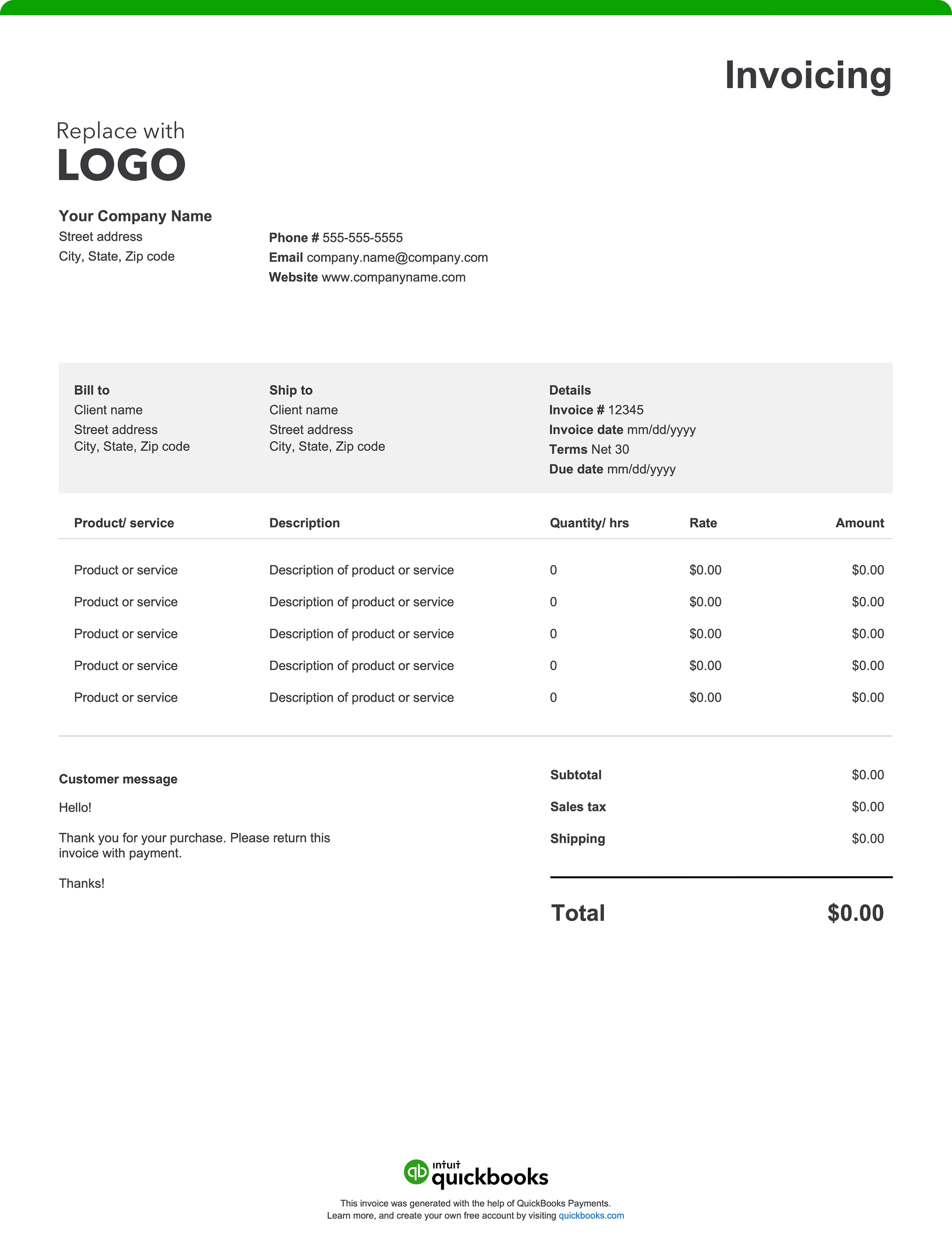
Once you’ve done the math, it’s time to put everything into a professional-looking document. You can use a standard invoice template, but clearly label it “Proforma Invoice.”

Next, add the basics:

  • Your business details: Name, address, phone, email, and logo if you have one.
  • The buyer’s information: Their business name, address, and contact details.
  • The reference number and date: Give the proforma invoice its own unique number and include the issue date to help keep paperwork organized.
  • The validity period: Make it clear how long the quote stands (for example, “valid for 30 days”). This keeps expectations clear and prevents disputes if prices change later.

Step 3: List invoice items

After you’ve set up the basics of the document, it’s time to get into the details of what you’re actually selling. Break everything down into a clear, itemized list so the buyer can see exactly what they’re paying for.

Be sure to include the product or service description, quantities, unit prices, and line totals. For international trade, it’s especially important to add customs-related details, like country of origin, HS or tariff codes, and weights or dimensions.

Step 4: State agreement terms

Explain how and when payment is expected, the currency, and any other conditions. If needed, add a space for a signature or digital approval.

Here’s a quick example line you can use:

*“Payment terms: 40% deposit on approval, balance net 30 from ship date. Quote valid 30 days. Prices exclude VAT and import duties. Delivery: CIF Hamburg, est. 3–4 weeks from deposit.”*

Step 5: Double-check and send

Check that all the details are accurate, such as names and addresses, reference numbers, dates, and validity period. Then, go line by line through your item list to confirm that quantities, unit prices, subtotals, taxes, shipping fees, and the grand total all add up correctly. If it’s an international transaction, make sure details like currency, Incoterms, HS codes, country of origin, and weights are clearly included.

Once it looks good, export it as a PDF so nothing shifts around. Then, send it to the buyer so they can review and approve it.

The best part? Our invoicing software makes the whole process a lot easier. With QuickBooks, you can:

  • Personalize invoices with your logo, colors, and business info
  • Send invoices and track them in one place
  • Automate invoice reminders so you get paid up to 5 days faster
  • Accept online payments through cards, ACH, PayPal, Venmo, and more
  • Keep your books organized automatically when payments come in

Find your QuickBooks plan today and start getting paid faster.

Proforma invoice examples

Below are a few examples of proforma invoice situations:

Example 1: Custom furniture order

You run a small cafe in Chicago and place an order with Elegant Designs LLC., a furniture company in North Carolina. You need 15 custom oak dining tables.

Proforma invoice shows:

  • Seller: Elegant Designs LLC, Charlotte, NC
  • Buyer: Sunrise Cafe, Chicago, IL
  • Reference number and date: PI-2025-014, issued Feb 12, 2025
  • Itemized list:
  • 15 Oak Dining Tables at $450 each = $6,750
  • Shipping: $750
  • Total estimate: $7,500 USD
  • Payment terms: 40% deposit due within 7 days, balance before shipment
  • Validity: Quote valid until March 15, 2025
  • Disclaimer: “This is a proforma invoice for estimate purposes only. Not a tax invoice.”

Example 2: Exporting electronics for customs

You run a tech company that exports 50 laptops to a distributor in Germany. Customs requires a proforma invoice before clearing the shipment.

Proforma invoice shows:

  • Seller: TechSource Inc., San Jose, CA
  • Buyer: EuroTech, Berlin, Germany
  • Reference number and date: PI-2025-045, issued Feb 20, 2025
  • Itemized list:
  • 50 laptops, Model TS-2025 at $800 each = $40,000
  • Country of origin: USA
  • HS Code: 847130
  • Total estimate: $40,000 USD
  • Shipping terms: CIF (Cost, insurance, and freight)—Port of Hamburg
  • Validity: 250 kg total shipment

How to pay a proforma invoice

As mentioned throughout this article, you don’t actually pay a proforma invoice. It’s a document meant to outline costs and terms before the actual transaction takes place. And because it’s not legally binding, you won’t record it in your books, and the seller can’t demand payment from it.

That said, there are times when a seller might use a proforma invoice to request a deposit or partial payment—e.g., if you’re ordering custom goods or arranging an international shipment. In that case, you can pay based on the proforma invoice, but the real, official payment always happens once the legally binding invoice is issued.

How to send a proforma invoice

Once you’ve created a proforma invoice, the next step is getting it into your buyer’s hands in a way that’s clear and professional. Here’s how to do it:

Step 1: Send it early

You typically send a proforma invoice at the start of the sales process, before the goods or services are delivered. This gives your buyer enough time to review details, get approvals, or begin customs processing if it’s an international sale

Step 2: Choose the best method

Email is one of the most common ways to send a proforma invoice. Always attach it as a PDF so the format stays clean and nothing gets altered. If you’re using accounting or invoicing software, you can usually generate and send it directly from the platform, which keeps everything neat and trackable.

Step 3: Make the subject line clear

A simple, descriptive subject line makes it easy for your buyer to spot. For example:

  • Proforma InvoiceYour Company to Their Company–Reference Number–Valid Until (Date)

Step 4: Keep the message simple

Share that you’re sending over a proforma invoice for review and provide a quick summary like:

  • What’s being quoted
  • Any next steps you expect (e.g. approval, deposit payment)
  • How long the quote remains valid

Also, encourage them to reach out if they have questions or want to make changes.

Step 5: Follow up

If you don’t hear back after a few days, send a polite reminder. It shows you’re proactive and keeps the deal moving forward.

Is a proforma invoice legally binding?

No, a proforma invoice is not a legally binding document. It has no contractual force, it’s only a preview of the deal and can be changed if terms, quantities, or prices shift, and the agreement becomes binding only when you accept a purchase order or issue the finalized invoice.

Can QuickBooks generate a proforma invoice?

Yes, but you’ll need to do a little customization. QuickBooks Online doesn’t have a built-in proforma invoice form, but you can quickly create one by customizing an Estimate template. Once you’ve set it up, you can send polished proforma invoices to customers right from QuickBooks, then convert them into final invoices as soon as the deal is confirmed.

Final thoughts on proforma invoices

Whether you’re the buyer or seller, a proforma invoice can keep both parties on the same page from the very start. It sets clear expectations, helps prevent misunderstandings, and makes it easier to move forward with the transaction.

But when it’s time to move from preview to payment, you need invoicing software that’s simple, reliable, and built to get you paid faster. With QuickBooks Online, you can:

  • Customize invoices to include your company’s logo and colors
  • Automate invoice reminders so you get paid up to 5 days faster
  • Accept online payments instantly—credit cards, ACH, PayPal, Venmo, and more
  • Keep your books updated automatically when customers pay

Try QuickBooks today and simplify how you manage invoicing and payments.


Recommended for you

Mail icon
Get the latest to your inbox
No Thanks

Get the latest to your inbox

Relevant resources to help start, run, and grow your business.

By clicking “Submit,” you agree to permit Intuit to contact you regarding QuickBooks and have read and acknowledge our Privacy Statement.

Thanks for subscribing.

Fresh business resources are headed your way!

Looking for something else?

QuickBooks

From big jobs to small tasks, we've got your business covered.

Firm of the Future

Topical articles and news from top pros and Intuit product experts.

QuickBooks Support

Get help with QuickBooks. Find articles, video tutorials, and more.