You could save up to 25% on transaction costs².
Speak with us now to see if you qualify.
Talk to sales 1-800-515-8366
Monday - Friday, 6 AM to 4 PM PT

Table of contents
Table of contents
Managing employees becomes more involved as a business grows, with more payroll runs, benefits, and time-off requests to track. When that work outgrows spreadsheets and separate tools, many small businesses turn to human resources information systems (HRIS).
HRIS software brings employee information and core HR tasks into one place. This guide explains what an HRIS is, what it does, how it compares to HRMS and HCM software, and when your business is ready for one.
A human resource information system (HRIS) is software that stores employee information and helps businesses manage day-to-day HR operations. It serves as the central record of your workforce, bringing employee data and HR processes together in one system.
Instead of maintaining employee information across payroll software, benefits portals, spreadsheets, and paper files, an HRIS keeps everything in one place. Employee information is entered once and shared across connected workflows, reducing duplicate data entry and helping teams keep records accurate and up to date.
For many small businesses, an HRIS becomes the single source of truth for employee information, simplifying everyday HR management.
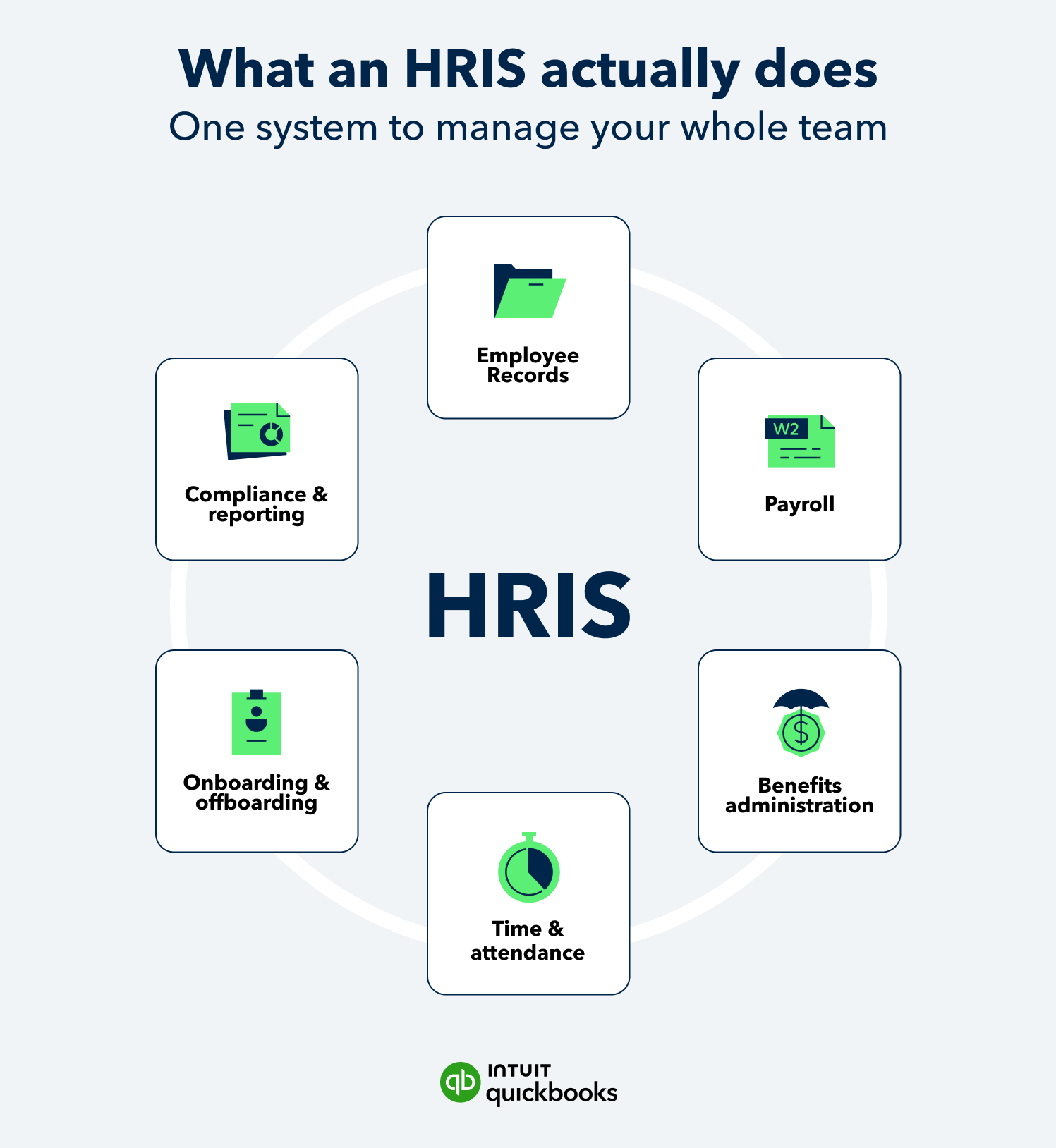
While every platform is different, most HRIS software includes tools to manage the essential tasks involved in employing people.
Keep in mind that payroll calculations use the pay and overtime rates, tax withholding, and deduction details you provide. It's a good idea to review this information regularly and update it when something changes.
While the HRIS generates the reports, the business owner or accountant is still responsible for reviewing and filing the actual forms, such as:
Some HRIS platforms also include recruiting, performance management, and HR workflow automation. Those capabilities are often part of broader human capital management (HCM) platforms that extend beyond core HR administration.

HRIS platforms can be grouped into different types based on the tasks they support and the breadth of their features. These categories often overlap, and one platform may combine several types of HRIS:
For many small businesses, an operational or comprehensive HRIS offers the most practical starting point. The right choice depends less on the category and more on whether the system supports your current HR needs and can adapt as your workforce grows.
HRIS, HRMS (human resource management system), and HCM refer to different types of HR software. An HRIS focuses on managing employee records and core HR tasks, while HRMS and HCM platforms typically include additional tools that support more of the employee lifecycle. Some software providers use these terms interchangeably.
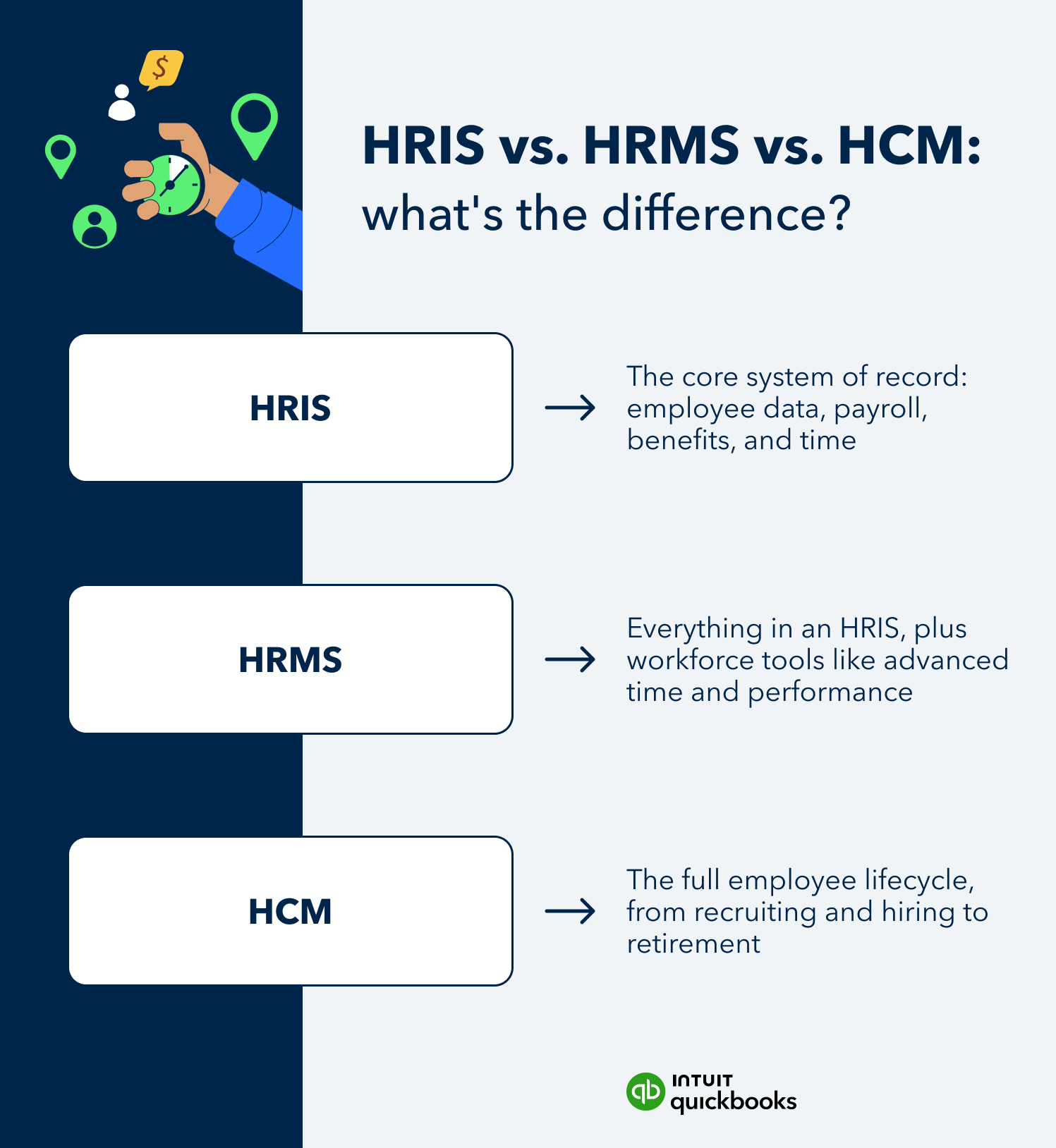

The labels matter less than the features. Many products sold as an HRIS include HRMS or HCM capabilities, so focus on what a system actually does when you compare options.
An HRIS can improve efficiency, reduce errors, and make it easier to manage your workforce. The main benefits include:
Many small businesses can manage HR with spreadsheets and a payroll tool at first. As your team grows, though, manual processes become more difficult to keep up with.
If several of the following signs sound familiar, it may be time to consider an HRIS.

The right HRIS fits how your business already runs, while giving you the tools to scale and evolve. Weigh these factors when you compare options:
Start with the most important question: Does the system do what you need today? Look for the core functions your business relies on, such as employee records, payroll, time tracking, benefits administration, or employee self-service.
If you expect your HR needs to expand, consider whether the platform also offers hiring, onboarding, or performance management tools so you don't have to switch systems later. Also confirm the system can organize the federal, state, and local forms you need for every location where you have employees.
Employee information should flow between your HR and payroll processes without duplicate data entry. Some platforms include payroll tools as part of the system, while others integrate with payroll software. Check for accurate wage-and-hour tracking, including overtime calculations for hourly employees, to help you stay compliant with the Fair Labor Standards Act (FLSA).
If you already use accounting, scheduling, or benefits tools, check that they connect with the HRIS and share data reliably.
Consider how easy it is to add a new employee, update records, approve time off, or run reports. Employee self-service is another advantage. Does it allow staff to update personal information, access pay documents, and request time off without relying on HR?
Compare pricing models, including any setup costs or per-employee fees, and understand how costs could change if your workforce expands. A scalable platform can help you avoid having to replace your HR system after a period of growth.
Look for features that help you organize employee records, generate reports, and manage HR processes more consistently. Choose a system that uses encryption, role-based access controls, and safeguards that align with applicable data privacy laws to help protect sensitive employee information.
Also, consider the support available if you have questions or run into issues. Responsive customer service and helpful resources can make a difference when you're implementing a new system or handling time-sensitive HR tasks.
QuickBooks Workforce includes the core HRIS tools businesses need to manage employee information, payroll, time tracking, and benefits in one connected system. It also goes beyond a traditional HRIS by adding human capital management (HCM) capabilities that support the employee lifecycle, from hiring and onboarding to performance management and offboarding.
Whether you're replacing manual processes or moving beyond basic payroll software, QuickBooks Workforce gives you a foundation to support your growing team and business. If your HR needs are more complex, such as multi-state payroll or unique benefits structures, consider working with a payroll expert or accountant to help set up and configure your HRIS correctly.

Call Sales: 1-800-285-4854