SUMMER SAVINGS 90% OFF QuickBooks for 3 months* Ends 8/27

Buy now
Switch to QuickBooks and 70% off for 3 Months
BossLadyVik
March 5, 2026
Solved

On Sales Receipt screen can a button be removed on desktop?

  • March 5, 2026
  • 4 replies
  • 18 views

I'd like to remove a few of the payment buttons on the Sales Receipt screen, not the template, on desktop. We only process our payments through Square. And it's a hassle to keep clicking on the drop-down button. I'd rather remove e-check and replace it with Square. Can this be done?


Best answer by GenmarieM

Hello there, @BossLadyVik. Removing or rearranging the payment tabs, like E-check, from your sales receipt screen isn't possible.


While you can customize the receipt templates that customers see, the data entry screen itself is hard-coded into the QuickBooks Desktop interface. This means the layout remains fixed regardless of which services you actually use. Because these specific payment tabs are tied to the software's internal processing modules, they cannot be removed, rearranged, or replaced with a dedicated Square button to simplify your view.


As a workaround, you can use Square as the default payment method for your most frequent customers to minimize the need for manual clicks.


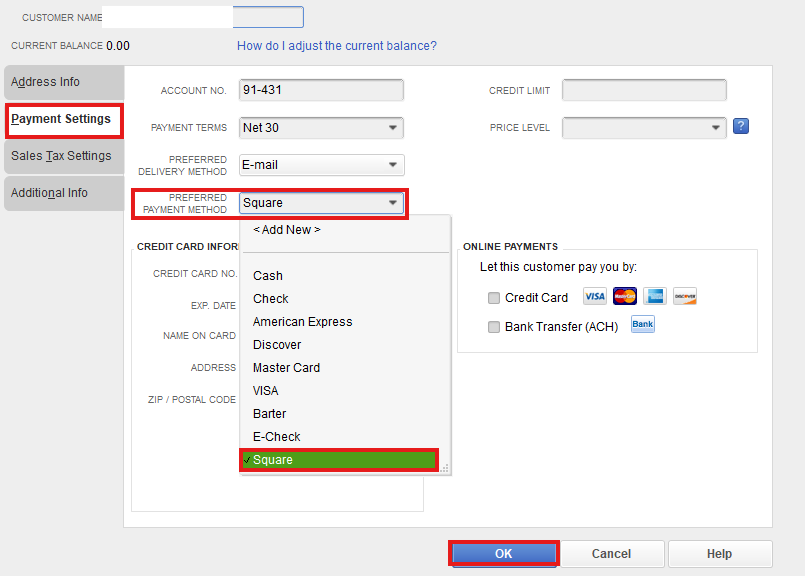
  1. Go to the Customer Center and right-click on a customer's name.
  2. Select Edit Customer: Job.
  3. Navigate to the Payment Settings tab.
  4. Set the Payment Method to Square. If you haven’t added Square to your list yet, you can do so under Lists, then Customer & Vendor Profile Lists.
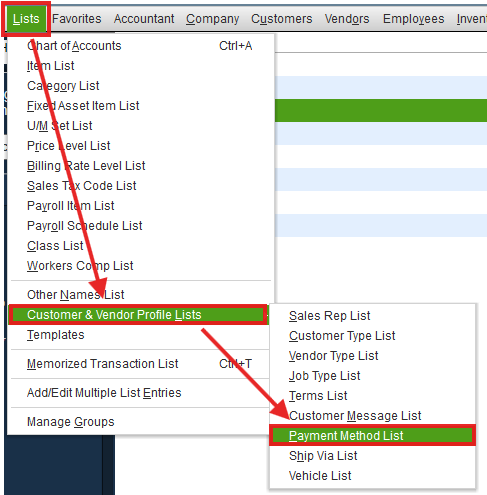
 

While this won’t hide the E-check tab, it ensures that Square is automatically selected in the dropdown whenever you create a new sales receipt for that customer, saving you an extra step.


We are here to help if you have any more questions about this or other QuickBooks tasks.

4 replies

Level 8
March 5, 2026

Good evening, @BossLadyVik


Thanks for reaching out to the Community with your question about a particular button being removed on the Sales Receipt screen. 


Before digging further into your question, can you clarify if you're using a connector like Commerce Sync to integrate Square and QBDT? Are you bringing those sales receipts over from Square through to QBDT with the connector? 


This will help us determine the best solution for the issue. I'll be waiting for your response! 

BossLadyVik
March 8, 2026

Thank you for reaching out. No, I am not using a connector. I enter the charges manually. I would like to remove a few of the tabs on the Sales Receipt desktop screen. Is that possible?

GenmarieMQuickBooks TeamAnswer
QuickBooks Team
March 8, 2026

Hello there, @BossLadyVik. Removing or rearranging the payment tabs, like E-check, from your sales receipt screen isn't possible.


While you can customize the receipt templates that customers see, the data entry screen itself is hard-coded into the QuickBooks Desktop interface. This means the layout remains fixed regardless of which services you actually use. Because these specific payment tabs are tied to the software's internal processing modules, they cannot be removed, rearranged, or replaced with a dedicated Square button to simplify your view.


As a workaround, you can use Square as the default payment method for your most frequent customers to minimize the need for manual clicks.


  1. Go to the Customer Center and right-click on a customer's name.
  2. Select Edit Customer: Job.
  3. Navigate to the Payment Settings tab.
  4. Set the Payment Method to Square. If you haven’t added Square to your list yet, you can do so under Lists, then Customer & Vendor Profile Lists.
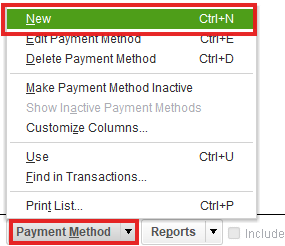
 

While this won’t hide the E-check tab, it ensures that Square is automatically selected in the dropdown whenever you create a new sales receipt for that customer, saving you an extra step.


We are here to help if you have any more questions about this or other QuickBooks tasks.