
Get 50% OFF QuickBooks for 3 months*

Buy now
Switch to QuickBooks and 70% off for 3 Months
July 21, 2022
Solved

Sales receipt

  • July 21, 2022
  • 2 replies
  • 70 views

When I create a sales receipt for a payment it deducts it from my bank account.  It also places in the undeposited funds to deposit.   How can I fix this?  No one on the online support has been able to resolve the issue.

Best answer by BigRedConsulting

@jmarkanderson  RE: When I create a sales receipt for a payment it deducts it from my bank account. It also places in the undeposited funds to deposit. How can I fix this? 


This means the item you're using on the face of the sales receipt uses your bank account as the account. It should use some other account, usually an income account.


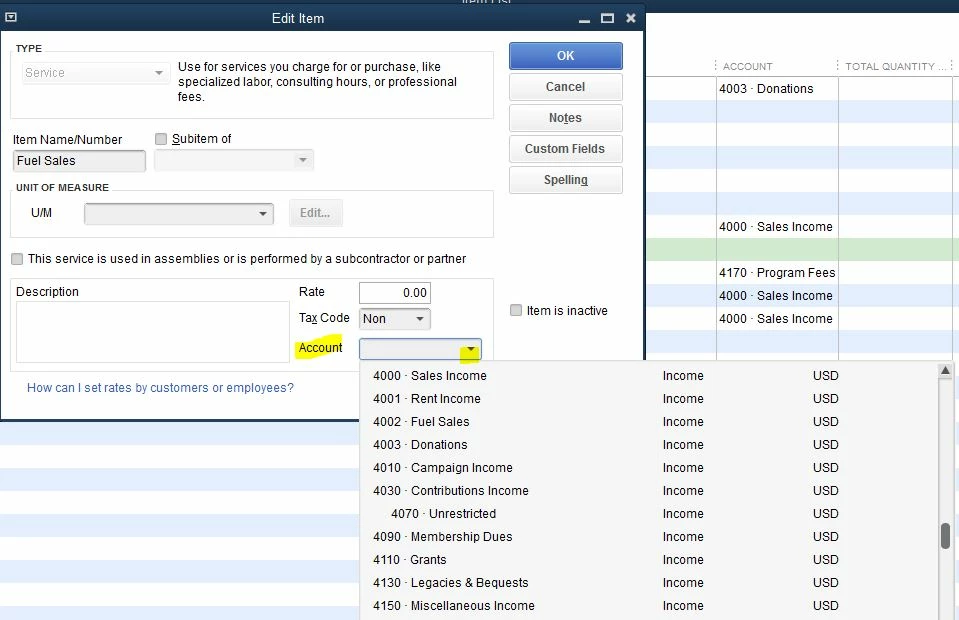
So, edit the item on the Items list and change the account to another non-bank account. Then this will stop happening.


When you edit the item, you can change the sales account that's used. There's a pick list there to pick from the allowable accounts.
 

2 replies

QuickBooks Team
July 21, 2022

Thanks for posting here in the Community space, @jmarkanderson. I'm here to help you fix you concern.

Before we start, I'd like to know more details about this issue by asking some question. This way, I can provide accurate information and a resolution. May I know if this sales receipt for refund or credit? Also, a screenshot will also a great help. For us to know why it will be deducted when you create a sales receipt.

I'll be around if you have any additional information. Have a good one!

July 22, 2022

The sales receipt is for payment recieved for a service.  


QuickBooks Team
July 22, 2022

I appreciate you coming back and adding some details, @jmarkanderson. I'm here to help deposit the payment directly to your bank account.


It's possible the Use Undeposited Funds as the default deposit to account feature is turned on in your QuickBooks Desktop (QBDT) account. That is why it's showing on the Undeposited funds account. To resolve this, we can disable the Deposit To field to appear in the sales receipt and choose your bank account. 


Let me guide you on how. 


  1. Go to Edit from the top menu on your QBDT account. 
  2. Select Preferences
  3. In the left menu, click Payments
  4. Choose Company Preferences
  5. Uncheck the Use Undeposited Funds as the default deposit to the account box. 
  6. Click OK


For more details on how Undeposited funds account work, see this article: Deposit payments into the Undeposited Funds account in QuickBooks Desktop.


For your other concern, it's quite odd if the sales receipt payment shows as a deduction on your bank account. Thus, it should be added as an income. To further check this, I'd like to verify if it shows a credit on your bank statement? Could you also please send a screenshot of it? Also, make sure to hide personal information when sharing it.


For your future reference, check out these links on how to edit bank settings, match, categorize, add account numbers. 


Keep me posted in the comments how things go on your end. I'll be right here should you need further help. Have a good one!

BigRedConsulting
Level 15
July 25, 2022

@jmarkanderson  RE: When I create a sales receipt for a payment it deducts it from my bank account. It also places in the undeposited funds to deposit. How can I fix this? 


This means the item you're using on the face of the sales receipt uses your bank account as the account. It should use some other account, usually an income account.


So, edit the item on the Items list and change the account to another non-bank account. Then this will stop happening.


When you edit the item, you can change the sales account that's used. There's a pick list there to pick from the allowable accounts.
