
Get 50% OFF QuickBooks for 3 months*

Buy now
Switch to QuickBooks and 70% off for 3 Months
December 7, 2017
Solved

How do I split a transaction QB Online - Self Employed?

  • December 7, 2017
  • 1 reply
  • 14 views

The title is the question.  I'm using QB Self Employed (the service at selfemployed.intuit.com) and I need to manually enter a transaction that needs to be split by dollar amount across multiple catagories.  I've found instructions on here that tell you to select the transaction and to the far-right, there should be a split option.  Well, I don't see one.  I've clicked every where I can think and even from the catagory selection section, I don't see a split option.  How can I do this?  Thank you.
    Best answer by vpcontroller

    @206486


    The instruction @js955  gave is for QuickBooks Online versions, not QuickBooks Sell-Employed (QBSE) which is a different software program.

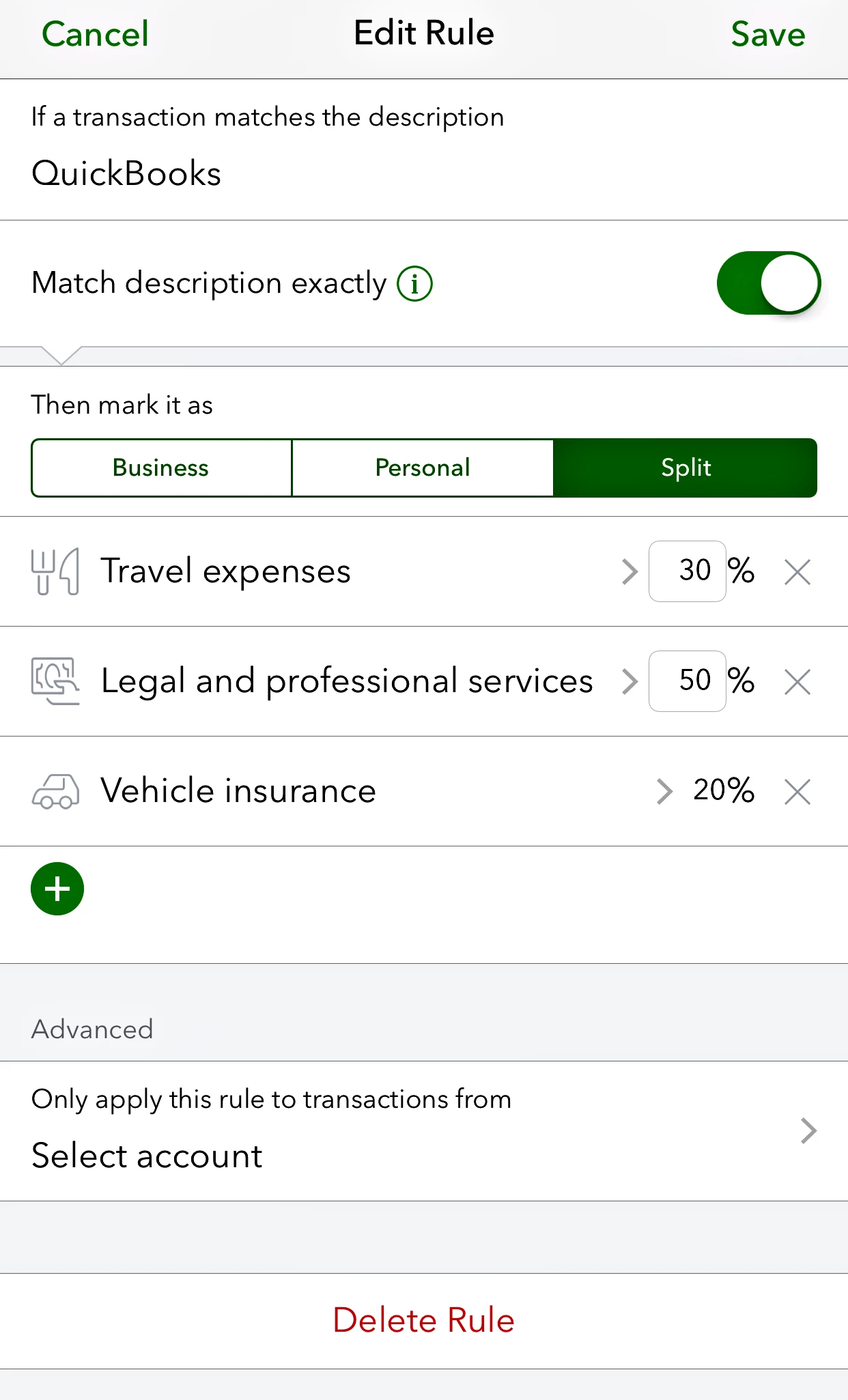
    As I understand it, you can't split expense categories into the browser version of QBSE yet, but only in the mobile app version. See screenshot below.


    Also, refer to the QuickBooks article.

    https://selfemployed.uservoice.com/knowledgebase/articles/934140-split-transactions-in-the-mobile-app


    Also, wish they have detailed articles on QBSE limitations published.


    Hope this helps!


    ++

    1 reply

    December 7, 2017

    Hello RLH,


    Welcome to the Community, I'd be happy to help with splitting transactions.


    Since the transaction has already been entered into the register,try these steps to enter the split:


    1. Go into your Chart of Accounts.

    2. Under the Action column for the bank account, select View Register/Account History.
    3. Click to highlight the transaction and select Edit.
    4. This will open the entry screen for that transaction, enter the other desired accounts and the respective amounts. (Make certain that the amounts for each account add up to the total amount of the transaction).
    5. Select Save.


    Let me know if you're able to get the split set up this way, I'll be on standby.

    December 8, 2017

    I have no Chart of Accounts within this service.  Again, this is the online version, not the installable application.  Within QB.SE, the options I have on the left are:


    • Home
    • Transactions
    • Miles
    • Taxes
      • Quarterly Taxes
      • Annual Taxes
    • Reports
    • Invoices

    I've looked through each one of those sections, and there isn't a CoA link anywhere for me to setup accounts.  Keep in mind, this is a very simplistic service, mostly used for tax estimations.


    Additionally, across the top of the page, the only pertinent menu option I have is a link to my next estimated tax payment, which takes me to the same Quarterly Tax page mentioned above, and a "Configuration" drop-down.  The drop-down includes:


    Transactions

    • Bank accounts
    • Imports
    • Rules

    Taxes

    • Tax profile
    • Vehicle info
    • Healthcare

    About you

    • Profile
    • Accountant [New]
    • Billing info
    • Refer a friend
    • Sign out


    None of these options, or anythin within their respective pages, has anything to do with setting up a CoA.


    vpcontroller
    Level 7
    December 8, 2017

    @206486


    The instruction @js955  gave is for QuickBooks Online versions, not QuickBooks Sell-Employed (QBSE) which is a different software program.

    As I understand it, you can't split expense categories into the browser version of QBSE yet, but only in the mobile app version. See screenshot below.


    Also, refer to the QuickBooks article.

    https://selfemployed.uservoice.com/knowledgebase/articles/934140-split-transactions-in-the-mobile-app


    Also, wish they have detailed articles on QBSE limitations published.


    Hope this helps!


    ++