Get 50% OFF QuickBooks for 3 months*

Buy now
Switch to QuickBooks and 70% off for 3 Months
May 20, 2021
Question

Retention Report

  • May 20, 2021
  • 1 reply
  • 2 views

I have built a couple of reports to show outstanding retentions; one is by subcontractor and the other is by job. I like using the 2 different reports as a check to make sure that the retention is not getting overlooked.


We just moved our accounting back to QuickBooks as of January 1st, so I entered outstanding retentions as a journal entry for December 31st.


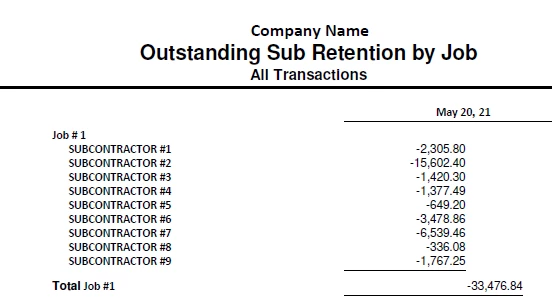
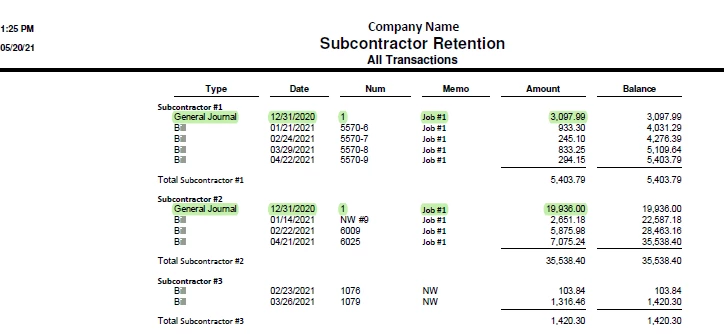
The carryforward journal entries show on the Subcontractor Retention report, but will not show on the Outstanding Retention by Job report as seen below: 
 

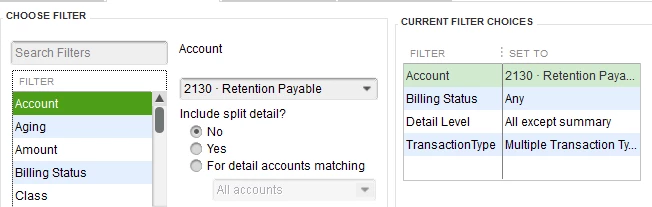
Here are the report filters that I am using the Outstanding Sub Retention by Job


Does anyone have an idea what I can do to make the journal entries show into the totals of the other report?


Thank you.

Cindy


1 reply

Jen_D
Level 8
May 20, 2021

Thanks for posting here with this reporting concern, @Cindy Croft,


I want to make sure we're on the same page, so I can guide you further with this. What report in QuickBooks are you using at the moment? Our reports in QuickBooks has different preferences and filters so I need this information to help you.


In the meantime, here are some general customizations for the reports in QuickBooks:

  1. Click the Customize Report button at the top and update the Report Date Range.
  2. Once done, go to the Filters tab.
  3. In the Filter search box, enter and select Transaction Type.
  4. Choose Multiple Transaction Types and pick the bill payment and checks or other expense transactions you need.
  5. Next, find the Posting Status filter then select Either.
  6. Hit OK when you're done.
  7. To save the custom filters, use the Memorize button at the top. You can use this for every Payment Method you want to track. Access saved reports in the Memorized Report List.


I'll be adding some articles to help you maximize the use of our reports in QuickBooks. See hem below:


I'll be waiting for your response and I'll be right here if you have any questions about QBDT reports. Have a nice day!

May 20, 2021

For the Outstanding Sub Retention by Job, I started with the Job Costs by Job and Vendor Summary report, and then changed the filters to specifically track just the Retention Payable account.