Get 50% OFF QuickBooks for 3 months*

Buy now
Switch to QuickBooks and 70% off for 3 Months
August 4, 2025
Question

VAT

  • August 4, 2025
  • 1 reply
  • 2 views

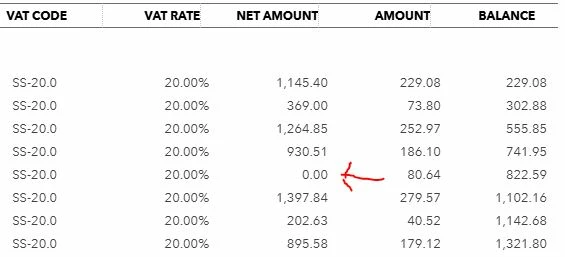
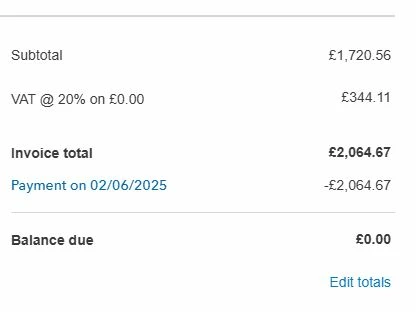
I have run a VAT detail report and some of my invoices are showing £0.00 in the net amount column, on checking the individual invoices under the subtotal column it says VAT @ 20% on £0.00 even though the vat total is showing a positive figure. The 3 invoices concerned where all converted from quotes so i suspect this may have something to do with it.

Any help would be much appreciated.  
 

1 reply

MsNorthPND1881
QuickBooks Team
August 4, 2025
You can review the Journal report by filtering it to the relevant transactions for a closer analysis of the amounts and accounts listed in the VAT Detail report, including the invoices and the Journal entries themselves, Cj-cfs.
 
If the transaction and VAT detail report don't align when viewed in the VAT details, we recommend contacting our Live Support Team for further assistance. They can be able to investigate the issue more thoroughly.
 
Here’s how:
 
  1. Sign in to your QuickBooks
  2. Select the Help icon.
  3. Then choose QuickBooks Online Help/Contact Us.
  4. Select Continue and then pick Assistant.
  5. Choose to chat with us or have us call you.
 
You can check this article to help you get everything sorted, and more details about common VAT codes and how to apply them: Understanding VAT codes in QuickBooks.
 
Feel free to reach out if you have any additional concerns or questions regarding the VAT detail report in QBO.