SUMMER SAVINGS 90% OFF QuickBooks for 3 months* Ends 8/27

Buy now
Switch to QuickBooks and 70% off for 3 Months
February 25, 2021
Solved

How to stop popups?

  • February 25, 2021
  • 53 replies
  • 243 views

How can I stop this popup from coming up every time my users make a change on an order? We just pgraded to Desktop Enterprise 21.0. 

 

Best answer by MaryLandT

I can help you turn off pop-up messages in QuickBooks Desktop, nancyl.


Notices serve as a helpful reminder on the system. You can hide them if you keep seeing these popup ads over and over.


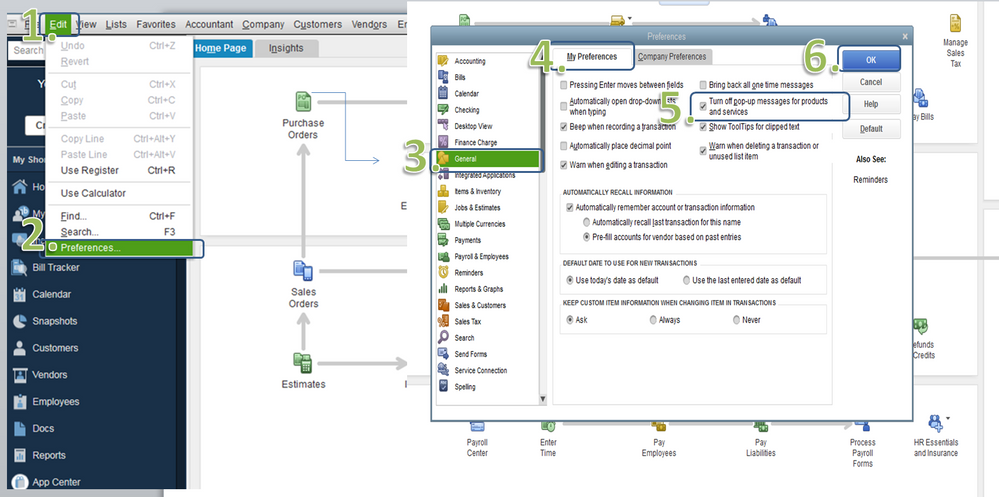
Here's how to turn off product and service pop-up:


  1. Open your QuickBooks and go to Edit menu.
  2. Select Preferences.
  3. Then choose General on the left-side panel.
  4. Click the My Preferences folder.
  5. Check the box next to Turn off popup messages for products and services.
  6. Once done, click OK.

popup ad.PNG


Restart QuickBooks for this change to take effect. 


Also, please browse this link to learn the improved features of your upgraded system: What’s new in QuickBooks Desktop 2021.


Keep me posted if you have follow-up questions by commenting below. I'll be right here to help you.

53 replies

MaryLandT
MaryLandTAnswer
Level 10
February 25, 2021

I can help you turn off pop-up messages in QuickBooks Desktop, nancyl.


Notices serve as a helpful reminder on the system. You can hide them if you keep seeing these popup ads over and over.


Here's how to turn off product and service pop-up:


  1. Open your QuickBooks and go to Edit menu.
  2. Select Preferences.
  3. Then choose General on the left-side panel.
  4. Click the My Preferences folder.
  5. Check the box next to Turn off popup messages for products and services.
  6. Once done, click OK.

popup ad.PNG


Restart QuickBooks for this change to take effect. 


Also, please browse this link to learn the improved features of your upgraded system: What’s new in QuickBooks Desktop 2021.


Keep me posted if you have follow-up questions by commenting below. I'll be right here to help you.

May 25, 2021

I have followed these steps and still get the banner on my home page.  I'm using quickbooks 2021 deskop pro.  Please help. I hate these banners!

Level 9
June 30, 2021

I am having the same horrible time with these ads.  It is beyond ridiculous!!!!  Each bill that I enter a pop up for new bill paying services enters.  I read it and close.  But once i have the information, I should be able to select, do not show this message again because I have received the new information.  But Intuit keeps popping up the message every single bill that I enter.  This makes me want to quit using this annoying software.  I do not understand why QB has chosen to become completely rude and annoying to its customers.  Find a solution.   


I wish I could make it better, @bookeeping girl.


As of the moment, there isn't an integrated way to turn off and get rid of the pop messages in the QuickBooks Desktop. You're on the right track in closing them so you can continue creating your bill entries.


Thus, I'd recommend sharing your request directly with our product developers by sending feedback. Let me show you how.


  1. Go to Help.
  2. Select Send Feedback Online.
  3. Click Product Suggestion.
  4. Under Product Area, select Product Updates.
  5. On the Here is my suggestion: field, describe your request. Say an option not to receive in-product promotions.
  6. Select Send Feedback.
  7. Click Close Window.


On top of that, here's a couple of articles you can read helpful in keeping you up-to-date with the latest software improvements and enhancements: 


Keep in touch if you need any more assistance with this, or there's something else I can do for you. I've got your back. Stay safe!

December 5, 2021

Hello, the screen shots do not reflect what I see on my Macbook. I've spent over an hour looking for the edit>preferences>turn off messages check box. Please show me the complete path for macbook. (if it is the same, how do i see the QB toolbar instead of the chrome tool bar)?

April 12, 2022

This doesn't work on the new "discovery hub" or "do you want to switch to online" nonsense. No. With 50 individual companies online would cost thousands of dollars a month. How do I stop those annoying messages?

January 3, 2023

Quickbooks Online, 


Receiving multiple pop-ups in a single sitting for ads and services that your company is promoting is getting really tedious. To be frank, it feels like a shameless cash grab and is highly disruptive to my workflow/productivity. Please include a feature similar to that of Quickbooks desktop to allow pop-ups to be permanently turned off, or perhaps a "do not show this message again" button. Holding your paying customers hostage and forcefeeding ads is not a good look... 

February 2, 2023

This is more or less user to user support.


Your comments to Intuit are probably not read.  Seek another channel for your complaint to be heard.

March 9, 2023

THIS DOES NOT STOP THE INCESSANT POP-UPS TRYING TO SELL  ADDITIONAL EXPENSIVE SERVICES! EVERY TIME I LAUNCH QB PRO DESKTOP I HAVE TO CLOSE NOT ONE BUT TWO ADS TRYING TO SELL ME ADDITIONAL SERVICES I WILL NEVER NEED NOR DO I EVER WANT - DO YOU GET IT???  CAN YOU HEAR ME NOW?  I HATE INTUIT, YOUR CONSTANT PEDDLING AND NICKLE AND DIMING ME TO DEATH IS WHY I TERMINATED QB PAYROLL SERVICES JUNE 2022 IN THE FIRST PLACE, FIRED ALL MY W2 EMPLOYEES, AND NOW USE ONLY CONTRACT VENDORS.  THANK YOU VERY MUCH, INTUIT.  NOW GIVE ME A VIABLE METHOD TO TURN OFF YOUR ADS - NOW!!!!!!!!!!!!!!!!!!!!!!!!!! and forever.