
Get 50% OFF QuickBooks for 3 months*

Buy now
Switch to QuickBooks and 70% off for 3 Months
April 28, 2022
Solved

Credit Card Processing Fee

  • April 28, 2022
  • 5 replies
  • 130 views

Is there a way to automatically include the credit card processing fee to your invoices so that the customer gets charged? 

Best answer by Kurt_M

Hi there, @HBDesigns. I'll share some information about how you can add the credit card processing fee to your invoices in QuickBooks Online (QBO).


To add a credit card processing fee to your invoice, you can create a service item, then manually add it to your invoice. You can also consider a third-party app and integrate it with your QuickBooks. To begin, these are the steps:


  1. On the left navigational bar, go to Get paid and & pay tab.
  2. Choose Product & Service.
  3. Click on New then select Service.
  4. Enter the name of your service item. (Example CC Fee)
  5. Select the account you'd use to track the processing fees.
  6. Once done, click Save and Close.


Once done, add the credit card fee as an additional item on your invoice when you charge your customers with the processing fee.


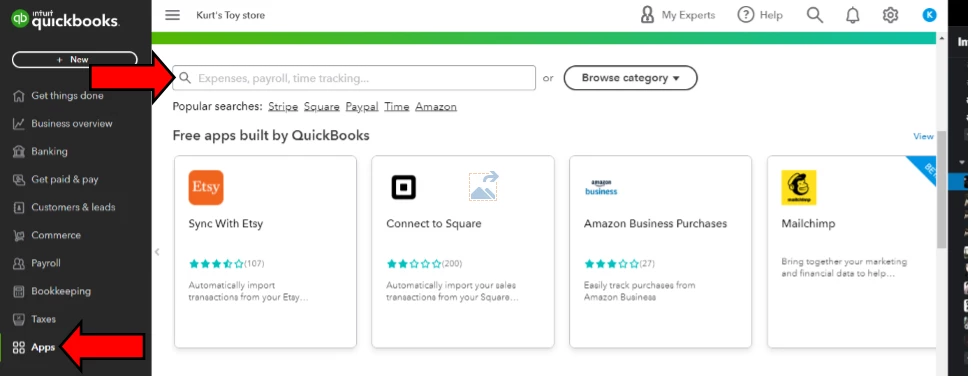
In case you'd like to use a third-party app, here's where you can find one in QuickBooks Online:


  1. Sign in to your QuickBooks Online Company.
  2. Go to Apps tab.
  3. On the search bar, type the name of the that you'd like to integrate with your QBO account.
  4. Click the Search icon.


For visual reference, you can refer on the screenshot below.


Feel free to visit these handy articles for future reference:


Know that I'm just a click a way if you need further assistance with this. Have a nice day! 

5 replies

Fiat Lux - ASIA
Level 14
April 28, 2022

QB Payment doesn't have such feature at this time. You need a third-party connector to integrate with QB Payment and have the ability to add additional fees to eInvoicing and payment links. They claim that this feature is the only GAAP and VISA compliant solution on the market. The connector will perform a real-time BIN lookup to verify that the customer is paying via credit card and charge the applicable fee then reconcile invoice and fees accordingly.

Kurt_MQuickBooks TeamAnswer
QuickBooks Team
April 28, 2022

Hi there, @HBDesigns. I'll share some information about how you can add the credit card processing fee to your invoices in QuickBooks Online (QBO).


To add a credit card processing fee to your invoice, you can create a service item, then manually add it to your invoice. You can also consider a third-party app and integrate it with your QuickBooks. To begin, these are the steps:


  1. On the left navigational bar, go to Get paid and & pay tab.
  2. Choose Product & Service.
  3. Click on New then select Service.
  4. Enter the name of your service item. (Example CC Fee)
  5. Select the account you'd use to track the processing fees.
  6. Once done, click Save and Close.


Once done, add the credit card fee as an additional item on your invoice when you charge your customers with the processing fee.


In case you'd like to use a third-party app, here's where you can find one in QuickBooks Online:


  1. Sign in to your QuickBooks Online Company.
  2. Go to Apps tab.
  3. On the search bar, type the name of the that you'd like to integrate with your QBO account.
  4. Click the Search icon.


For visual reference, you can refer on the screenshot below.


Feel free to visit these handy articles for future reference:


Know that I'm just a click a way if you need further assistance with this. Have a nice day! 

November 12, 2022

I see how it is on the Invoice. But I'm confused on setting up the item for credit card processing fees. These charges are added on the invoice, and charged. That money should go into your bank act just like an payment.

But mine doesn't do that. I have it as a service and other income for the account.. Is that incorrect? If I change the account to my bank account it should show as a credit or increase but its not. it shows as a debit or decrease.

Barbara

June 14, 2023

Hi @Rea_M 
If I charge $105 but Can I record the Processing Fee ($5) separately without line item.
e.x:
If I've a Invoice ($100) and I push payment $100 and want to push a fee ($5.00) separately instead of one payment 105 (payment + Fee)?
Can I record this in another way without adding a line item?


I have not found a way to do that or seen where we can add it other than a line item. Would be nice if we could or it would automatically add our entered percentage rate to the total if they choose this option. Once you add the line item it increases the percentage other than what your charging. So by adding the automated option with our elected percentage rate would eliminate this problem.

Rainflurry
Level 11
April 28, 2022

@HBDesigns 


Many states outlaw that practice so confirm yours isn't one of them.  Charging your customer a credit card fee looks bad.  It's like a retail store charging a customer a "rent fee" because the customer chose to shop in-store instead of online. 

December 11, 2022

I don't care if it "looks bad", if we're getting charged 3% fees on these credit card invoices, I'm charging for the convenience. 3% on a $10,000 sale is $300. If they want to save money they can pay cash, if not, pony up.

February 16, 2024

Credit card fees and finance charges are tax deductible for businesses.

April 28, 2022

No Quickbooks does not offer this feature although there is a workaround.

July 30, 2022

What's the work around?

May 10, 2023

It is 2023. Is it available now, the automatic credit card fee?