
SUMMER SAVINGS 90% OFF QuickBooks for 3 months* Ends 8/27

Buy now
Switch to QuickBooks and 70% off for 3 Months
April 13, 2022
Question

Clearing JE's from A/R reports

  • April 13, 2022
  • 3 replies
  • 16 views

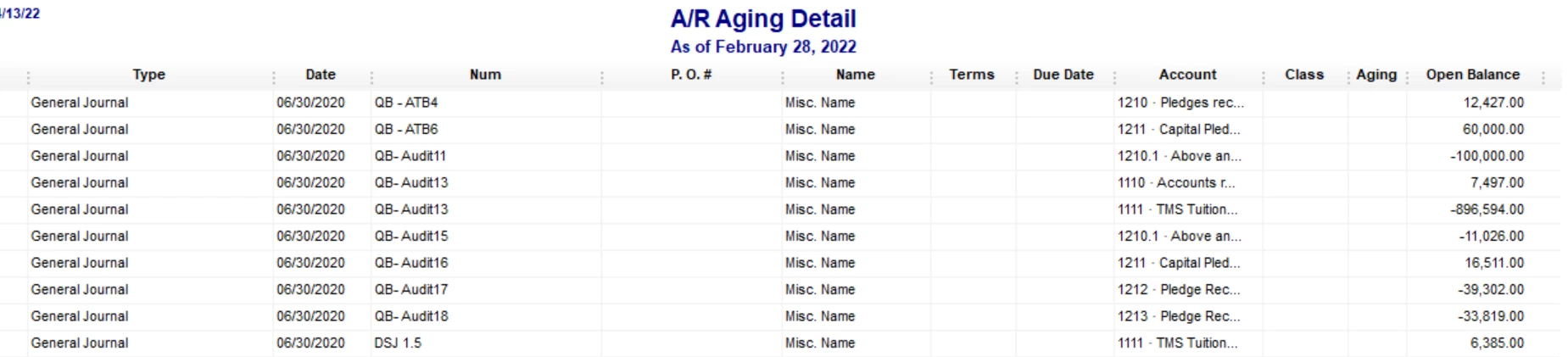
My client has a lot of JE's to A/R from past audits that show on the A/R Aging Detail. Is there a way to make these gone other than customizing the A/R report to not show JE's. Here is a snip 
3 replies

Rustler
Level 15
April 14, 2022

Unfortunately there is not.  Journal entries do not work well with a/r, a/p, inventory due to the way QB is set to work. 

Deb-JAuthor
April 20, 2022

Thank you for responding. I was back at this client this morning and I was wondering if the following is a possible solution. Many of the JE's I have reverse back out at the beg of the FY. So was wondering if I "changed" the JE to an invoice and then the reversal to a credit memo and then matched the two. This would remove it from the A/R report. Do you foresee a negative "domino" effect on the books by doing this? Thanks!

Level 6
April 20, 2022

Glad to see you here in the Community, @Deb-J. I've got some information you need so you can fix this issue about clearing journal entries from A/R reports in QuickBooks Desktop. 


About your process, it’ll most likely create negative amounts as journal entries don't work well with A/R aging reports. I recommend reaching out to your accountant about the best process for your books.


Your accountant will know more information to provide based on your business needs. If you don't have an accountant, you can find one here in our Resource Center.


Refer to these articles to learn more about running an A/R Aging report and how to write off uncollectable balances:


I've also included these links that will guide you on how to handle customer and vendor credits:


If you have any further questions or concerns about reports in QBDT, please know that you can always tag my name. I'm here to help you in any way I can. Enjoy your day!
