You could save up to 25% on transaction costs².
Speak with us now to see if you qualify.
Talk to sales 1-800-515-8366
Monday - Friday, 6 AM to 4 PM PT

Table of contents
Table of contents
In many scaling construction firms, project managers use their own systems to track costs and project progress. Finance teams then have to piece those inputs together to build a cost-to-complete. Intuit's Construction Technology Trends report found that 72% of construction professionals spend too much time managing data because of disconnected technology stacks. As technology trends in construction accelerate, costs are only rising.
The problem is that variances that could have been caught mid-project only reach you at month-end. Effective construction budgeting gives finance and project managers a shared workflow for recording costs, reviewing variances, and updating cost-to-complete, while there’s still time to recover margin.
Scaling the volume and size of the construction projects you take on should not mean you have to scale your back-office effort at the same rate. Building a repeatable structure allows you to manage more work with the same level of financial precision.
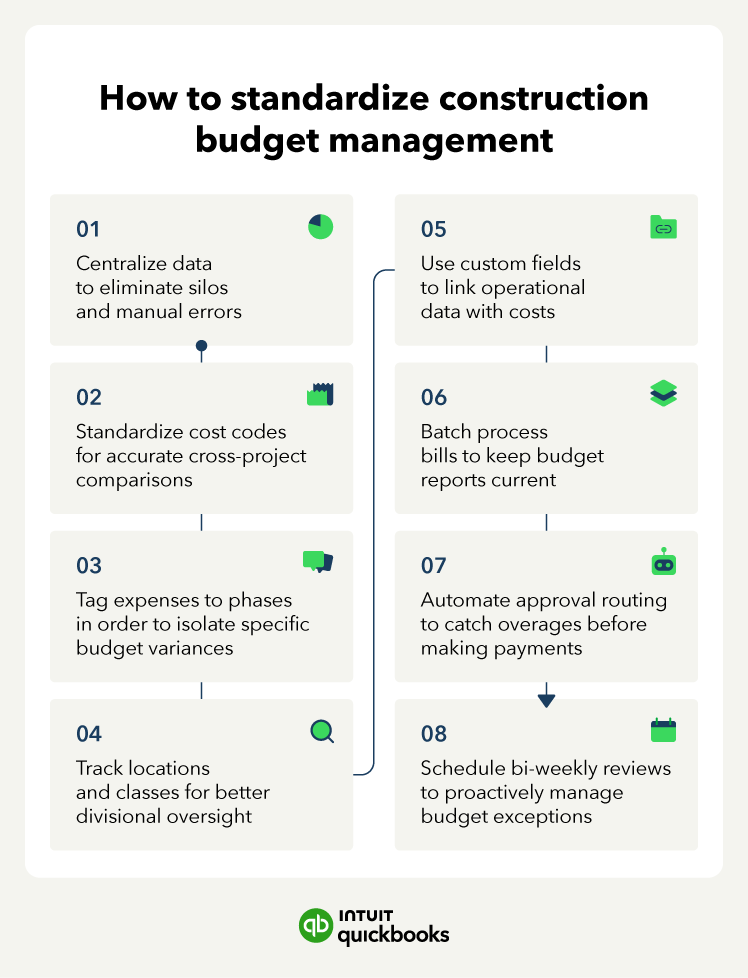
Keeping budgets in a separate system from actual spend creates a delay between what is committed in the field and what you see in the ledger. That delay is where manual data-entry errors build, and late surprises originate. Intuit's Construction Technology Trends survey found that the typical construction firm uses 10 different apps, creating data silos that worsen this problem.
A unified view keeps finance and the project manager working from the same numbers simultaneously. When a subcontractor invoice is entered on Tuesday, it appears in the budget-to-actual report before the next review, so you can update cost-to-complete before the overage affects billing, cash planning, or the next phase of work.
Real-time alignment between committed and reported costs gives you a basis to challenge variances while there is still time to reprice the remaining scope or back a change order with job-level evidence.
Without a standardized set of cost categories for crews, subcontractors, and materials, finance teams have to manually stitch together multiple spreadsheets to compare costs across projects.
For example, one PM codes a cost as “concrete labor” while another codes it as “foundation crew”. Each entry needs to be reclassified and mapped to a shared cost structure before you can run a reliable cross-project comparison. Intuit's Construction Technology Trends survey found that 82% of construction professionals wanted better integrations, specifically to reduce data fragmentation.
Consistent cost codes let you compare margin performance across projects on a like-for-like basis, showing which jobs are tracking to estimate and which are drifting. With every job margin measured on the same terms, you spot repeated labor, material, or subcontractor overruns before estimators carry the same allowance into the next bid.
Tagging every bill, purchase order, and timesheet to a specific project phase the moment your team incurs the expense eliminates the backward-looking reclassification work that routinely delays month-end visibility. This requires a high level of connectivity between office and field data management platforms, which fewer than half of construction firms currently have.
Phase-level detail shows which part of the job is driving the variance. Instead of knowing a job is 12% over budget construction-wide, you can see that framing is on track, while finishing is the problem. Your construction project budgeting becomes a diagnostic tool rather than simple budget-to-actual reporting.
Isolating variance to an active job phase allows finance leaders to protect margin integrity before cost overruns permanently erode the project's profitability. This visibility delivers the immediate, verifiable data you need to challenge sub-contractor packages and accurately update cost-to-complete projections while you still have time to protect the remaining contingency.

Tag expenses at the point of entry, or finance may end up batch-tagging at month-end. This removes the reconciliation delay that phase-level tracking is meant to eliminate.
Classes and Locations in QuickBooks Online Advanced let finance slice budget data by region or project type, like residential versus commercial, without needing to create separate charts of accounts (COA). Intuit's Construction Technology Trends survey found that 50% of construction firms wanted better visibility across all departments.
Segmented data shows whether overages are isolated to a single crew or a systemic issue across your portfolio. An isolated overage may require a meeting with one PM. But if it's a trend across your wider portfolio, it requires a divisional review of labor rates, subcontractor pricing, project mix, or the assumptions used to price that work.
Segmented data lets you limit remedial action recommendations to the affected part of the business, protecting margin without disrupting regions, crews, or project types that are still performing to target.
Custom fields in QuickBooks Online Advanced let you attach project-specific variables, like phase completion, lead subcontractor, or WIP stage, to your financial reports without cluttering the COA. Intuit's Construction Technology Trends survey found that 47% of construction leaders said their field and finance systems were only partially connected.
That partial connectivity means operational data like change order status, AIA billing milestones, and permit approvals stay in the PM's project file, reaching finance much later or not at all. Full connectivity closes that gap by placing those fields next to the job costs as the PM records them, so finance can see the likely cause of a variance.
With all the information at hand, you can choose whether to recover the cost through billing, wait for an approved milestone or change order, or treat it as a hit to margin before you sign off on the close.
When PMs send subcontractor invoices and material bills at the end of a project phase to the central office, entering them one at a time creates a backlog that delays the budget-to-actual report. Material costs rose 3.4% late last year, according to a QuickBooks Construction Profitability report. Every day that entry is delayed, finance is reviewing margin against numbers that don't include all of the costs.
Batch processing multiple bills at once ensures that actual costs are captured quickly, keeping your BvA reports current and reliable. You can catch an overage before the next payment run and still correct the coding, query it with the PM, or hold payment until the cost is confirmed.
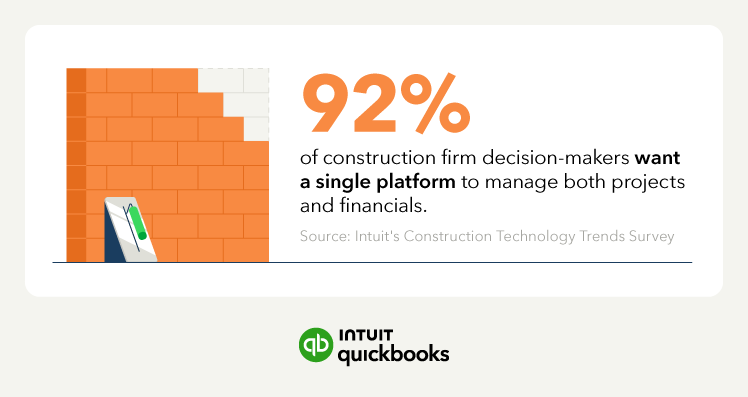
Automated workflows can route any expense exceeding a predefined threshold for secondary approval, allowing you to maintain oversight without slowing field operations. Intuit's Construction Technology Trends survey found that 92% of construction firm decision-makers want a single platform to manage both projects and financials.
Approval routing that connects the field to the central office achieves this by keeping cost controls, project data, and financial review inside the same workflow.
This means finance receives an alert any time a PM or other budget holder attempts to process a cost that exceeds the approved threshold. You build a control that catches over-budget costs before payment is released. As job volume grows, that threshold applies regardless of the number of invoices, jobs, or PMs involved.
Setting a repeatable every-two-week schedule for reviewing BvA reports turns your financial data into an active management tool.
A standardized review schedule keeps the meeting focused on exceptions. You review only the variances, thresholds, and KPIs that have changed since the last meeting.
At that frequency, every variance you review is still current enough to assign an owner and a deadline before the cost is paid, accepted into margin, or carried into the next billing cycle.
A construction budget is a living document whose value depends on how often it is checked against reality. Waiting until a project is finished to analyze the budget is a recipe for margin erosion, because you miss opportunities at every phase to renegotiate, recode, or recover costs.
Moving to a disciplined, bi-weekly review cadence ensures you spot exceptions and identify "drifting" jobs while you still have time to adjust field operations or renegotiate with subs. A 30-minute meeting between finance and project managers, held every two weeks, shifts your team from forensic accounting to proactive margin management.
When managing multiple construction projects, this routine ensures immediate visibility into cost overruns and confirms that all field liabilities have been correctly allocated to the ledger.
Case study: A construction firm cut its month-end close time by 50% after moving from fragmented manual reporting to combined financials ready for review. You start each budget review with current numbers, fewer manual fixes, and more time to focus on variances before the billing cycle locks them in.

Email each PM one variance they need to research and investigate before the meeting. They come with the information they need, turning what could be a 60-minute data-gathering session into a 15-minute decision meeting.
In a scaling business, important signals get lost in the noise. Automated construction workflows act as a financial safety net, for example, by triggering automated alerts when a cost category reaches 80% of its budget, forcing a review before the limit is exceeded.
This is not about policing the team but giving finance and project managers the visibility to keep the company profitable and make sure resources are going to the right jobs. For projects with frequent material purchases, tighter construction inventory management protects construction budgets.
Automated workflows let you set the budget rules once and apply them across every job. That means finance spends less time chasing routine cost exceptions and more time preparing the margin, cash, and recovery analysis you need to make decisions and recommendations to other leaders.
Case study: A construction firm saved up to 32 hours per month after automating workflows that had previously left WIP reports out of date and bills lost in email threads. Finance now reviews cost-to-revenue trends before they affect the bottom line.
Review your threshold levels at the end of each quarter. A threshold set at 80% for a stable cost category may need to be 70% for categories with volatile pricing.
As you scale your construction portfolio, financial visibility is at risk when the manual tracking that worked for three jobs cannot keep up with ten. True financial control requires moving away from siloed data and establishing connected reporting between your financial ledger and active project data.
This unified coordination delivers live cost visibility across every job site, empowering finance leaders to detect phase-level overruns early and correct course before the monthly billing cycle locks in the variance.
Take a free tour of QuickBooks Online Advanced to discover how connected project reporting can eliminate tracking gaps, streamline your variance reviews, and protect your remaining contingency.

Call Sales: 1-800-285-4854