
Get 50% OFF QuickBooks for 3 months*

Buy now
Switch to QuickBooks and 70% off for 3 Months
January 10, 2025
Solved

Adjusting 1099 amount

  • January 10, 2025
  • 3 replies
  • 28 views

I overpaid a 1099 contractor, they paid me back and I put it towards their account. However, when filing a W9 it only shows the actual amount I paid and does not take into account they paid me back. I know that I entered the whole transaction wrong but have no clue how to go back and fix it correctly and have the W9 show the lesser amount. 

Best answer by RazzieE

I appreciate you for providing further details, @SLC100001. To correct the check, you'll have to delete you initially created by going to the detailed report. I'd be glad to show you the process.


It’s essential to delete the check you initially created and recreate then record it under the vendor’s account in QuickBooks Online (QBO). This ensures the transaction is accurately reflected in your financial records.


Here's how to delete the Check:
 

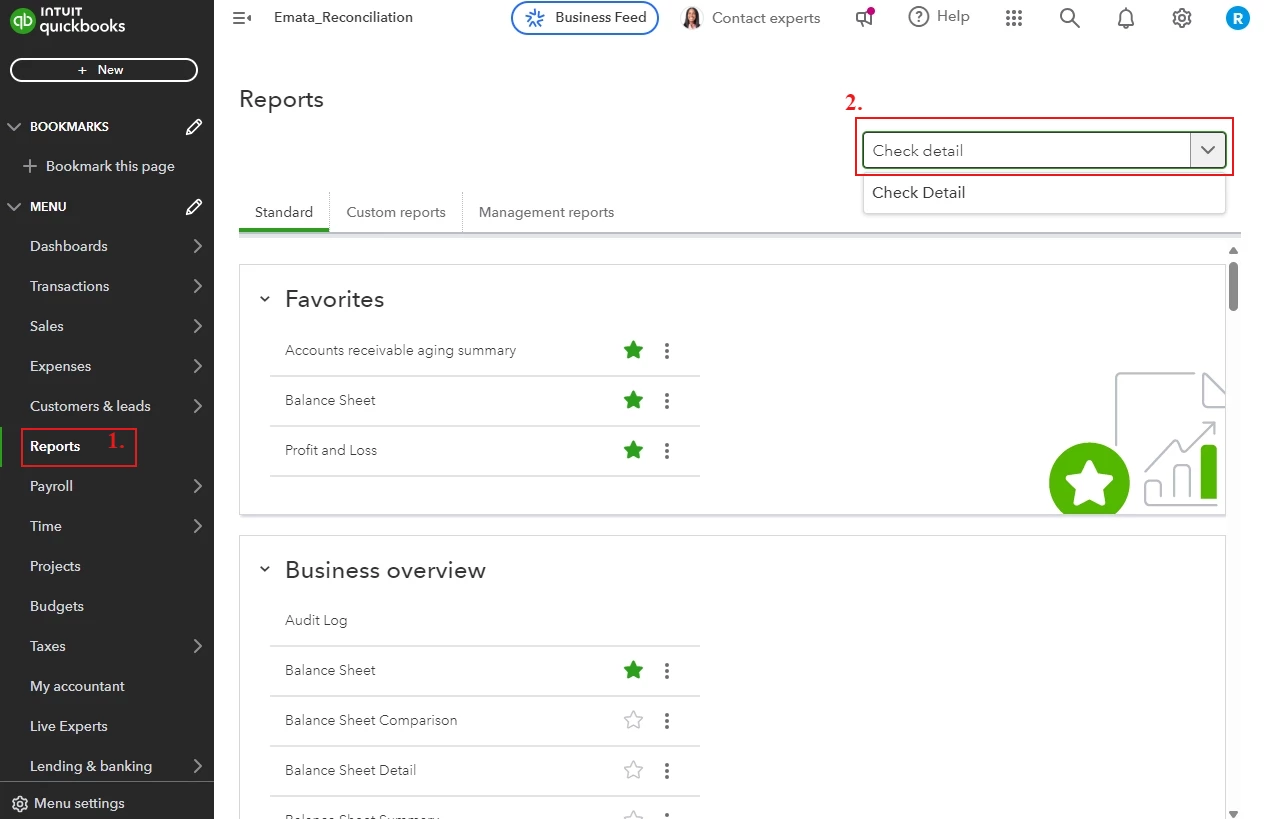
  1. Go to the Reports tab.
  2. In the search tab, type Check Detail Report.

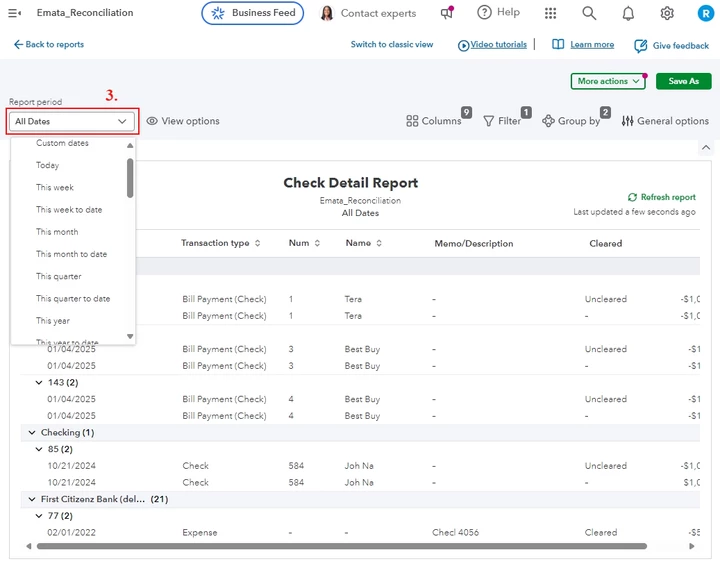
  3. Filter the date of the check in the report period. 
     

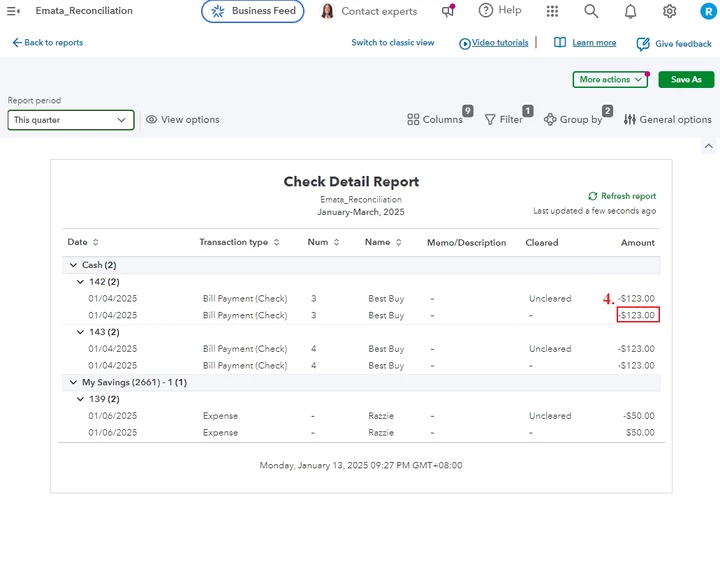
  4. Navigate to the incorrect check and click the Amount.
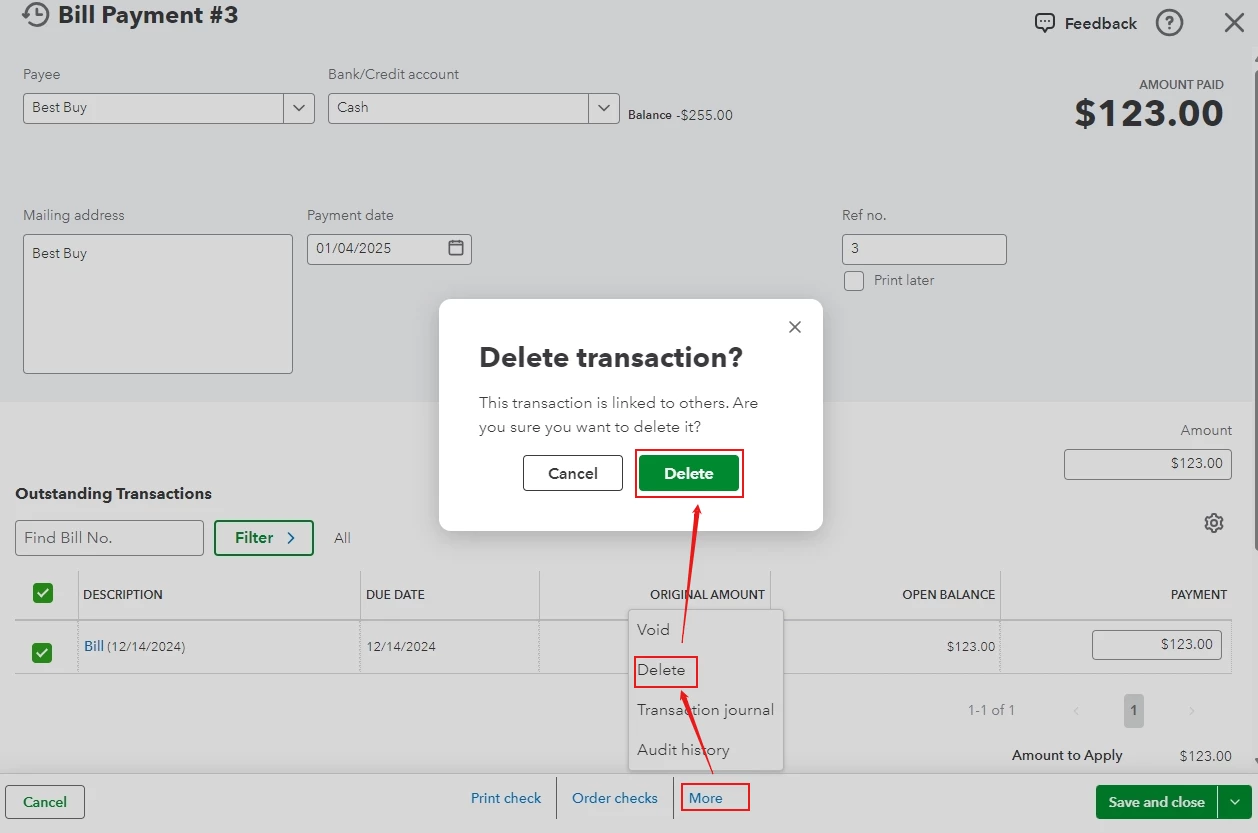
  5. Click More, then choose Delete and delete the transaction. (Note: Remember the amount of the check, as we need this amount for the recreation).
Steps to re-create the Check:
 

  1. Go to the +New button, then choose Check.
  2. In the payee field, set up the vendor by selecting Add New and fill in the necessary information, once done hit Save.
  3. In the category details, fill in necessary information and re-enter the amount of the check previously deleted.
  4. Once complete, click Save and Close.


Following these steps ensure your check is recorded correctly and assigned as a Vendor.


You can visit this helpful article to review your books, financial records and prepare your tax return: 
Year-end guide for QuickBooks Online.


For further assistance, you can explore our Live Bookkeeper Expert. They provide the expertise to organize your books and maintain their accuracy.

You can reply below if you have further questions about your checks in QBO. I'll keep the thread open so you can comment back. Have a nice day!


3 replies

FishingForAnswers
Level 4
January 10, 2025

@SLC100001  "I overpaid a 1099 contractor, they paid me back and I put it towards their account."


Depends. What do you mean by that, exactly?


Because it sounds like you treated it a payment on an amount they owed you, or otherwise turned it into a credit on an account they have with you.

Moderator
January 11, 2025

Let's collaborate to address the overpayment with your 1099 contractor, SLC. I'll go over the details below.


Before we proceed, I'd like to gather more details about your concern to offer a more targeted solution. Could you please clarify what you meant by reporting a lesser amount on the W-9? It's important to note that the W-9 does not include any payment amounts. It simply provides the necessary information that is used to prepare 1099 forms.


However, if you're referring to showing the correct amount on your 1099 form, the figure you recorded will be the amount that appears on the form.


Moreover, to address the line "Put it towards their account," I'd like to clarify if you have already recorded a vendor credit or refund for this overpayment. If not, creating a vendor credit or refund would be an appropriate way to resolve the issue.


Finally, I'm sharing an article that offers step-by-step guidance on correcting your 1099 forms after you've e-filed them in QuickBooks Online (QBO). This comprehensive guide will walk you through the process, ensuring you can accurately update your forms: Correct or change 1099s.


Please feel free to provide additional details about your 1099 concern by clicking the Reply button below. Our team is ready to offer prompt and tailored guidance to help resolve your queries.

SLC100001Author
January 12, 2025

I do not have them set up as a Vendor. I simply entered the check received and it ended up correcting the amount I pay them to what should have been the correct amount. I know now that I didn’t’ do that correctly. But don’t know how to fix it so that the W9 shows the correct amount.

RazzieE
RazzieEQuickBooks TeamAnswer
QuickBooks Team
January 12, 2025

I appreciate you for providing further details, @SLC100001. To correct the check, you'll have to delete you initially created by going to the detailed report. I'd be glad to show you the process.


It’s essential to delete the check you initially created and recreate then record it under the vendor’s account in QuickBooks Online (QBO). This ensures the transaction is accurately reflected in your financial records.


Here's how to delete the Check:
 

  1. Go to the Reports tab.
  2. In the search tab, type Check Detail Report.


  3. Filter the date of the check in the report period. 


  4. Navigate to the incorrect check and click the Amount.
  5. Click More, then choose Delete and delete the transaction. (Note: Remember the amount of the check, as we need this amount for the recreation).

Steps to re-create the Check:
 

  1. Go to the +New button, then choose Check.
  2. In the payee field, set up the vendor by selecting Add New and fill in the necessary information, once done hit Save.
  3. In the category details, fill in necessary information and re-enter the amount of the check previously deleted.
  4. Once complete, click Save and Close.


Following these steps ensure your check is recorded correctly and assigned as a Vendor.


You can visit this helpful article to review your books, financial records and prepare your tax return: 
Year-end guide for QuickBooks Online.


For further assistance, you can explore our Live Bookkeeper Expert. They provide the expertise to organize your books and maintain their accuracy.

You can reply below if you have further questions about your checks in QBO. I'll keep the thread open so you can comment back. Have a nice day!

New Member
July 7, 2026

I am having somewhat of the same issue. But I used contractor direct deposit through QBO. contractor paid the amount back. I can not get the original amount off their account as QBO do not allow a cancel of direct deposit. 

QuickBooks Team
July 7, 2026

When a contractor's direct deposit successfully clears the banking network, QuickBooks Online maintains a permanent financial audit trail, meaning the original transaction cannot be canceled or deleted. To account for the returned funds, you can manually record a Journal Entry. This method brings the cash back into your bank register, offsets the original expense account, and resets the contractor's profile balance.


Here is how to do it:


  1. Click the + New button in the top-left corner.
  2. Select the Journal Entry.
  3. Set the Journal date to the exact day the contractor returned the funds.
  4. On the first line, select your main business Bank Account (where the returned money landed) and enter the exact transaction amount in the Debit column.
  5. On the second line, choose the Contractor Payments expense account (or the specific account used for the original payment) and enter the exact dollar amount in the Credit column.
  6. In the Name column on this second line, select the Contractor's Name from the dropdown menu to link this adjustment directly to their profile ledger.
  7. Hit Save and close.


Once the entry is saved, you can link it to the deposit in your bank feed:


  1. Navigate to Bank Transactions from the left-hand menu.
  2. Locate the specific deposit transaction showing the returned money.
  3. The system will automatically recognize your created Journal and display a green Match found button. Click it to complete the process.


Because Journal Entries directly affect your general ledger, I recommend consulting with your accounting professional to verify that the offset account used aligns with your business's tax and reporting needs.


Direct deposit transactions can only be modified or deleted if they are still within the pending processing window. You can check the details here: Void or cancel contractor payments.


Please don't hesitate to reply below if you have any questions or other concerns.