Thanks for sharing the complete details of your concern, SherrylB.
I can help make sure the state withholding payroll item won't show multiple times on the paycheck.
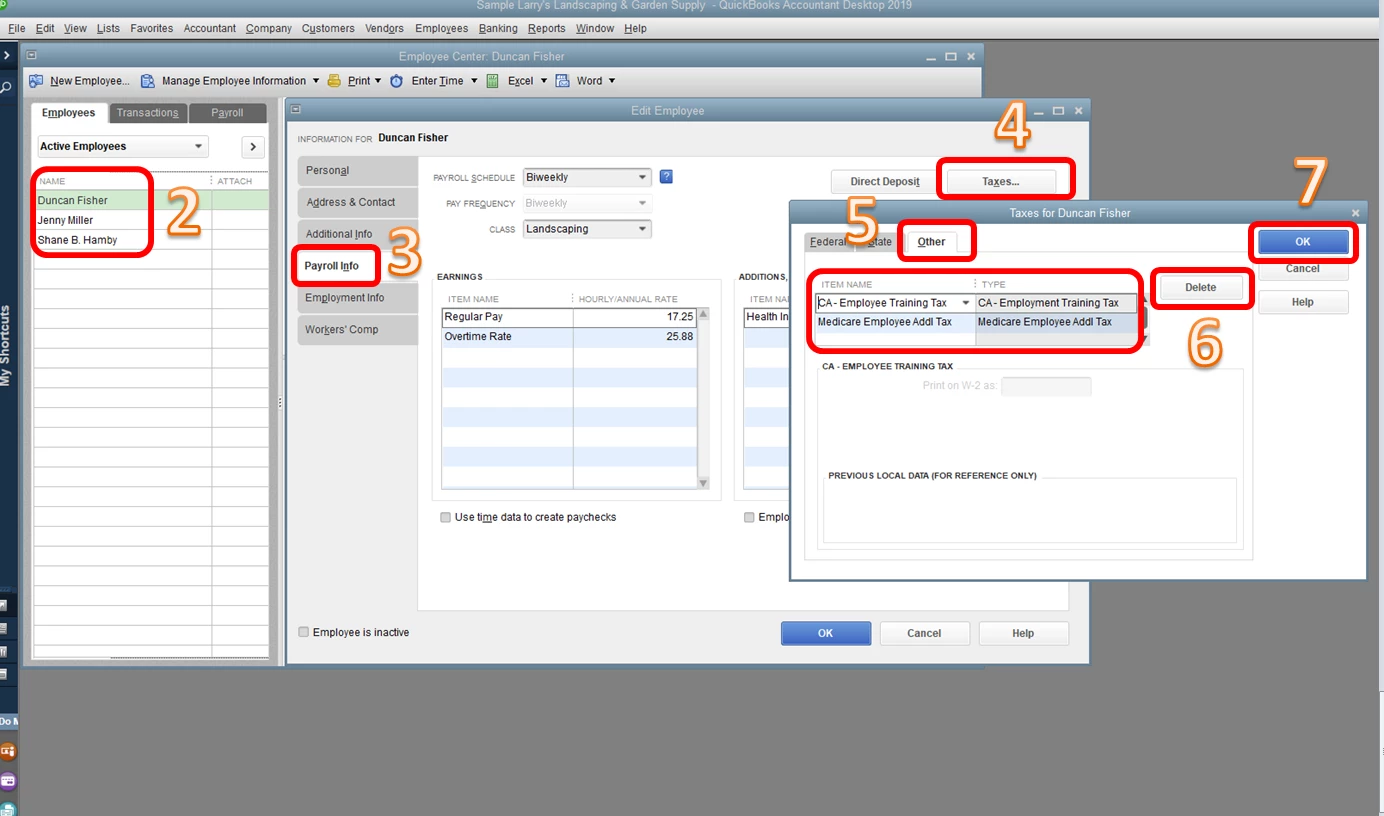
This happens when the duplicate tax item is added on the Other tab of the employee's profile. Let's delete it to fix the issue.
Here's how:
- Go to the Employees menu, then choose Employee Center.
- Double-click the employee's name.
- Choose the Payroll Info tab.
- Click Taxes.
- Select Other.
- Delete the duplicate tax item.
- Click OK.
Please check the screenshots below.
Once done, delete or void and recreate the paychecks if you haven't sent them as Direct Deposit or if you have not handed out the paycheck to the employee. Otherwise, you're right that we have to enter an employee liability adjustment to correct the tax amount.
This should get you moving forward again. Let me know how it goes or if you have follow-up questions about this. I'll be here and ready to help anytime. Have a good one.