
Get 50% OFF QuickBooks for 3 months*

Buy now
Switch to QuickBooks and 70% off for 3 Months
June 12, 2020
Solved

Customer Statements Format / Presentation

  • June 12, 2020
  • 3 replies
  • 0 views

HI Everyone,


Am I the only one to find the customer statements in Quickbooks annoying ? For some odd reason, the balance column is left aligned which not only makes the numbers difficult to read, but also doesn't look very professional (who ever left aligns numbers ?) and is an eyesore ! It would be EXTREMELY helpful if this could either be fixed or we were given the option to adjust at least some some aspects of the formatting for ourselves - this cannot be a difficult or contentious thing to fix so really hope QBO Engineers are listening.   

Best answer by IamjuViel

I appreciate the feedback you've shared, @Barheys.


As of now, the ability to customise your forms is only available to invoices, estimates, and sales receipts. Let me share additional ways so you can maximize the use of the available features in QuickBooks Online to help you manage your business.


You can generate and customize the Transaction Detail by Account report so it will display the information that you need. Let me guide you on how to do it.


  1. Open the Transaction Detail by Account report.
  2. Click the Customise button.
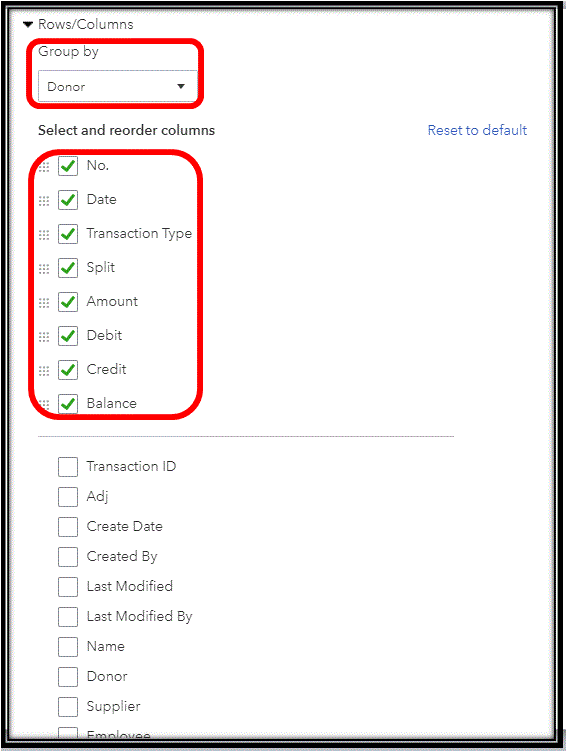
  3. Expand the Rows/Columns section.
  4. Select Customer from the Group by drop-down menu.
  5. Under Select and reorder columns, mark the information you want to include:
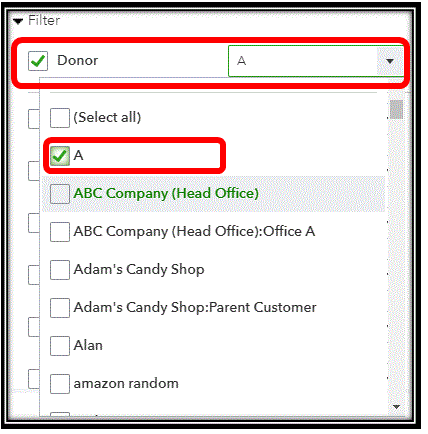
  6. From the Filter section, mark the Customer/Donor tick box.
  7. Choose the specific name of the customer.
  8. Click the Run Report button.

Once completed, you can change the name of the report and email it directly to your customers.
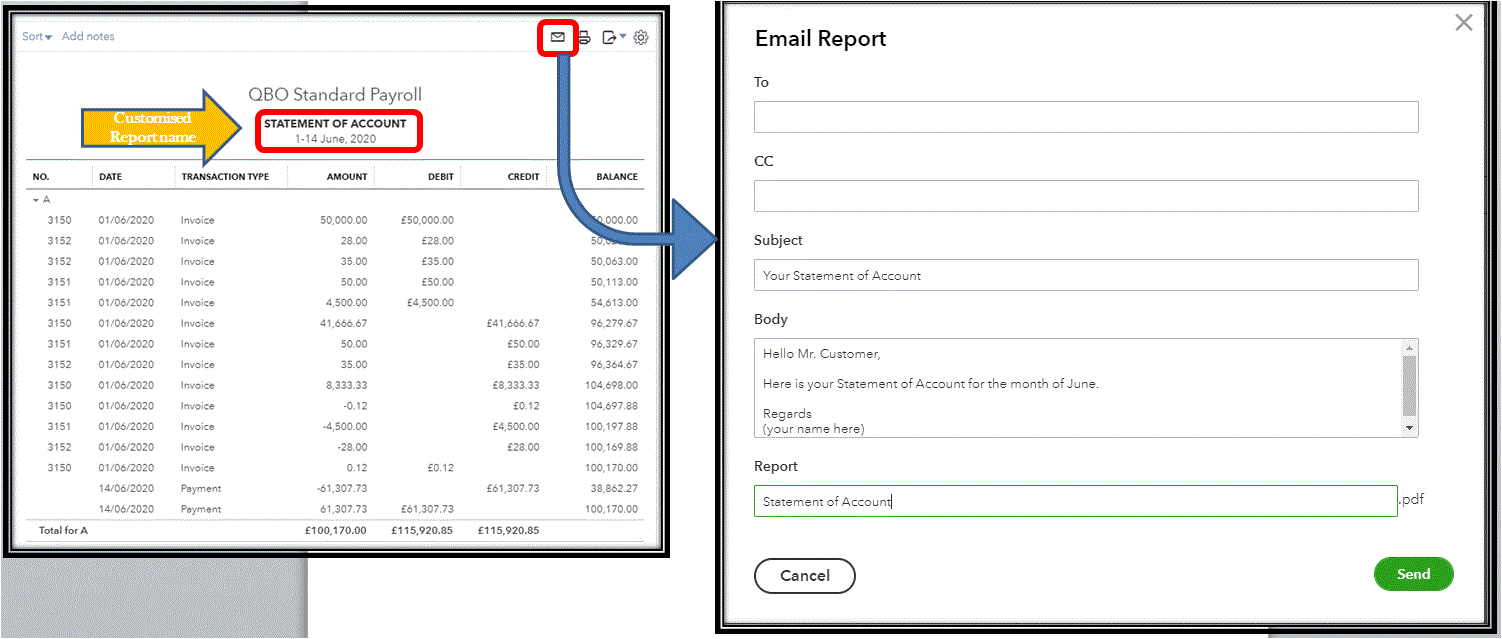
Also, you can download the report as an Excel or PDF file. Lastly, you can save the customisation you've made. This way you can easily generate the same type of report in the future.


On the other hand, as your business grows, you can be sure that QuickBooks will grow alongside it. Our Product Developers are planning on adding more tools and features to this program in the coming months ahead, so be sure to keep an eye on our blog for announcements: https://intuit.me/2L2zqTv.


Keep me posted if you have other questions about generating statements in QuickBooks. I'm always here to help.

3 replies

MariaSoledadG
QuickBooks Team
June 12, 2020

I'll take note of this, Barheys.


The statements show customers a summary of their invoices, payments, credits, and balances. I can see the importance if you're able to adjust its formatting in QuickBooks Online (QBO). But, you have a few options to customise your statements by going to the preferences. Let me guide you with the steps.

  1. Click the Gear icon, and select Company Settings.
  2. Select the Sales tab and scroll to the bottom to Statements.
  3. Select Edit.
  4. Select either List each transaction as a single line or List each transaction including all detail lines.
  5. Select the Show ageing table at bottom of statement checkbox.
  6. Click Save.

You'll also want to run the Transactions List by Customer report if you only want to keep track of your customer's balance. Here's how:

  1. Click Reports on the left menu.
  2. On the search bar, type Transaction List by Customer.
  3. Select the Report period on the upper left.
  4. Click Run report.

For future reference, customise your reports to show only the information you need.


If there's anything that you want us to help with, please let us know so we can get back.

BarheysAuthor
June 14, 2020

Thank you for your reply. 


The options you have listed I am already aware of. The Transaction list by customer 1) cannot be run for a single customer 2) does not give a running account balance and 3) is not a debits and credits type of account report. 


The account statements cannot be downloaded to Excel so I can only use the PDF versions which are inflexible and in any case badly formatted - I still cannot understand the reasoning for left aligning numbers - no one does that !!!


I am getting the impression that as a piece of software, it was designed business owners who want something simple and uncomplicated and dont mind a few short cuts - when accountants start using it to serve their clients, it is coming up wanting and hasn't the built in flexibility to allow us to manage to a standard we need to. This is a design philosphy flaw that QBO would do well to address asap before trying to branch out into other areas. 

IamjuViel
IamjuVielAnswer
Level 8
June 14, 2020

I appreciate the feedback you've shared, @Barheys.


As of now, the ability to customise your forms is only available to invoices, estimates, and sales receipts. Let me share additional ways so you can maximize the use of the available features in QuickBooks Online to help you manage your business.


You can generate and customize the Transaction Detail by Account report so it will display the information that you need. Let me guide you on how to do it.


  1. Open the Transaction Detail by Account report.
  2. Click the Customise button.
  3. Expand the Rows/Columns section.
  4. Select Customer from the Group by drop-down menu.
  5. Under Select and reorder columns, mark the information you want to include:
  6. From the Filter section, mark the Customer/Donor tick box.
  7. Choose the specific name of the customer.
  8. Click the Run Report button.

Once completed, you can change the name of the report and email it directly to your customers.

Also, you can download the report as an Excel or PDF file. Lastly, you can save the customisation you've made. This way you can easily generate the same type of report in the future.


On the other hand, as your business grows, you can be sure that QuickBooks will grow alongside it. Our Product Developers are planning on adding more tools and features to this program in the coming months ahead, so be sure to keep an eye on our blog for announcements: https://intuit.me/2L2zqTv.


Keep me posted if you have other questions about generating statements in QuickBooks. I'm always here to help.

January 28, 2021

I have to agree!!! I want the amount outstanding on the statement and not the totals.  I have googled various helps and although they tell you how to customise a statement template - I dont have a template to customize!! I am using quickbooks online and not happy at the moment!

Level 14
January 28, 2021

Hello BPSGaylin, 


Thanks for posting on this thread so the information for the statement gets pulled from the main invoice template in custom form styles, so you may need to adjust that so you can see what you want to see. 


Main cog wheel>customer form styles>main invoice template> content > edit the information in each section to show what you need 

March 1, 2022

I agree!  It's very annoying that Statements can't be customised.  I can't get my statements to look right at all - the field widths are too short and resulting statement looks awful.  Not happy with this aspect of QuickBooks.  I hope you got your issue sorted.

May 26, 2022

Very disappointed with the flexibility of changing templates  with QBO (changed from QBD) 

The credit notes and statements layout is appalling and  not professional looking   at all 


I am considering moving to Xero 

May 27, 2022

Intuit have been ignoring suggestion for basic things for years. When you ask they just ask to send feedback, which is 100% waste of time.

I actually started a suggestions thread but you’ll see it’s just the same, ignore their paying customers, replies.


https://quickbooks.intuit.com/learn-support/en-uk/other-questions/wish-list-feedback-thread/01/1062595#M13722