
Get 50% OFF QuickBooks for 3 months*

Buy now
Switch to QuickBooks and 70% off for 3 Months
May 17, 2022
Solved

Performance cente QBO UK

  • May 17, 2022
  • 8 replies
  • 26 views

Hi I have just signed up to QBO UK and don't haver the option of performance centre or Cash Flow on the left tab. Do I have to turn these options on somewhere?

Best answer by CharleneMaeF

Hi @lin_jcaj  thank you for the response.


I am using QBO UK version so I don't think there is the advanced option, otherwise we would purchase.


Can i sign up to an accountant version  and access our company that way?


Or are these features coming to the UK version?


The Performance Center page is a great feature for all the QuickBooks versions, nvaisey.


Since this is only limited to Advanced (US) and Accountant versions, I'd recommend sending a feature request directly to our Product Development team. This helps us improves your experience with the program. 


Here's how:
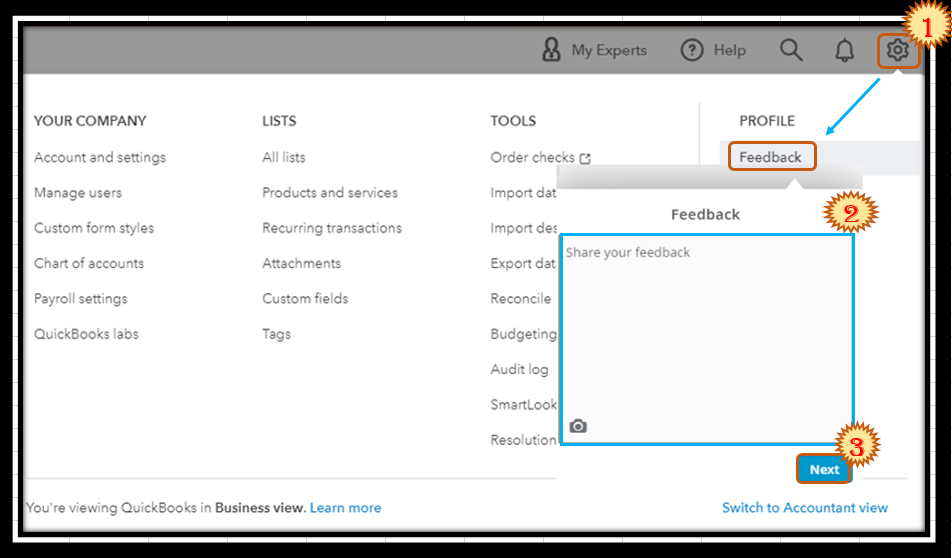
  1. Go to the Gear menu and then select Feedback.
  2. Type in your feature request in the description box.
  3. Once done, click on Next.
    Capture.PNG


Also, QuickBooks Online Accountant is a portal to your client's books that you can use to help them with their bookkeeping. Therefore, it isn't recommended to sign up for this version.


In case you'd still like to try this product, I'd suggest visiting our Prices page to sign up.


Additionally, I've included an article that'll help you learn more about how QuickBooks Online forecasts your income and expenses: Use the Cash Flow Planner.


I'm only a post away if you need more help in completing your other tasks in QuickBooks. It's always my pleasure to help you out again.

8 replies

Rubielyn_J
Level 8
May 17, 2022

The Cash flow menu or Performance center is only available for certain users, @nvaisey.


The master administrator of the QBO account has access rights to this cash flow planning feature. You may consider working with your client for any information needed concerning cash flow.


You can also check out this reference that provides depth information on how to manage cash follow in QuickBooks. This includes tips and details on what causes cash flow issues. You can also refer to the resources I've attached above to get started and track cash flow.


Enter a comment below if you have additional concerns or questions about cash flow. I’m determined to help you out. Take care!

nvaiseyAuthor
May 18, 2022

Hi Thanks for the reply. I am the Primary Admin so surely I should have access to all features??


nvaiseyAuthor
May 18, 2022

Hello there, nvaisey.


I’m glad to know you’re able to get the Cash Flow menu to show on the left tab of your company. Let me help and guide you on how to access the Performance centre.


The tab mentioned above can be viewed on the Reports screen. That’s why you’re unable to see it on the left panel of your company.


When you first visit the Performance centre, QuickBooks Online (QBO) has built-in charts ready for you. You can also tailor them to meet your business needs.


Here’s how to get there:


  1. In your company, head to Business overview and select Reports.
  2. On the Reports screen, go to the Performance centre tab.


With these steps, you can access the tab mentioned above easily. You'll also be able to track your business performance in no time.


For more insights into this process, feel free to read this reference: Create charts to see your business performance. This reference will guide you how how to customize the look of your charts, create one, edit or delete it.


You can open the links below to help you get acclimated to the tasks and features in QBO. These resources contain topics about the Cash Flow option, taxes, payroll, inventory, handle customer or supplier transactions to name a few.


Drop a comment below if you have additional questions on how to use the Performance centre and the Cash Flow option to handle your company's transactions. I'll get back to make sure this is taken care of for you, @nvaisey. Have a good one.


Hi,


Thanks for the reply. The issue is, I do not have the performance centre link - see attached.