
Get 50% OFF QuickBooks for 3 months*

Buy now
Switch to QuickBooks and 70% off for 3 Months
September 12, 2018
Solved

Inventory and COGS

  • September 12, 2018
  • 12 replies
  • 40 views

I have an e-commence business, and have set up inventory with my estimated cost of final product for each item under inventory setup. I also buy raw materials to make the items and code those to COGS. So am I doubling the costs here? Should I do only one of the above things? Either enter the amount of each final product and not code raw materials to COGS or have the inventory item as zero cost and code raw materials to  COGS? 


I also have a couple products I buy and resell. When I purchase the items, should I enter those as an expense or COGS? And do I add the actual cost to the inventory item?   
Best answer by vpcontroller

QuickBooks Inventory functionality is very basic like buy gadgets and sell the same gadgets. It's really not designed for converting from raw materials to finished products process.
If you're buying/selling products, you can follow the above article link for more information.


The only workaround is if you're buying few material items and making the final product out of that, you can create known as Zero Bill in QBO.
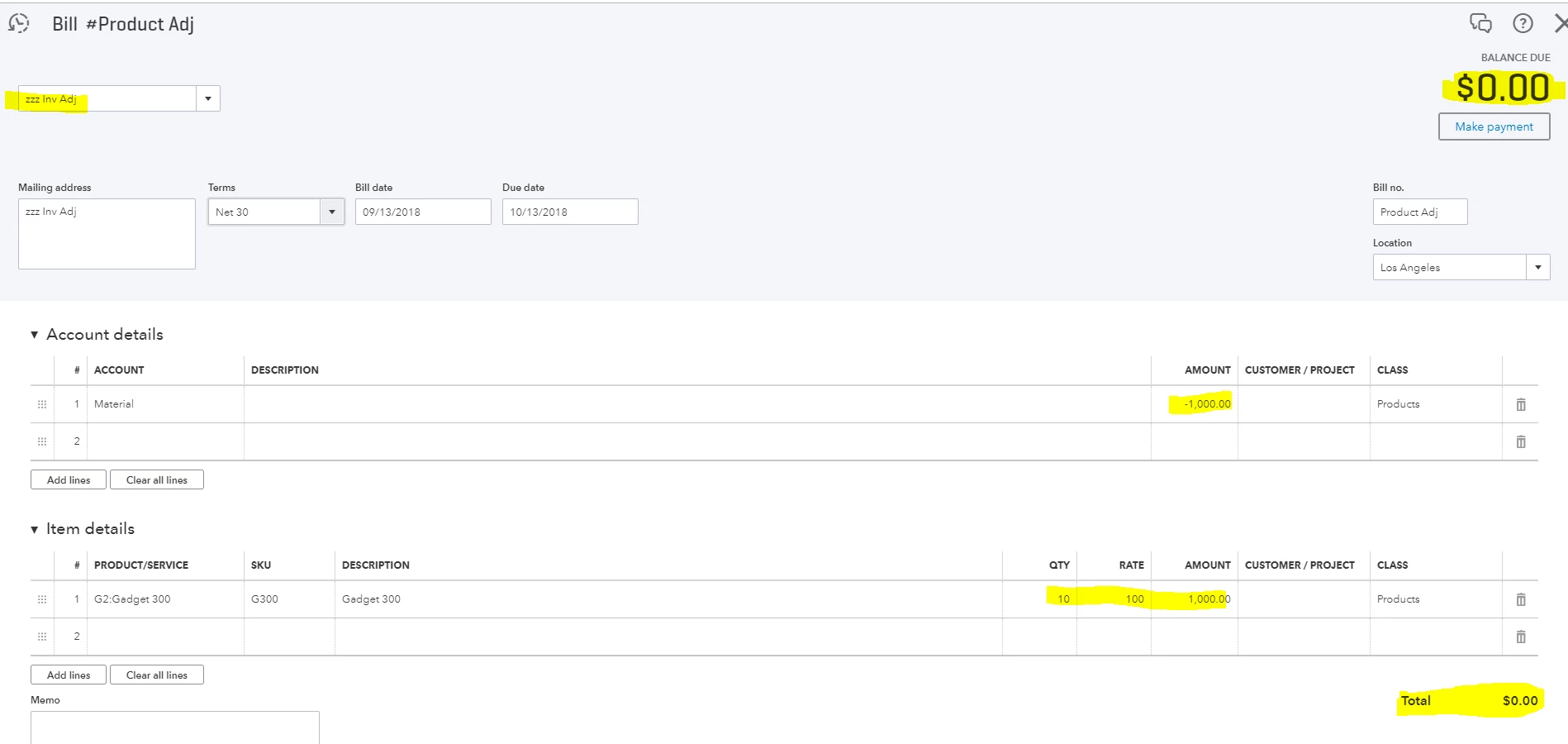
See example below with attachment for reference.


In this example, $1000 materials purchased and expensed to COGS (a separate account). Final product - produced 10 units. Average Cost is $100 per unit ($1,000 /10 = $100).

To enter Zero Bill:
Select create "+" sign on top > Vendors > Bill
For Payee, create a new one something like inv adj
Under account details section > select account originally used to purchase materials > enter negative amount -1,000.00. (This will reverse out previously entered COGS expense).
Under Item details section > enter product/service item, quantity and the amount same as above account details. In this case, $1,000. (This will add to the inventory item. When you create invoice or sale receipt, it will also post COGS at $100 each unit).
Entered Bill should zero out.


-

12 replies

vpcontroller
Level 7
September 12, 2018

Just to clarify - do you have QuickBooks Desktop (QBDT) or QuickBooks Online (QBO) like Plus, Essentials or Simple Start)? 

Jenae85Author
September 12, 2018

QBO Plus.

Level 8
January 25, 2023


Thanx a lot James

I can't enter item cost unless 1$ or 10$ or 120$ impossible to add 0,35$ 1,76$

As you said the problem is from comma separate, 

I tried many times to enter the same item with the cost price, and close the QBook,& open it again

doesn't change anything. 

Checked left Menu QBook, edit, preference, Items & inventory, Company preference, automatic price & cost updates. 


just nothing changed.

Thanks 

AMO


Good evening, @TCL22


Thanks for coming back and giving us some additional information. 


Before digging further, since you already tried removing the commas, let's try replaying the commas with periods to see if it accepts the amount. 


If not, use the verify and rebuild tool to help fix the problem. 


Please, reach back out and let us know if this works for you. We're always here to lend a helping hand. Take care! 

vpcontroller
Level 7
September 13, 2018

QuickBooks Inventory functionality is very basic like buy gadgets and sell the same gadgets. It's really not designed for converting from raw materials to finished products process.
If you're buying/selling products, you can follow the above article link for more information.


The only workaround is if you're buying few material items and making the final product out of that, you can create known as Zero Bill in QBO.
See example below with attachment for reference.


In this example, $1000 materials purchased and expensed to COGS (a separate account). Final product - produced 10 units. Average Cost is $100 per unit ($1,000 /10 = $100).

To enter Zero Bill:
Select create "+" sign on top > Vendors > Bill
For Payee, create a new one something like inv adj
Under account details section > select account originally used to purchase materials > enter negative amount -1,000.00. (This will reverse out previously entered COGS expense).
Under Item details section > enter product/service item, quantity and the amount same as above account details. In this case, $1,000. (This will add to the inventory item. When you create invoice or sale receipt, it will also post COGS at $100 each unit).
Entered Bill should zero out.


-

December 21, 2018

In the case of buying materials to sell one product, wouldn't another workaround be to simply create an assembly item from  all  those materials and sell that? You can have double sided COS/inventory items.

August 14, 2019

vpcontrollers workaround seems to be consensus as the best way of handling accounts here.


Would say though, that if you want a more dedicated manufacturing module then an app like Katana might serve you well. It will manage your material and finished goods inventory alongside your production schedule automatically and real-time.  


Then you can push invoices and bills directly to your QBO account.