
Get 50% OFF QuickBooks for 3 months*

Buy now
Switch to QuickBooks and 70% off for 3 Months
December 23, 2020
Question

Bonus check problem

  • December 23, 2020
  • 1 reply
  • 32 views

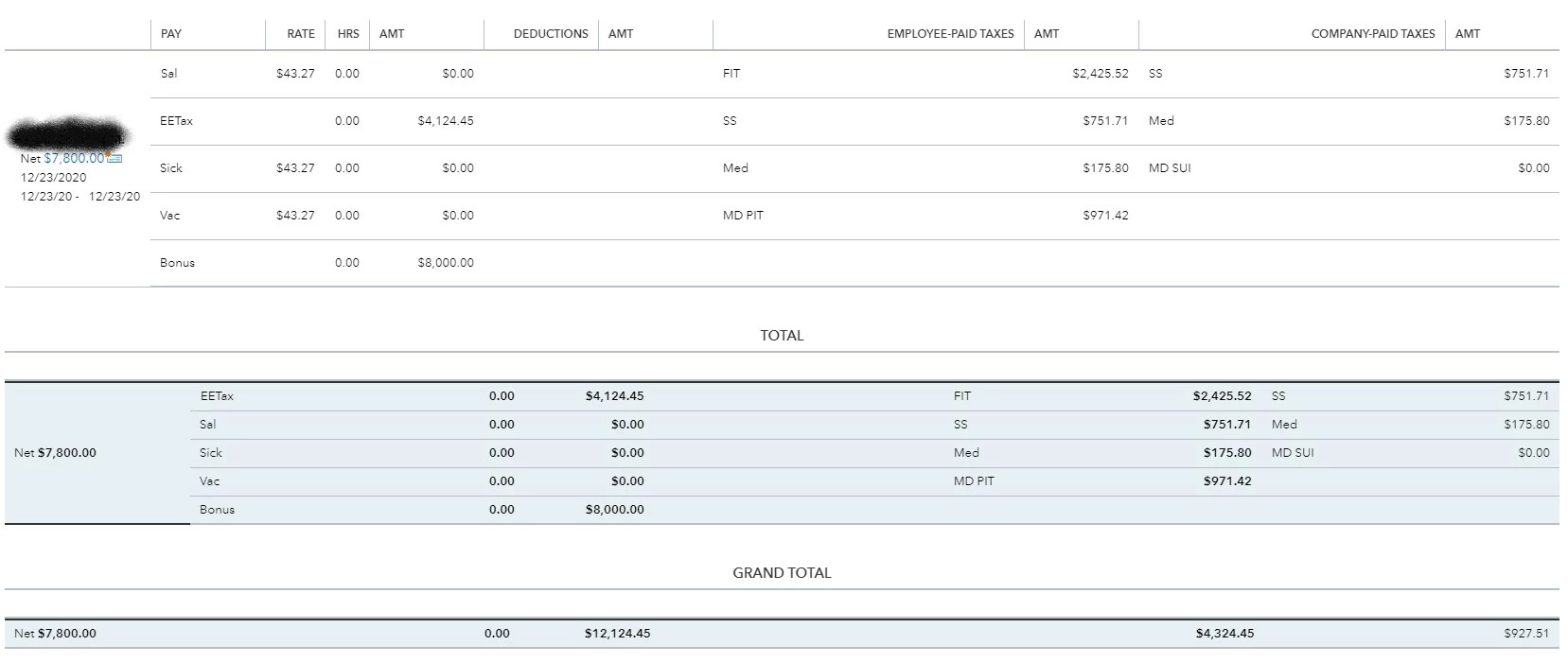
I am trying to write a net bonus check for $8000 to an employee. When I enter $8000 as net, Quickbooks changes the net pay to $7800. This is only occurring for 1 employee.

1 reply

QuickBooks Team
December 23, 2020

I'm here to help you sort this out, jmcintosh.


The net pay changed to $7800 because the bonus amount of $8000 was added to the gross wage. Thus the total taxable wage as seen in the screenshot is $12124.45 (4124.45 + 8000). To resolve this, we'll have to create a separate bonus check to ensure the employee gets the exact bonus amount.


Before we proceed, there are things that we should know before issuing a separate bonus check. I suggest checking this article's Understand the tax settings for issuing a separate check section to learn more: Pay an Employee Bonus.


Here's how to create a separate bonus paycheck:

  1. Go to the Payroll menu and then select Employees.
  2. Click Run payroll and then select Bonus 
  3. Choose the applicable settings for the bonus paycheck, then select Continue.
  4. Select the employee, then enter the bonus amount.
  5. Click the edit icon beside Payroll options.
  6. Select the payroll options you want and then click Apply.
  7. Choose Preview and Submit payroll.
  8. If you selected As net pay, the pay stub includes Employee Taxes Paid by Employer in the pay section.


To learn more about the basics of payroll processing, I recommend checking out this article: Payroll 101


Additionally, I've included an article that'll help you learn more about federal and state payroll wage bases and limits. This is to ensure your payroll data is accurate: Payroll Tax Wage Bases and Limits.


It's our pleasure to assist you here in the Community. For other payroll concerns, please get in touch with us. This way, we'll be able to help you out.

jmcintoshAuthor
December 23, 2020

I did bonuses for 20 employees. This was the only employee that had their net bonus changed. For this employee I did "Bonus Only"-

I chose "Net Pay" in the next screen-

I entered $8000 for the employee "Net Bonus" which created a "Gross Pay" amount of $12,124.45

When I clicked "Preview Payroll" the Gross Pay amount was still $12124.45 but the Net Pay amount had changed to $7800.

When I "Submit Payroll" and go to the paycheck list, the Total Pay shows $12124.45 and the Net Pay shows $7800.

I'm not going to go through the effort of showing these same screenshots for every other employee, but please trust me that I am telling the truth that NO OTHER EMPLOYEES' Net Pay was changed like this.


I know I can create an additional Bonus Check for $200 so this employee receives her full $8000, but it is ridiculous and embarrassing that I have to.


December 16, 2022

I figured out what is causing this problem, in case anyone else is still struggling with this. It's happens when the employee has requested extra tax to be taken off each cheque. The net pay of the bonus will be reduced by the amount of extra tax they've requested to be taken off. Example: Trying to pay a bonus of net $500. Employee has requested an extra $50 in tax be deducted on each pay cheque. Actual net pay that will calculate in bonus module will be $450. I haven't figured out an easy way around it as the module will not allow you to manually adjust income tax. I guess the solution would be to confirm with the employee if they want that extra tax taken off on bonus payments or not. If not, you have to go into the tax form and remove the extra tax amount, process the bonus payment, and then add it back afterwards. Not very convenient.. Let me know if anyone else comes up with a better solution. 


Thanks for the last post. I had the same problem today trying to create Christmas Bonus checks. After reading the last post, I went into the employee list and change the extra withholding to 0.00 and saved. Then I deleted and recreated the bonus checks. Afterwards I change the extra withholding back to the original amounts so the next regular payroll run will be correct.