
Get 50% OFF QuickBooks for 3 months*

Buy now
Switch to QuickBooks and 70% off for 3 Months
April 30, 2019
Solved

duplicate payroll item

  • April 30, 2019
  • 1 reply
  • 36 views

Last week, my state withholding payroll item appeared multiple times (4) for one employee only. I was able to get rid of two of them, but the one extra kept reappearing every time I deleted it. I made a manual adjustment to his net check for that week only, but the problem is not solved. As I will have to manually adjust the payroll liability every week as well. Who can help with resetting this payroll item for this one employee?

Best answer by PreciousB

Thanks for sharing the complete details of your concern, SherrylB.


I can help make sure the state withholding payroll item won't show multiple times on the paycheck.


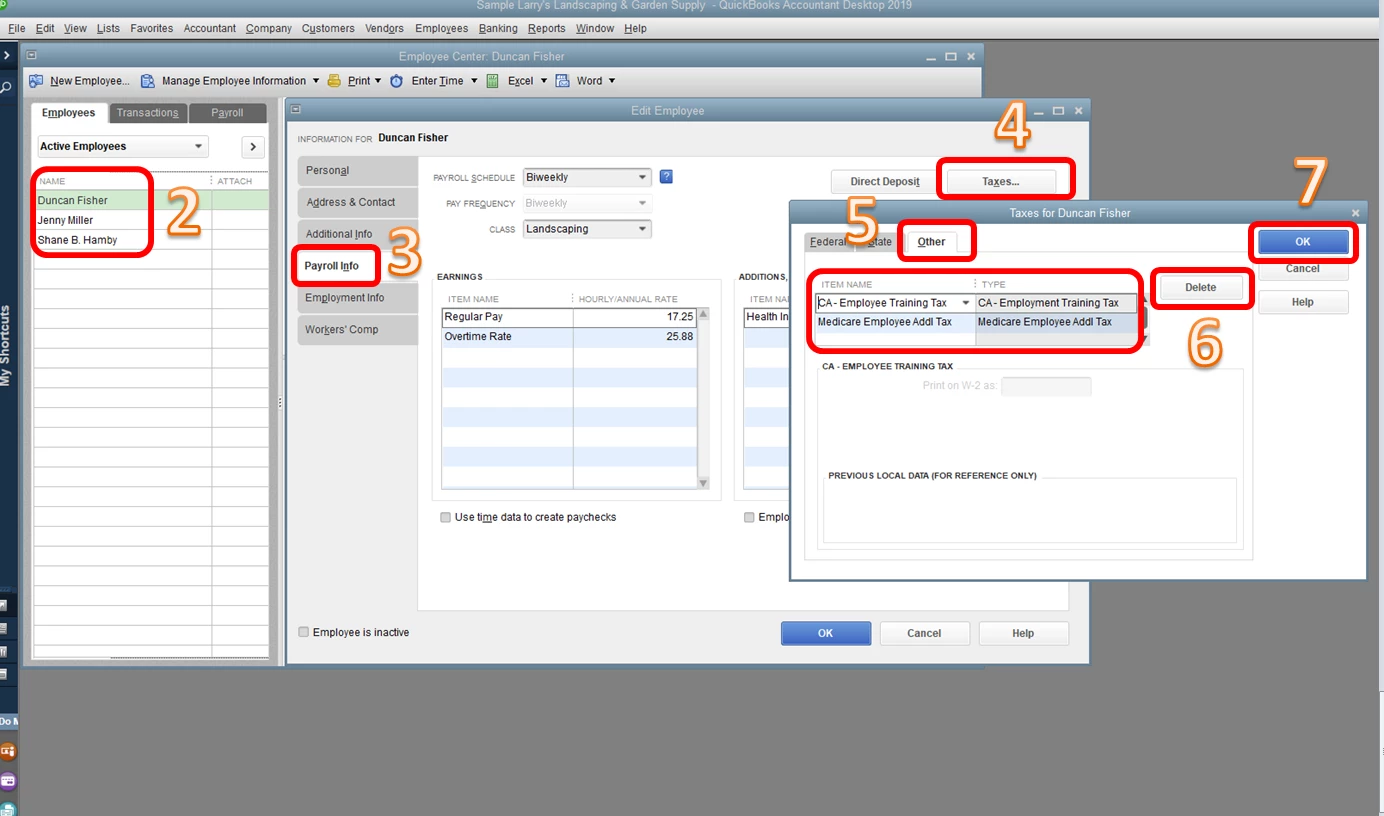
This happens when the duplicate tax item is added on the Other tab of the employee's profile. Let's delete it to fix the issue.


Here's how:

  1. Go to the Employees menu, then choose Employee Center.
  2. Double-click the employee's name.
  3. Choose the Payroll Info tab.
  4. Click Taxes.
  5. Select Other.
  6. Delete the duplicate tax item.
  7. Click OK.

Please check the screenshots below.


Once done, delete or void and recreate the paychecks if you haven't sent them as Direct Deposit or if you have not handed out the paycheck to the employee. Otherwise, you're right that we have to enter an employee liability adjustment to correct the tax amount.


This should get you moving forward again. Let me know how it goes or if you have follow-up questions about this. I'll be here and ready to help anytime. Have a good one.

1 reply

PreciousB
PreciousBAnswer
Level 6
April 30, 2019

Thanks for sharing the complete details of your concern, SherrylB.


I can help make sure the state withholding payroll item won't show multiple times on the paycheck.


This happens when the duplicate tax item is added on the Other tab of the employee's profile. Let's delete it to fix the issue.


Here's how:

  1. Go to the Employees menu, then choose Employee Center.
  2. Double-click the employee's name.
  3. Choose the Payroll Info tab.
  4. Click Taxes.
  5. Select Other.
  6. Delete the duplicate tax item.
  7. Click OK.

Please check the screenshots below.


Once done, delete or void and recreate the paychecks if you haven't sent them as Direct Deposit or if you have not handed out the paycheck to the employee. Otherwise, you're right that we have to enter an employee liability adjustment to correct the tax amount.


This should get you moving forward again. Let me know how it goes or if you have follow-up questions about this. I'll be here and ready to help anytime. Have a good one.

April 27, 2020

Hello,


We had this error and were able to fix the paycheck going forward.  The problem I have now is that the paychecks where we had multiple lines for federal with holding, that we did not catch until after the fact are still there from 2017.  This is now giving us problems when we try to condense our files as well as move to a new verse of quick books.  

I can go in an change the pay check and force the information to match (instead of 2 lines with a $20 deduction one with a $40 deduction and one with a Zero deduction) but it will not allow me to delete the duplicate federal withholding line that is now showing zero. .  These are old direct deposit checks from 2017.   How do we fix this problem?


QuickBooks Team
April 27, 2020

Let's get this working, GCarr.


Before we do anything else on your company file, I'd recommend creating a backup copy of your company file. After that, we can do a few troubleshooting steps to review the condition of your QuickBooks and your company file. 

  1. Update the QuickBooks release version.
  2. Do the Verify and Rebuild process.

If there are no problem, you can continue condensing your company file. Otherwise, I'd recommend contacting our Technical Support Team to further review your file. They can pull up your account and provide additional troubleshooting steps to fix it:

  1. Click Help at the top menu and select QuickBooks Desktop Help.
  2. Select Contact us and then enter that you get Reminder prompts. 
  3. Select Continue
  4. Choose either to Message an Agent or Talk to a Specialist

Let me know if you need anything else.